Refunds/Invoices/Bills
ダウンロード
フォーカスモード
フォントサイズ
Refund Policy
You can request a refund if you meet the following conditions:
Product Type | Refund Policy |
Pro (Continuous Monthly) | Refund not supported. |
Pro (Continuous Annual) | Refundable if the plan credits (including base usage and bonus usage) remain unused within 7 calendar days after the order is placed (only one refund per order). |
Add-on Pack | Refund not supported. |
Redemption Code | Refund not supported. |
Refund requests that do not meet the above conditions will not be supported.
Refund Process
1. Log in to codebuddy.ai, go to the Console, and submit a ticket.
2. Alternatively, send an email to codebuddy_ai@tencent.com and include your account information.
Invoices
How to Access
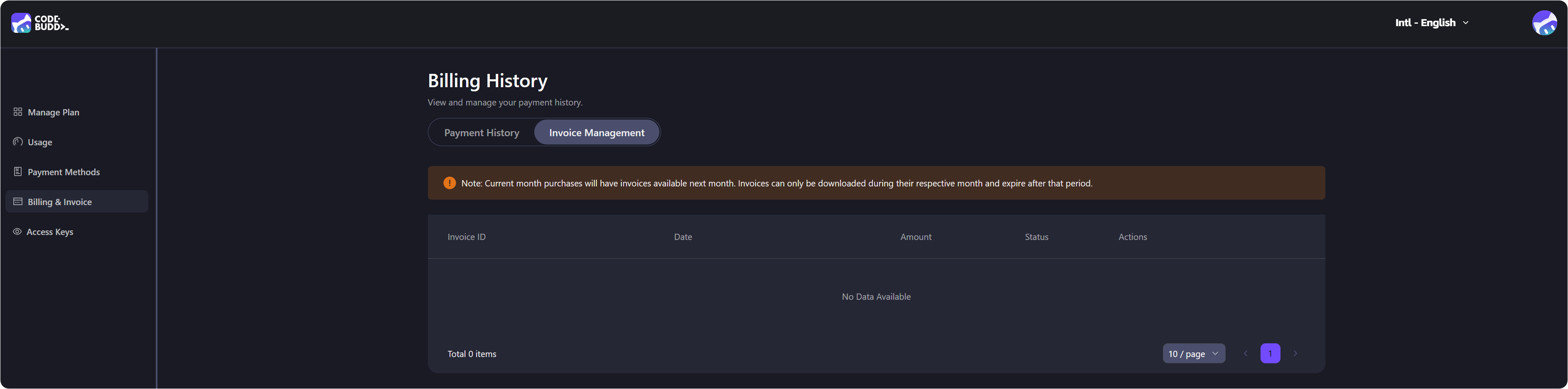
Users can log in to the CodeBuddy website to view invoices:
1. Log in to the CodeBuddy website.
2. Click the avatar in the upper-right corner to go to the Personal Homepage > Billing & Invoices section.
Corrections Required
Invoice Issue: [Invoice Number]A reply will be provided within 2 business days.
Bills
Supported Payment Methods
Payment method | Description |
Credit Card | Visa,Mastercard,American Express |
Debit Card | Visa,Mastercard |
WeChat Pay | Supported in some regions |
Prepaid Card | Supported in some regions |
You can update or change your payment method on the Profile > Payment Methods page.
Attention:
Only one subscription plan can be active at a time.
How to Access Bills
1. Log in to codebuddy.ai.
2. Choose the avatar in the upper-right corner to go to the Profile > Billing & Invoices section.
Help Needed
Issue | Operation |
Payment failure | Check card information on the Profile > Billing & Invoices page. |
Unrecognized charges | Check the Usage page + billing history on the Profile. |
Request a refund |
フィードバック