Billable Items
ダウンロード
フォーカスモード
フォントサイズ
What Are Credits?
Credits are the unified consumption unit for AI operations in CodeBuddy. Different models consume different amounts, and you can check your balance and details before and after each call. When the credit limit is approached, you will receive an advance reminder. The decision to continue or upgrade is always yours.
How Are Credits Consumed?
Model Token Pricing: Different models consume different amounts of Credits. Advanced models possess stronger reasoning capabilities and richer knowledge reserves, but they have a higher per-unit price for processing input and output Tokens. Consequently, processing the same number of Tokens consumes more Credits.
Task Complexity: Simple tasks, such as brief Q&A, consume fewer Credits, while complex tasks, such as long code analysis, multi-round chats, and knowledge base search, require more reasoning computation and Token processing, consuming more resources.
How Are Credits Deducted?
Pro
Credit Validity: Base credits and bonus credits are issued monthly. They are valid for the current month and do not roll over. Bonus credits are valid for one month from the date of issuance.
Consumption Priority: Credits are consumed first based on their expiration date, which includes subscription quotas (Pro/Team), purchased top-up packs, and other point packs. If multiple items share the same expiration date, base usage is consumed first, followed by bonus usage.
After Pro or Pro 7-day trial is activated, the 100 credits for the Free edition are no longer issued separately.
Team
Team members draw Credits from the shared team pool (1,000 Credits per person). After the pool Credits are exhausted, the administrator can purchase Team top-up packs. The remaining Credits are deducted in the order of earliest expiration first, which includes subscription quotas (Pro/Team), purchased top-up packs, and other point packs.
Viewing Credit Usage
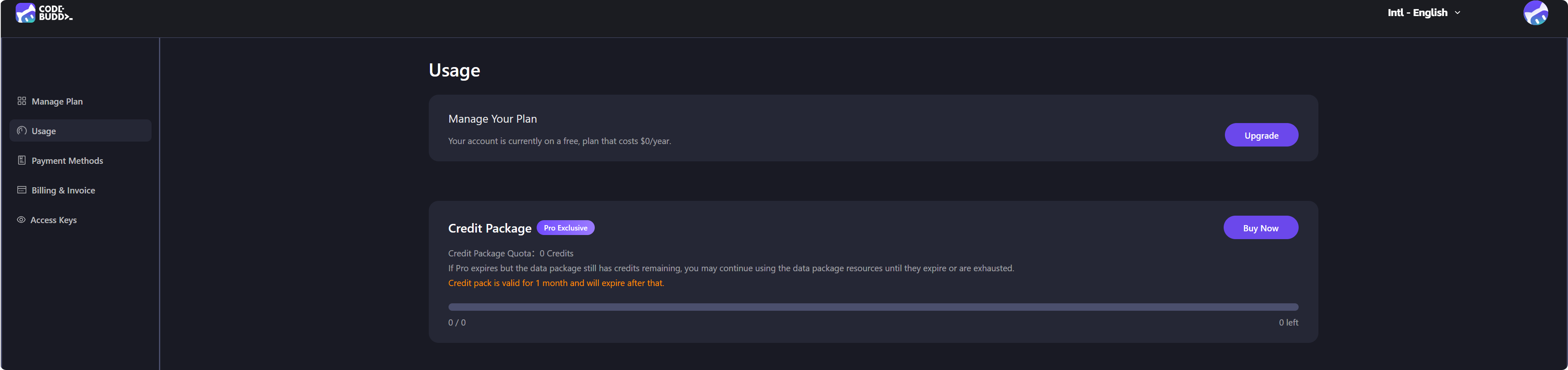
Users can view their credit usage history and current consumption on their personal homepage on the CodeBuddy website. If you are a member of the Team edition, you can also view the quota information added by your enterprise.
1. Log in to the CodeBuddy website.
2. Click the avatar in the upper-right corner to go to Personal Homepage > Usage.
Here, you can view your current subscription status, as well as the available and used credit information in your resource packs.
Insufficient Credits?
Upgrade Your Plan - Higher-tier plans include more monthly points (see Pricing Details).
Purchase Top-up Packs - You can purchase one-time point packs on the Personal Homepage > Usage page.
フィードバック