Audience List Component(Flutter)
Baixar
Modo Foco
Tamanho da Fonte
The Audience List component (AudienceListWidget) provides both real-time audience count display and audience list popup functionality for your live streaming room. Easily embed it in your UI to enable essential audience interaction features for your live broadcast.
Demo
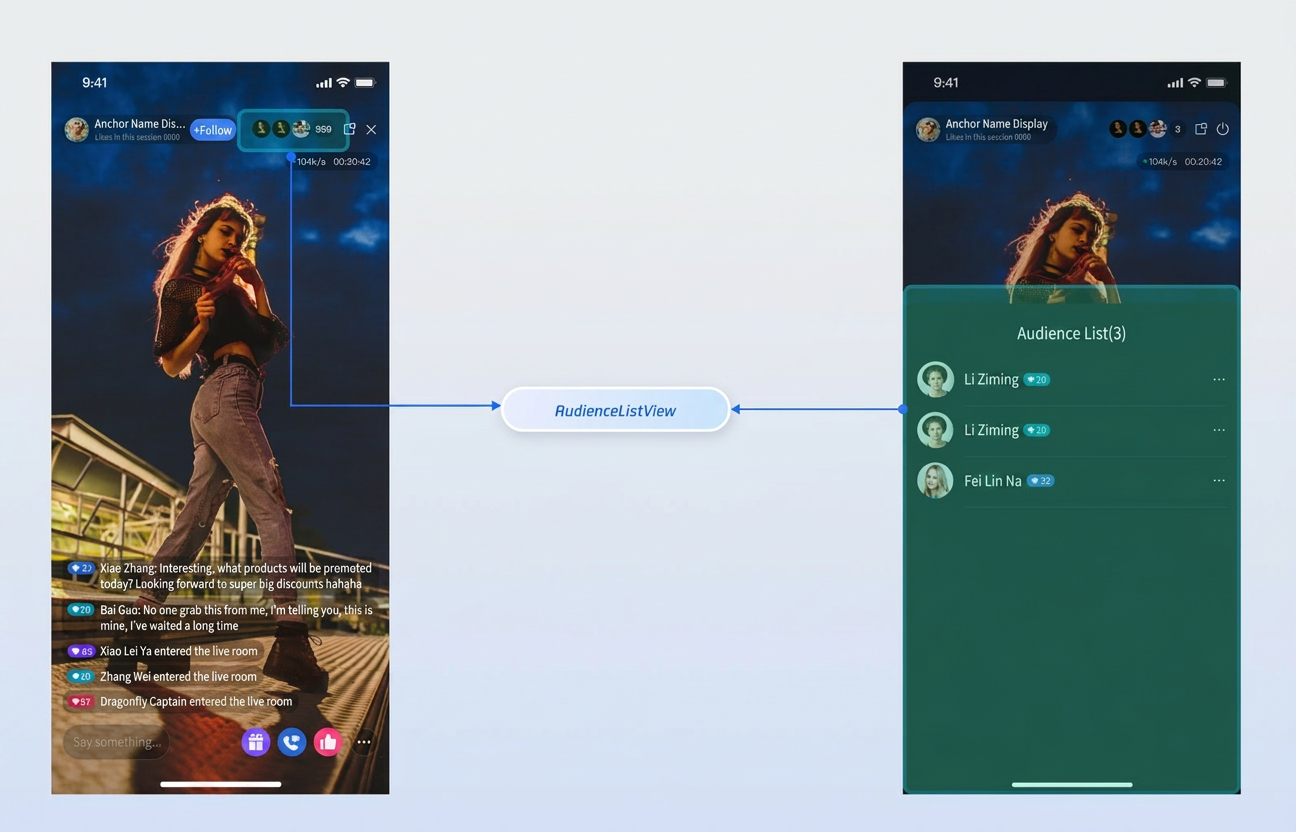
Quick Start
Step 1: Activate the Service
Step 2: Integrate the SDK
Step 3: Add the Audience List Component
Using the host live streaming scenario as an example, add AudienceListWidget to your host view controller. Example code:
import 'package:flutter/material.dart';import 'package:tencent_live_uikit/common/index.dart';import 'package:tencent_live_uikit/component/index.dart';class YourAnchorPage extends StatefulWidget {final String liveId;const YourAnchorPage({super.key, required this.liveId});@overrideState<YourAnchorPage> createState() => _YourAnchorPageState();}class _YourAnchorPageState extends State<YourAnchorPage> {@overrideWidget build(BuildContext context) {return Scaffold(body: SafeArea(child: Stack(children: [// ... Other live room elements ...// Audience List componentPositioned(top: 12.height,right: 50.width,child: AudienceListWidget(roomId: widget.liveId,),),],),),);}}
Customization
The Audience List component supports a callback interface for audience item clicks within the live room, enabling you to implement custom audience management logic to suit your business needs.
Component Interface
Interface | Parameter | Description |
onClickUserItem | LiveUserInfo | Callback triggered when an audience list item is clicked. |
class LiveUserInfo {/// Unique user ID.String userID;/// User name.String userName;/// User avatar URL.String avatarURL;LiveUserInfo({this.userID = '', this.userName = '', this.avatarURL = ''});}
Audience Management
By default, clicking a user in the audience list opens a management popup. You can implement the
onClickUserItem callback and use LiveAudienceStore to perform actions such as removing a user from the live room:import 'package:atomic_x_core/atomicxcore.dart';import 'package:flutter/cupertino.dart';import 'package:flutter/material.dart';import 'package:tencent_live_uikit/component/index.dart';import 'package:rtc_room_engine/rtc_room_engine.dart';class YourAnchorPage extends StatefulWidget {final String liveId;const YourAnchorPage({super.key, required this.liveId});@overrideState<YourAnchorPage> createState() => _YourAnchorPageState();}class _YourAnchorPageState extends State<YourAnchorPage> {// 1. Define the Store for the Audience List componentlate final LiveAudienceStore _liveAudienceStore;@overridevoid initState() {super.initState();_liveAudienceStore = LiveAudienceStore.create(widget.liveId);}@overrideWidget build(BuildContext context) {return Scaffold(body: SafeArea(child: Stack(children: [// ... Other live room elements ...// 2. Integrate the Audience List component and bind the "click audience" eventPositioned(top: 12.height,right: 50.width,child: AudienceListWidget(roomId: widget.liveId,onClickUserItem: (LiveUserInfo userInfo) {_showUserManagementSheet(userInfo);},),),],),),);}// 3. Custom user management popupvoid _showUserManagementSheet(LiveUserInfo user) {showCupertinoModalPopup<void>(context: context,builder: (ctx) => CupertinoActionSheet(title: const Text('Audience Management'),message: Text('Please select an action for ${user.userName}'),actions: [CupertinoActionSheetAction(isDestructiveAction: true,onPressed: () {Navigator.of(ctx).pop();_kickOutUser(user);},child: const Text('Remove from live room'),),],cancelButton: CupertinoActionSheetAction(isDefaultAction: true,onPressed: () => Navigator.of(ctx).pop(),child: const Text('Cancel'),),),);}// 4. Call Store method to remove uservoid _kickOutUser(LiveUserInfo user) {_liveAudienceStore.kickUserOutOfRoom(user.userID).then((result) {if (result.errorCode == TUIError.success.rawValue) {debugPrint('Successfully removed ${user.userName}.');} else {debugPrint('Failed to remove user, code: ${result.errorCode}, message: ${result.errorMessage}');}});}}
Ajuda e Suporte
Esta página foi útil?
Você também pode entrar em contato com a Equipe de vendas ou Enviar um tíquete em caso de ajuda.
comentários