Multi-AZ Deployment
Baixar
Modo Foco
Tamanho da Fonte
Distributed Cache supports deploying replica nodes across multiple AZs within the same Region. Compared to single-AZ instances, where master and replica nodes reside in the same physical server room and offer only host- or rack-level disaster recovery, multi-AZ deployment extends nodes to different, independent physical server rooms. This provides Zone-level physical disaster recovery capability, helping to reduce the impact of single-AZ failures, such as network or power outages in a server room, on your business.
Deployment Mode | Disaster recovery capability |
Single-AZ deployment | Host-level and rack-level disaster recovery |
Multi-AZ deployment | Host-level, rack-level, and AZ-level disaster recovery |
Deployment Architecture
The architecture of a multi-AZ instance is characterized by: master and replica nodes deployed in different AZs within the same Region, the two AZs interconnected with low latency via the Tencent Cloud private network, and the instance providing a single unified access address (VIP:Port) externally. The following figure illustrates a typical multi-AZ topology using a deployment with two AZs, one master, and three replicas as an example:
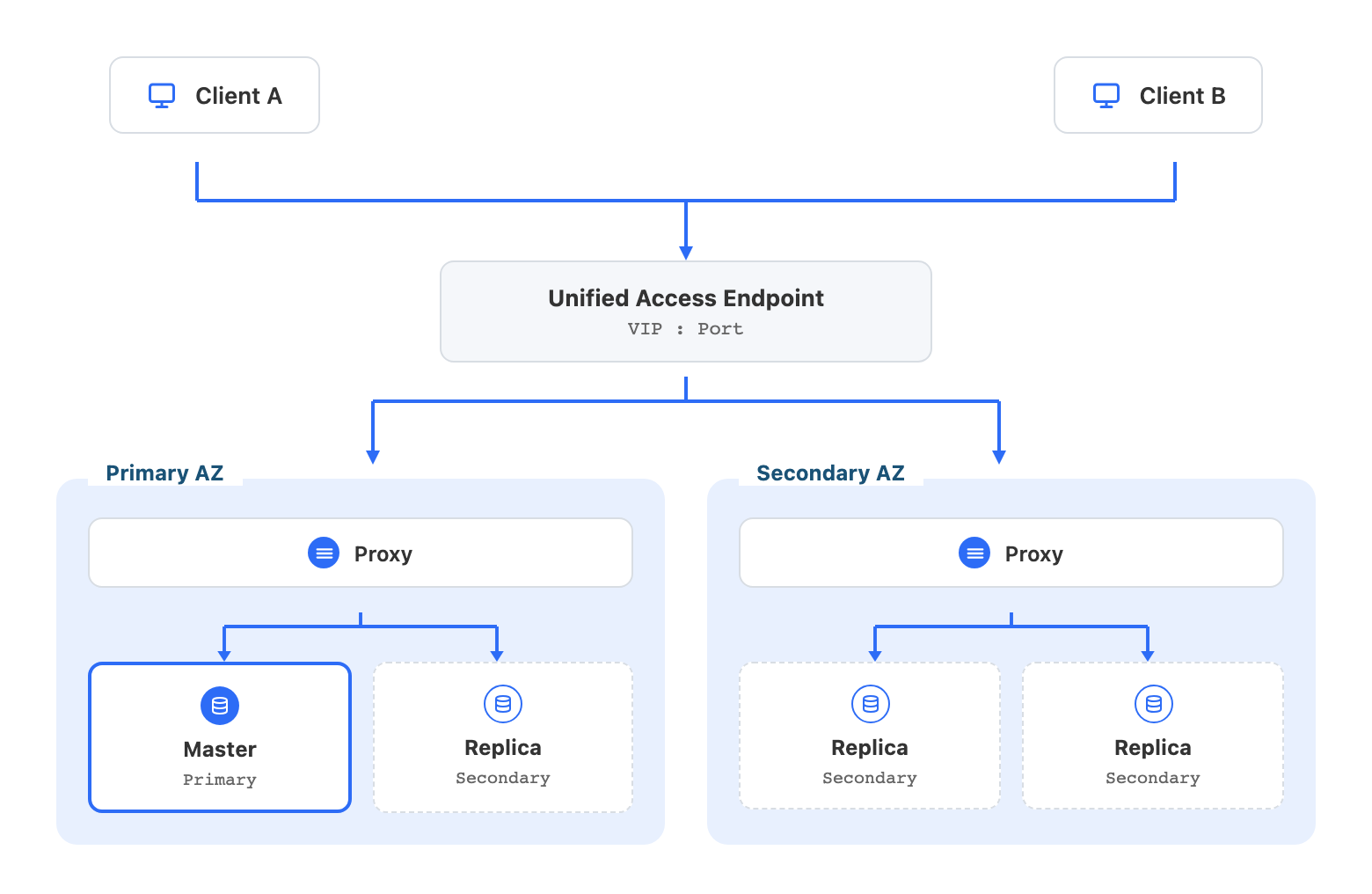
Component | Description |
Unified access address for the instance | The instance provides a unique VIP:Port externally, accessible across the entire Region. When a client connects to the instance via the VIP, the system automatically routes the request to the Proxy in the client's AZ. Regardless of any HA switchover the instance undergoes, the VIP remains unchanged, and the business does not need to modify connection information. |
Primary AZ | The AZ where the master node (Master) resides, which handles the write requests of the instance. Unless manually changed via the console, the primary AZ remains unchanged. |
Secondary AZ | An AZ that deploys only replica nodes, which works together with the primary AZ to provide AZ-level disaster recovery. |
Proxy | A Proxy is independently deployed in each AZ to receive client requests and route them to the corresponding node. When a client connects via the VIP, the system routes the request to the Proxy in the client's AZ to reduce access latency. |
Primary Node | The node that handles write requests in the instance, deployed in the primary AZ. |
Replica node | Nodes used for data redundancy and high availability, distributed across AZs (1 in the primary AZ + 2 in the secondary AZ), which work together to provide AZ-level disaster recovery. |
Cross-AZ High Availability
Multi-AZ instances provide automatic disaster recovery failover capability in two scenarios: master node failure and AZ failure.
Automatic Failover
When the host where the master node resides or the primary AZ fails, the system automatically elects the replica node with the latest data and promotes it to the new master node, and service read/write operations are automatically restored. The master election process follows these principles:
1. Data latest first: The replica node whose data replication progress is closest to that of the original master node is preferentially elected as the new master node, to minimize data loss as much as possible.
2. Primary AZ first: When data replication progress is the same, replica nodes in the primary AZ are preferentially elected as the master node, to reduce the impact of cross-AZ access on business latency.
Automatic Failback (Auto Failback)
After the master node is switched to the secondary AZ, the status of the primary AZ is temporary. When the original primary AZ recovers from a failure and meets the switchover conditions, the system automatically migrates the master node back to the primary AZ, simplifying Ops operations after the failure. For details, see Automatic Failback.
Note:
The automatic failback process does not affect business operations. However, if your business uses blocking commands such as BLPOP, BRPOP, or BLPUSH, the blocking connections may be interrupted. In this case, the client must have the capability to automatically reconnect.
Cross-AZ Access
Read-only replica is not enabled
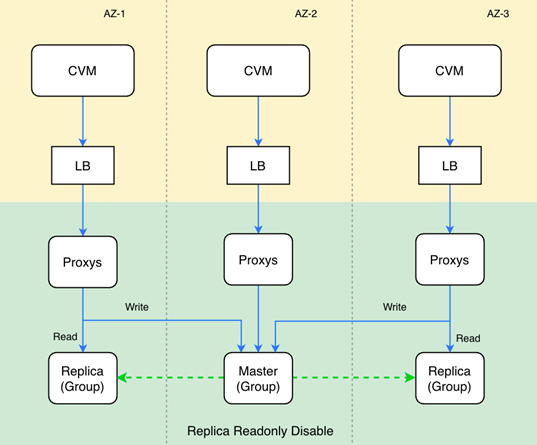
Read/Write separation disabled (that is, replicas can be written to and read from): Write/read requests in a replica AZ are routed by proxy to the master node, and the master node synchronizes with replica nodes to ensure consistent data across all nodes. In this process, only one cross-AZ access happens.
Instance with read-only replica enabled
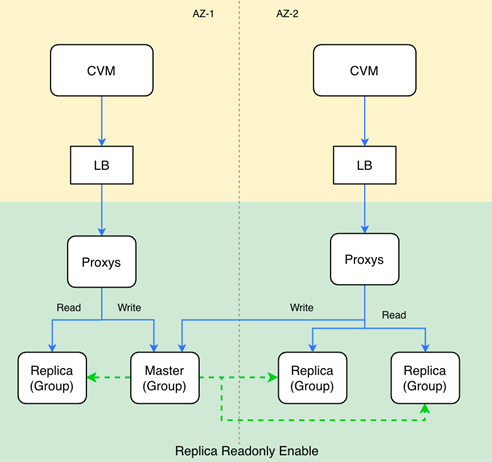
For instances with read-only replica (read/write separation) enabled, write requests are routed by the Proxy in the local AZ to the master node. Read requests are preferentially routed to replica nodes in the local AZ, meeting the business requirements for proximity access and low latency. Meanwhile, read traffic can also be distributed to read-only replicas in other AZs, achieving decoupling of read and write traffic and significantly relieving the read pressure on the master node.
Recommended Deployment Solution
Two-AZ deployment
One primary node and three replica nodes are deployed in two AZs, with one primary node and one replica node in the primary AZ and two replica nodes in the secondary AZ. Load balancing is performed in the two AZs, with two nodes in each AZ. This ensures that read requests do not cross AZs in the event of a single-node failure, and primary-secondary high availability is still maintained after a single-AZ failure. This solution is suitable for scenarios with high requirements for availability and access latency.
Three-AZ deployment
One primary node and two replica nodes are deployed in three AZs, with one node deployed in each AZ. This solution achieves disaster recovery distribution across three AZs with the minimum number of replicas, maintaining primary/secondary high availability after any single-node or single-AZ failure. However, because no replica is retained in the primary AZ, the primary AZ changes after a master node failover, and the proportion of cross-AZ access is relatively higher. This solution is suitable for business scenarios with extremely high availability requirements and low sensitivity to latency.
Relevant Operations
To configure and view multi-AZ information via the console, see Configure Multi-AZ.
To upgrade from a single AZ to multi-AZ via the console, see Change AZ.
To enable or disable the read/write separation feature via the console, see read-only replica.
Both multi-AZ instances and single-AZ instances use the same access method, providing a VIP for business access. See Accessing Multi-AZ Instances.
Multi-AZ deployed instances support automatic failover capability to ensure service availability. See Failure Simulation.
Multi-AZ deployed instances provide the automatic failback feature (Auto Failback). See Auto Failback.
Multi-AZ deployed instances support the manual master promotion feature. You can deploy the master node to a specified AZ or replica (group) based on business requirements. See Replica Promotion to Primary.
In multi-AZ deployment scenarios, to reduce service access latency for businesses, Distributed Cache provides proximity access capability; see Proximity Access.
Ajuda e Suporte
Esta página foi útil?
Você também pode entrar em contato com a Equipe de vendas ou Enviar um tíquete em caso de ajuda.
comentários