Creating Read-Only Instance
Download
Focus Mode
Font Size
Scenarios
TencentDB for MySQL allowed users to create one or multiple read-only instances to support read-write separation and scenarios with one primary node and multiple secondary nodes. This significantly improved read workload capabilities of user databases.
When creating a read-only instance, you can choose between two different engines: the InnoDB engine and the LibraDB engine. The InnoDB engine can handle a higher volume of concurrent read requests that the primary instance cannot support in traditional scenarios. The LibraDB engine processes complex SQL queries in your business, such as multi-table joins, large-scale Group by operations, and subqueries, using columnar storage and a parallel engine.
Database proxy is now supported. After creating read-only instances, you can purchase a database proxy and enable the read-write separation feature. When the database proxy address is configured in your application, write requests are automatically forwarded to the primary instance, and read requests are automatically forwarded to each read-only instance.
Note:
For read-only instance pricing, see Product Pricing.
Read-only instances support enabling independent private network addresses on the instance details page and allow custom modifications of private IP addresses and port numbers.
Cloud disk edition instances are deployed with one read-write node and up to five read-only nodes. If you have purchased a cloud disk edition instance, for operations on adding or deleting read-only nodes, see Adding Instance Nodes and Deleting Instance Nodes. The cloud disk edition also supports adding 1 to 15 independent read-only instances. You can create them by referring to the methods described in this document. Note that independent read-only instances cannot be switched to read-write nodes.
Basic Concepts
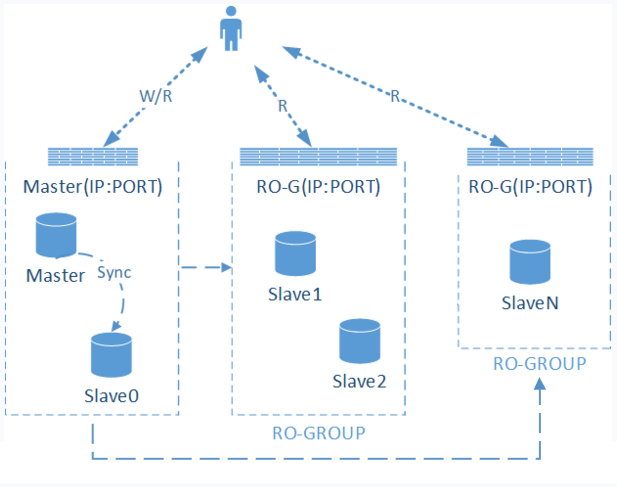
RO group: A read-only instance group with load balancing capabilities. If an RO group contains multiple read-only instances, it evenly distributes user read requests among each instance within the group. The RO group provides external IP address and PORT for database access.
Read-only instance: A single-node (standalone) instance that supports read requests. Read-only instances in dual-node/three-node architectures cannot exist independently; each belongs to an RO group. Read-only nodes of cloud disk edition instances and independent read-only instances do not belong to any RO group.
Proxy pure network mode: The capability to precisely forward client database requests to target read-only instances through a pure network approach. If the RO group under a dual-node/three-node primary instance has been upgraded to Proxy pure network mode, you can select Proxy pure network mode when adding a read-only instance to that primary instance. For upgrade operations, see Network Forwarding Feature.
Basic Architecture
Read-only instances use the MySQL binlog source-replica synchronization feature to replicate changes from the primary instance (source database) to all read-only instances. All read-only instances adopt a single-node architecture without a secondary server. If a read-only instance fails, we will continuously attempt to recover it. If you require higher availability, you can choose an RO group.
Note:
Having only one read-only instance in an RO group poses a single point of failure risk, and this RO group will not be included in the overall availability calculation of the TencentDB for MySQL service. A single read-only instance does not provide availability SLA guarantees. It is recommended to purchase at least 2 read-only instances in an RO group to ensure its availability.
Feature Limits
Single-node cloud disk edition instances do not support creating read-only instances.
Only Two-Node and Three-Node primary/disaster recovery instances and Cluster Edition primary instances with at least 1GB memory, 50GB disk space, MySQL 5.6 or later, and the InnoDB engine support purchasing read-only instances. If your instance does not meet these specifications, upgrade the instance specification first.
The minimum specification requirement for read-only instances is 1 GB of memory and 50 GB of disk space, which must be greater than or equal to the purchased storage specification of the primary instance.
A dual-node or three-node primary instance can have up to 5 read-only instances created for it, while a cloud disk edition instance can have up to 15 read-only instances created.
Backup and rollback features are not supported.
Data migration to read-only instances is not supported.
Database creation/deletion operations are not supported; phpMyAdmin (PMA) is not supported.
Account creation/deletion is not supported. Granting permissions to accounts and modifying account passwords are also not supported.
Precautions
Read-only instances do not require maintenance of accounts and databases, as they are all synchronized from the primary instance.
If the MySQL version is 5.6 but GTID is not enabled, you can enable GTID via the console and then add read-only instances.
The GTID enabling process is time-consuming and will cause a brief disconnection of several seconds for the instance. It is recommended to perform this operation during off-peak business hours and add a reconnection mechanism to the program that accesses the database.
Read-only instances only support the InnoDB engine.
Due to data synchronization delays, minor data inconsistencies may occur among multiple read-only instances. The synchronization delay between each read-only instance and the primary instance can be viewed in the console.
The instance specifications of read-only instances can differ from those of the primary instance, allowing users to upgrade based on workload requirements. It is recommended that read-only instances within the same RO group maintain consistent specifications.
Operation Steps
1. Log in to the TencentDB for MySQL Console. In the instance list, click the instance ID or Manage in the Operation column to go to the instance details page.
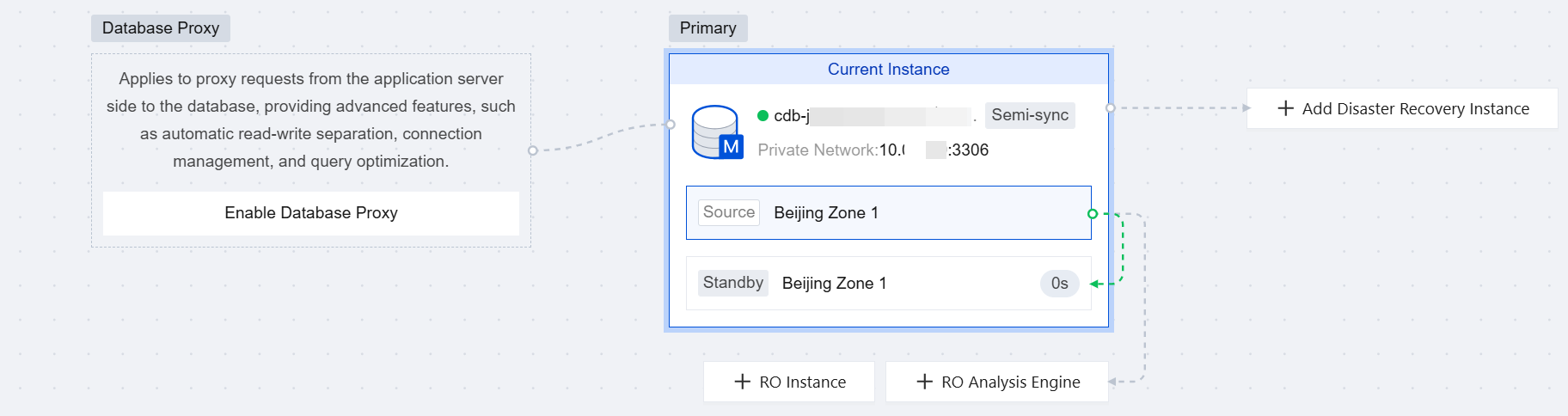
2. On the instance details page, click + RO Instance or + RO Analysis Engine in the Instance Architecture Diagram section, or click Create on the read-only instance page to go to the purchase page.
Note:
Click + RO Instance to create an InnoDB engine read-only instance. Click + RO Analysis Engine to create a read-only analysis engine LibraDB.
3. On the purchase page, configure the read-only instance and click Buy Now after confirmation.
Note:
To unify the expiration time of read-only instances with that of the primary instance, you can set a unified expiration date in the Renewal Management Console. For specific steps, see Unified Expiration Date.
Newly added independent read-only instances for cloud disk edition instances have no operations related to specifying an RO group.
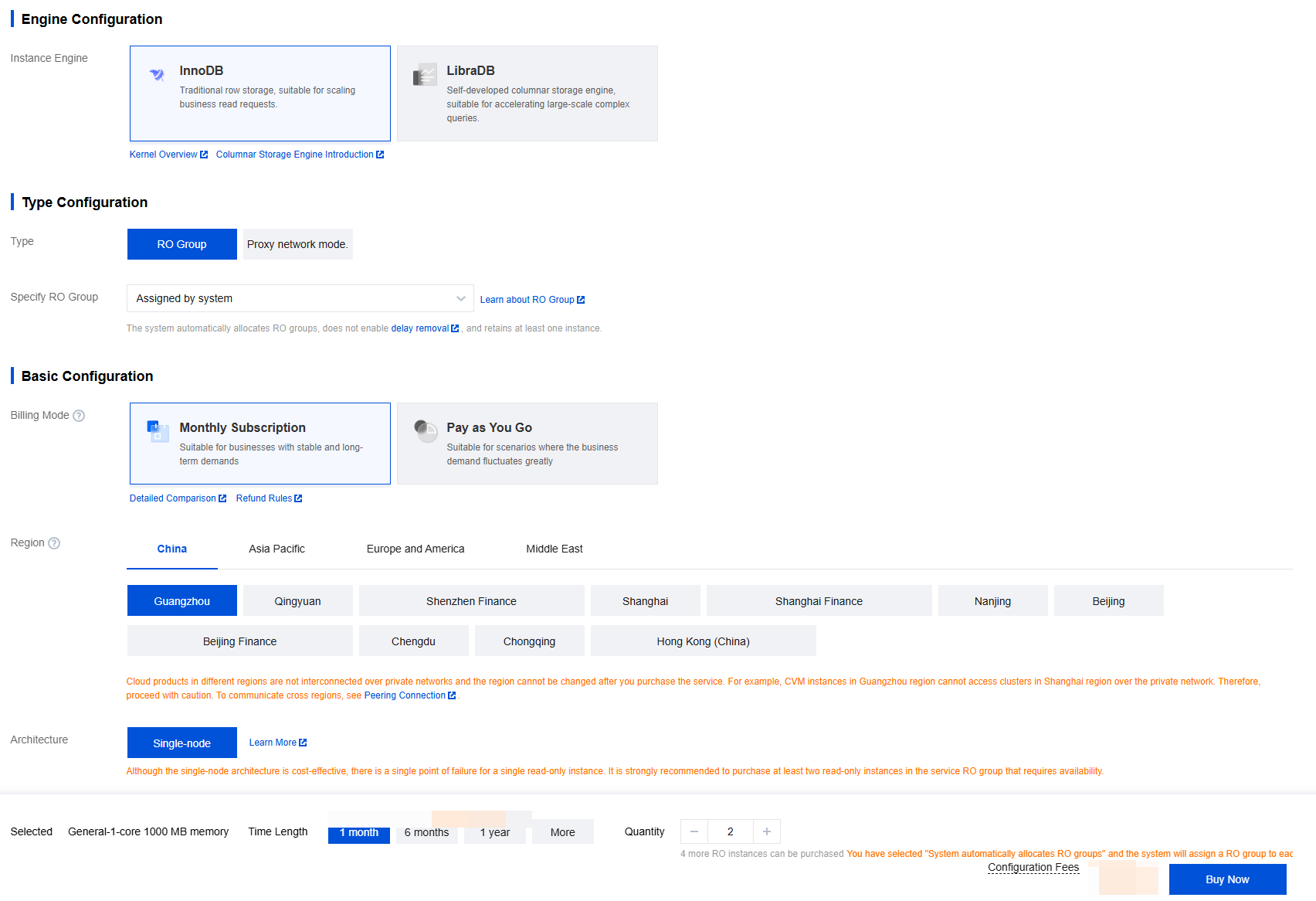
Parameter | Description |
Instance Engine | Select an engine for the current read-only instance. Currently, InnoDB and LibraDB engines are supported. In this example, select the InnoDB engine. For details about the creation and description of the LibraDB engine, see Enabling a Read-only Analysis Engine. |
Type | RO group: Indicates a standard RO group. After selecting this option, you must specify an RO group. Proxy pure network mode: Forwards SQL in pure network mode. This option is available only when a Proxy pure network mode already exists under the primary instance, indicating that read-only instances can be added only under an existing Proxy pure network mode. After selecting this option, you must specify a Proxy pure network address. |
Specify RO Group | When the type is RO group, this item must be configured. It supports system auto-assignment, creating a new RO group, or using an existing RO group. Automatic assignment by the system: If multiple instances are purchased at once, the system will assign a separate RO group to each instance. The weight distribution method is set to automatic assignment by the system by default. Create an RO group: Creates an RO group. If multiple instances are purchased at once, all will be assigned to this RO group. The weight distribution method is set to automatic assignment by the system by default. Existing RO group: Specifies an existing RO group. If multiple instances are purchased at once, all will be assigned to this RO group. The weight distribution method follows the RO group configuration: If the RO group is set to automatic assignment by the system, RO groups will be added automatically based on the purchased specifications; if it is set to custom assignment, the default weight is zero. Since instances in the same RO group share the same private IP address, they will also share the same security group settings in VPC networks. If you select an existing RO group, you will not be able to customize the security group during the purchasing process. |
RO Group Name | When creating an RO group, you need to specify a name for the new RO group. The name can include Chinese characters, English letters, digits, hyphens (-), underscores (_), and periods (.), and should be less than 60 characters in length. |
Designate Proxy Network Address | When the type is Proxy network mode, this item must be configured. The existing Proxy network address under the current primary instance is selected by default. |
Remove Delayed RO Instances | Select whether to enable the removal policy. If the removal policy is enabled, you must set the latency threshold and minimum number of retained instances. Instances removed will automatically have their weights set to zero. If a read-only instance is removed due to latency exceeding the threshold, an alarm will be sent to the user (for configuring the removal alarm and recipients, see Alarm Feature), and the instance status will be set to "Service Suspended, Synchronizing" with a weight of 0. When the latency of the read-only instance falls below the threshold, it will be re-added to the RO group. Meanwhile, regardless of whether the latency-based removal feature is enabled for the instance, if a read-only instance is removed due to a failure, it will also be re-added to the RO group after the instance is repaired. Note: When the type is RO group and the specified RO group is automatically assigned by the system, delay removal is not enabled, and at least one instance is retained. When the type is RO group and the specified RO group is a new RO group, you must choose whether to enable the removal policy. When the type is RO group and the specified RO group is an existing RO group, the settings for this item are consistent with those of the existing RO group. When the type is Proxy pure network mode, the settings for this item are consistent with those of the existing Proxy pure network mode. |
Billing Mode | The yearly/monthly subscription and pay-as-you-go modes are supported. |
Region | Select the region for the read-only instance. When the type is RO group, you can select the same region as the primary instance or a different region. When the type is Proxy network mode, only the same region as the primary instance is supported by default. The specific available regions are subject to the actual display on the page. |
Architecture | The default is single-node. |
AZ | You can select the same AZ as the primary instance or a different AZ. The specific available AZs are subject to the actual display on the page. There is no substantial difference between different AZs. Creating a cross-AZ RO group or Proxy network mode enhances data disaster recovery capabilities but introduces a few milliseconds of additional network latency. |
Instance Specification | Select a specification for the read-only instance based on your actual business needs. |
Hard Disk | Select the disk space. The minimum and maximum limits depend on the selected instance specification and may vary based on the actual options available on the purchase page. |
Network | By default, the VPC network is the same as that of the primary instance of TencentDB for MySQL, and the subnet is selected from the available subnets within the specified availability zone (AZ). You can also deploy the read-only instance in a different VPC from the primary instance. |
Custom Port | The default port is 3306. You can customize it to a value between 1024 and 65535. |
Security Group | You can select a security group different from that of the corresponding TencentDB for MySQL instance to control its access policy. |
Tag | Add tags to the read-only instance. |
Alarm policy | |
Instance Name | Customize the instance name. You can name the instance upon or after its creation. |
Data Replication Mode | Asynchronous replication is used by default. |
Instance Termination Protection | Instance Termination Protection is unchecked by default, which means it is disabled by default. You can enable it based on your needs. Once enabled, the instance cannot be terminated through the console or APIs. |
Quantity | Select the purchase quantity based on actual business requirements. |
4. After the purchase is completed, return to the instance list. Once the instance status changes to Running, it can be used normally.
FAQs
What Are the Removal Rules for Read-Only Instances?
After delayed-exceed-removal is enabled, the RO group will remove instances based on the latency threshold and the minimum number of retained instances. Removed instances will have their weight automatically set to 0. If a read-only instance is removed due to exceeding the latency threshold, an alarm will be sent to the user. The instance status will be "Service Suspended and Synchronizing" with a weight of 0. When the read-only instance latency falls below the threshold, it will rejoin the RO group.
Delay threshold: A delay threshold is set for read-only instances. Instances exceeding this threshold will be removed from the RO group.
Minimum Number of Retained Instances: The minimum number of instances that must be retained in the group. If the number of existing read-only instances is less than or equal to this minimum and their delay exceeds the threshold, none of the existing read-only instances will be removed.
What Impact Does the Termination/Return of Read-Only Instances Have on the Primary Instance?
Terminating/returning read-only instances does not affect the primary instance.
Why Is It Not Possible to Select a Certain AZ When a Read-Only Instance Is Created?
If a specific AZ is unavailable, it indicates that there are no resources in that AZ. You can select another AZ based on the actual options displayed on the purchase page, which will not affect your use of the read-only instance.
Can Read-Only Instances Be Deployed in Different AZs from the Primary Instance During Creation?
Yes. When creating a read-only instance and selecting a new RO group or Proxy pure network mode, you can choose an AZ different from that of the primary instance. However, if you select an existing RO group when the read-only instance is created, the AZ of that read-only instance must be the same as the AZ of the selected existing RO group, and it may not be in the same AZ as the primary instance.
Help and Support
Was this page helpful?
You can also Contact sales or Submit a Ticket for help.
Help us improve! Rate your documentation experience in 5 mins.
Feedback