読取専用インスタンスROグループの管理
Download
フォーカスモード
フォントサイズ
シナリオ
TencentDB for MySQLは、ユーザーが1つまたは複数の読み取り専用インスタンスを作成して読み取り専用インスタンスROグループを構成することをサポートし、読み取りと書き込みの分離や1つのマスターと複数のスレーブの応用シナリオに適しており、ユーザーのデータベースの読み取り負荷能力を大幅に向上させることができます。
ROグループは読み取り専用インスタンスの集合であり、1つのROグループは1つのIPアドレスを共有します。同時に、グループ内の読み取り専用インスタンスのウエイトを設定してトラフィックの負荷分散を行ったり、遅延排除を設定したりすることもできます。ユーザーは必要に応じてROグループをデプロイし、対応する読み取りリクエストを一定のルールに従って読み取り専用インスタンスに送信できます。同じROグループ内の複数の読み取り専用インスタンスを設定することで、災害復旧の役割を果たすことができます。
TencentDB for MySQLは、2種類のROグループをサポートしています。それぞれ、通常のROグループと分析ROグループです。2ノード/3ノードインスタンスの通常のROグループは、Proxyピュアネットワークモードにアップグレードすることができ、アップグレード後はクロスアベイラビリティーゾーンでの読み取り専用インスタンスのデプロイをサポートするようになります。
通常のROグループ:InnoDBエンジンを利用した通常の読み取り専用インスタンスのROグループです。CLB、遅延排除、最小インスタンス数の維持などの機能をサポートしています。
分析ROグループ:LibraDBエンジンを利用した読み取り専用分析エンジンインスタンスのROグループです。CLB機能のみサポートしています。
Proxyピュアネットワークモード:純粋なネットワーク方式により、クライアントからのデータベースリクエストをターゲットの読み取り専用インスタンスに正確に転送する機能です。2ノード/3ノードアーキテクチャのマスターインスタンス配下のROグループが既にProxyピュアネットワークモードにアップグレードされている場合、そのマスターインスタンスに読み取り専用インスタンスを追加する際に、Proxyピュアネットワークモードを選択できます。アップグレードの操作については、ネットワーク転送機能をご参照ください。
注意:
分析ROグループは読み取り専用分析エンジンのみを管理でき、通常のROグループは読み取り専用インスタンスのみを管理できます。
2ノード、3ノードアーキテクチャのマスターインスタンスまたは災害復旧インスタンスのみが、読み取り専用インスタンスROグループの作成をサポートしています。
遅延閾値を設定した場合、読み取り専用インスタンスが再起動または再構築された後も、遅延が設定した閾値以内に復元するまではROグループに再参加しません。
前提条件
読み取り専用インスタンス ROグループの作成
1. MySQLコンソールにログインし、インスタンス一覧でインスタンスIDまたは操作列の管理をクリックすると、インスタンス管理ページに移動します。
2. 読み取り専用インスタンスページを選択し、新規作成をクリックすると、購入ページに移動します。
3. 購入ページで読み取り専用インスタンスの対応する設定を選択し、問題がなければ今すぐ購入をクリックします。
インスタンスエンジン:読み取り専用インスタンスのエンジンを選択します。現在、InnoDBおよびLibraDBエンジンがサポートされています。ここではInnoDBエンジンを選択します。
指定ROグループ:新規ROグループを選択します。複数のインスタンスを一度に購入する場合、すべてこのROグループに割り当てられます。ウエイトの割り当て方式はデフォルトでシステム自動割り当てとなります。
ROグループ名の設定:ROグループ名は一意である必要はありません。60文字未満の中国語、英語、数字、
-、_、.がサポートされています。遅延超過による除外:マスターとスレーブ間のレプリケーション中に、スレーブインスタンスが一定時間以上マスターの更新を取得できず、遅延が事前に設定された閾値を超えた場合、自動的に接続が切断され、スレーブインスタンスはレプリケーションチェーンから除外されます。これにより、チェーン全体の可用性とパフォーマンスを確保します。除外ポリシーの有効/無効は設定可能です。
説明:
読み取り専用インスタンスが閾値を超えて除外された場合、ユーザーにアラートが送信され(アラートの設定と通知先についてはアラート機能をご参照ください)。また、インスタンス状態は「同期停止中」、ウエイトは0となります。遅延が回復し閾値を下回ると、自動的にROグループへ再参加します。
インスタンスが遅延超過による除外機能を有効にしているかどうかに関わらず、読み取り専用インスタンスが故障により除外された場合も、インスタンスが修復されると自動的にROグループへ再参加します。
遅延閾値:読み取り専用インスタンスの遅延超過閾値を設定します。閾値を超えた読み取り専用インスタンスはROグループから除外されます。
最少保留インスタンス:グループ内で保証する必要があるインスタンスの下限数です。既存の読み取り専用インスタンス数がこの下限以下であり、かつ遅延時間が閾値を超えている場合、既存の読み取り専用インスタンスはすべて除外されません。
説明:
遅延超過による除外が発生した場合、最少保留インスタンス数が1より大きいときは、他の読み取りリクエストは保留された読み取り専用インスタンスにルーティングされます。最少保留インスタンス数が0のときは、他の読み取りリクエストはマスターインスタンスにルーティングされます。
インスタンスの遅延超過による除外を有効にし、かつ最少保留インスタンス数が1以上の場合、すべての読み取り専用インスタンスで遅延が発生し、遅延時間が設定した遅延閾値を超えていても、ユーザーは遅延したデータを読み取ることになります。
読み取りウエイトの割り当て:システム自動割り当てとなります。
課金モード:年間・月額プランと従量課金の2つの課金モードをサポートしています。
リージョン:デフォルトではマスターインスタンスと同じリージョンですが、他のリージョンを選択することもサポートしています。
アーキテクチャ:シングルノードです。シングルノードアーキテクチャはコストパフォーマンスに優れていますが、単一の読み取り専用インスタンスにはシングルポイントリスクがあります。可用性が求められるビジネスでは、ROグループ内に少なくとも2つの読み取り専用インスタンスを購入し、可用性を保証することをお勧めします。
アベイラビリティーゾーン:新規ROグループ作成時、マスターインスタンスと同じアベイラビリティーゾーンまたは異なるアベイラビリティーゾーンを選択できます。異なるアベイラビリティーゾーン間に実質的な違いはありません。クロスアベイラビリティーゾーンのROグループを作成するとデータの災害復旧能力が向上しますが、数ミリ秒のネットワーク遅延が発生します。
インスタンススペック:必要に応じてインスタンススペックを選択します。読み取り専用インスタンスの最低スペック要件は1GBのメモリです。
ハードディスク:必要に応じてハードディスク容量を選択します。読み取り専用インスタンスの最低スペック要件は50GBのハードディスクで、かつマスターインスタンスの購入済みのストレージスペック以上である必要があります。
データレプリケーション方式:非同期レプリケーションです。
アベイラビリティーゾーン:新規ROグループ作成時、マスターインスタンスと同じアベイラビリティーゾーンまたは異なるアベイラビリティーゾーンを選択できます。異なるアベイラビリティーゾーン間に実質的な違いはありません。クロスアベイラビリティーゾーンのROグループを作成するとデータの災害復旧能力が向上しますが、数ミリ秒のネットワーク遅延が発生します。
その他の設定の詳細については、読み取り専用インスタンスの作成をご参照ください。
4. インスタンス一覧に戻ると、作成したインスタンスのステータスが作成中と表示されます。ステータスが実行中に切り替わると、読み取り専用インスタンスの作成が成功したことを示します。
読み取り専用インスタンス ROグループの設定
読み取り専用インスタンスROグループの設定画面では、ROグループのID、名称、インスタンス遅延レプリケーション、遅延時間、インスタンス遅延超過による除外、遅延閾値、最少保留インスタンス、読み取りウエイトなどの基本情報を設定できます。
説明:
ROグループ内の読み取り専用インスタンスは異なるスペックを使用でき、読み取りトラフィックのウエイトを設定できます。
同一ROグループ内の読み取り専用インスタンスは、異なる有効期限と課金方式をサポートできます。
遅延レプリケーションを有効にすると、ROグループ内のすべてのROインスタンスに適用されますが、ROインスタンスのレプリケーションステータスは変更されません。
遅延レプリケーションを有効にすると、遅延時間のオプションが表示されます。
1. MySQLコンソールにログインし、インスタンス一覧から対象のマスターインスタンスまたは災害復旧インスタンスを選択し、インスタンスIDをクリックして、インスタンス管理ページに移動します。
2. インスタンス管理ページで、読み取り専用インスタンスタブを選択し、ROグループ列の設定をクリックして、ROグループ設定ページに移動します。

3. ROグループ設定ページで、ROグループ情報を設定し、確定をクリックします。
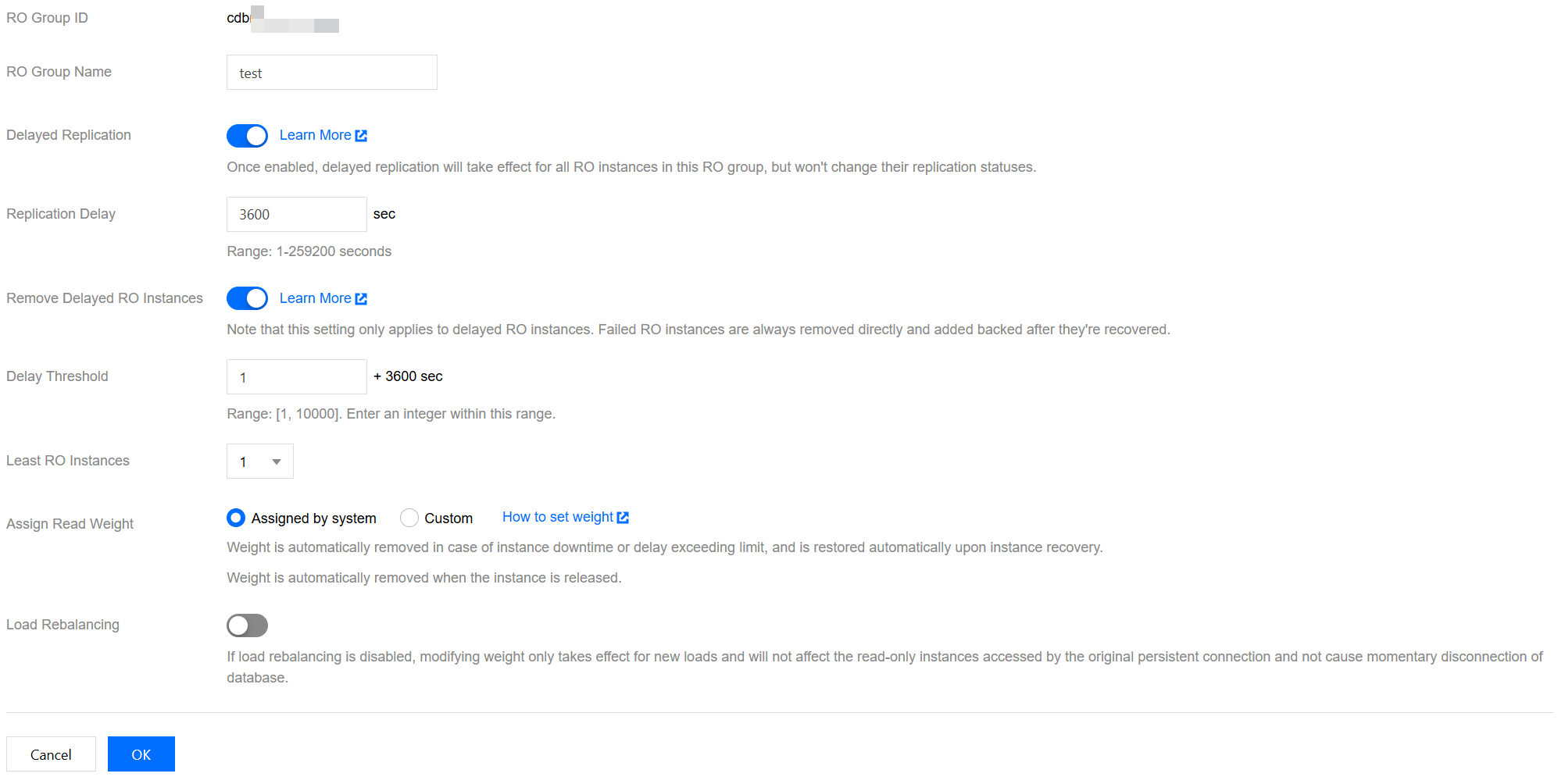
ROグループ名:ROグループ名を入力します。
インスタンス遅延レプリケーション:遅延レプリケーションを設定し、遅延期間中に指定時間またはGTID(グローバルトランザクション識別子)へのリカバリーを起動することで、効率的なデータのロールバックと障害の迅速なトレースバックを実現できます。
遅延時間:読み取り専用インスタンスとマスターインスタンス間の遅延レプリケーション時間で、設定可能な範囲は1秒から259200秒です。
インスタンス遅延超過による除外:除外ポリシーを有効にするかどうか。除外されたインスタンスのウエイトは自動的に0に設定されます。読み取り専用インスタンスが閾値を超えて除外された場合、ユーザーにアラートが送信されます。アラートの設定と通知先についてはアラート機能をご参照ください。
遅延閾値:読み取り専用インスタンスの遅延超過閾値を設定します。閾値を超えた読み取り専用インスタンスはROグループから除外されます。
最少保留インスタンス数:グループ内で保証する必要があるインスタンスの下限数です。既存の読み取り専用インスタンス数がこの下限以下であり、かつ遅延時間が閾値を超えている場合、既存の読み取り専用インスタンスはすべて除外されません。
読み取りウエイト割り当て:ROグループは、システムによる自動ウエイト割り当てとカスタムウエイトの2種類のウエイト設定方式をサポートしています。ウエイトの入力範囲は0から100で、整数である必要があります。システムが自動的に設定するデュアルノードおよびトリプルノードMySQLインスタンスの読み取りウエイト値のリストは以下の通りです:
インスタンスメモリスペック(MB) | 1000 | 2000 | 4000 | 8000 | 12000 | 16000 | 24000 | 32000 | 48000 | 64000 | 96000 | 128000 | 244000 | 488000 |
ウエイト | 1 | 1 | 2 | 2 | 4 | 4 | 8 | 8 | 10 | 12 | 14 | 16 | 26 | 50 |
再負荷分散:
再負荷分散をオフにすると、ウエイトの変更は新規負荷にのみ有効になり、既存の長期接続がアクセスしている読み取り専用インスタンスは変更されず、データベースの接続切れは発生しません。
再負荷分散を有効にすると、すべての接続を切断するためにデータベースに秒単位の接続切れが発生し、新規接続は設定されたウエイトに基づいて負荷が均等に分散されます。
Proxy ピュアネットワークモードの設定
通常のROグループがProxyピュアネットワークモードにアップグレードされた場合、その設定調整の方法と効果はデータベースプロキシアドレスの設定調整と同一となります。詳細な操作方法については、アクセスポリシーの確認と変更をご参照ください。

読み取り専用インスタンス ROグループの破棄
説明:
ROグループは手動削除機能を提供していません。
ROグループは、グループ内の最後の読み取り専用インスタンスが完全に破棄されると自動的に削除されます。
空のROグループを保留することはサポートされていません。
1. MySQLコンソールにログインし、インスタンス一覧でマスターインスタンスIDをクリックすると、インスタンス管理ページに移動します。
2. インスタンス管理ページで、読み取り専用インスタンスタブを選択し、右側の操作列で破棄インスタンスまたは破棄/返却をクリックします。
3. 表示されたダイアログボックスで、破棄情報を確認し、確定破棄をクリックします。破棄ルールを確認・同意の上、確定をクリックします。
ホットトピック
読み取り専用インスタンスを作成する際、特定のアベイラビリティーゾーンを選択できないのはなぜですか。
特定のアベイラビリティーゾーンを選択できない場合、そのゾーンには現在リソースがありません。実際の購入ページに基づいて他のアベイラビリティーゾーンを選択できます。読み取り専用インスタンスの使用には影響しません。
読み取り専用インスタンスを作成する際、マスターインスタンスとは異なるアベイラビリティーゾーンに配置することはできますか。
可能です。読み取り専用インスタンスを作成する際、新規ROグループまたはProxyピュアネットワークモードを選択する場合は、マスターインスタンスとは異なるアベイラビリティーゾーンを選択できます。ただし、既存のROグループを選択して読み取り専用インスタンスを作成する場合、その読み取り専用インスタンスのアベイラビリティーゾーンは、選択した既存ROグループのアベイラビリティーゾーンと一致する必要があり、必ずしもマスターインスタンスと同じアベイラビリティーゾーンに配置されるとは限りません。
既存のROグループに読み取り専用インスタンスを新規作成しようとした際にInvalidParameter.RoGroupError.RoCdbTypeErrorというエラーが表示されました。原因はなんですか。
読み取り専用インスタンスのインスタンスタイプの選択が誤っています。同じROグループ内のインスタンスタイプは統一する必要があり、汎用型インスタンスと専有型インスタンスが混在することはできません。対応するROグループ配下の既存の読み取り専用インスタンスのインスタンスタイプを確認し、新規作成時にはそのタイプと一致させてください。
フィードバック