Viewing Rule Template List
Download
Focus Mode
Font Size
This document introduces how to view the rule template list via the console.
View Rule Template List and View Template Details
1. Log in to the TencentDB for MySQL console.
2. Select SQL Insight (Database Audit) in the left sidebar.
3. Select region, and click Rule Template.

4. In the rule template list, find the target rule template (or quickly find it by filtering by resource attributes in the search box), and in its Operation column, click Details.
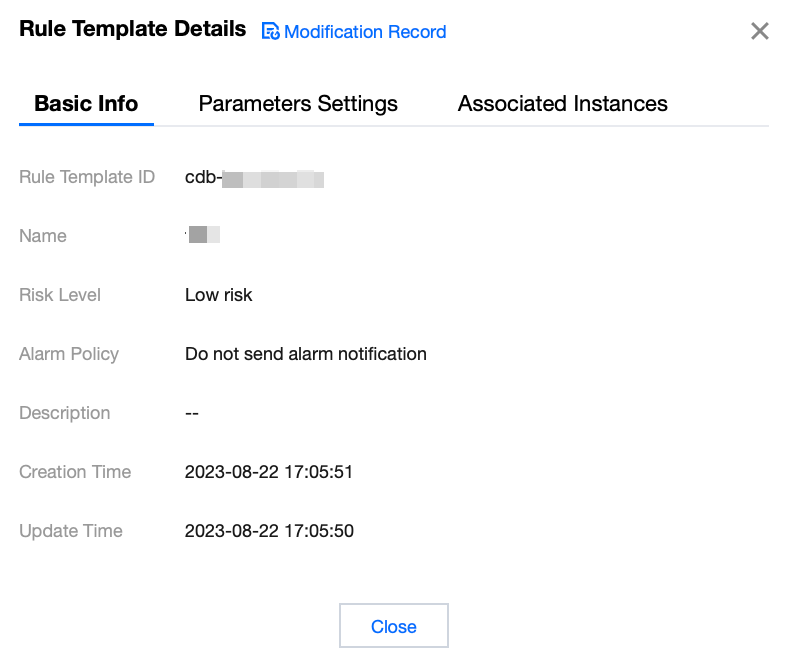
5. In the pop-up window, you can switch to view the Basic Information, Parameter Settings, Associated Instances, and Modification History of the rule template.
Tool List
Tool | Description |
Search box | Click  |
Revision History | Click  |
Refresh | Click  |
Template List Field
Field | Description |
Rule Template ID | Displayed are the created rule template IDs. |
Name | Displayed are the created rule template names. |
Associated Instances | Displays the number of instances bound to the corresponding rule template. Click the number of instances to view details of associated instances, including instance ID, audit type, and so on. |
Risk Level | Displays the risk level (Low, Medium, High) of the corresponding rule template, with filtering support. |
Alarm Policy | Displays the alarm policy (Do not send alarms, Send alarms) for the corresponding rule template, with filtering support. |
Description | Displayed are the description remarks of the created rule templates. |
Creation Time | Displays the creation time of the corresponding rule template in the format of YYYY-MM-DD HH:mm:ss. |
Update time | Displays the latest update time of the corresponding rule template. |
Operation | Details: You can view the rule template details, including Basic Information, Parameter Settings, Associated Instances, and Modification History. Edit: You can modify the rule template content. Delete: Delete the rule template. |
Related Documentation
Help and Support
Was this page helpful?
You can also Contact sales or Submit a Ticket for help.
Help us improve! Rate your documentation experience in 5 mins.
Feedback