Creating Rule Template
Download
Mode fokus
Ukuran font
This document introduces how to create a new rule template via the console.
Note:
From September 25, 2023, the relationship between rule templates and audit instances has been changed from initialization to strong association. Modifying the content of a rule template will synchronously affect the audit rules applied by instances bound to that rule template.
Up to 5 feature strings can be configured in the same parameter field of the rule content, separated by the English vertical bar.
Operation Steps
1. Log in to the TencentDB for MySQL console.
2. Select SQL Insight (Database Audit) in the left sidebar.
3. Select Region, and click Rule Template.
4. In the template list, click Create Rule Template.

5. Under the Create Rule Template window, complete the following configurations, then click OK.
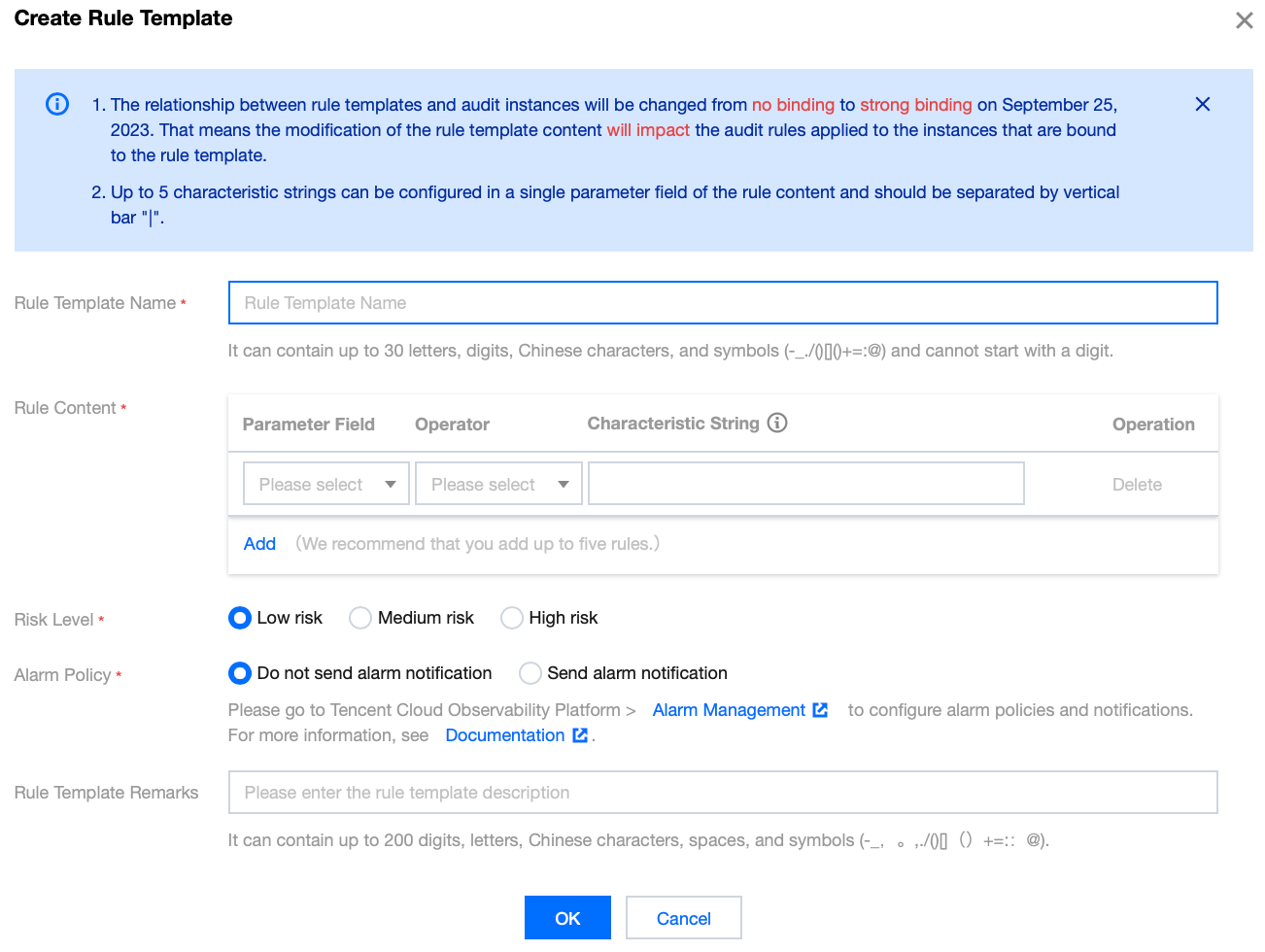
Parameter | Description |
Rule Template Name | Only digits, upper-case letters, lower-case letters, Chinese characters, and special characters -_./()[]()+=:@ are allowed. Cannot start with a number. Maximum 30 characters. |
Rule Content | Set rule content (Parameter Field, Match Type, Feature String). For detailed configuration instructions, see the following Rule Content Details and Examples . Note: Under Rule Content, click Add to add parameter fields. In the Operation column under Rule Content, you can click Delete to remove unnecessary parameter fields and conditions, but at least one parameter field and condition must be retained. |
Risk Level | Select the risk level for the new rule template. Supported options are low risk, medium risk, and high risk. |
Alarm Policy | Select an alarm policy for the new rule template. Supported options are Do not send alarms and Send alarms. Note: Please go to Tencent Cloud Observability Platform > Alarm Management to configure alarm rules and notifications. For details, see Configure Post-Incident Alarms. |
Rule Template Remarks | Only digits, uppercase and lowercase letters, Chinese characters, and special characters -_./()[]()+=:@ are supported. Cannot start with a digit. Maximum 200 characters. |
Rule Content Details and Examples
Note:
You can configure one or more rules, with support for adding up to 5 rules.
Between different rules, it is an AND relationship, indicating that they must be satisfied simultaneously.
Within a rule, different feature strings have an OR relationship, meaning that only one of them needs to be satisfied.
For the same rule, only one condition can be added. For example, for the database name, a template can only support either inclusion or exclusion, but not both.
Parameter Field | Operator | Characteristic String |
Client IP | Include, Exclude, Equal to, Not equal to, Regex | Up to five client IPs can be configured and should be separated by vertical bar "|". When the operator is Regex, only one characteristic string can be entered. |
User Account | Include, Exclude, Equal to, Not equal to, Regex | Up to 5 user accounts can be configured, separated by English vertical bars. When the match type is regular expression, only one feature string is supported. |
Database Name | Include, Exclude, Equal to, Not equal to, Regex | Up to five database names can be configured and should be separated by vertical bar "|". When the operator is Regex, only one characteristic string can be entered. |
SQL Details | Include, Exclude | Up to five SQL commands can be configured and should be separated by vertical bar "|". |
SQL Type | Equal to, Not equal to | Available types: ALTER, CHANGEUSER, CREATE, DELETE, DROP, EXECUTE, INSERT, LOGOUT, OTHER, REPLACE, SELECT, SET, UPDATE, and PREPARE. Up to 5 SQL types can be selected. |
Affected Rows | Greater than, Less than | Select affected rows. |
Returned Rows | Greater than, Less than | Select returned rows. |
Scanned Rows | Greater than, Less than | Select scanned rows. |
Execution Time | Greater than, Less than | Select execution time, with the unit being millisecond. |
Error Code | Equal to, Not equal to | Enter an error code. |
Example: If the rule content set by the user is: database name contains a, b, or c, and client IP address contains IP1, IP2, or IP3, then the audit logs filtered by this rule are: those where the database name contains a, b, or c and the client IP address contains IP1, IP2, or IP3.
Bantuan dan Dukungan
Apakah halaman ini membantu?
Anda juga dapat Menghubungi Penjualan atau Mengirimkan Tiket untuk meminta bantuan.
masukan