Hardware Adaptation Requirements for TMultiple Network Acceleration Linux SDK
Download
Focus Mode
Font Size
Last updated: 2026-06-15 15:48:33
AI-Translated
1. Environment Requirements
1.1 Software Requirements
1.1.1 Operating System (OS)
In terms of name and type, a mainstream operating system is required, such as: OpenWrt, CentOS, or Ubuntu.
The architecture requires the operating system to be a 64-bit OS.
Basic tools:
The operating system is recommended to support tools such as python, nc, and curl, primarily for troubleshooting.
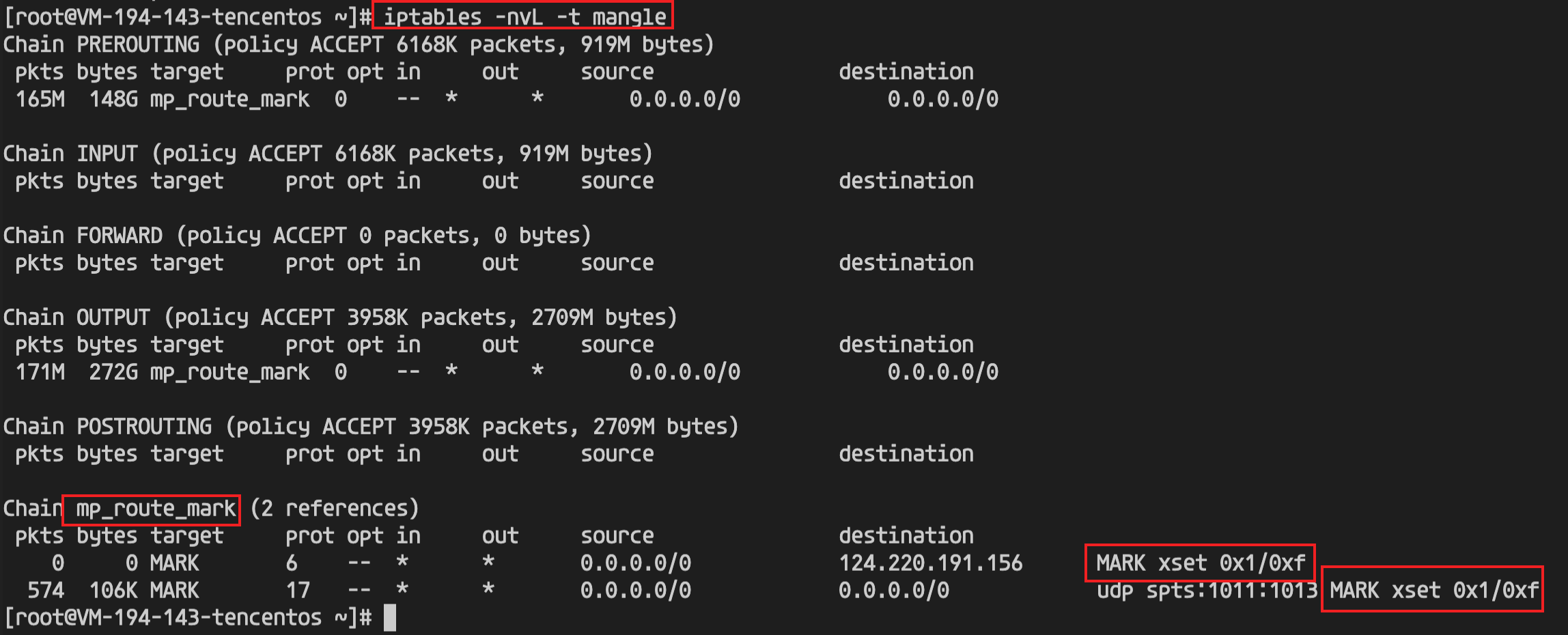
iptables must be supported; otherwise, traffic cannot be redirected.
For process management, the platform must support systemd, procd, or rc.local to manage processes and persist configurations, enabling the acceleration program to be automatically launched to accelerate services after system startup. If the system does not support the above options, the vendor must develop and integrate a startup script (for example, ZTE devices present significant adaptation challenges and are not recommended).
1.1.2 Kernel
The kernel version must be 4.4 or higher (>=4.4).
Regarding compilation parameters, the vendor must enable the TUN module when compiling the firmware (mandatory).
1.1.3 Routing
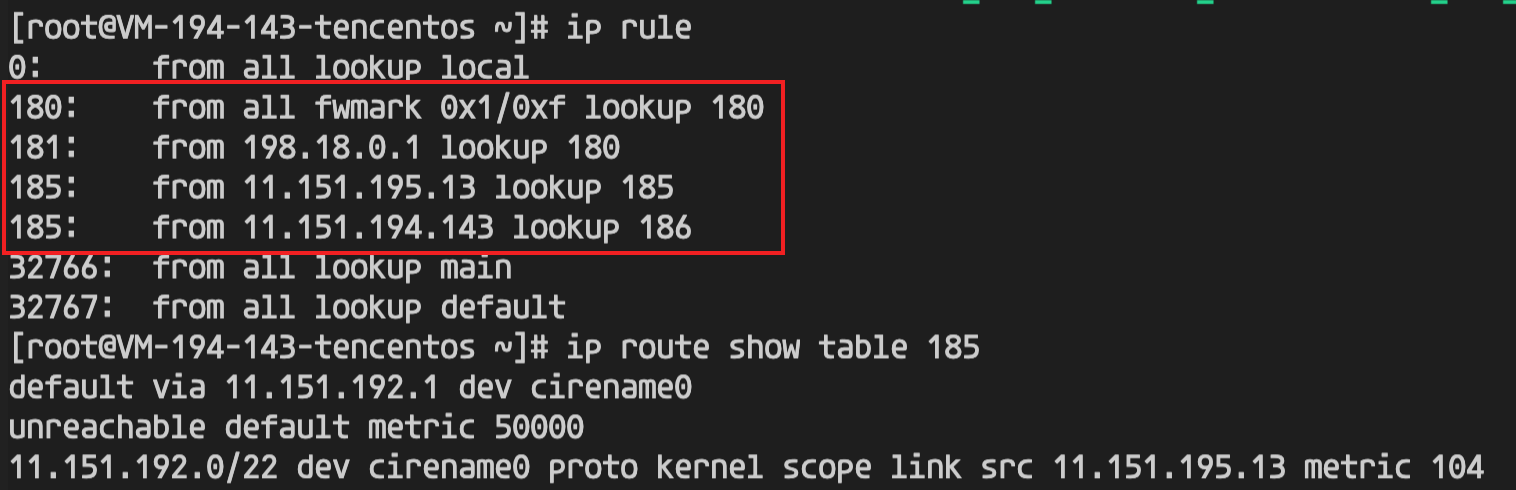
The system must support policy-based routing.
Policy-based routing management:
If policy-based routing is managed by the customer, the priority of the traffic-steering policy-based routing must be higher than that of other system routes. If the customer does not manage policy-based routing, the traffic-steering policy-based routing can be managed by the SDK (managing policy-based routing based on the source IP address of the interface). The prerequisite for the SDK to manage policy-based routing is that the corresponding gateways of multiple lines can be detected.
Regarding default routing, the system must support multiple default routes and be able to select the optimal default route based on metrics or support ECMP (Equal-Cost Multi-Path routing).
1.1.4 Others
Persistence: The SDK requires that configurations, logs, and processes all have persistence capabilities.
Configuration persistence: All configurations delivered by the SDK are persistently saved, and all files under the /usr/local/etc/mp-speeder directory are configurations. The content must remain unchanged after firmware upgrades or system restarts.
Log persistence: The /var/log directory (which stores mp-sdk and mp-speeder logs) must be non-volatile; otherwise, issues cannot be located.
If the disk itself lacks the required permissions, mount the corresponding directory to a writable disk. The required installation directories are listed below. For detailed installation files and paths, refer to SDK Installation Directory Structure.
/usr/local/etc/mp-speeder/data # Data file directory
Storage and Memory:
Memory: The memory reserved for Multiple Network Acceleration (Tencent Cloud Multiple Network Acceleration) is recommended to be greater than 100 MB (minimum recommendation: 50 MB). Memory usage correlates with bandwidth and the number of business connections. When a memory bottleneck occurs, perform actual tests based on the specific business scenario.
Storage: The storage space reserved for Multiple Network Acceleration (Tencent Cloud Multiple Network Acceleration) is recommended to be greater than 200 MB.
Remote Ops (Optional): Supports remote login methods such as SSH, enabling remote debugging of issues.
1.2 Hardware Requirements
1.2.1 Network Communication Module
In terms of aggregation capability, it supports a rich set of configuration combinations, such as 4G+4G, 4G+5G, 5G+5G, single 4G, or single 5G.
For the cellular module, SIM card recognition should support hot-swapping. It must support the display of information such as dial-up status, card number, signal strength, carrier, IMEI, base station, IP address, frequency band, and module version.
For the Wi-Fi module, support for both 2.4 GHz and 5.8 GHz is recommended.
1.2.2 Computing Power (CPU and Architecture)
In terms of architecture, the performance of ARM Cortex A72/A53/Cortex A7 is considered relatively poor, and software cannot run on the MIPS architecture.
For instruction acceleration, support for AES instruction acceleration is required, and support for system socket buffer configuration is recommended.
The performance evaluation and sample data for the terminal chip are as follows:
The performance of Cortex-A53 (dual-core, 800 MHz) is approximately 44 Mbps.
The performance of IPQ4019 is 50 Mbps for downlink and 120 Mbps for uplink.
The performance of RK3568 (Cortex-A55, 2 GHz, quad-core) is approximately 250 Mbps for downlink and 300 Mbps for uplink.
The performance of Intel Atom C3558 (X86, 2.2 GHz, quad-core) can reach 1 Gbps.
The performance of RK3588 (quad-core Cortex-A76 + quad-core (Cortex-A55, 2.4 GHz)) is approximately 650 Mbps for downlink and 500 Mbps for uplink.
The Linux sdk is implemented using a managed process approach. After installation, the sdk starts a process to listen for HTTP requests. Users can then deliver configurations and manage the start and stop of the sdk through HTTP requests.
The sdk supports a choice between direct installation via a BIN package (based on a makeself self-extracting script) and manual binary deployment.
Option A. Recommended: Direct Installation Using.BINSelf-Extracting Package
Applicable Scenarios (All of the following conditions must be met):
The operating system is a general-purpose Linux server/desktop distribution (such as CentOS / RHEL / Ubuntu / Debian / SUSE / Kylin / UOS / Anolis, and so on) or an OpenWrt / LEDE router system.
The init system must be one of the following: systemd, OpenWrt procd, or the traditional rc.local (which is satisfied by the vast majority of Linux distributions).
The customer permits the SDK to write to standard directories: /usr/local/bin, /usr/local/etc, /var/log, /etc/init.d, and so on.
The customer permits us to take over/override certain sysctl kernel parameters (such as rp_filter=0, accept_local=1, and so on).
The customer permits the SDK to automatically register as a system service (systemd unit / procd init script / rc.local startup entry) and run persistently with root privileges.
The customer desires "one-click installation, one-click uninstallation, and automatic upgrades with configuration preserved", and does not intend to manually manage binary locations or start/stop operations.
In this scenario, you only need to use the single file MP_SDK_<version>_<arch>.BIN:
sudo bash ./MP_SDK_<version>_<arch>.BIN
The BIN package automatically performs the following steps: architecture detection → environment pre-check → binary copying → configuration writing → service registration → process startup, requiring no customer intervention in file layout throughout the entire process.
Option B. Alternative: Separate Delivery of Binary + SDK Library for Customer Integration
Applicable Scenarios (Any of the following conditions is met):
The operating system is a deeply customized embedded Linux / vendor-specific distribution (such as those used in certain IPCs, gateways, in-vehicle systems, or dedicated industrial PCs), the init system is not systemd / procd / rc.local, or the root file system is a read-only squashfs / overlay that restricts writes.
If standard directories such as /usr/local, /var/log, and /lib are not writable or reside on tmpfs (which is lost upon reboot), you must place the files on a persistent partition specified by the customer.
The customer already has its own process management framework (such as in-house supervisor, busybox init, container entrypoint, or host App startup) and does not permit us to register systemd / procd services.
The customer has a strict, unified management policy for sysctl / iptables / ip rule, requiring that configurations be merged by the customer themselves and prohibiting installation scripts from writing directly.
The customer needs to embed the SDK as a submodule into their own application package for joint release (for example, by packaging it into their own IPK / DEB / RPM / image layer).
In containerized environments, the customer wants to build images themselves, requiring only the binaries and default configuration files, without deployment scripts.
The standalone binary package also includes the deploy.sh script to facilitate copying files to the corresponding directories:
cd deploy
sudo ./deploy.sh
If the copy path contains a read-only system and the script fails to copy the files, you must manually copy the files to the corresponding directories. Refer to the following file copy paths:
Q1: Must the ip_tables , iptable_filter , iptable_mangle , and tun kernel modules be in the form of modules , or can they be in the form of built-in ?
A1: Both implementation methods are acceptable.
Q2: The copy of the ld-musl-aarch64.so.1 library to /lib failed. Can it be copied to another directory, for example, to /user/local/lib?
A2: Yes. Ensure that the environment variables for program startup can automatically load libraries from /user/local/lib .
Q3: According to the integration documentation, full traffic diversion must include LAN. However, vehicle-side configurations typically do not include the "lan" prefix. Is it possible to specify only certain ports within the LAN?
A3: If full traffic diversion lacks a LAN, it will fall back to the first bridge interface. However, it is more recommended to use specific traffic diversion rules for precise control. By specifying the IP address subnet of downstream devices via srcIP , you can precisely cover traffic on specific interfaces, achieving the same effect as "specifying full traffic on certain interfaces."
Q4: After integration is complete, when the acceleration status is queried (/api/v2/client/mp-speeder), the process status is found to be not started (ready == false). How can this be resolved?
A4: First, use curl https://www.baidu.com to check whether local certificate loading issues are causing TLS handshake failures. Then, check whether the device's local time shows significant anomalies. Finally, verify whether the device has write permissions for the /usr/local/etc/mp-speeder path. Note that delivering sdk configurations involves generating configuration files.