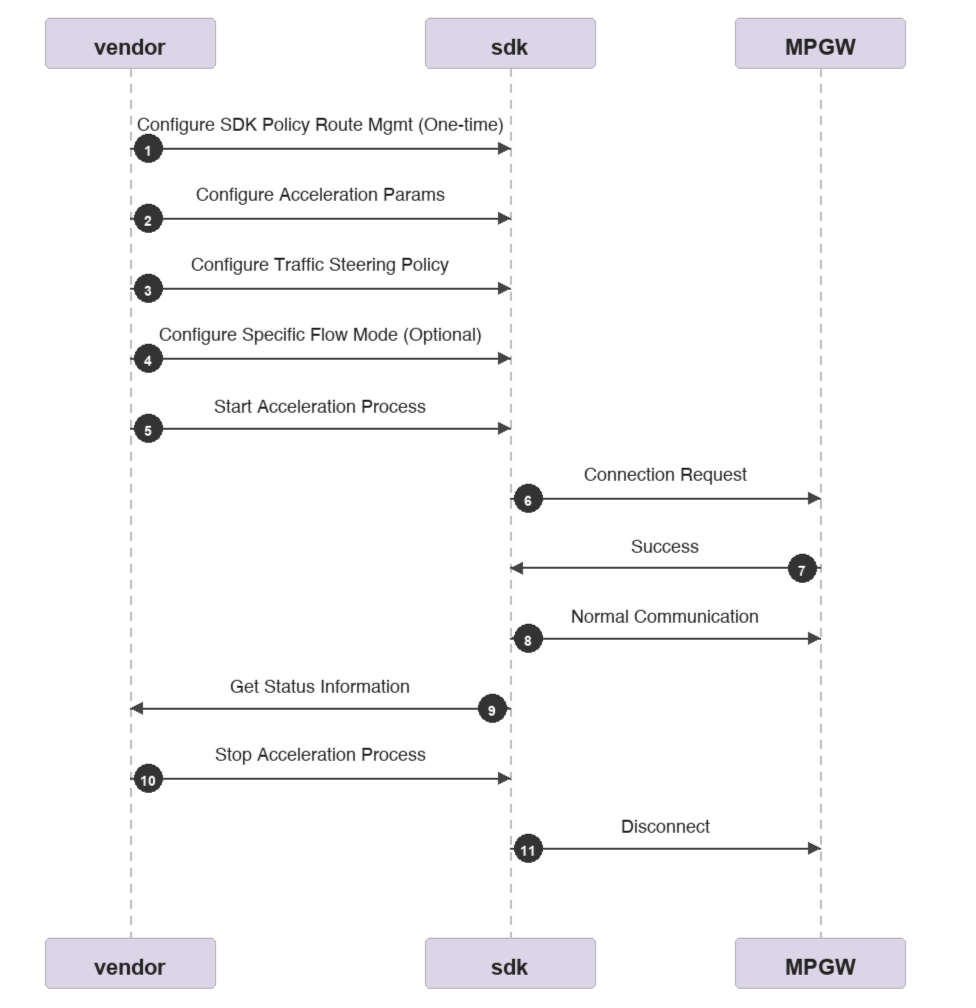
1. Please ensure the client program has the config and log directories in the working directory at runtime or has permission to create these two directories.
2. Please ensure the sdk has file read/write permissions in the config and log directories.
Start up the sdk
// StartSDK Start the SDK service
// Return: 0 indicates successful startup (reentrant), -1 indicates startup failure, -2 indicates the SDK is uninitialized
int StartSDK();
Stop the sdk
// StopSDK Stop the SDK service
// Return: 0 indicates stopped successfully, -1 indicates the SDK is not started
int StopSDK();
View sdk status
// IsSDKRunning Check whether the SDK is running
// Return: 1 means running, 0 means not running
int IsSDKRunning();
2. Acceleration Relevant APIs (REST API)
api
Description
/api/v2/client/mp-speeder
Configure acceleration parameters
/api/v2/client/mp-speeder/start
Start acceleration
/api/v2/client/mp-speeder/stop
Stop acceleration
/api/v2/client/mp-speeder/restart
Restart acceleration
/api/v2/client/mp-speeder
Query acceleration status
/api/v2/client/flowStatistics
Query acceleration traffic information
/api/v2/client/multi-mode
Configure flow forwarding policy
/api/v2/diagnosis/log
Log Reporting
/api/v2/client/t2Statistics
Query drop-off point speed test information
Configure acceleration parameters
Before starting the acceleration process, the manufacturer needs to collect the required parameters, which must be carried as parameters when launching the sdk acceleration.
required parameter
1. Activate one of the four parameters:
vendor and sn: vendor is the device vendor model, and sn is the serial number provided by the device vendor.
b. dataKey: device license key.
c. appId and appSign: Register in app mode. Get from console.
d. appId, appSign, and gwId: Register in eo mode. Get from console.
scheduleMode: default work mode: rtc.
Note: Four types of activation methods for Cloud Connect. The vendor can determine which to select based on their situation.
vendor+sn: Activate by device serial number. Create the device to be activated in the Tencent Cloud console in advance.
dataKey: Activate by license key. Contact Tencent Cloud sales and business to get it.
appId+appSign: Activate by appId. Please retrieve from console.
appId+appSign+gwId: Use in eo mode. Enable the enableEoSch switch at the same time.
Call the following APIs to configure acceleration parameters (only configure parameters without starting acceleration):
datakey mode
curl -X POST "http://127.0.0.1:9801/api/v2/client/mp-speeder" ^
This interface imports the Client entity, defined as follows:
Name
Type
Description
dataKey
string
Required: The device dataKey for the activation mode selected from the three options above.
vendor
string
Required: The device vendor and model for the activation mode selected from the three options above.
sn
string
Required: The unique device serial number provided by the device vendor when one of the three activation modes mentioned above is selected.
registerEnv
integer
Required. Value: 1.
appId
string
Optional: Used when the app mode + eo mode is selected from the three activation modes mentioned above. Fill in the corresponding zoneId in eo mode.
appSign
string
Optional: Used when the app mode + eo mode is selected from the three activation modes mentioned above.
enableEoSch
boolean
Optional: Must be true in eo mode.
gwId
string
Optional: Used in eo mode. Fill in the corresponding gatewayId.
lineType
[int]
Optional: Used when specified lines are enabled in eo mode.
0: Direct connection.
1:eo.
2: Third-party.
enableObfuscated
string
Optional: Whether to enable the IP address obfuscation feature.
encryptSign
string
Optional: Required when IP address obfuscation is enabled. Used for encrypting and decrypting IP addresses. Must match the sign used for IP address encryption on the client side. appSign is recommended. For the encryption algorithm, see the appendix.
scheduleMode
string
Optional: The default acceleration mode for Windows, "rtc".
accGateway
string
Optional: Specify the acceleration gateway IP address. Multiple IP addresses should be separated by commas. If this parameter is not specified, the SDK will automatically connect to the nearest gateway. Otherwise, it will forcibly connect to the specified acceleration gateway, for example: "120.30.39.129".
gwPort
string
Optional. The gateway port. Default: "443".
UUID
string
Optional: The hardware fingerprint. If this parameter is not specified, the SDK will automatically generate it based on the hardware.
disableCrypto
integer
Optional: Allows the customer to choose whether to enable encryption when starting acceleration. Traffic encryption is enabled by default. Disabling encryption can reduce traffic consumption.
0: Enable traffic encryption (default).
1: Disable traffic encryption.
flowStatisticsInterval
integer
Optional: The frequency for link acceleration traffic statistics. Default: 3 seconds.
maxRttDisableAggregation
integer
Optional: The maximum latency for link aggregation. Default: 460 ms.
maxRttThreshold
integer
Optional: The latency for initiating link failure detection. Default: 460 ms.
minSwitchRTT
integer
Optional: The sensitivity for fast link switching. Default: 20 ms.
maxDelayUntilFailed
integer
Optional: The maximum latency for link switching. Default: 460 ms.
The listening address of the socks5 server is "127.0.0.1" and non-configurable.
Name
Type
Description
enable
bool
Required: Whether to customize the socks5 server.
port
int
Required: socks5 server port.
userName
string
Required: socks5 server username.
passWord
string
Required: socks5 server password.
If necessary, query the socks5 server configuration via this API.
curl -X GET "http://127.0.0.1:9801/api/v2/client/socks5" ^
-H "accept: application/json" ^
-H "Content-Type: application/json"
Start acceleration
Call the following API to start acceleration. The SDK will then create a virtual interface named mp_tun0. Business traffic is directed to this virtual interface for acceleration based on the traffic diversion policy. (Before calling this API, ensure the acceleration parameters are configured.)
curl -X POST "http://127.0.0.1:9801/api/v2/client/mp-speeder/start" -H "accept: */*" -H "Content-Type: application/json"
Stop acceleration
After stopping multi-net, all traffic will not be accelerated, acceleration terminates, and mp_tun0 interface is terminated.
curl -X POST "http://127.0.0.1:9801/api/v2/client/mp-speeder/stop" -H "accept: */*" -H "Content-Type: application/json"
Restart acceleration
Restart the acceleration process and reload configuration. This API is normally used to make the configuration take effect after modification.
curl -X POST "http://127.0.0.1:9801/api/v2/client/mp-speeder/restart" -H "accept: */*" -H "Content-Type: application/json"
Query acceleration status
This API will return a Status entity containing SDK status info.
curl -X GET "http://127.0.0.1:9801/api/v2/client/mp-speeder" -H "accept: */*" -H "Content-Type: application/json"
Status definition:
Name
Type
Description
ready
boolean
Whether the acceleration process is started normally.
UUID
string
The hardware fingerprint of the device.
dataKey
string
The device dataKey.
swVersion
string
The sdk software version.
accGateway
string
The IP address of the acceleration gateway.
gatewayPort
string
The port of the acceleration gateway.
interfaces
[string]
The list of interfaces participating in multi-link aggregation.
scheduleMode
string
The default acceleration mode. "bonding", "redundant", "rtc".
Query acceleration traffic information
This interface will be returned Statistics entity, containing cumulative accelerated traffic consumption based on network interface card and acceleration channel real-time speed. Statistical information is periodically refreshed at 10-second intervals.
curl -X GET "http://127.0.0.1:9801/api/v2/client/flowStatistics" -H "accept: application/json" -H "all: true"
Statistics definition:
Name
Type
Description
interface
string
Name of the link NIC.
state
integer
Current link operational status:
-2: Link unavailable.
60: Link temporarily disabled.
100: Link normal.
totalReceivedBytes
integer
Cumulative accelerated traffic in the receive direction, in Bytes.
totalSendBytes
integer
Cumulative accelerated traffic in the send direction, in Bytes.
receivedRate
float
Receive rate of the current NIC acceleration channel, in bit/s.
sendRate
float
Send rate of the current NIC acceleration channel, in bit/s.
loss
float
Packet loss rate of the current NIC acceleration channel. The packet loss rate is expressed as a decimal, for example, 0.1 indicates a packet loss rate of 10%, and 1 indicates a packet loss rate of 100%.
rtt
integer
rtt of the current NIC acceleration channel, in ms.
Note: -1 indicates that the current link is unavailable.
Query drop-off point speed test info
When T2 acceleration is specified and a drop-off point is specified, you can query the speed test info of the drop-off point via this api.
Note:
Speed test for drop-off points is supported only when manually specifying a drop-off point. When using auto to automatically select a drop-off point, speed test for drop-off points is not supported.
curl -X GET "http://127.0.0.1:9801/api/v2/client/t2Statistics" -H "accept: application/json" -H "all: true"
Name
Type
Description
area
string
Name of the drop-off point.
rttAccelerated
int
Latency from the sdk to the drop-off point.
rttDirect
int
Latency for the sdk directly connecting to the drop-off point.
Forwarding policy configuration
The forwarding policy mainly specifies how traffic should be forwarded.
curl -X POST "http://127.0.0.1:9801/api/v2/client/multi-mode" ^
35 - "T2 rtc": First performs rtc fast switching, then performs T2 full-path acceleration.
45 - (Reserved configuration).
Mobile rights and interests authentication interface
Mobile rights and interests authentication. If necessary, obtain through the API to avoid traffic consumption during acceleration.
curl -X POST "http://127.0.0.1:9801/api/v2/client/enableCMCCRightsVerify" ^
-H "accept: application/json" ^
-H "Content-Type: application/json" ^
-d "{\\"token\\": \\"xxxxx\\"}"
Request Parameters:
Name
Type
Description
token
string
Required: Used to verify the token.
guid
string
Required: Used to verify the guid, and must be used together with the token.
salt
string
Required: The salt value, used for encryption.
Response Parameters:
Name
Type
Description
status
bool
Required: Whether the token is authenticated successfully.
authCode
string
Optional: Returns the traffic-free authentication code if the verification succeeds.
error
string
Optional: Returns an error via the error field when the verification fails.
IV. Diagnostics
This chapter is optional and mainly used for product operation and maintenance.
Log Reporting
Optional: Report logs to the backend for problem localization. Log reporting has two methods:
1. Manual reporting: Execute a command to report the multi-network logs saved locally on the device to the backend.
2. Automatic reporting: After setting the reporting interval and turning on the switch, logs will be reported to the backend periodically. You can turn off the switch at any time to pause upload.
Note:
Local logs occupy up to 50MB storage space. Stored logs will be deleted after reporting.
Configure log reporting parameters
curl -X POST "http://127.0.0.1:9801/api/v2/diagnosis/log" ^
Console.WriteLine("\\nSDK started, program will continuously run");
Console.WriteLine("Press Ctrl+C to manually end the program\\n");
// Continuously run until Ctrl+C is pressed
while (keepRunning)
{
Thread.Sleep(1000); // Check once per second
}
}
finally
{
Console.WriteLine("Pausing SDK...");
Stop the sdk
StopSDK();
Console.WriteLine("SDK stopped, program exit");
}
}
}
socks5 acceleration
1. Call mobile rights and interests authentication (Option)
For customers supporting mobile rights and interests with free data traffic, first call /api/v2/client/enableCMCCRightsVerify to obtain the free data traffic authentication code.
Parameter configuration:
token: token provided by mobile.
guid: be used with token.
salt: salt value, used for encryption.
Note:
If successful, record the return value authCode and fill it in step 2.
If it fails, respond with based on requirements.
2. Configure acceleration parameters
First, retrieve the appId and app key from the Tencent Cloud console, then refer to the source code in the appendix to calculate the appSign. Next, call /api/v2/client/mp-speeder (parameter interface for acceleration configuration).
Configure the parameters as follows:
appId: Enter the application id obtained from the Tencent Cloud console.
appSign: calculated based on the app key. For the algorithm, please refer to the appendix.
scheduleMode:rtc.
authCode (Option): fill in the authCode returned by the mobile rights and interests authentication interface in step one.
interfaces: not required.
accGateway and gwPort: not required.
UUID: not required.
disableCrypto: not required, keep the default.
Other optional parameters: not required.
3. Configure forwarding rules
Call /api/v2/client/multi-mode (stream forwarding policy configuration interface) and specify the forwarding policy.
Specified parameters:
area: auto, automatically select drop-off points.
speedMode: select 35.
4. Enable the socks5 service.
Call /api/v2/client/socks5 (socks5 server configuration API) to enable socks5.
Specified parameters:
enable:true.
port: customer specified.
userName: customer specified.
passWord: customer specified.
5. Enable acceleration
After the acceleration interface is called, the SDK first connects to the nearest Tencent Cloud gateway.
curl -X POST "http://127.0.0.1:9801/api/v2/client/mp-speeder/start" -H "accept: */*" -H "Content-Type: application/json"
6. Direct traffic to socks5.
Business app traffic is directed to the specified socks5 port and forwarded based on configured rules.