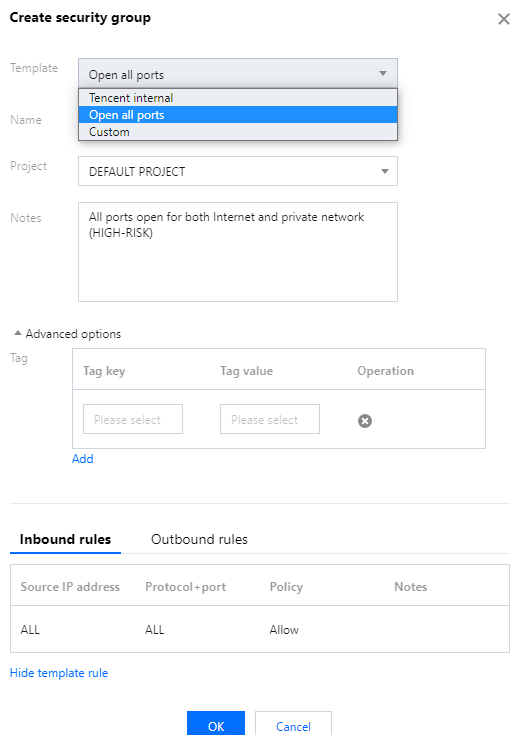
2. Select Security Group on the left sidebar, select a region at the top, and click Create.
3. In the pop-up dialog window, configure the following items, and click OK.
Table 1:
Parameter
Description
Template
Select a template based on the service to be deployed on the TencentDB instance in the security group, which simplifies the security group rule configuration, as shown in the Table 2.
Name
Custom name of the security group.
Project
"DEFAULT PROJECT" is selected by default. You can select another project for easier management.
Remark
A short description of the security group.
Advanced options
You can add tags as needed for the security group in Advanced options, and no tag is selected by default. For details, see Tag Overview.
Display template rule
If the template is selected, you can click Display template rule to view the rule details.
Table 2:
Template
Description
Applicable Scenario
Open all ports
All ports are opened to the public and private networks by default. This may pose security issues.
-
Open ports 22, 80, 443, and 3389 and the ICMP protocol
Ports 22, 80, 443, and 3389 and the ICMP protocol are opened to the public network by default. All ports are opened to the private network.
This template doesn’t take effect for TencentDB.
Custom
You can create a security group and then add custom rules. For more information, see Adding Security Group Rules.
-
Managing a security group
After the security group is created, you can perform management operations for security groups. For detailed directions, see the following steps: