Change from Pay-as-You-Go to Serverless Billing
Download
Focus Mode
Font Size
The billing mode of TDSQL-C for MySQL supports switching from pay-as-you-go to Serverless. TDSQL-C for MySQL implements this switch by converting the cluster type in the background. After a successful conversion, the instance mode of the cluster will also be changed from provisioned resources to Serverless. After the conversion, bills and details will change, while the billing mode remains postpaid.
Scenarios
A cluster whose instance mode is provisioned resources and whose billing modes for both computing and storage are pay-as-you-go can be converted to a cluster whose instance mode is Serverless.
Note
During the conversion from the pay-as-you-go mode to the Serverless mode, the database remains accessible. However, a momentary disconnection may occur at the point of conversion. Therefore, we recommend that your application be configured with an automatic reconnection feature.
After a switch from pay-as-you-go to Serverless is performed, a Serverless instance cannot be converted back to a pay-as-you-go instance.
After a pay-as-you-go cluster is converted to a Serverless cluster, the original private network addresses remain unchanged.
After a switch from pay-as-you-go to Serverless is performed, parameters that have not been custom-modified will be reset according to the default Serverless template. If you have made custom modifications to parameters (for example, by changing them to fixed values or by modifying variable parameters in formulas), such changes to these parameters will be retained after the conversion to Serverless.
Use Limits
Clusters with parallel query enabled do not support conversion to Serverless. To convert to Serverless, disable the parallel query feature first.
Clusters with columnar storage indexes enabled do not support conversion to Serverless. To convert to Serverless, disable the columnar storage index feature first.
The conversion from the pay-as-you-go mode to the Serverless mode is supported only if the region and AZ of the original cluster support creating clusters of the Serverless instance type.
Operation Steps
1. Log in to the TDSQL-C for MySQL console.
2. Select a region at the top of the page based on your actual console view mode and perform corresponding operations.
In the cluster list on the left, click the target cluster to go to the Cluster Management page. Then, click Pay-as-You-Go to Serverless on the right.

In the instance list, select the desired instance. Then, in its Operation column, choose More > Pay-as-You-Go to Serverless.
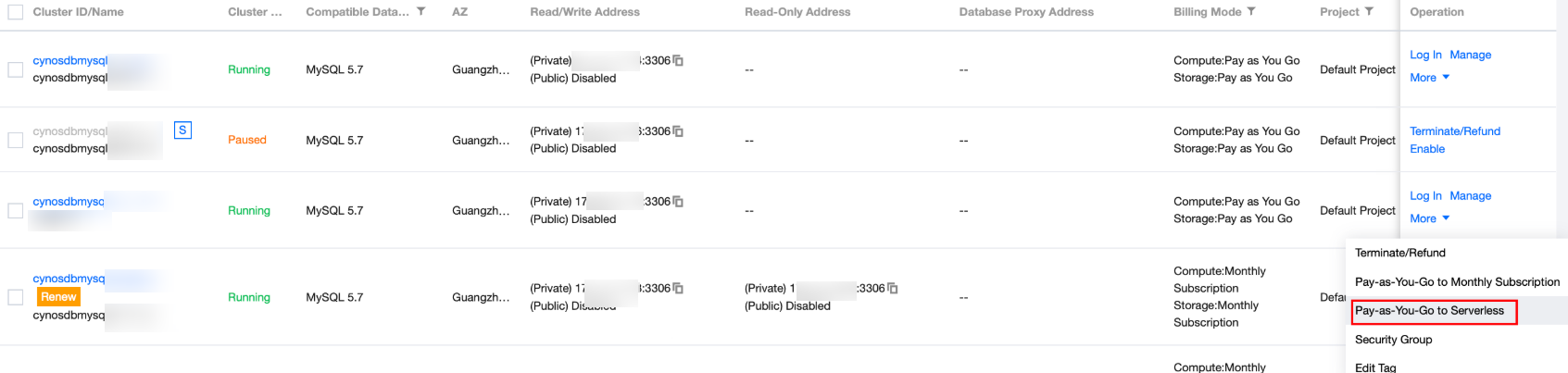
3. In the pop-up dialog box, configure the settings for the Serverless database to be converted, read and select the agreement, and click OK.
Parameter | Description |
Serverless | If a pay-as-you-go cluster contains only read-write instances, the Serverless architecture can be configured as either the single-node edition or the cluster edition. If a pay-as-you-go cluster contains both read-write instances and read-only instances, the Serverless architecture is configured as the cluster edition by default. |
Read-Write Node Computing Power Configuration | Configure the computing resource range for read/write nodes. For details about computing resource configuration, see Service Computing Resource Configuration. |
Read-Only Node Computing Power Configuration | If the Serverless architecture is selected as the single-node edition, you do not need to configure this item. If the Serverless architecture is selected as the cluster edition, you can configure the number of read-only nodes (1 to 8) and the computing resource range in this item. For details about computing resource configuration, see Service Computing Resource Configuration. |
Auto-Pause | Select this option to indicate that the database will automatically enter a paused status if it is not used within the set time period. During the paused status, no computing charges will be incurred. After selecting this option, set the automatic pause time below. If you do not select this option, the database will keep running continuously. You can manually pause the database as needed. You can also enable automatic pause in the console later. For details, see Automatic Start and Stop. |
Storage Node | Primary storage: Data files use a three-replica strong consistency model to ensure reliability. Secondary storage: It is disabled by default and can be enabled or disabled. Once enabled, data will be stored in Cloud Object Storage (COS) buckets when the instance is suspended, and secondary storage offers more favorable pricing than primary storage. For details about secondary storage, see Secondary Storage. |
Switch Time | Execute now: The task is executed immediately after you click Confirm. During maintenance time: The conversion task is executed during the next maintenance time after you click Confirm. Note: During the operation, a momentary disconnection lasting seconds may occur. Ensure that your service has a reconnection mechanism. |
4. When the cluster status is updated from "Running Asynchronous Task: Switching to Serverless" to "Running", it indicates that the conversion is successful.
Note:
You can go to the task list to view the progress and details of the conversion task. For details, see Task List.
Help and Support
Was this page helpful?
You can also Contact sales or Submit a Ticket for help.
Help us improve! Rate your documentation experience in 5 mins.
Feedback