Adding a Forwarding Rule
Download
Focus Mode
Font Size
Overview
Private DNS forwarding rules can forward DNS request traffic for private domain name resolution within Tencent Cloud VPCs to external DNS systems by creating domain forwarding rules and DNS outbound endpoints. This effectively addresses invocation scenarios between hybrid cloud, cloud, and off-cloud services. This document guides you on how to use the forwarding rule feature.
Note:
Currently, the regions where the forwarding rule feature is available include Beijing, Guangzhou, Shanghai, Singapore, Tokyo, Frankfurt, and others. The specific list is subject to what is displayed on the Private DNS console > Create Endpoint page.
Billing details: Outbound endpoint IP address (USD 0.15 per IP address/hour), forwarding resolution volume (pay-as-you-go, USD 0.004 per 10,000 requests). For details, see Billing Overview.
Use Cases
In a hybrid cloud architecture, applications and services in the cloud environment (for example, a Tencent Cloud VPC) need to access private network resources hosted off-cloud (in on-premises data centers or other clouds). To ensure correct resolution of private domain names, the Private DNS server in the cloud environment is configured with forwarding rules. Private domain name requests that match a forwarding rule are forwarded to the DNS server off-cloud. Consequently, DNS query requests initiated by cloud applications are first processed by the cloud DNS. If a request matches a forwarding rule, it is automatically forwarded to the off-cloud DNS, enabling private network domain name resolution and access across cloud environments.
Forwarding Principle
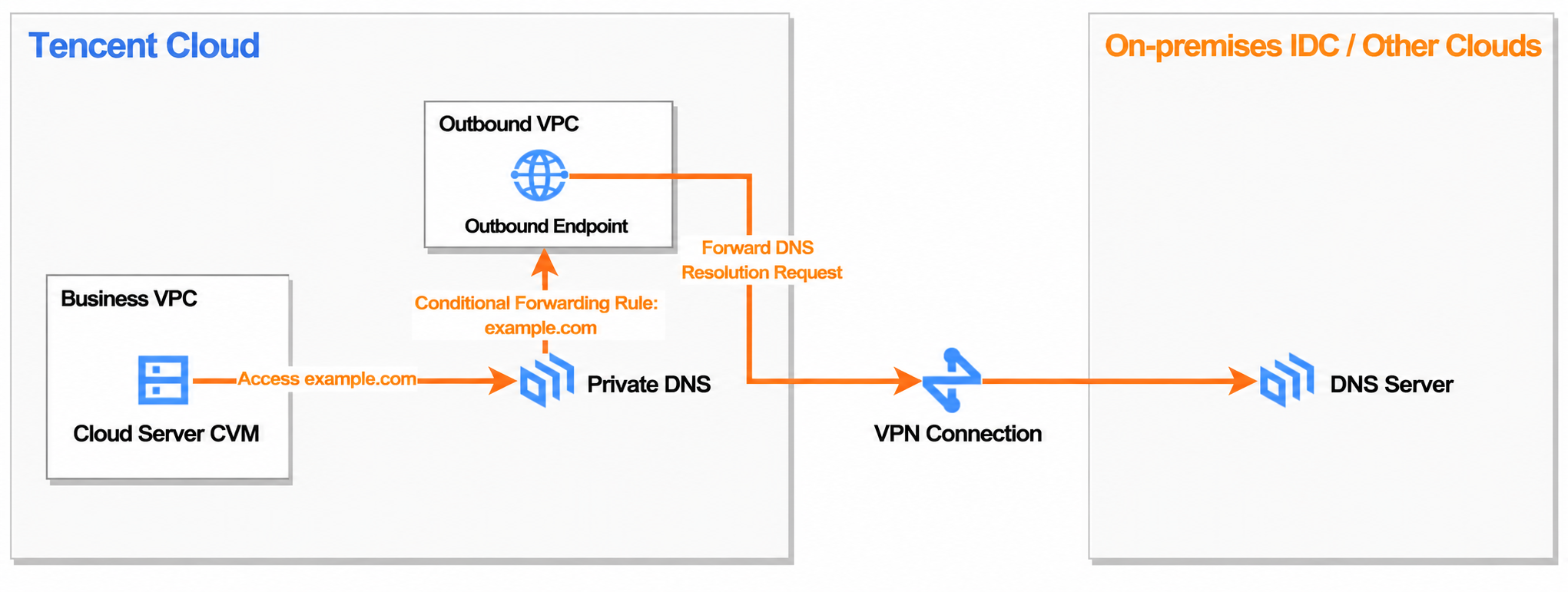
Forwarding Process
1. An attempt is made to access example.com from cloud resources.
2. The DNS client of this resource initiates a query request to the Private DNS server.
3. The Private DNS server checks the configured rules and finds that the example.com domain matches its configured forwarding rule.
4. The Private DNS server encapsulates the query request and conditionally forwards it via an outbound endpoint to the designated off-cloud local DNS server (for example, 10.1.0.100) that is connected via a private network.
5. The off-cloud local DNS server finds the IP address record for example.com (for example, 192.168.10.20) in its local database zone.
6. The off-cloud local DNS server returns the resolution result (192.168.10.20) to the Private DNS server via the private network connection.
7. The Private DNS server returns the resolution result to the cloud resource that originally initiated the query.
8. The cloud resource successfully accesses the off-cloud example.com via the private network connection using the obtained IP address.
Operation Process
Prerequisites
1. The private domain corresponding to the forwarding rule has been created. For details, see Create Private Domain.
2. The VPC where the outbound endpoint resides has been created. For details, see Create VPC.
Operation Steps
Creating an Outbound Endpoint
1. Log in to the Tencent Cloud DNSPod Console > Private DNS page, click the Forwarding Management tab, and you will go to the Forwarding Management page.
2. On the Forwarding Management page, click Outbound Endpoint Node.
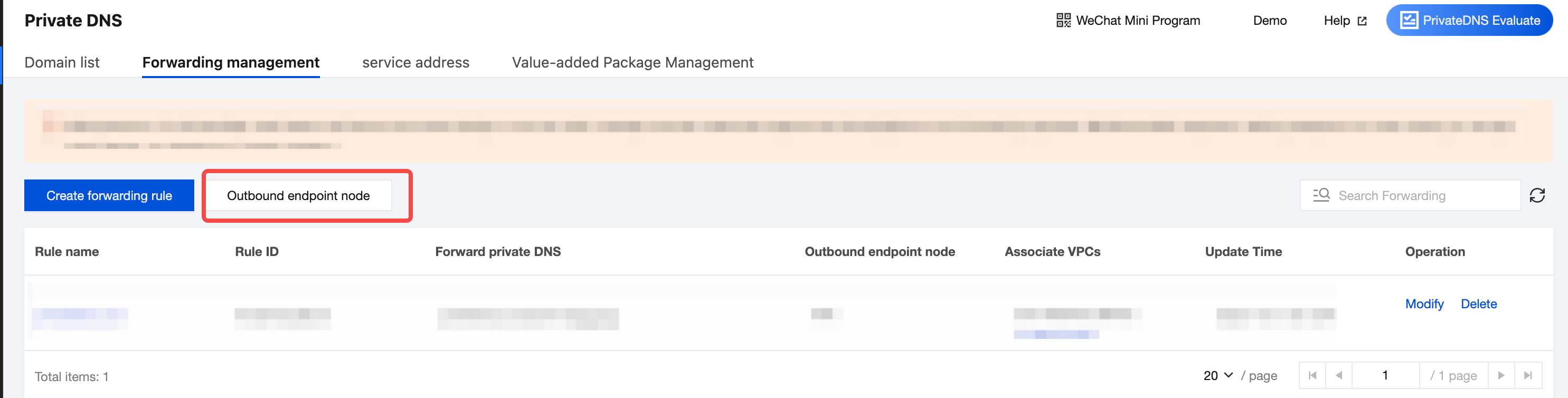
3. On the Outbound Endpoint Node page, click Create Endpoint Node.

4. On the Create Endpoint Node page, configure the Endpoint node name, Region, Affiliated network, Network Access Type, Forwarding target, and Outbound endpoint node.
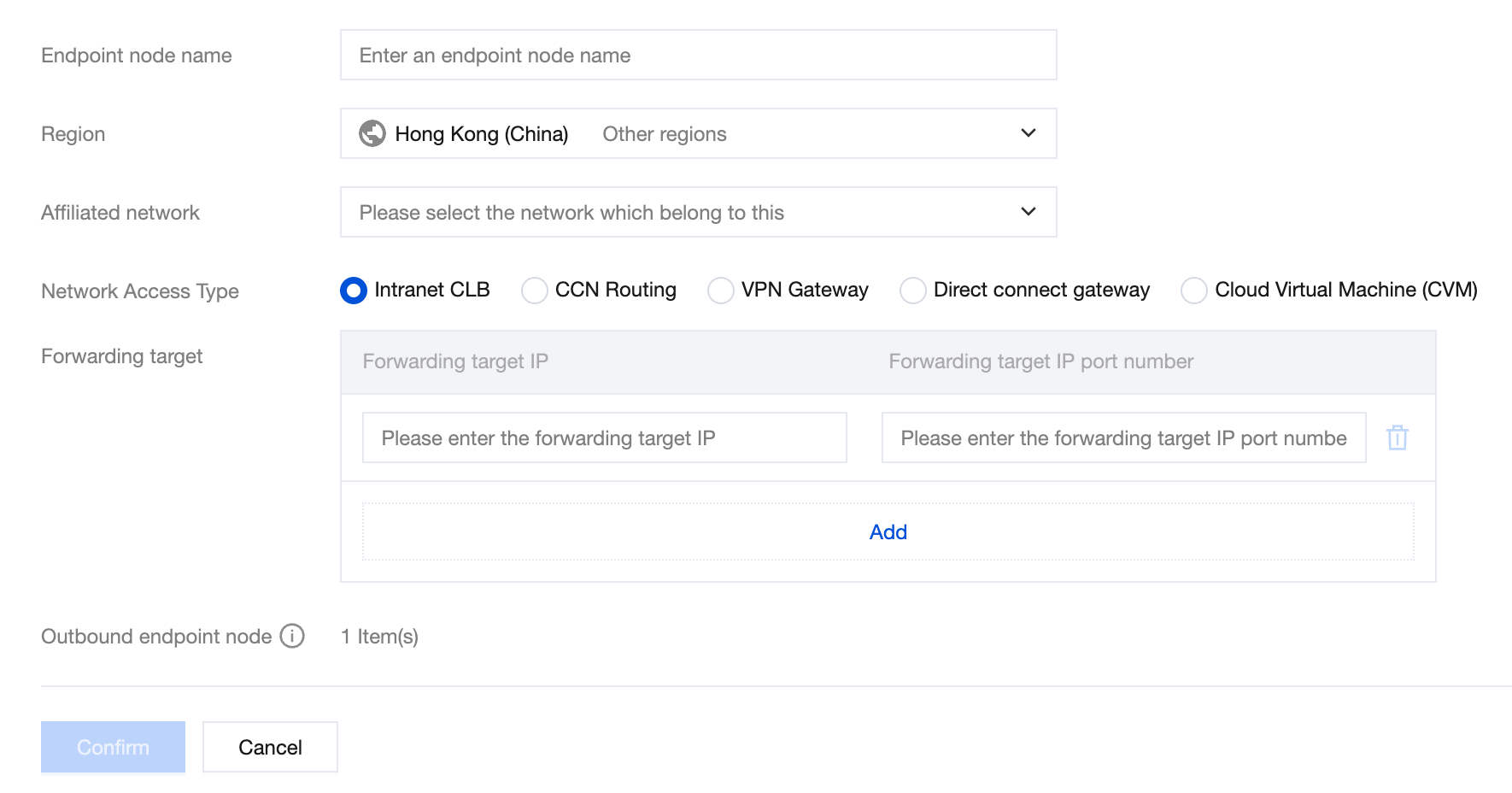
Endpoint Node Name: The name of the endpoint currently being created, which should be named according to your actual business requirements.
Region: The region where the VPC corresponding to the endpoint currently being created is located.
Affiliated Network: Select the VPC to which you belong.
Network Access Type:
Access TypeNote:
Internal CLB, CCN routes, VPN gateways, and dedicated line gateways are different forwarding methods. Before creating an endpoint, ensure that the internal CLB, CCN routes, VPN gateways, and dedicated line gateways have been created in the region. If you need to access CCN routes across accounts, you can submit a ticket to apply.
A CVM server refers to a target that is forwarded to the corresponding CVM. The CVM address is the forwarding target address.
When you select CCN routes, VPN gateways, or dedicated line gateways as the network access type, you need to select a subnet. This operation will occupy 16 subnet IP addresses. Please check the number of remaining subnet IP addresses to avoid affecting your usage.
Forwarding Target: The target server to which traffic is forwarded. You can add/delete multiple forwarding targets. (An endpoint supports binding up to 5 forwarding target IP addresses and ports.)
Forwarding Target IP: The IP address of the target server to which traffic is forwarded.
Forwarding Target IP Port Number: The port number of the target server IP address to which traffic is forwarded.
Note:
The network between the forwarding target server and the private domain must be connected via VPN/dedicated line, and the forwarding target IP address and port number must be valid. If you select the private network CLB for network access, enter the IP address and port generated when the private network CLB was created as the forwarding target IP address and port. If you select CCN routes for network access, enter the IP address and port of the off-cloud DNS as the forwarding target IP address and port.
Outbound Endpoint Node: It is automatically generated based on the number of forwarding targets. By default, the number of outbound endpoints equals the number of forwarding targets.
5. After completing the endpoint configuration, click Confirm to create it successfully. The created endpoint is automatically displayed in the outbound endpoint list.
Note:
In your local data center or other clouds, configure the security group to allow the subnet segment displayed on the console. (The outbound endpoint IP address is randomly obtained from the subnet segment.)

Creating a Forwarding Rule
1. Log in to the Tencent Cloud DNSPod Console > Private DNS page, click the Forwarding Management tab, and you will go to the Forwarding Management page.
2. On the Forwarding Management page, click Create Forwarding Rule. (You can create one forwarding rule per private domain.)
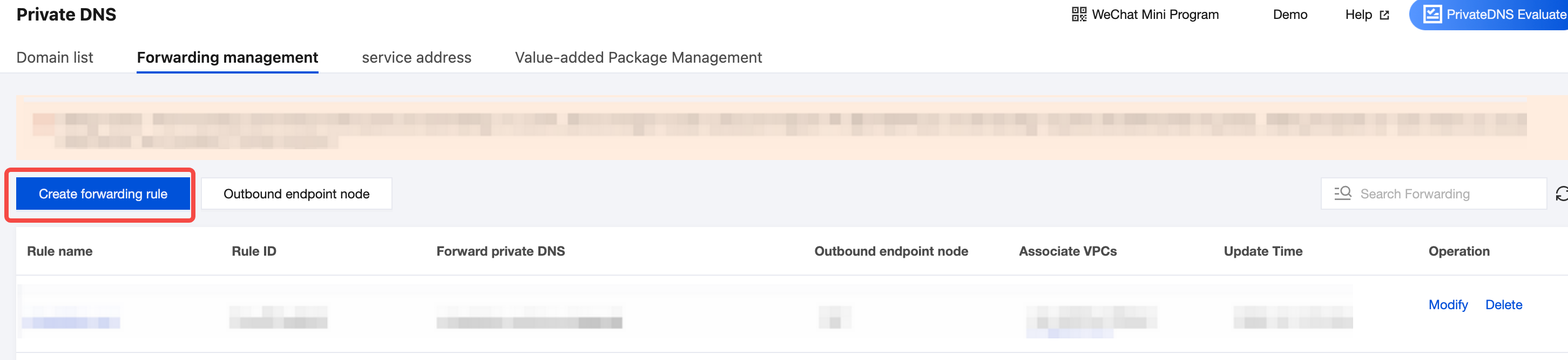
3. On the Create Forwarding Rule page, enter the forwarding rule parameters.
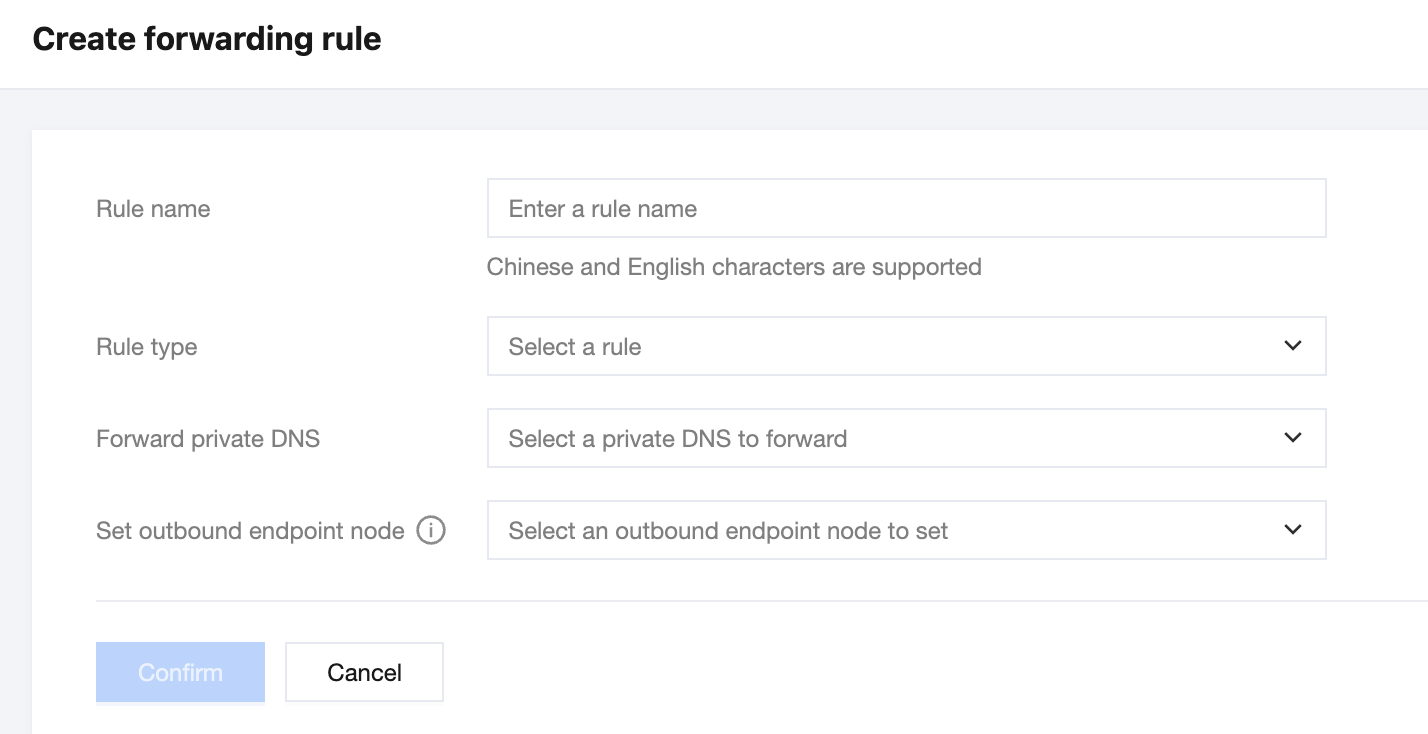
Rule Name: Set the rule name according to your business needs.
Rule Type: Currently, only External DNS is supported.
Forward Private DNS: Select the private DNS for which resolution requests need to be forwarded.
Set outbound endpoint node: Select the created endpoint to forward DNS query traffic to the IP addresses specified in the target IP address list.
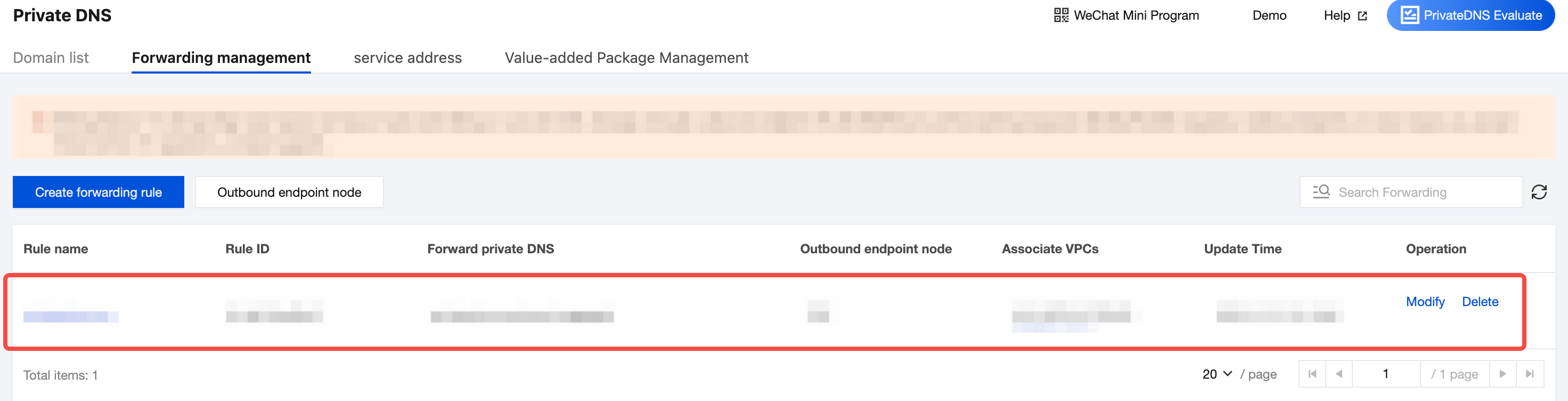
4. After completing the entry, click Confirm. A forwarding rule will be generated in the forwarding rule list.
Note:
After a forwarding rule is created, you cannot modify the Rule Type or Forwarding Private DNS.
Help and Support
Was this page helpful?
You can also Contact sales or Submit a Ticket for help.
Help us improve! Rate your documentation experience in 5 mins.
Feedback