截屏、录屏事件和添加水印
Download
聚焦模式
字号
截屏事件
截屏事件在用户进行截屏之后的时候触发,此时会调用在 appletDidTakeScreenshot 中实现的方法。
- (void)appletDidTakeScreenshot:(TMFMiniAppInfo *)appletInfo atPagePath:(NSString *)pagePath;
参数说明:
appletInfo:发生截屏时的小程序信息。
pagePath:发生截屏时当前小程序页面的路径。
录屏事件
录屏事件会在 UIScreen.isCaptured 发生改变的时候触发,例如录屏、屏幕镜像和 AirPlay 等。
- (void)applet:(TMFMiniAppInfo *)appletInfo screenCaptureStatusChanged:(BOOL)isCapture atPagePath:(NSString *)pagePath;
参数说明:
appletInfo:屏幕采集状态发生变化时的小程序信息。
isCapture:
YES:屏幕当前正在被录制、镜像或投屏;
NO:屏幕采集已经停止。
pagePath:状态发生变化时当前小程序页面的路径。
添加水印
该方法可以为小程序页面添加自定义水印,每当小程序页面显示时,该方法都有可能被调用,返回的 UIView 会被添加到当前的小程序页面上层。除非水印需要交互,最好为水印设置 userInteractionEnabled = NO ,避免水印阻挡用户对于小程序的操作。
- (nullable UIView *)appletCustomizeWatermarkView:(TMFMiniAppInfo *)appletInfo
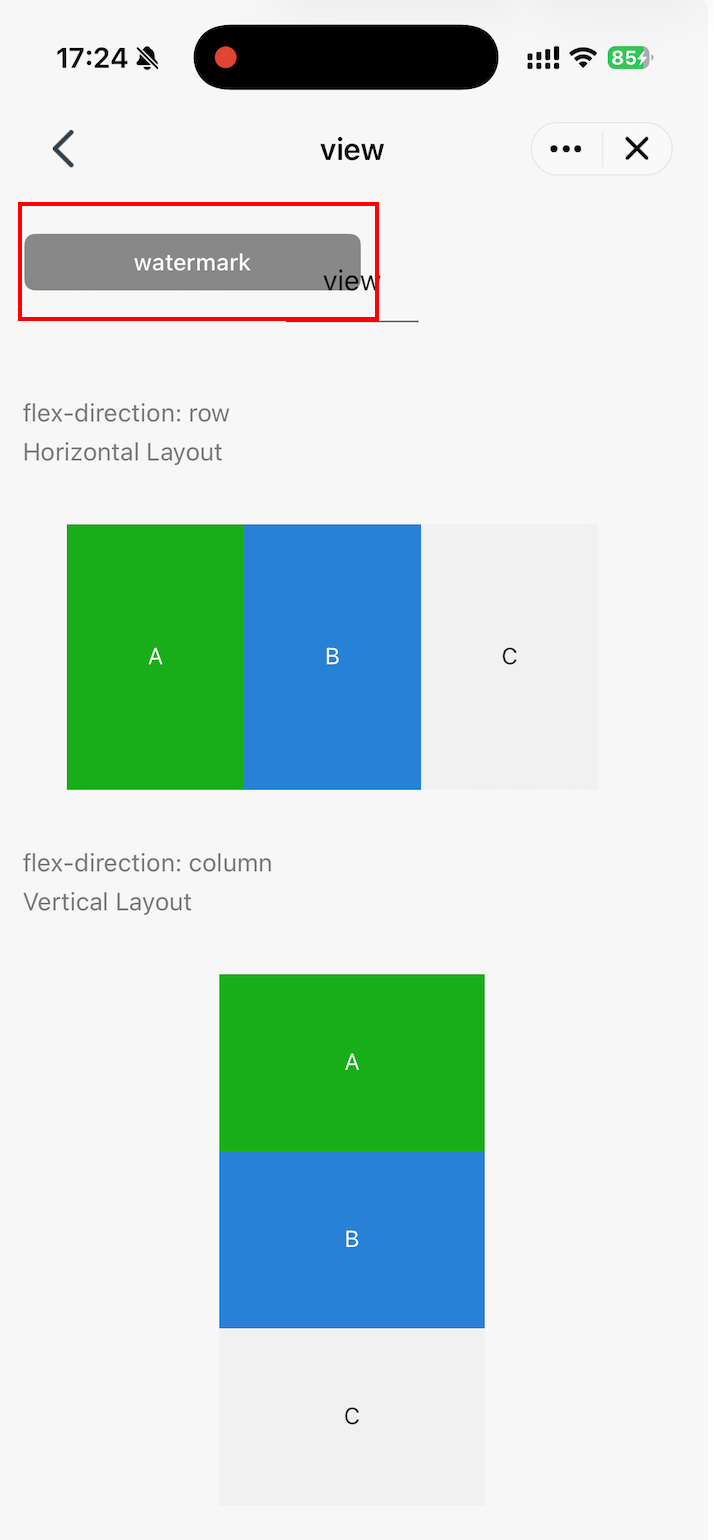
下方的示例将演示如何为小程序添加一个仅在录屏时显示的水印。
@interface MiniAppDemoSDKDelegateImpl : NSObject <TMFMiniAppSDKDelegate>+ (instancetype)sharedInstance;// 当前已挂载水印的弱引用。水印由其父视图强引用。@property (nonatomic, weak, nullable) UIView *watermarkView;// 当前是否显示水印@property (nonatomic, assign) BOOL shouldShowWatermark;@end
在录屏事件触发时,修改 shouldShowWatermark 来决定水印是否显示:
- (void)applet:(TMFMiniAppInfo *)appletInfo screenCaptureStatusChanged:(BOOL)isCapture atPagePath:(NSString *)pagePath {// 确保已经挂载到页面上的 watermarkView 的状态能被修改dispatch_block_t updateWatermark = ^{self.shouldShowWatermark = isCapture;self.watermarkView.hidden = !isCapture;};if ([NSThread isMainThread]) {updateWatermark();} else {dispatch_async(dispatch_get_main_queue(), updateWatermark);}}
在 appletCustomizeWatermarkView 中定义水印的 UIView 并返回。
/// 水印 View:默认隐藏,仅在录屏时由 screenCaptureStatusChanged: 显示- (nullable UIView *)appletCustomizeWatermarkView:(TMFMiniAppInfo *)appletInfo {// 该方法可能多次调用,移除当前示例此前创建的水印。[self.watermarkView removeFromSuperview];// 防止在录屏已经开始后才进入页面时,初始状态不正确。self.shouldShowWatermark = UIScreen.mainScreen.isCaptured;UIView *container = [[UIView alloc] initWithFrame:CGRectMake(0, 0, 190, 32)];container.backgroundColor = [UIColor colorWithWhite:0.0 alpha:0.45];container.layer.cornerRadius = 6;container.layer.masksToBounds = YES;container.userInteractionEnabled = NO;container.hidden = !self.shouldShowWatermark;UILabel *watermark = [[UILabel alloc] initWithFrame:container.bounds];watermark.autoresizingMask = UIViewAutoresizingFlexibleWidth | UIViewAutoresizingFlexibleHeight;watermark.text = @"TCMPP SDK Demo";watermark.textColor = [UIColor whiteColor];watermark.textAlignment = NSTextAlignmentCenter;watermark.font = [UIFont systemFontOfSize:13 weight:UIFontWeightMedium];[container addSubview:watermark];self.watermarkView = container;return container;}
效果如图:
文档反馈