Hierarchical Tag Design
Baixar
Modo Foco
Tamanho da Fonte
Background
Many enterprise customers need to improve resource management efficiency through hierarchical management during resource planning. They also need to refine employee permission controls and allocate resource costs based on resource ownership. For these scenarios, we recommend that you plan a Tag system and establish hierarchical Tags to ensure resources are correctly associated with Tags. By granting employees Tag access permissions, you can restrict their access to resources under specific Tags. You can also split resource bills based on Tags.
Overall Solution
1. Plan Tags based on resource ownership: Customers who need hierarchical management of resources can plan their Tags according to their organizational hierarchy to manage cloud resources in a layered manner. For example, you can use the company entity, department, and specific business as Tag keys, with the entity name, department name, and business name as Tag values, forming a set of Tags for entity, department, and business.
2. Manage resource permissions flexibly with Tags: After resources are grouped and managed using Tags, you can create permission policies based on Tags to authorize CAM sub-users or roles. This allows you to control resource management permissions and improve the efficiency of permission management. Once authorized, the CAM sub-users or roles will have management permissions for the resources associated with those Tags. By using hierarchical Tags, you can grant employees Tags corresponding to their management responsibilities, which simplifies the authorization logic.
3. Set cost allocation Tags to split resource bills: After you set cost allocation Tags, your cloud bill records the Tags associated with the consumed resources. This helps you manage your bill in detail based on Tags and control your cloud costs.
Solution Architecture
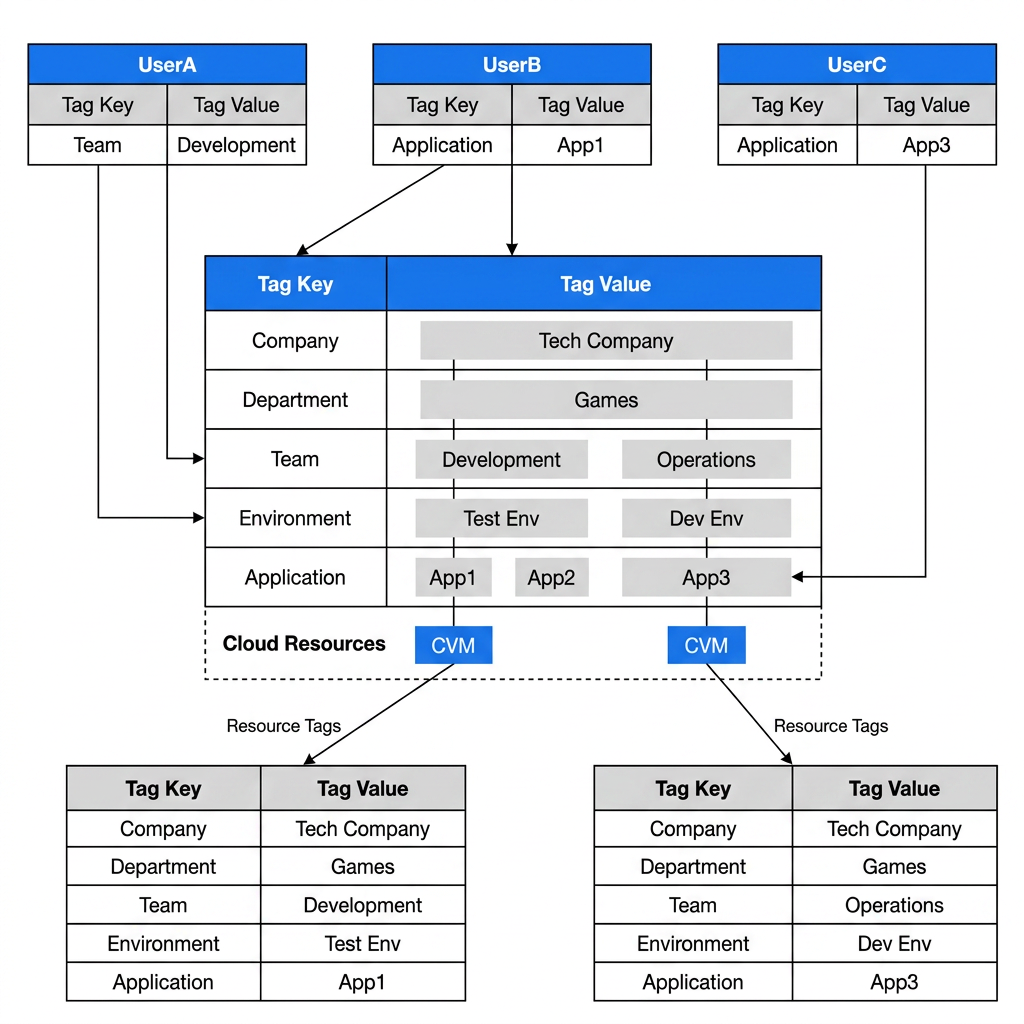
A development account of a technology company is used daily by three employees who need to access cloud resources.
User A is the development lead and needs to manage the cloud resources related to the development department.
User B is a developer on the development team. He is responsible for developing App1 and needs to manage the cloud resources related to App1.
User C is a developer on the Ops team. He is responsible for developing App3 and needs to manage the cloud resources related to App3.
Directions
Step 1: Preparing an Account
Prepare four accounts in advance. The details are as follows:
Note:
Tag administrator account: It is used to create Tags, create permission policies, and perform other related tasks.
Sub-user UserA: Used by User A to verify access to the resources of App1 and App2 under the development team.
Sub-user UserB: Used by User B to verify that access is granted only to the resources of App1.
Sub-user UserC: Used by User C to verify that access is granted only to the resources of App3.
Step 2: Creating Hierarchical Tags
1. Tag planning: Enterprise administrators need to establish a Tag system and create a five-layer Tag structure based on the resource management plan.
Note:
When designing a hierarchical Tag system, adhere to the following principles:
Tag Keys must remain generic.
Specific distinguishing characteristics are reflected in the Tag Value.
Example:
Poor design: The Tag Key is set to "Responsible Person Zhang San", and the Tag Value is set to "Zhang San".
Proper design: Set the Tag Key to "Responsible Person" and the Tag Value to "Zhang San".
Advantages of this design approach:
Tag Value expansion is supported.
Avoid resource waste caused by excessive subdivision of Tag Keys.
Maintain the simplicity and maintainability of the Tag system.
Tag Key | Tag Value |
Company | Technology Company |
Department | Games |
Team | Development, Ops |
Environment | Test Environment, Development Environment |
Application | App1,App2,App3 |
2. Create Tags: You can create Tags through the Tag console Create Tags or via the API Create Tags.
Note:
Please use the Tag administrator account to perform operations.
Step 3: Associating Resources with Hierarchical Tags
Note:
Please use the Tag administrator account to perform operations.
After hierarchical Tags are created, you can associate Tags with resources. In hierarchical Tag association, a single resource must be bound with Tags from all levels. For example, the set of Tags that need to be bound to resources under App1 is:
Company: Technology Company
Department: Game
Team: Development
Environment: Test Environment
Application: App1
When creating a new resource, you can bind the corresponding resource Tags on the corresponding cloud resource console or purchase page. For existing resources in your account, you can bind Tags on the corresponding cloud resource console, or in the Tag console, select the tag key value Bind Resource.
Step 4: Authorizing Users to Control Resource Management Permissions
This document uses the hierarchical management of cloud resources by sub-users as an example.
1. Create a permission policy based on Tags.
Note:
Please use the Tag administrator account to perform operations.
Create three policies: UserA, UserB, and UserC. Associate the corresponding Tags based on the management hierarchy and requirements. After the policies are created, they will have permissions for a type of Tag-attribute resources. For detailed operations, see Create a Custom Policy via Tag Authorization. An example of Tag association is shown below:
Permission Policy UserA Associated Tags:
Team: Development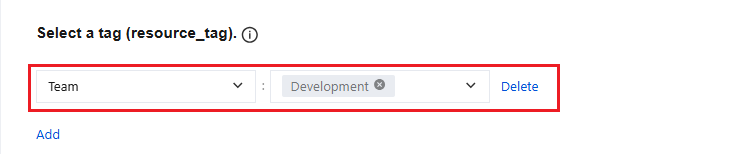
Permission Policy UserB Associated Tags:
Application: App1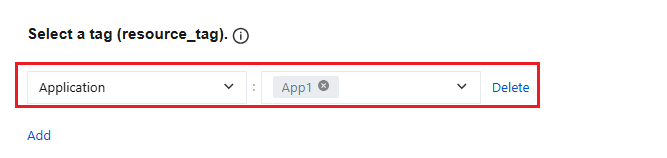
Permission Policy UserC Associated Tags:
Application: App 3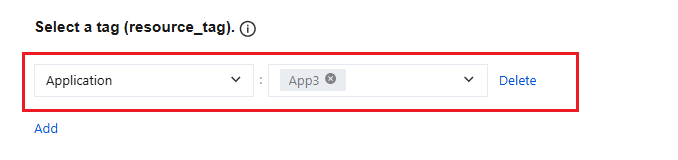
2. Grant permissions to sub-users.
Note:
Please use the Tag administrator account to perform operations.
By associating policies with users (Permission Policy UserA is associated with UserA, Permission Policy UserB is associated with UserB, Permission Policy UserC is associated with UserC), sub-users can obtain the corresponding operation permissions. For detailed operations, see Authorization Management.
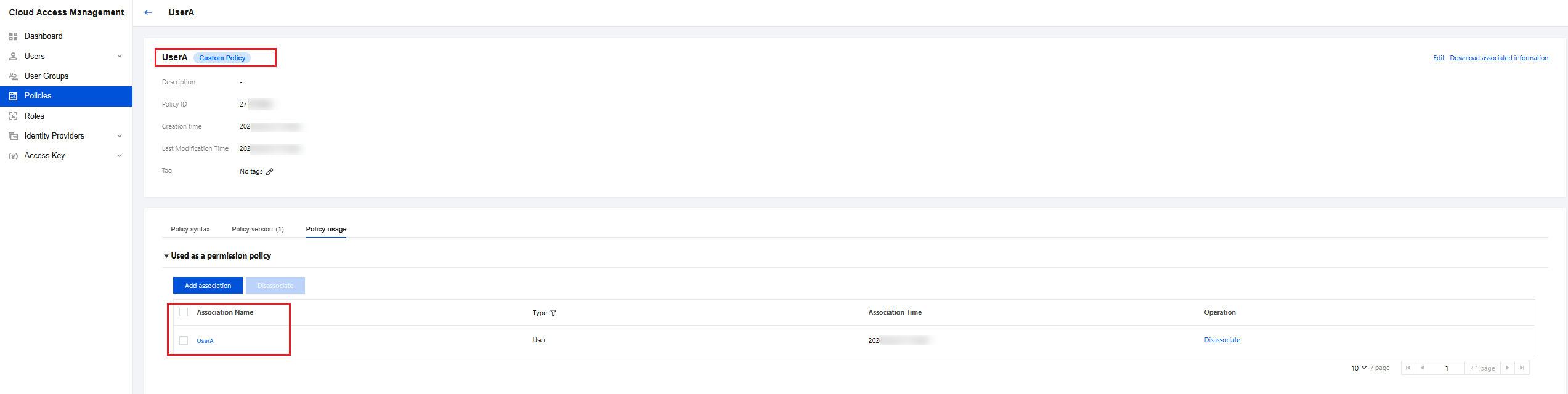
3. Log in to the sub-user account to verify the effect.
Note:
Please perform operations using the accounts of sub-users UserA, UserB, and UserC respectively.
Switch to sub-users UserA, UserB, and UserC respectively, log in to Tencent Cloud to verify the effect. This configuration ultimately grants User A access to all resources under applications App1 and App2, User B access only to resources of App1, and User C access only to resources of App3.
Step 5: Using Tags for Cost Allocation
Users can set the Tag key as a cost allocation tag based on cost allocation dimensions (common dimensions include the department using the resource, the application project of the resource, and so on). When a bill is issued, the corresponding Tag information (that is, the cost allocation dimension information) is displayed through the resource association in the bill settlement record, achieving cost allocation for cloud resource bills based on Tags.
Ajuda e Suporte
Esta página foi útil?
Você também pode entrar em contato com a Equipe de vendas ou Enviar um tíquete em caso de ajuda.
comentários