Participant Management (Android)
Download
Modo Foco
Tamanho da Fonte
RoomParticipantStore is a module in AtomicXCore for managing participants in a conference room. It provides the core building blocks for multi-party conferencing—so you can implement reliable participant and role management.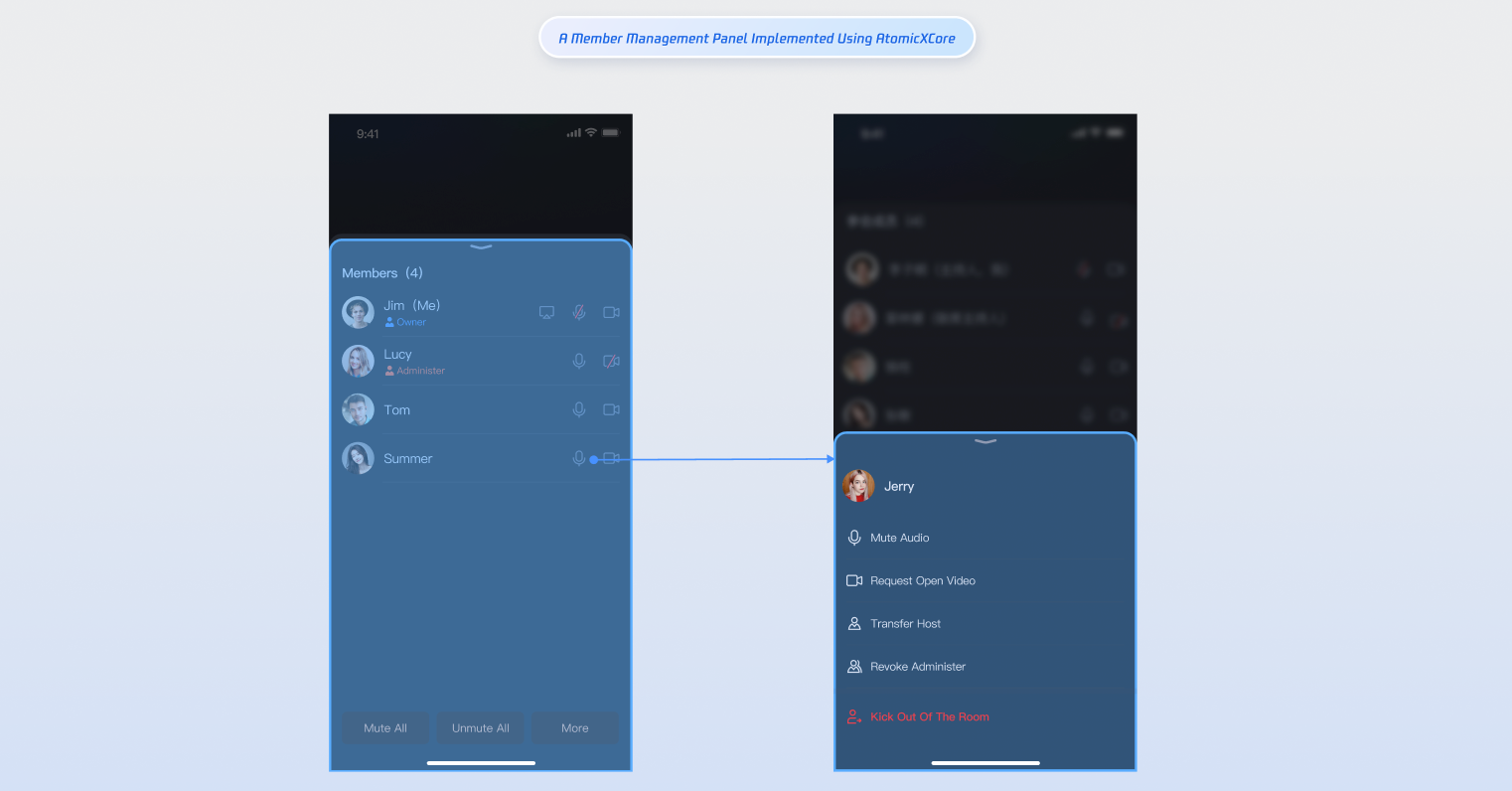
Core Features
Get the participant list: Retrieve details for everyone currently in the room.
Transfer room ownership: The current owner can transfer ownership to another participant.
Grant/revoke admin role: The owner can promote participants to admins and revoke admin privileges.
Remove a participant: The owner or an admin can remove a participant from the room.
Update participant profile: Participants can update their own in-room profile information.
Manage audio/video devices: Invite participants to enable camera/mic, remotely turn off another participant’s camera/mic, and (for owners/admins) mute all or disable all video.
Core Concepts
The core concepts of
RoomParticipantStore is summarized as follows:Core Concept | Type | Core Responsibilities & Description |
data class | Represents the participant data model, encapsulating participant information and state management. Main functions include managing participant basic information (user ID, user name, user avatar, in-room role) and managing device status (microphone, camera, screen sharing, message status). | |
data class | Represents the participant state management structure, responsible for maintaining participant-related state information in the room. Main properties: participantList: collection of all participant information in the current room.participantListCursor: snapshot for paginated participant list.localParticipant: current user's participant information in the room. | |
abstract class | Handles real-time participant events in the room, grouped as join/exit events, role change events, and device control events. | |
abstract class | Core class for participant control. Functions include managing participant audio/video status, participant management operations, and subscribing to RoomParticipantListener for real-time events. |
Implementation Steps
Step 1: Add the SDK
Follow the Integration Overview to integrate the AtomicXCore SDK. Make sure you have completed the Implement Login Logic before proceeding.
Step 2: Retrieve the Participant List
After entering the room, use the
getParticipantList method of RoomParticipantStore to get the current list of participants.import android.util.Logimport io.trtc.tuikit.atomicxcore.api.room.RoomParticipantStoreimport io.trtc.tuikit.atomicxcore.api.room.RoomParticipantimport io.trtc.tuikit.atomicxcore.api.ListResultCompletionHandlerfun getParticipantList() {// Prerequisite: You must be in the room and have created a RoomParticipantStore instance with roomIDval roomID = "test_room_001"val participantStore = RoomParticipantStore.create(roomID)// Fetch participant list, supports pagination via cursorval initialCursor: String? = null // null fetches the first pageparticipantStore.getParticipantList(initialCursor, object : ListResultCompletionHandler<RoomParticipant> {override fun onSuccess(result: List<RoomParticipant>, cursor: String) {Log.d("Participant", "Retrieved participant list, count: ${result.size}")}override fun onFailure(code: Int, desc: String) {Log.e("Participant", "Failed to retrieve participant list [Error code: $code]: $desc")}})}
Step 3: Search Room Members
Once you've entered the room, call the
searchUsers method of RoomParticipantStore to search for members.import android.util.Logimport io.trtc.tuikit.atomicxcore.api.ListResultCompletionHandlerimport io.trtc.tuikit.atomicxcore.api.room.RoomParticipantStoreimport io.trtc.tuikit.atomicxcore.api.room.RoomUserfun searchUsers() {// Prerequisite: You must be in the room.val participantStore = RoomParticipantStore.create(roomID = "your_room_id")// Search by user name keywordval keyword = "userName"participantStore.searchUsers(keyword = keyword, completion = object : ListResultCompletionHandler<RoomUser> {override fun onSuccess(result: List<RoomUser>, cursor: String) {Log.d("Test", "Search succeeded, member count: ${result.size}")}override fun onFailure(code: Int, desc: String) {Log.e("Test", "Search failed [Error code: $code]: $desc")}})}
Step 4: Transfer the Room Ownership
If you're the owner, use
transferOwner in RoomParticipantStore to transfer ownership to any participant. After transfer, the previous owner becomes a regular participant. Each room can have only one owner.import android.util.Logimport io.trtc.tuikit.atomicxcore.api.room.RoomParticipantStoreimport io.trtc.tuikit.atomicxcore.api.CompletionHandlerfun transferOwner(userID: String) {// Prerequisite: You must be in the room and have a RoomParticipantStore instanceval roomID = "test_room_001"val participantStore = RoomParticipantStore.create(roomID)// Only the current owner can perform this operationparticipantStore.transferOwner(userID, object : CompletionHandler {override fun onSuccess() {Log.d("Participant", "Ownership transferred, new owner: $userID")}override fun onFailure(code: Int, desc: String) {Log.e("Participant", "Ownership transfer failed [Error code: $code]: $desc")}})}
Participants can subscribe to the
onOwnerChanged event in RoomParticipantListener to receive ownership change notifications.import android.util.Logimport io.trtc.tuikit.atomicxcore.api.room.RoomParticipantListenerimport io.trtc.tuikit.atomicxcore.api.room.RoomParticipantStoreimport io.trtc.tuikit.atomicxcore.api.room.RoomUserprivate val roomID = "test_room_001"private val participantStore = RoomParticipantStore.create(roomID)private val participantListener = object : RoomParticipantListener() {override fun onOwnerChanged(newOwner: RoomUser, oldOwner: RoomUser) {Log.d("Participant", "Ownership changed: newOwner: $newOwner, oldOwner: $oldOwner")}}private fun subscribeParticipantEvent() {participantStore.addRoomParticipantListener(participantListener)}
Step 5: Grant/Revoke Admin
Owners can call
setAdmin in RoomParticipantStore to assign a user as admin, or revokeAdmin to remove admin privileges.import android.util.Logimport io.trtc.tuikit.atomicxcore.api.room.RoomParticipantStoreimport io.trtc.tuikit.atomicxcore.api.CompletionHandlerprivate val roomID = "test_room_001"private val participantStore = RoomParticipantStore.create(roomID)fun setUserAsAdmin(userID: String) {participantStore.setAdmin(userID, object : CompletionHandler {override fun onSuccess() {Log.d("Participant", "Assigned user $userID as admin")}override fun onFailure(code: Int, desc: String) {Log.e("Participant", "Assign admin failed [Error code: $code]: $desc")}})}fun revokeAdmin(userID: String) {participantStore.revokeAdmin(userID, object : CompletionHandler {override fun onSuccess() {Log.d("Participant", "Revoked admin privileges for user $userID")}override fun onFailure(code: Int, desc: String) {Log.e("Participant", "Revoke admin failed [Error code: $code]: $desc")}})}
Participants can subscribe to
onAdminSet and onAdminRevoked events in RoomParticipantListener to receive updates about role changes.import android.util.Logimport io.trtc.tuikit.atomicxcore.api.room.RoomParticipantListenerimport io.trtc.tuikit.atomicxcore.api.room.RoomParticipantStoreimport io.trtc.tuikit.atomicxcore.api.room.RoomUserprivate val roomID = "test_room_001"private val participantStore = RoomParticipantStore.create(roomID)private val participantListener = object : RoomParticipantListener() {override fun onAdminSet(userInfo: RoomUser) {Log.d("Participant", "Admin assigned: $userInfo")}override fun onAdminRevoked(userInfo: RoomUser) {Log.d("Participant", "Admin revoked: $userInfo")}}private fun subscribeParticipantEvents() {participantStore.addRoomParticipantListener(participantListener)}
Step 6: Remove Participants from a Room
Owners or admins can call
kickUser in RoomParticipantStore to remove a participant.import android.util.Logimport io.trtc.tuikit.atomicxcore.api.room.RoomParticipantStoreimport io.trtc.tuikit.atomicxcore.api.CompletionHandlerprivate val roomID = "test_room_001"private val participantStore = RoomParticipantStore.create(roomID)fun kickUser(userID: String) {// Only owners or admins can perform this operationparticipantStore.kickUser(userID, object : CompletionHandler {override fun onSuccess() {Log.d("Participant", "User removed: $userID")}override fun onFailure(code: Int, desc: String) {Log.e("Participant", "Remove user failed [Error code: $code]: $desc")}})}
Participants can subscribe to
onKickedFromRoom in RoomParticipantListener to receive removal notifications.import android.util.Logimport io.trtc.tuikit.atomicxcore.api.room.KickedOutOfRoomReasonimport io.trtc.tuikit.atomicxcore.api.room.RoomParticipantListenerimport io.trtc.tuikit.atomicxcore.api.room.RoomParticipantStoreprivate val roomID = "test_room_001"private val participantStore = RoomParticipantStore.create(roomID)private val participantListener = object : RoomParticipantListener() {override fun onKickedFromRoom(reason: KickedOutOfRoomReason, message: String) {Log.d("Participant", "Removed from room: reason: $reason, info: $message")}}private fun subscribeParticipantEvents() {participantStore.addRoomParticipantListener(participantListener)}
Step 7: Update the Participant Information
After joining the room, use
updateParticipantNameCard and updateParticipantMetaData in RoomParticipantStore to update your information, such as name card and custom metadata.import android.util.Logimport io.trtc.tuikit.atomicxcore.api.room.RoomParticipantStoreimport io.trtc.tuikit.atomicxcore.api.CompletionHandlerprivate val roomID = "test_room_001"private val participantStore = RoomParticipantStore.create(roomID)fun updateParticipantNameCard(userID: String, nameCard: String) {// Only admins or the user themselves can modify the name cardparticipantStore.updateParticipantNameCard(userID, nameCard, object : CompletionHandler {override fun onSuccess() {Log.d("Participant", "Name card updated: user: $userID, new name card: $nameCard")}override fun onFailure(code: Int, desc: String) {Log.e("Participant", "Name card update failed [Error code: $code]: $desc")}})}fun updateParticipantMetaData(userID: String, metaData: HashMap<String, ByteArray>) {// Key length ≤ 50 bytes, value length ≤ 200 bytesparticipantStore.updateParticipantMetaData(userID, metaData, object : CompletionHandler {override fun onSuccess() {Log.d("Participant", "Custom metadata updated: user: $userID, key count: ${metaData.size}")}override fun onFailure(code: Int, desc: String) {Log.e("Participant", "Custom metadata update failed [Error code: $code]: $desc")}})}
Step 8: Invite Participants to Enable Their Devices
Owners or admins can call
inviteToOpenDevice in RoomParticipantStore to invite participants to turn on their camera or microphone.import android.util.Logimport io.trtc.tuikit.atomicxcore.api.room.RoomParticipantStoreimport io.trtc.tuikit.atomicxcore.api.device.DeviceTypeimport io.trtc.tuikit.atomicxcore.api.CompletionHandlerprivate val roomID = "test_room_001"private val participantStore = RoomParticipantStore.create(roomID)fun inviteUserToOpenDevice(userID: String, device: DeviceType, timeout: Int = 30) {// Invited participants will receive a notification and can accept or declineparticipantStore.inviteToOpenDevice(userID, device, timeout, object : CompletionHandler {override fun onSuccess() {Log.d("Participant", "Device invitation sent: user: $userID, device: $device")}override fun onFailure(code: Int, desc: String) {Log.e("Participant", "Device invitation failed [Error code: $code]: $desc")}})}
Participants should:
Subscribe to
onDeviceInvitationReceived in RoomParticipantListener to receive device invitations.Call
acceptOpenDeviceInvitation or declineOpenDeviceInvitation to respond.import android.util.Logimport io.trtc.tuikit.atomicxcore.api.room.RoomParticipantStoreimport io.trtc.tuikit.atomicxcore.api.room.RoomParticipantListenerimport io.trtc.tuikit.atomicxcore.api.room.DeviceRequestInfoimport io.trtc.tuikit.atomicxcore.api.device.DeviceTypeimport io.trtc.tuikit.atomicxcore.api.CompletionHandlerprivate val roomID = "test_room_001"private val participantStore = RoomParticipantStore.create(roomID)private val participantListener = object : RoomParticipantListener() {override fun onDeviceInvitationReceived(invitation: DeviceRequestInfo) {Log.d("Participant", "Device invitation received: device: ${invitation.device}, sender: ${invitation.senderUserName}")// Handle acceptance or decline}}private fun subscribeParticipantEvents() {participantStore.addRoomParticipantListener(participantListener)}fun acceptOpenDeviceInvitation(userID: String, device: DeviceType) {participantStore.acceptOpenDeviceInvitation(userID, device, object : CompletionHandler {override fun onSuccess() {Log.d("Participant", "Accepted device invitation: device: $device")}override fun onFailure(code: Int, desc: String) {Log.e("Participant", "Accept device invitation failed [Error code: $code]: $desc")}})}fun declineOpenDeviceInvitation(userID: String, device: DeviceType) {participantStore.declineOpenDeviceInvitation(userID, device, object : CompletionHandler {override fun onSuccess() {Log.d("Participant", "Declined device invitation: device: $device")}override fun onFailure(code: Int, desc: String) {Log.e("Participant", "Decline device invitation failed [Error code: $code]: $desc")}})}
Step 9: Close Remote Participant Devices
Owners or admins can call
closeParticipantDevice in RoomParticipantStore to remotely disable a participant's camera or microphone.import android.util.Logimport io.trtc.tuikit.atomicxcore.api.CompletionHandlerimport io.trtc.tuikit.atomicxcore.api.device.DeviceTypeimport io.trtc.tuikit.atomicxcore.api.room.RoomParticipantStoreprivate val roomID = "test_room_001"private val participantStore = RoomParticipantStore.create(roomID)fun closeParticipantDevice(userID: String, device: DeviceType) {participantStore.closeParticipantDevice(userID, device, object : CompletionHandler {override fun onSuccess() {Log.d("Participant", "Closed participant device: user: $userID, device: $device")}override fun onFailure(code: Int, desc: String) {Log.e("Participant", "Close participant device failed [Error code: $code]: $desc")}})}
Participants can listen for
onParticipantDeviceClosed in RoomParticipantListener to receive device closure notifications and update their UI.import android.util.Logimport io.trtc.tuikit.atomicxcore.api.device.DeviceTypeimport io.trtc.tuikit.atomicxcore.api.room.RoomParticipantListenerimport io.trtc.tuikit.atomicxcore.api.room.RoomParticipantStoreimport io.trtc.tuikit.atomicxcore.api.room.RoomUserprivate val roomID = "test_room_001"private val participantStore = RoomParticipantStore.create(roomID)private val participantListener = object : RoomParticipantListener() {override fun onParticipantDeviceClosed(device: DeviceType, operator: RoomUser) {Log.d("Participant", "Device closed: device: $device, operator: ${operator.userName}")}}private fun subscribeParticipantEvents() {participantStore.addRoomParticipantListener(participantListener)}
Step 10: Request Permission to Turn On Devices
Participants can call
requestToOpenDevice in RoomParticipantStore to request permission to enable their camera or microphone if mute all or disable all video is active.import android.util.Logimport io.trtc.tuikit.atomicxcore.api.CompletionHandlerimport io.trtc.tuikit.atomicxcore.api.device.DeviceTypeimport io.trtc.tuikit.atomicxcore.api.room.RoomParticipantStoreprivate val roomID = "test_room_001"private val participantStore = RoomParticipantStore.create(roomID)fun requestToOpenDevice(device: DeviceType, timeout: Int = 30) {participantStore.requestToOpenDevice(device, timeout, object : CompletionHandler {override fun onSuccess() {Log.d("Participant", "Request to enable device sent: device: $device")}override fun onFailure(code: Int, desc: String) {Log.e("Participant", "Request to enable device failed [Error code: $code]: $desc")}})}
Owners or admins should:
Subscribe to
onDeviceRequestReceived in RoomParticipantListener to receive device requests.Use
approveOpenDeviceRequest or rejectOpenDeviceRequest to respond.import android.util.Logimport io.trtc.tuikit.atomicxcore.api.CompletionHandlerimport io.trtc.tuikit.atomicxcore.api.device.DeviceTypeimport io.trtc.tuikit.atomicxcore.api.room.DeviceRequestInfoimport io.trtc.tuikit.atomicxcore.api.room.RoomParticipantListenerimport io.trtc.tuikit.atomicxcore.api.room.RoomParticipantStoreprivate val roomID = "test_room_001"private val participantStore = RoomParticipantStore.create(roomID)private val participantListener = object : RoomParticipantListener() {override fun onDeviceRequestReceived(request: DeviceRequestInfo) {Log.d("Participant", "Device request: user: ${request.senderUserName}, device: ${request.device}")// Approve or reject the request}}private fun subscribeParticipantEvents() {participantStore.addRoomParticipantListener(participantListener)}fun approveOpenDeviceRequest(device: DeviceType, userID: String) {participantStore.approveOpenDeviceRequest(device, userID, object : CompletionHandler {override fun onSuccess() {Log.d("Participant", "Device request approved: user: $userID, device: $device")}override fun onFailure(code: Int, desc: String) {Log.e("Participant", "Device request approval failed: $desc")}})}fun rejectOpenDeviceRequest(device: DeviceType, userID: String) {participantStore.rejectOpenDeviceRequest(device, userID, object : CompletionHandler {override fun onSuccess() {Log.d("Participant", "Device request rejected: user: $userID, device: $device")}override fun onFailure(code: Int, desc: String) {Log.e("Participant", "Device request rejection failed [Error code: $code]: $desc")}})}
Step 11: Mute/Disable All Videos
Owners or admins can call
disableAllDevices in RoomParticipantStore to mute all microphones or disable all cameras in the room. When enabled, participants cannot independently turn on their microphone or camera.import android.util.Logimport io.trtc.tuikit.atomicxcore.api.room.RoomParticipantStoreimport io.trtc.tuikit.atomicxcore.api.device.DeviceTypeimport io.trtc.tuikit.atomicxcore.api.CompletionHandlerprivate val roomID = "test_room_001"private val participantStore = RoomParticipantStore.create(roomID)fun disableAllDevices(device: DeviceType, disable: Boolean) {participantStore.disableAllDevices(device, disable, object : CompletionHandler {override fun onSuccess() {val action = if (disable) "Disabled" else "Enabled"Log.d("Participant", "${action} all ${device} successfully")}override fun onFailure(code: Int, desc: String) {val action = if (disable) "Disabled" else "Enabled"Log.e("Participant", "${action} all ${device} failed [Error code: $code]: $desc")}})}
Participants can subscribe to
onAllDevicesDisabled in RoomParticipantListener to track mute all or disable all video actions and update their UI. When restricted, participants must submit requests to enable their camera or microphone.import android.util.Logimport io.trtc.tuikit.atomicxcore.api.device.DeviceTypeimport io.trtc.tuikit.atomicxcore.api.room.RoomParticipantListenerimport io.trtc.tuikit.atomicxcore.api.room.RoomParticipantStoreimport io.trtc.tuikit.atomicxcore.api.room.RoomUserprivate val roomID = "test_room_001"private val participantStore = RoomParticipantStore.create(roomID)private val participantListener = object : RoomParticipantListener() {override fun onAllDevicesDisabled(device: DeviceType, disable: Boolean, operator: RoomUser) {val action = if (disable) "Disabled" else "Enabled"Log.d("Participant", "All ${device} ${action}: operator: ${operator.userName}")}}private fun subscribeParticipantEvents() {participantStore.addRoomParticipantListener(participantListener)}
Step 12: Listen for Participant Events
Subscribe to participant events in
RoomParticipantListener to track who joins or leaves the room.import android.util.Logimport io.trtc.tuikit.atomicxcore.api.room.RoomParticipantListenerimport io.trtc.tuikit.atomicxcore.api.room.RoomParticipantStoreimport io.trtc.tuikit.atomicxcore.api.room.RoomUserprivate val roomID = "test_room_001"private val participantStore = RoomParticipantStore.create(roomID)private val participantListener = object : RoomParticipantListener() {override fun onParticipantJoined(participant: RoomUser) {Log.d("Participant", "Participant joined: user: ${participant.userName}, ID: ${participant.userID}")}override fun onParticipantLeft(participant: RoomUser) {Log.d("Participant", "Participant left: user: ${participant.userName}, ID: ${participant.userID}")}}private fun subscribeParticipantEvents() {participantStore.addRoomParticipantListener(participantListener)}
You can also subscribe to participant state changes in
RoomParticipantState, such as tracking users who are currently speaking.import android.util.Logimport io.trtc.tuikit.atomicxcore.api.room.RoomParticipantStoreimport kotlinx.coroutines.CoroutineScopeimport kotlinx.coroutines.Dispatchersimport kotlinx.coroutines.launchprivate val roomID = "test_room_001"private val participantStore = RoomParticipantStore.create(roomID)private fun subscribeParticipantState() {CoroutineScope(Dispatchers.Main).launch {participantStore.state.speakingUsers.collect { speakingUsers ->Log.d("Participant", "Speaking users updated: count: ${speakingUsers.size}")}}}
API Documentation
Store/Component | Description | API Documentation |
RoomParticipantStore | Manages room participants: assign admin, transfer ownership, retrieve participant list, remove participant, control participant devices (close, invite to enable camera/microphone, etc.), request device enablement. |
Contact Us
If you have any questions or suggestions during integration or use, please contact info_rtc@tencent.com.
Ajuda e Suporte
Esta página foi útil?
Você também pode entrar em contato com a Equipe de vendas ou Enviar um tíquete em caso de ajuda.
comentários