Delete Passkey
Baixar
Modo Foco
Tamanho da Fonte
Scenarios
This article will guide you on how to delete the passkey bound to your account. After the passkey is deleted, you will no longer be able to use this method to log in to your Tencent Cloud account.
Note
The passkey cannot be recovered after deletion. If you need to recreate it, please refer to Create Passkey.
After deleting the passkey for a device, ensure to simultaneously remove the corresponding key stored locally on that device. Otherwise, when attempting to log in using the device's local key afterward, signature verification will fail due to "no matching public key on the server." This may result in prompts such as "Passkey verification timed out" or "No passkey credentials found."
If only the local key on the device is deleted without removing the server-side key, it may cause login exceptions. It is recommended to synchronously clean up both ends.
Operation Steps
1. Log in to the Tencent Cloud console and go to the Account Center > Security Settings page.
2. On the Security Settings page, locate the Passkey module under account protection. Click Manage to open the Passkey management window.
3. In the Passkey Management pop-up window,find the specific passkey you wish to remove and click Delete.
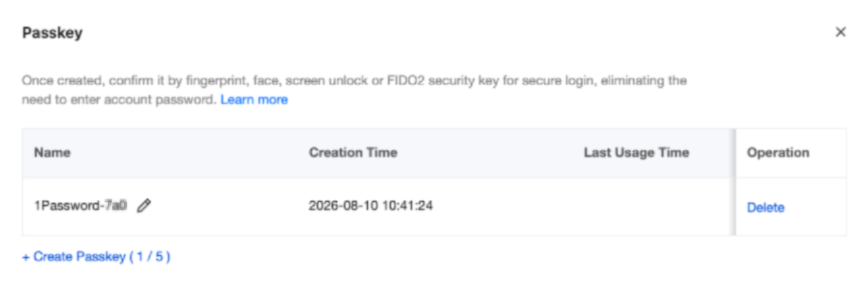
4. On the pop-up identity verification page, complete identity verification as prompted on the page.
Note:
If the identity verification method is unavailable, please contact us or submit a ticket to obtain support.
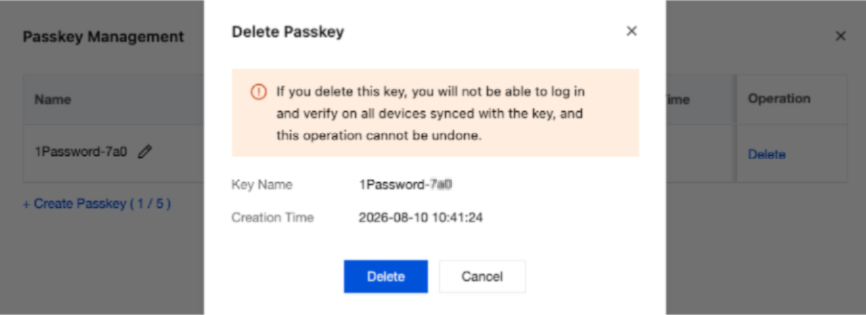
5. In the final confirmation dialog, review the passkey details to ensure you are deleting the correct one. If everything is correct, click Delete to confirm. System prompts Passkey deleted successfully. The server side synchronously clears the corresponding public key information, and you will no longer be able to log in to Tencent Cloud using the deleted key subsequently.
Attention:
If you delete this key, you will no longer be able to use it for login and verification on all devices that have synchronized this key. Additionally, this operation cannot be undone.
We recommend that you also delete the corresponding passkey stored locally on the device. For example, locate the Tencent Cloud International domain in Google Password Manager, iCloud Keychain, or Windows Hello, and delete the associated account passkey. This helps you manage your credentials more effectively.
Ajuda e Suporte
Esta página foi útil?
Você também pode entrar em contato com a Equipe de vendas ou Enviar um tíquete em caso de ajuda.
comentários