Recording Event Notification
下载
聚焦模式
字号
The live recording feature records live streams in real time according to the recording template bound to the push domain name, and then stores the recording files in VOD. A recording callback notifies you of the information of a recording file, including the start and end time of recording, the recording file ID, the file size, and the download URL. To receive recording callbacks, you need to configure a callback template, specify a server address for the callback, and bind the template to your push domain name. When a recording event occurs, the CSS backend will send the recording file information to the specified server.
This document describes the fields in a callback notification sent by CSS after a recording file event occurs.
Notes
This guide assumes that you understand how to configure callbacks and receive callback notifications from CSS. For details, see How to Receive Event Notification.
Recorded video files are saved to the VOD console by default, with an option to save them to Cloud Object Storage (COS) products. It is advisable to activate the VOD or COS service in advance to prevent service suspension due to overdue payments.
If a recording task is created by the CreateRecordTask API, the recording callback returned will not include the
stream_param parameters of the push URL. They will be included if a task is created using another method.If HLS recording resumption is enabled, a callback will be triggered only for the final recording file. No callbacks will be sent when push is interrupted.
Recording Event Parameters
Event type
Event Type | Value |
Live recording (files) | event_type = 100 |
Common callback parameters
Parameter | Type | Description |
t | int64 | The time (Unix timestamp) when the notification signature expires. The default validity period of a callback notification from Tencent Cloud is 10 minutes. After the time specified by the t value elapses, a notification will be considered invalid. This can prevent network replay attacks. The value of t is a decimal Unix timestamp, which is the number of seconds that have elapsed since 00:00:00 (UTC/GMT time), January 1, 1970. |
sign | string | The security signature, sign = MD5(key + t) . Tencent Cloud splices the encryption key and t, generates an MD5 hash of the spliced string, and embeds it in callback notifications. Your backend server performs the same calculation when it receives a callback, and if the signature matches, it indicates that the notification is from Tencent Cloud. |
Note:
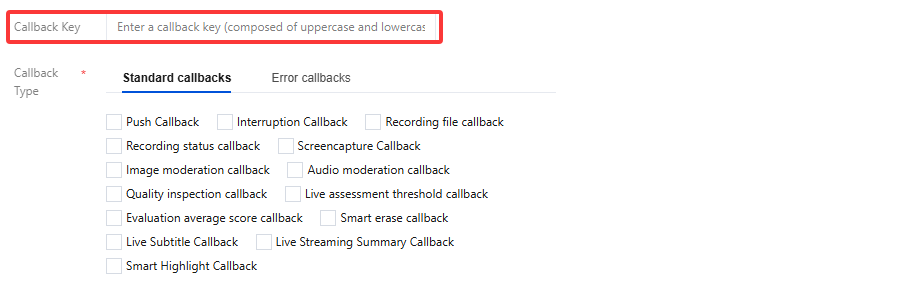
You can set the callback key in Feature Configuration > Live Stream Callback, which is used for authentication. We recommend you set this field to ensure data security.
Recording callback parameters
Parameter | Type | Description |
appid | int | |
app | string | The push domain. |
appname | string | The push path. |
stream_id | string | The live stream name. |
channel_id | string | Same as the stream ID. |
file_id | string | |
record_file_id | string | The recording file ID. |
record_temp_id | string | The template ID of the recording task indicates that the file was generated by a template task if it exists and is not null; otherwise, it signifies that the file was produced by a global task. |
file_format | string | The file format. Valid values: flv, hls, mp4, aac. |
task_id | string | The ID of a recording task, which is returned by the CreateRecordTask API and is valid only if the task is created by the API. |
start_time | int64 | The recording start time. |
end_time | int64 | The recording end time. |
start_time_usec | int | The recording start time (microseconds). |
end_time_usec | int | The recording end time (microseconds). |
duration | int64 | The duration of the recording file, in seconds. The difference between start_time and end_time may be different from the duration value under normal circumstances, especially in cases of weak network connections and stream pushing anomalies. |
file_size | uint64 | The recording file size, in bytes. |
stream_param | string | The push URL parameters (custom). |
video_url | string | The download URL of the recording file. |
media_start_time | int | The PTS when the stream is first pulled for recording. This is not necessarily the PTS of the first frame of the recording file. |
record_bps | int | The bitrate, in kbps, of the transcoding output recorded. |
callback_ext | The JSON object string. | The JSON object includes multiple fields: video_codec indicates the video codec.resolution indicates the resolution of the pushed stream.session_id indicates the recording task ID.These are all additional fields of a recording callback. We recommend you do not rely your business logic too much on them. |
Sample callback
{"event_type": 100,"appid": 12345678,"app": "yourapp","callback_ext": "{\\"video_codec\\":\\"h264\\",\\"resolution\\":\\"640x480\\"}","appname": "yourappname","stream_id":"stream_test","channel_id":"stream_test","file_id":"1234567890","record_file_id": "1234567890","file_format":"hls","task_id":"UpTbk5RSVhRQ********************0xTSlNTQltlRVRLU1JAWW9EUb","start_time":1642089445,"end_time":1642089598,"start_time_usec": 316441,"end_time_usec": 618577,"duration":154,"file_size":277941079,"stream_param":"stream_param=test","video_url":"http://12345678.vod2.myqcloud.com/xxxx/yyyy/zzzz.m3u8","media_start_time": 135802,"record_bps": 0,"sign":"ca3e25e**********09a9ae7281e300d","t":1545030873}
文档反馈