Cross-Region Metadata Disaster Recovery
下载
聚焦模式
字号
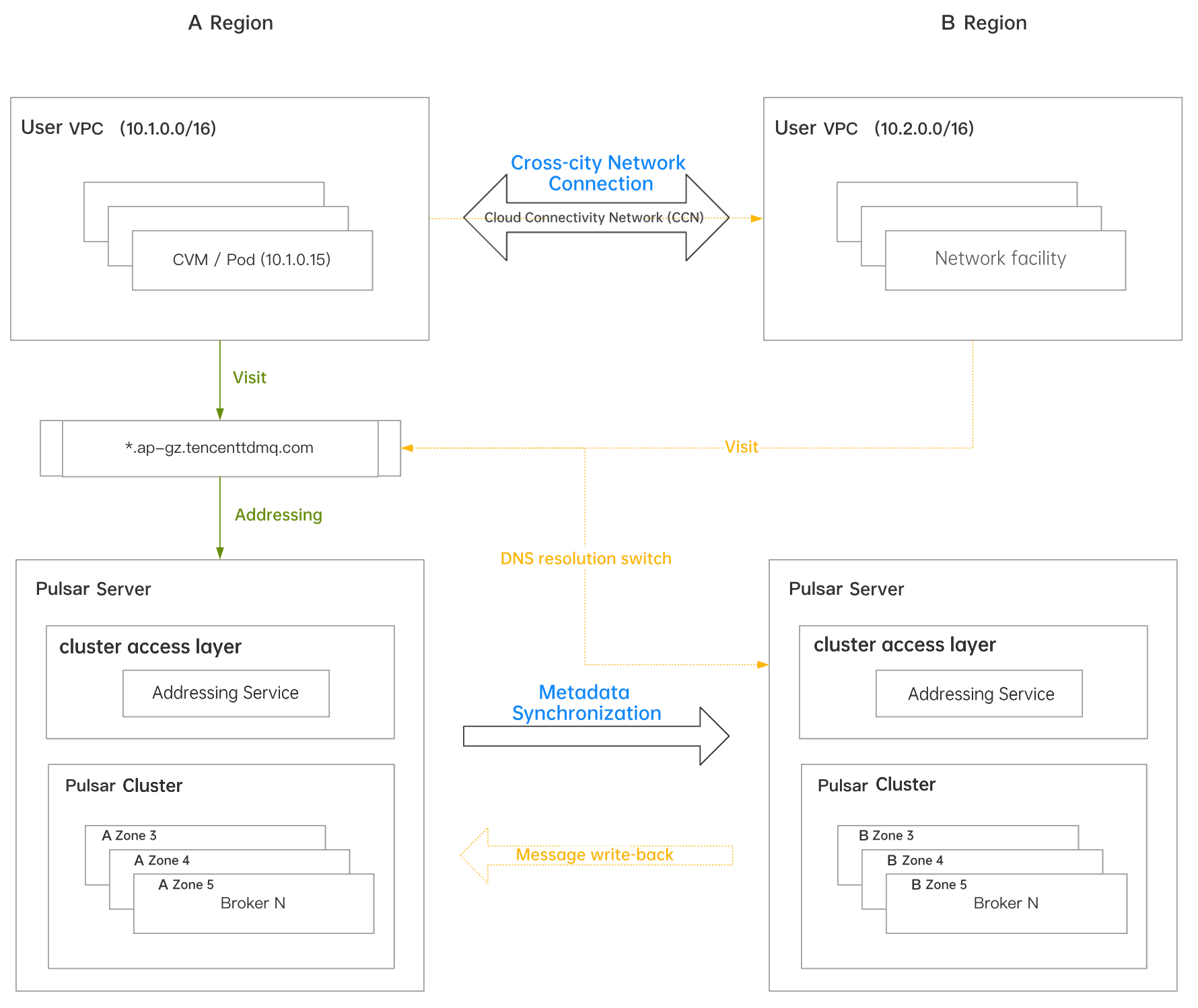
TDMQ for Apache Pulsar already supports disaster recovery across Multiple AZs. To address more extreme regional disaster scenarios and help customers quickly migrate services and recover in the event of a failure, it introduces the metadata-level cross-region message replication solution.
Cross-Region Message Replication Scenario at the Metadata Level
The metadata-level cross-region message replication solution is introduced below in three scenarios: normal operation, failure occurrence, and post-failure recovery.
Normal Scenario
Assuming the primary business region is Region A, you must complete the following two preparatory tasks to enable the metadata-level cross-region disaster recovery capability. This ensures rapid service migration in the event of a regional disaster.
Establish an inter-city network connection. Use Cloud Connect Network (CCN) to connect the VPC networks in Region A and Region B, enabling cross-region communication.
Create a disaster recovery cluster in the corresponding disaster recovery region. Enable the cross-region message replication switch. Associate the disaster recovery cluster to be created with the existing primary cluster.
Establish metadata synchronization between clusters in both regions through the TDMQ for Apache Pulsar console. This includes namespaces, topics, subscriptions, roles, and more.
Failure Scenario
When a regional disaster occurs, the TDMQ for Apache Pulsar console provides a DNS resolution switching feature. This feature redirects the domain name originally used in Region A to the cluster in the target disaster recovery Region B. This approach eliminates the need for clients to modify their access point addresses, enabling the disaster recovery solution for the cluster in Region B and ensuring business continuity.
After Failure Recovery
After Region A recovers, users must first evaluate whether to write back the messages generated in Region B during the failure to Region A to ensure message data integrity. If write-back is required, contact the after-sales team for assistance.
After completing the evaluation (and any necessary write-back), the user performs the switchback of the access point's domain name resolution on the cluster in Region B. Once the switchback operation is executed and takes effect, clients can normally access Region A.
Operation Process
Creating a Disaster Recovery Cluster
1. Log in to the TDMQ for Apache Pulsar console.
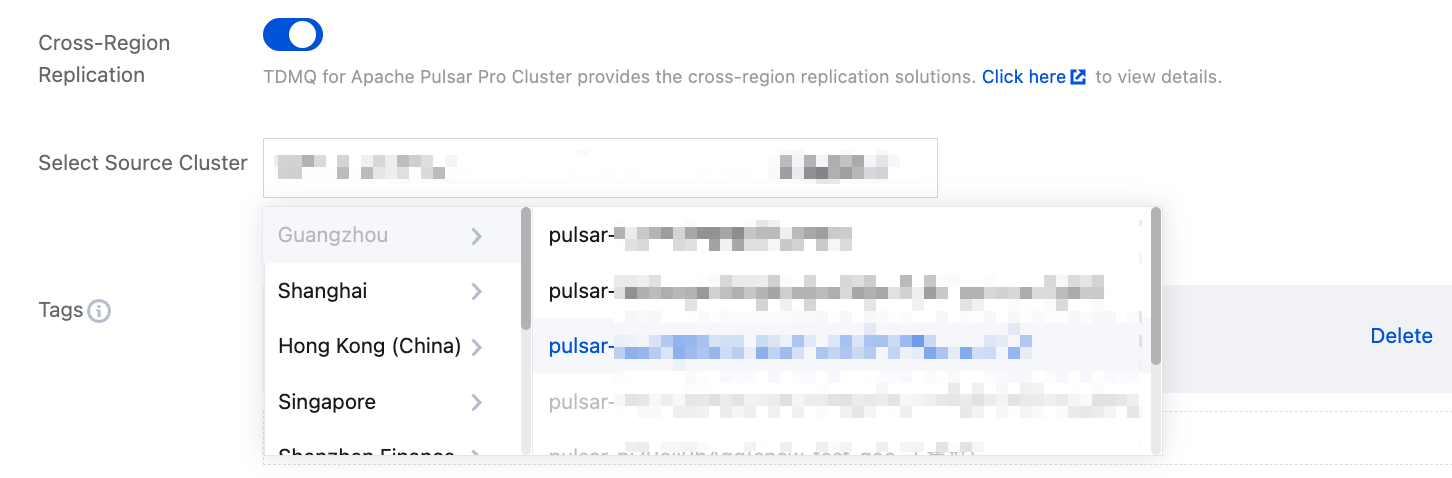
2. Create a pro cluster in the backup region. On the cluster purchase page, enable the Cross-Region Replication switch and select the cluster to be backed up.
CCN-based Network Connectivity
Connect the network between the production region and the backup region through CCN to set up a network access channel. This way, clients in the production region can access the backup cluster across regions in the event of a disaster.
For more information about the configuration, see Operation Guide of CCN. Then, perform the following operations:
Creating a Metadata Replication Link
1. In the left sidebar of the console, choose Cross-Region Replication, click New Link, and configure the cluster's metadata synchronization link:
Copy Link Name: Define a name for the synchronization link. It cannot be empty, can contain digits, letters, and characters "-_=:.", and its length cannot exceed 128 characters.
Link Type: Select Metadata.
Source Cluster: Select the source Pulsar cluster for replication.
Select Target Cluster: Select the target cluster that has been created in the desired region. Only clusters with the same Cluster ID are displayed here.
Replication Level: Two levels are supported: Cluster Level and Namespace Level.
Cluster Level is applicable to cluster-level replication.
Namespace Level is suitable for scenarios where clusters in both regions are active on a daily basis, with different namespaces distributed across regions.
2. Click Save to complete the creation.
Creating a Disaster Recovery Access Point
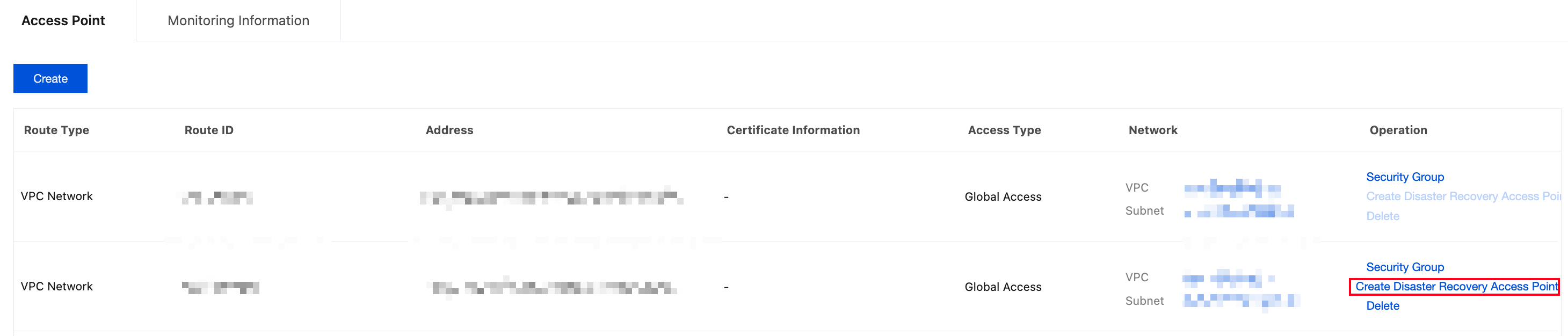
1. Go to the endpoint list on the cluster details page of the primary cluster. In the operation column of the target endpoint, click Create Disaster Recovery Endpoint.
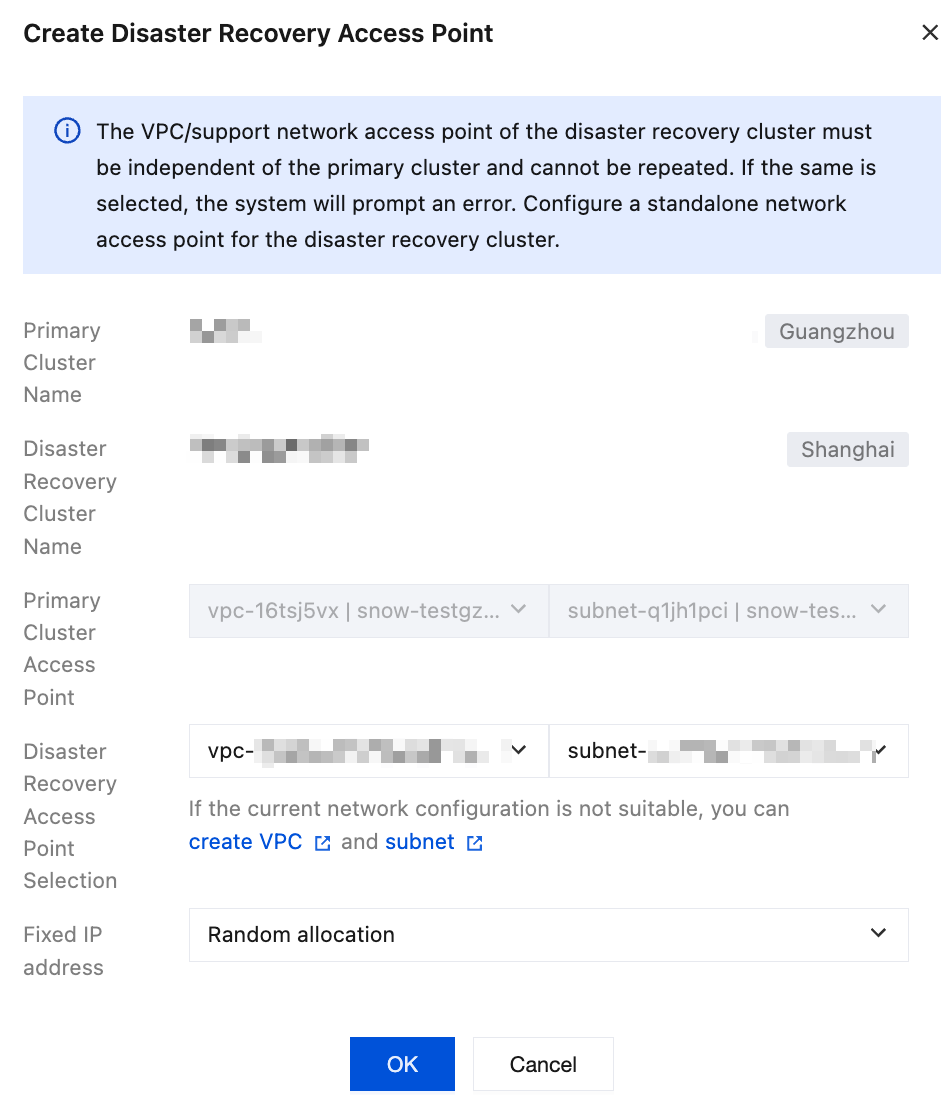
2. In the pop-up window, select the VPC and subnet corresponding to the disaster recovery cluster in the disaster recovery region, and then click OK.
3. After the disaster recovery endpoint is successfully created, the corresponding endpoint information is automatically generated in the endpoint list of the disaster recovery cluster. If the primary cluster fails in the future, you can directly click Cross-Region Switch to perform an emergency traffic switchover with one click, ensuring business continuity.

In the Event of a Disaster
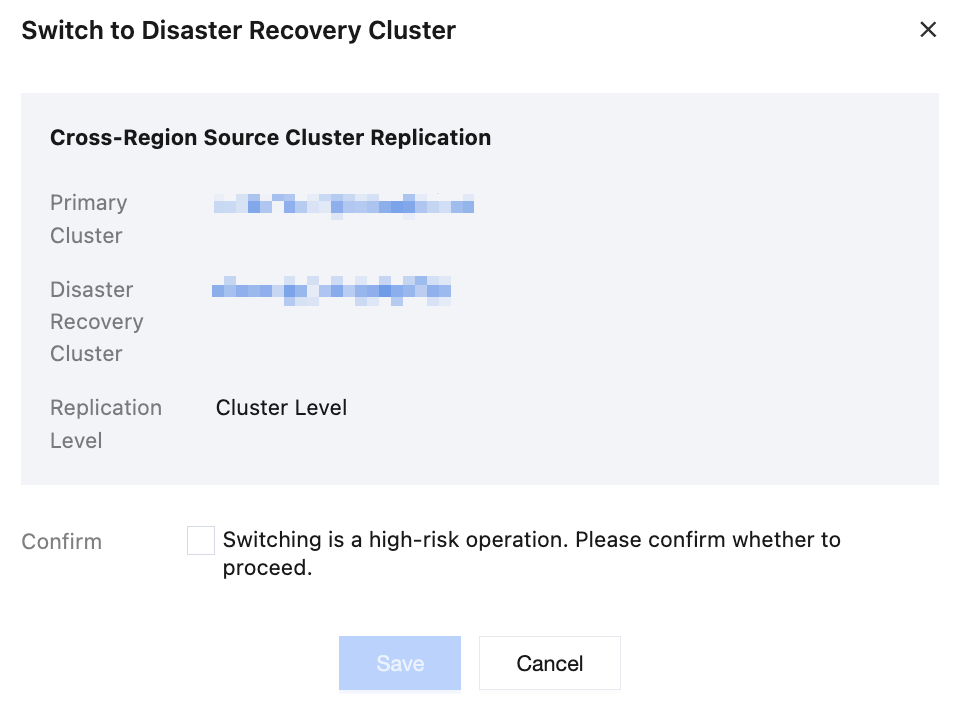
Based on the user decision, click Cross-Region Switch on the disaster recovery cluster access points page in the console to perform an emergency traffic switchover to the disaster recovery cluster:
1. In the console, click Cross-Region Switch in the operation column of the disaster recovery cluster access points.
2. If the console is unavailable, customers can contact after-sales architects or submit a ticket to have the TDMQ service side initiate the switchover.
After Disaster Recovery
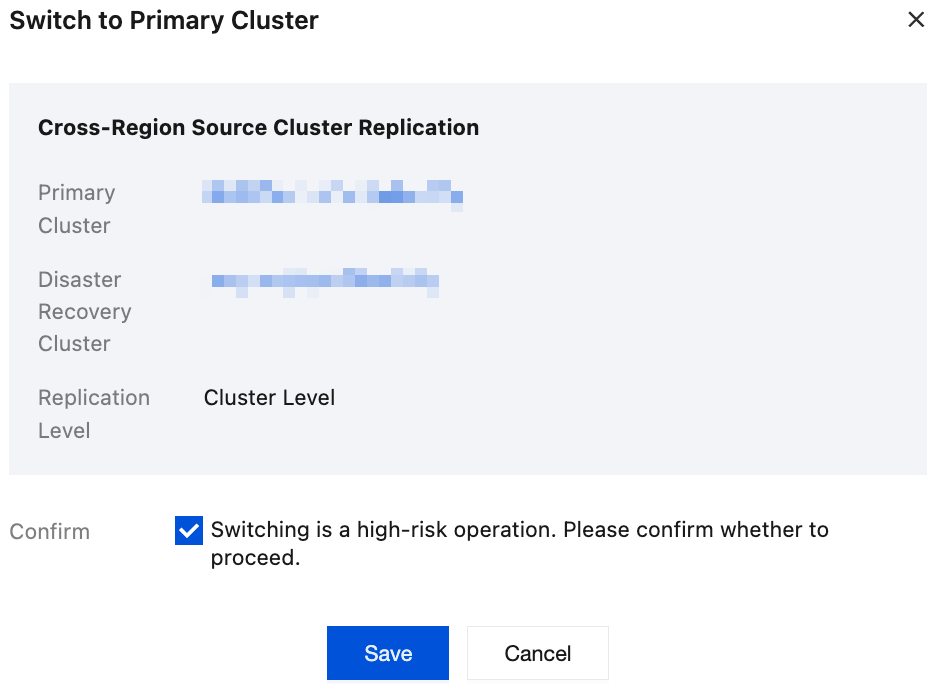
According to the user decision, switch client access back to the cluster in the original region:
1. Users determine whether message write-back is required. If write-back is needed, submit a ticket to contact the operations team.
2. After the write-back is completed and you observe that the write-back task has essentially caught up, click Cross-Region Switchback in the operation column of the disaster recovery cluster access points in the console. After this operation is performed, clients will normally access the primary cluster in the original region.
Must-Knows
1. Supported Scope
This feature is supported only by pro clusters with fixed/elastic storage.
2. Message Write-Back
Message write-back is a prerequisite decision when users switch traffic back to the original region. This aims to avoid data loss and ensure data integrity. Domain name switchback can be performed only after users determine whether to perform write-back.
Information provided by users:
The list of topics to be migrated. Example: cluster ID, namespace, or a specific topic list.
The start time and end time. Messages in the topic whose sending time falls within this time range are the data to be migrated. The reference field is publishTime in the message header.
Impact of message write-back:
A large number of duplicate messages. Subjectively, the server does not consider the complex state machine for checkpoint synchronization between the source and target clusters. It uniformly treats a migrated message as a new message. As a result, they are regarded as two different messages even if historical data already contains the same message. If duplicate messages have an impact on business, it is recommended to perform idempotent processing on the clients.
Fewer out-of-order messages.
3. Roles
The source cluster must have at least one Role, which can be unbound from a namespace. This ensures that the Role and Token remain consistent with the disaster recovery cluster during synchronization.
4. CCN Configuration
When you configure CCN, ensure that the VPC CIDR blocks created in the two regions do not overlap. For example, the CIDR blocks in the two regions are Guangzhou 10.0.0.0/16 and Shanghai 10.1.0.0/16. This way, CCN can connect the two VPCs without IP address conflicts.
5. Effective Time of Domain Name Switch
It takes approximately 5 seconds to 5 minutes for the domain name switch to take effect. The process includes two phases: Switch domain name resolution; clients disconnect from the cluster in the original region and then reconnect to brokers in the new cluster.
6. After the Switch During a Disaster
In the event of a disaster, after traffic is switched to the disaster recovery cluster, avoid modifying metadata in the backup cluster, such as modifying namespace properties and creating a topic.
文档反馈