tencent cloud
Ofertas mais recentes
Produtos
Soluções
Preços
Parceiros
Marketplace
Explore Mais
Prev
Next
VPN Connections
Release Notes and Announcements
Release Notes
Announcements
Product Introduction
Overview
Components
Application Scenarios
Use Limits
Related products
Purchase Guide
Billing Overview
Purchase Methods
Expiration Notifications
Getting Started
IPSec VPN
SSL VPN
Operation Guide
Operations Overview
VPN Gateway
VPN Tunnel
Customer Gateway
SSL VPN Server
SSL VPN Client
Binding an Anti-DDoS Instance
Alarming and Monitoring
SSL VPN Configuration Guide
IPSec VPN Configuration Guide
Practical Tutorial
IPsec VPN
SSL VPN
API Documentation
FAQs
Concepts
Scenarios
Generic class
Billing
About IPsec gateways
About SSL
Troubleshooting
VPN Tunnel Unconnected
VPN Tunnel Connected Yet Private Network Unconnected
IPSec VPN Error Description for Negotiation Failure
Service Agreement
Service Level Agreement
Contact Us
Glossary
文档
VPN Connections
Operation Guide
VPN Gateway
IPSec VPN Gateway
Viewing IPSec VPN Gateway
下载
聚焦模式
字号
最后更新时间: 2024-01-09 14:29:29
1.
Log in to
VPC Console
.
2.
In the left sidebar, choose
VPN Connection
>
VPN Gateway
to go to the management page.
3.
Click the ID of the target VPN gateway to go to the details page.
4.
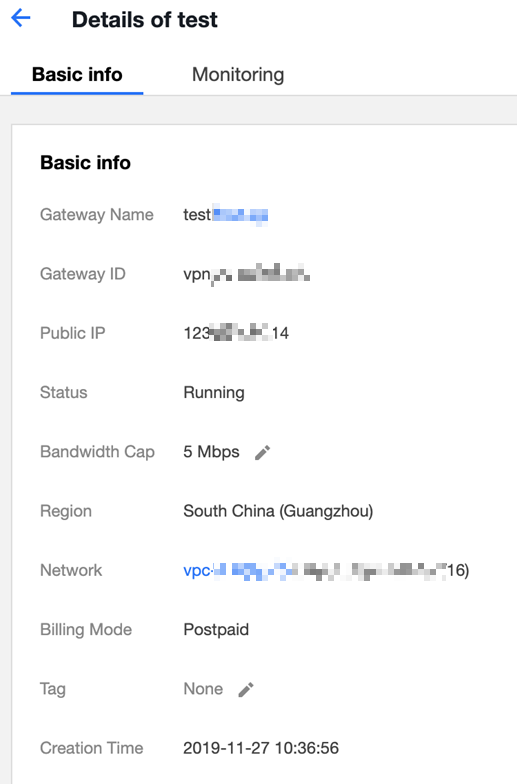
View the details of the VPN gateway.
上一篇: Deleting IPSec VPN Gateway
下一篇: Creating an SSL VPN Gateway
帮助和支持
本页内容是否解决了您的问题?
是
否
您也可以
联系销售
或
提交工单
以寻求帮助。
填写满意度调查问卷,共创更好文档体验。
点击前往
文档反馈