Delivering to CLS (Cross-Account and Cross-Region Delivery for Log Topics)
다운로드
포커스 모드
폰트 크기
Note:
Scenarios
CLS supports delivering data from one log topic to another, including within the same account and region, across regions within the same account, across accounts within the same region, and across accounts and regions. This feature applies to the following use cases:
Unified Log Management: With business teams distributed across different locations, the Ops team delivers logs across regions/accounts to a specified region for centralized monitoring and analysis.
Centralized Archival Storage: Logs generated in different regions are uniformly aggregated into a single log topic.
Compliant Data Aggregation: It meets the compliance requirement for data to be aggregated across AZs and domains.
Prerequisites
You have logged in to the CLS Console.
You have completed creating the logset and log topic. The source and destination log topics already exist.
Cross-account delivery scenario: The target account must have completed CAM role authorization. For details, see the relevant description for other root accounts.
Note:
Delivery to a CLS log topic is incremental. After a task is created, it only delivers newly generated data.
Operation Steps
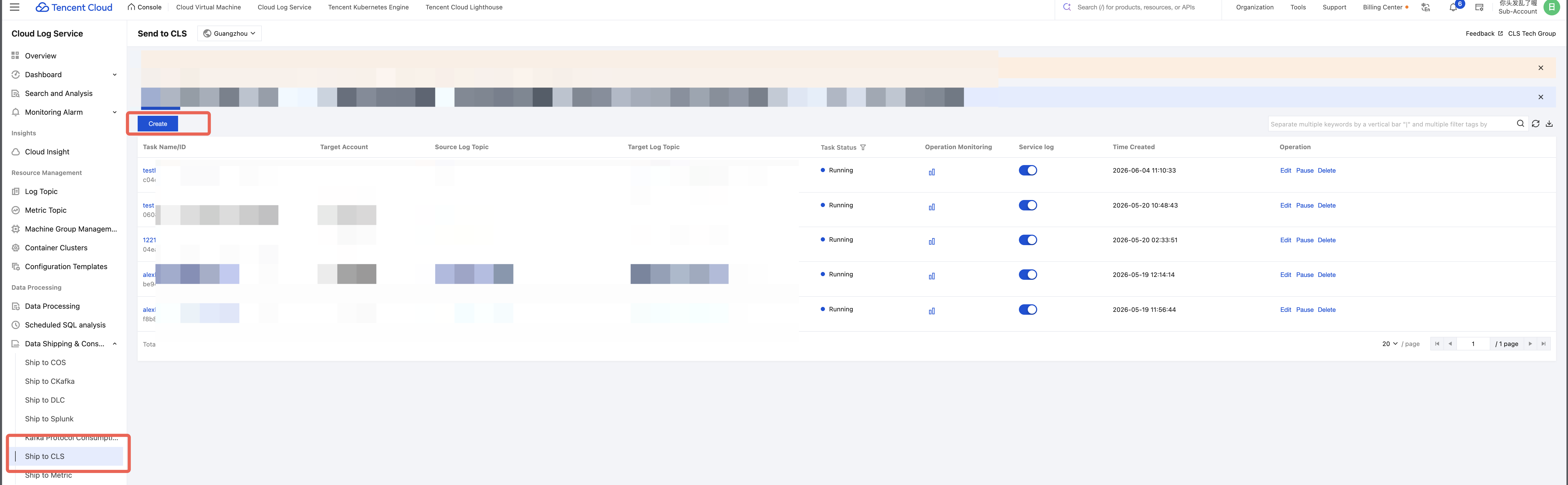
1. Log in to the CLS console. In the left sidebar, choose Data Shipping & Consumption > Ship to CLS to go to the Task Management page.
2. Click Create.
3. Configure a delivery task.
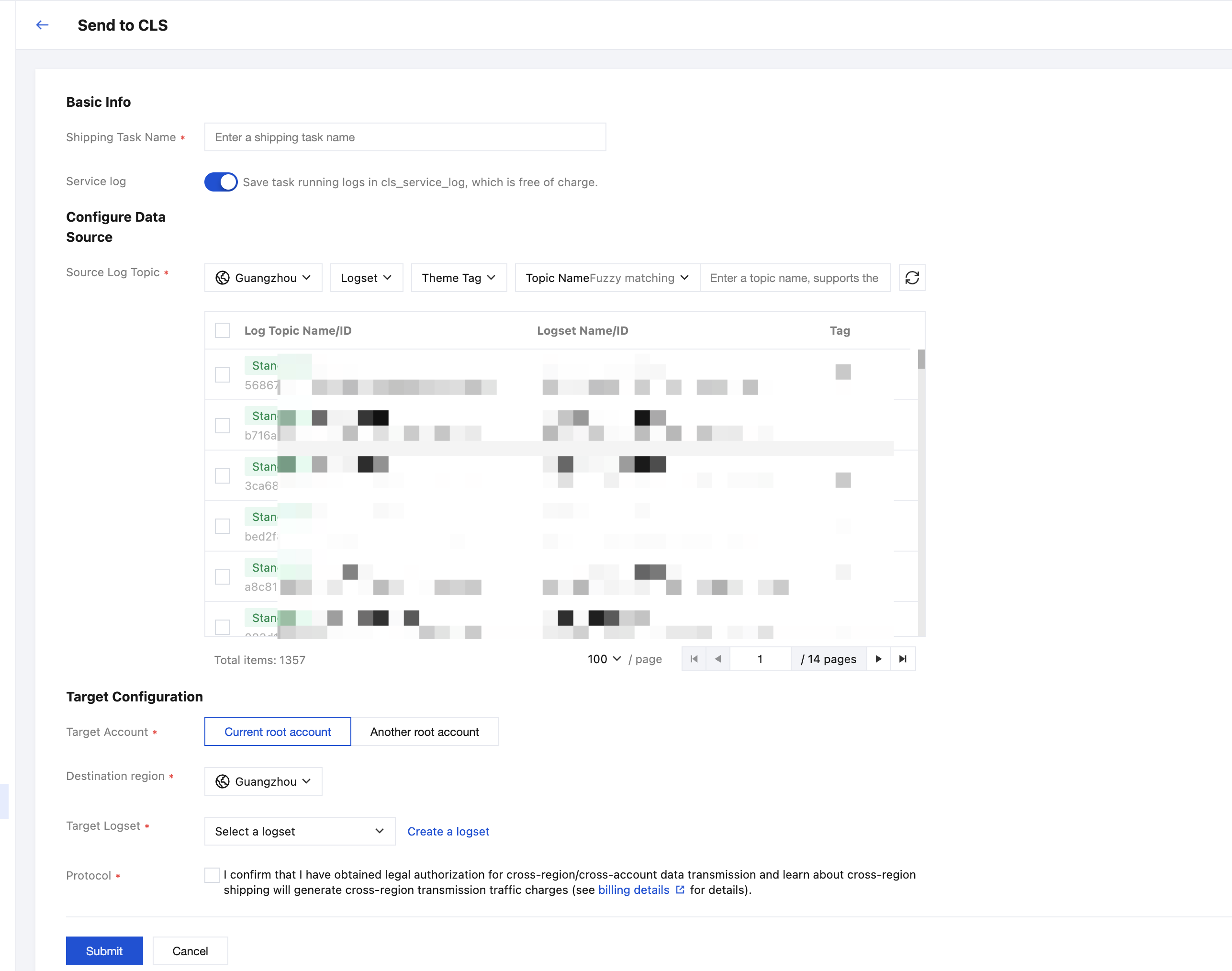
The specific configuration items are described as follows:
Configuration Item | Description |
Shipping Task Name | Task name. |
Service Log | The service log for this task, which records the task's running status, is enabled by default (this feature is free of charge). |
Source Log Topic | The source log topics to be delivered. Multiple selection is supported, and you can select up to 50 topics. |
Target Account | Current root account: Logs are delivered to the log topic of the current root account. Another root account : To deliver CLS logs to the log topic of another root account, for example, delivering CLS logs from Account A to the log topic of Account B, Account B must configure an access role in CAM. After the role is configured, Account A must enter the role ARN and external ID in the CLS console to enable cross-account delivery. The steps to configure the role are as follows:1. Create a role. Account B logs in to the CAM Role Management page. 1.1 On the Policy page, create an access policy. Select Create by Policy Syntax and enter a name, for example: cls_shipper. Refer to the following policy syntax: Note: The authorization in the example follows the principle of least privilege, with the resource configured to only allow delivery to topics in the target region. Please grant permissions based on the principle of least privilege according to your actual situation.
1.2 Create a role. Select Tencent Cloud Account as the role carrier. For the cloud account type, select Other Root Account. Then, enter the ID of Account A, for example, 100012345678. Select Enable Verification and configure an external ID, for example, Hello123. 1.3 Configure the role's access policy. Select the access policy configured in the first step, cls_shipper (example). 1.4 Save the role, for example: uinA_writeCLS_to_CLS. 2. Configure the carrier for the role. In the CAM role list, find uinA_writeCLS_to_CLS (example). Click the role, select Role Carrier > Manage Carrier > Add Product Service > Select CLS, and then click Update. You can see that the current role is carried by two entities: one is Account A, and the other is cls.cloud.tencent.com (CLS). 3. Account A logs in to CLS and enters a role ARN and external ID. The following two pieces of information must be provided by Account B: Account B finds the role uinA_writeCLS_to_CLS (example) in the CAM role list. Click the role to view its RoleArn, for example, qcs::cam::uin/100001112345:roleName/uinA_writeCLS_to_CLS. The external ID, such as Hello123, can be seen in the role carrier. Note: When entering the role ARN and external ID, ensure you do not input extra spaces, otherwise the permission verification will fail. |
Destination region | The region where the target log topic is located. |
Target Logset | The logset to which the target log topic belongs. You can select an existing logset or create a new one. |
Target Log Topic | The target log topic. You can select an existing one or create a new one. |
4. After completing the configuration, click Submit.
Use Limits
Limit | Limit |
Maximum number of delivery tasks per account | 50. |
Maximum number of source log topics per task | 50. |
Delivery latency (real-time delivery) | ≤500ms. |
Data loop scenario | Data delivery loops (for example, log topic A → log topic B → log topic A) are not supported. The system automatically detects and restricts such behavior during configuration. |
Note:
The data format for logs delivered to the destination log topic is based on the original format of the source log topic. The index configuration follows the index of the destination log topic. If a field conflict occurs, data is written according to the format of the destination log topic.
피드백