Releasing a Secondary Private IP Address
다운로드
포커스 모드
폰트 크기
This document describes how to release a secondary private IP address.
Note:
Elastic Network Interface (ENI) only supports releasing secondary IP addresses and does not support releasing the primary IP address.
After a private IP address is unbound, its associated Elastic IP (EIP) will be automatically unbound as well.
Prerequisites
A secondary private IP address has been applied for.
Operation Steps
1. Log in to the ENI console.
2. On the ENI list page, click the ID of the instance that you want to view to go to the ENI details page.
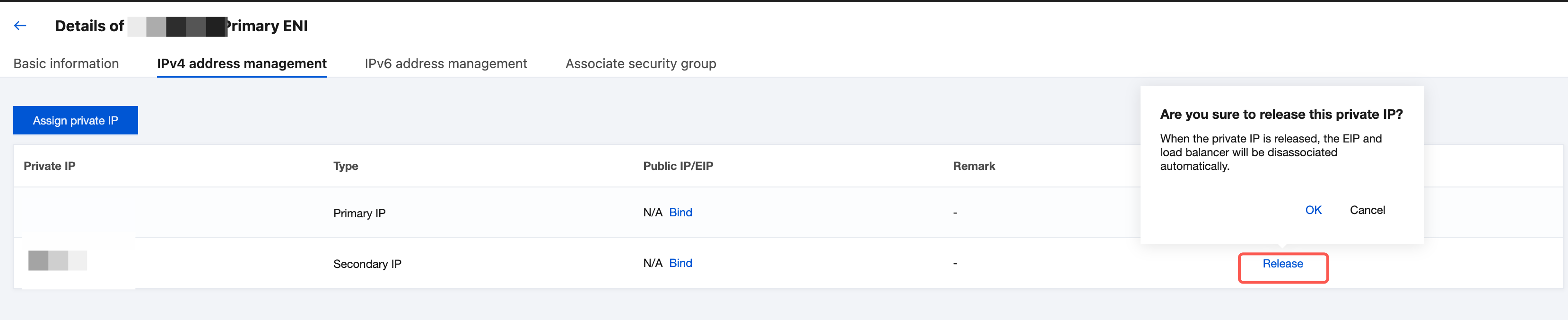
3. Click the IPv4 Address Management tab to view the bound private IP addresses and EIPs.

4. Locate the row of the private IP address that you want to release and click Release in the Operation column.
5. In the displayed dialog box, click OK.
Note:
After a private IP address is released, this IP address will no longer provide network services for the Cloud Virtual Machine (CVM). Before releasing, confirm whether this operation meets your business expectations.
피드백