Migrating MySQL/MariaDB/Percona/TDSQL-C MySQL/TDSQL Boundless to MariaDB
ダウンロード
フォーカスモード
フォントサイズ
This document describes how to use the DTS data migration feature to migrate data from MySQL, MariaDB, Percona, TDSQL-C for MySQL, and TDSQL Boundless to TencentDB for MariaDB.
The following deployment modes of the source database are supported:
Self-built MySQL and TencentDB for MySQL
Self-built MariaDB and TencentDB for MariaDB
Self-built Percona
Tencent Cloud TDSQL-C for MySQL.
Tencent Cloud TDSQL Boundless.
Description
TencentDB for MariaDB supports three kernel types: MariaDB, MySQL, and Percona. Users do not need to distinguish between these kernel types during use. If the source database is TencentDB for MariaDB, regardless of whether its kernel is MariaDB, Percona, or MySQL, select MariaDB when setting the source database type.
This document describes how to migrate data from MariaDB to TencentDB for MariaDB. The requirements and steps of data migration from MySQL and Percona to TencentDB for MariaDB are basically the same.
Must-Knows
When Data Transfer Service (DTS) is used to perform a full data migration, it occupies certain resources of the source instance, which may cause the source instance load to increase and add pressure to the database. If your database configuration is low, it is recommended to perform the migration during off-peak hours.
A lock-free migration method is adopted by default. During the migration, no global lock (FTWRL) is applied to the source database. Only tables without primary keys are locked at the table level, while no locks are added to other tables.
When creating a data consistency check, DTS uses the account that executes the migration task to write to the system database
__tencentdb__ in the source database. This database records data comparison information during the migration task.To facilitate troubleshooting of subsequent data comparison issues, the
__tencentdb__ system database in the source database is not deleted after the migration task is completed.The
__tencentdb__ system database occupies minimal space, approximately 0.01% to 0.1% of the source database's storage capacity. For example, for a 50 GB source database, the __tencentdb__ system database is approximately 5 MB–50 MB. It employs a single-threaded, connection-waiting mechanism, thus having a negligible impact on source database performance and not preempting any resources.Prerequisites
A TencentDB for MariaDB instance has been created.
The source and target databases must meet the migration feature and version requirements. For verification, see Databases Supported for Data Migration.
The preparation steps have been completed.
The source database must have the following permissions:
"Entire Instance" Migration:
CREATE USER 'migration_account'@'%' IDENTIFIED BY 'migration_password';GRANT RELOAD, LOCK TABLES, REPLICATION CLIENT, REPLICATION SLAVE, SHOW DATABASES, SHOW VIEW, PROCESS ON *.* TO 'migration_account'@'%';// If the source is a TencentDB for MariaDB database, you must submit a ticket to request RELOAD permissions. For other scenarios, refer to the code for authorization.// When the source database is an Alibaba Cloud database, you do not need to grant SHOW DATABASES permissions. For other scenarios, you must grant the permissions. For Alibaba Cloud database authorization, see https://help.aliyun.com/document_detail/96101.html.// If you choose to migrate triggers and events, you must also grant TRIGGER and EVENT permissions.GRANT ALL PRIVILEGES ON `__tencentdb__`.* TO 'migration_account'@'%';GRANT SELECT ON *.* TO 'migration_account';
"Specified Objects" Migration:
CREATE USER 'migration_account'@'%' IDENTIFIED BY 'migration_password';GRANT RELOAD, LOCK TABLES, REPLICATION CLIENT, REPLICATION SLAVE, SHOW DATABASES, SHOW VIEW, PROCESS ON *.* TO 'migration_account'@'%';// If the source is a TencentDB for MariaDB database, you must submit a ticket to request RELOAD permissions. For other scenarios, refer to the code for authorization.// When the source database is an Alibaba Cloud database, you do not need to grant SHOW DATABASES permissions. For other scenarios, you must grant the permissions. For Alibaba Cloud database authorization, see https://help.aliyun.com/document_detail/96101.html.// If you choose to migrate triggers and events, you must also grant TRIGGER and EVENT permissions.GRANT ALL PRIVILEGES ON `__tencentdb__`.* TO 'migration_account'@'%';GRANT SELECT ON `mysql`.* TO 'migration_account'@'%';GRANT SELECT ON `database_to_be_migrated`.* TO 'migration_account';
The following permissions on the target database are required: ALTER, ALTER ROUTINE, CREATE, CREATE ROUTINE, CREATE TEMPORARY TABLES, CREATE USER, CREATE VIEW, DELETE, DROP, EVENT, EXECUTE, INDEX, INSERT, LOCK TABLES, PROCESS, REFERENCES, RELOAD, SELECT, SHOW DATABASES, SHOW VIEW, TRIGGER, and UPDATE.
Application Limits
It supports migrating base tables, views, functions, triggers, stored procedures, and events. It does not support migrating system database tables, including
information_schema, sys, performance_schema, __cdb_recycle_bin__, __recycle_bin__, __tencentdb__, and mysql.When migrating views, stored procedures, and functions, DTS checks whether the user1 specified by
DEFINER ([DEFINER = user1]) in the source database matches the migration account user2. If they do not match, after migration, DTS modifies the SQL SECURITY attribute of user1 in the target database, changing it from DEFINER to INVOKER ([INVOKER = user1]). At the same time, DTS sets the DEFINER in the target database to the migration account user2 ([DEFINER = migration account user2]). If the view definition in the source database is overly complex, it may cause the task to fail.If the source is a non-GTID instance, DTS does not support a high availability (HA) switch on the source. If a switch is performed on the source MySQL, the DTS incremental synchronization may be interrupted.
Only the InnoDB, MyISAM, and TokuDB database engines are supported for migration. Tables using other database engines are skipped by default and are not migrated. If the source database contains TokuDB engine data in compressed mode, the target database must also support compressed mode for the migration to proceed. Otherwise, the task will report an error.
Correlated data objects need to be migrated simultaneously; otherwise, the migration will fail. Common relationships include: views referencing tables, views referencing views, and primary-foreign key associated tables.
During incremental migration, if the source database generates Binlog statements in the
STATEMENT format, the migration will fail.When the source database is TencentDB for MariaDB, the application restrictions are as follows.
DTS migration tasks require the
lower_case_table_names parameter (case sensitivity for table names) to be consistent between the source and target databases. If the source database is TencentDB for MariaDB, note that the lower_case_table_names parameter for TencentDB for MariaDB can only be modified during instance creation. Therefore, you must determine the case sensitivity rule when creating the source database instance. If the parameter validation fails, modify the lower_case_table_names parameter of the target database.In a lock-free migration scenario, DDL operations are not supported when the migration task is in the "source database export" phase.
If gaps exist in the GTID of the source database's Binlog, they may affect the performance of the migration task and cause it to fail.
A single transaction cannot contain both DML and DDL statements at the same time. Such transactions will cause task errors.
Geometry-related data types are not supported. Such data will cause task errors.
The
ALTER VIEW statement is not supported. If this statement is encountered, it is skipped and not migrated.Operation restrictions
Do not perform the following operations during migration. Otherwise, they will cause the migration task to fail.
Do not modify or delete user information (including usernames, passwords, and permissions) and port numbers in the source and target databases.
Do not write data in the
STATEMENT Binlog format to the source database.Do not perform binlog cleanup operations on the source database.
During the structure migration and full migration phases, do not perform DDL operations that alter database or table structures.
During the incremental migration phase, do not delete the system database
__tencentdb__.If you perform only a full data migration, do not write new data to the source instance during the migration. Otherwise, it will cause data inconsistency between the source and target. For scenarios where data write operations are required, to maintain data consistency in real time, it is recommended to select full + incremental data migration.
When the source database is Alibaba Cloud RDS or PolarDB, RDS and PolarDB add an additional primary key column in the Binlog for tables that lack a primary key or a non-null unique key. However, this column is not visible in the table structure, which may cause DTS to fail to recognize it. Therefore, it is recommended that users avoid migrating tables without a primary key whenever possible.
Supported SQL Operations
Operation Type | Supported SQL Operations |
DML | INSERT,UPDATE,DELETE,REPLACE |
DDL | TABLE:CREATE TABLE,ALTER TABLE,DROP TABLE,TRUNCATE TABLE,RENAME TABLE VIEW:CREATE VIEW,DROP VIEW INDEX:CREATE INDEX,DROP INDEX DATABASE:CREATE DATABASE,ALTER DATABASE,DROP DATABASE Currently, statements such as CREATE TABLE table_name AS SELECT are not supported. |
Environment Requirements
Description
The system automatically performs a check against the following environment requirements before starting a migration task. If the requirements are not met, the system reports an error. If you can identify the issue, you can refer to the Check Item Requirements to make modifications yourself. If you cannot, wait for the system check to complete and then modify according to the error message.
Type | Environment Requirement |
Source database requirements | The networks between the source and target databases can be connected. The server where the source database is located is required to have sufficient outbound bandwidth; otherwise, the migration speed is affected. Instance parameter requirements: The server_id parameter of the source database needs to be manually set and cannot be set to 0. The row_format of source database tables cannot be set to FIXED. The lower_case_table_names variable must be set to the same value in both the source and target databases. The value of the connect_timeout variable in the source database must be greater than 10. It is recommended to enable skip-name-resolve to reduce the possibility of connection timeouts. Binlog parameter requirements: The log_bin variable of the source database must be set to ON. The binlog_format variable of the source database must be set to ROW. The binlog_row_image variable of the source database must be set to FULL. When the gtid_mode variable is not set to ON in MySQL 5.6 or later, a warning will be triggered. It is recommended to enable gtid_mode. You cannot set the do_db or ignore_db filter conditions. The log_slave_updates variable must be set to ON when the source instance is a secondary database. It is recommended to retain binlogs in the source database for at least 3 days. Otherwise, if the task is paused or interrupted for a period longer than the binlog retention period, the task may fail due to the inability to resume. Foreign key dependencies: Foreign key dependencies can only be set to NO ACTION or RESTRICT. When a subset of databases and tables is migrated, all tables with foreign key dependencies must be complete. DTS provides a migration precision of 38 digits for the FLOAT data type and 308 digits for the DOUBLE data type. You need to verify whether this meets your expectations. The environment variable innodb_stats_on_metadata must be set to OFF. |
Target database requirements | The version of the target database must be greater than or equal to that of the source database. The storage capacity of the target database must be at least 1.2 times the size of the tablespaces to be migrated from the source database. (Full data migration concurrently executes INSERT operations, which can cause fragmentation in the tables of the target database. Therefore, after the full migration is complete, the table storage space in the target database is likely to be larger than that in the source instance.) The target database must not contain migration objects, such as tables or views, that have the same name as those in the source database. The max_allowed_packet parameter for the target database must be set to at least 4M. |
Operation Steps
1. Log in to the DTS console, select Data Migration in the left sidebar, and then click Create Migration Task to go to the migration task creation page.
2. On the migration task creation page, select the source instance type and region as well as the target instance type, region, and specification for migration, and then click Buy Now.
Configuration Item | Description |
Creating Mode | Select New Task. |
Billing Mode | Only pay-as-you-go is supported. After purchase, no charges are incurred during the task configuration and full migration phases. Charges are only applied during the incremental migration phase. However, due to the unified pay-as-you-go requirements of Tencent Cloud, a 1-hour fee will be frozen upon purchase. For detailed billing rules, see Billing Items and Rules. |
Source Instance Type | Select based on your source database type. It cannot be modified after purchase. Select MariaDB here. If your source database is a self-built MariaDB or a MariaDB from another cloud provider, select MariaDB here. If your source database is TencentDB for MariaDB, note that TencentDB for MariaDB has three kernel editions (MySQL/MariaDB/Percona). In this case, you do not need to distinguish the kernel edition and should still select MariaDB. |
Source Instance Region | This refers to the source region of the DTS data migration service. If the source database is a TencentDB database, select the region to which the source database belongs. If the source database is a self-built database or a database from another cloud provider, select the region closest to the source database, so that DTS can choose the optimal migration path and reduce migration duration. |
Target Instance Type | Select based on your target database type. It cannot be modified after purchase. Select MariaDB here. |
Target Instance Region | Select the target database region. |
Specification | Select the specifications for the migration link based on your business needs. For performance and billing details of different specifications, see Billing Overview. |
Quantity | A maximum of 10 migration tasks can be purchased in a single purchase. |
3. On the source and target database configuration page, complete the task, source database, and target database configurations. After the connectivity test between the source and target databases passes, click Create.
Description
If the connectivity test fails, troubleshoot and resolve the issue according to the prompts and Troubleshooting Guide, and then try again.
Setting Type | Configuration Item | Description |
Task Configuration | Task Name | Set a task name that is easy to identify. |
| Running Mode | Immediate execution: The task will be started immediately once the task check passes. Scheduled execution: Configure when the task is executed. It will automatically start at the specified time. |
| Automatic Retry | After configuration, if a migration task is temporarily interrupted due to network exceptions or similar issues, DTS will automatically retry and resume the task within the configured time range. No manual intervention is required. The supported time range for automatic retries is 5–720 minutes. |
Source Database Settings | Source Database Type | Source database type selected during purchase. It cannot be modified. |
| Service Provider | For a self-built database (including those on CVM) or a TencentDB database, select "Others". For a database from a third-party cloud provider, select the corresponding service provider. For this scenario, select "Others". |
| Region | Source database region selected during purchase. It cannot be modified. |
| Access Type | Select the access type based on your scenario. For this scenario, select Direct Connect or VPN Access. This scenario requires configuring the connection between VPN and IDC. For preparations of other access types, see Preparations Overview. Public Network: The source database is accessible through a public IP address. Self-built on CVM: The source database is deployed on Tencent CVM. Direct Connect: The source database can connect to Tencent Cloud Virtual Private Cloud (VPC) through DC. VPN Access: The source database can connect to Tencent Cloud VPC through VPN Access. Database: The source database is a TencentDB instance. CCN: The source database can connect to Tencent Cloud VPC through CCN. |
| VPC-Based Direct Connect Gateway/VPN Gateway | Only the VPC-based Direct Connect gateway is supported for DC. Confirm the network type associated with the gateway. For the VPN gateway, select the VPN gateway instance for access. |
| VPC | Select the VPC network and subnet associated with the VPC-based Direct Connect gateway and VPN gateway. |
| Host Address | IP address or domain name for accessing the source database. |
| Port | Port for accessing the source database. |
| Account | Database account for the source database. The account permissions should meet the requirements. |
| Password | The password for the account of the source database. |
| Connection Method | Secure Sockets Layer (SSL) connection refers to the use of SSL to establish a secure connection between DTS and the database, encrypting the transfer link. Selecting the SSL connection may increase the database connection response time. Generally, the private network link of Tencent Cloud is relatively secure, and the SSL connection is not required to be enabled. However, for scenarios where transfer methods such as public networks and DC are adopted, and data security requirements are high, the SSL connection is required to be enabled. Before the SSL connection is selected, SSL encryption is required to be enabled for the database first. |
Target Database Settings | Target Database Type | Target database type selected during purchase. It cannot be modified. |
| Region | Target database region selected during purchase. It cannot be modified. |
| Access Type | Select the access type based on your scenario. For this scenario, set it to Cloud Database. |
| Database Instance | Select the ID of the target database. |
| Account | Target database account. The account permissions should meet the requirements. |
| Password | The password for the account of the target database. |
| Connection Method | Secure Sockets Layer (SSL) connection refers to the use of SSL to establish a secure connection between DTS and the database, encrypting the transfer link. Selecting the SSL connection may increase the database connection response time. Generally, the private network link of Tencent Cloud is relatively secure, and the SSL connection is not required to be enabled. However, for scenarios where transfer methods such as public networks and DC are adopted, and data security requirements are high, the SSL connection is required to be enabled. Before the SSL connection is selected, SSL encryption is required to be enabled for the database first. |
4. On the Set migration options and select migration objects page, configure the migration type and objects, and then click Save.
Description
If you are certain that a RENAME operation will be performed on a table during migration (for example, renaming table A to table B), you must select the entire database (or the entire instance) where table A resides as the migration object. Do not select only table A. Otherwise, after the RENAME operation, data from table B will not be synchronized to the target database.
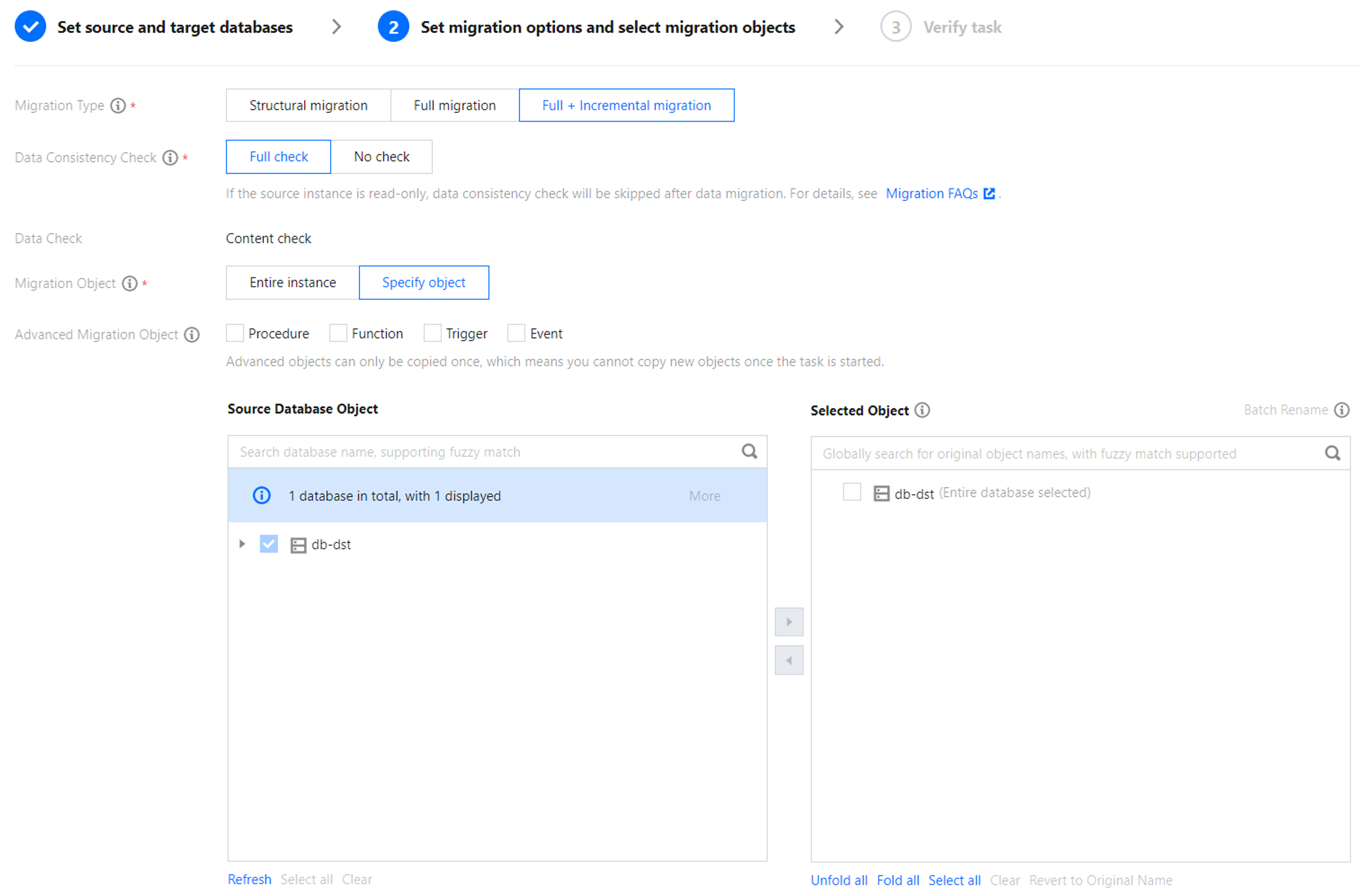
Configuration Item | Description |
Migration Type | Select the migration type based on your scenario. Structural migration: Structured data, such as databases and tables, will be migrated. Full migration: The entire database will be migrated. The migration includes only the data that exists in the source database when the task starts and excludes any new data written after the migration begins. Full + incremental migration: Both existing data in the source database at the start of the task and any new data written during the migration process are migrated. You can select this option if data is continuously written to the source database during migration, and a non-stop, hitless migration is required. |
Migration Object | Entire instance: The entire instance will be migrated, excluding system databases such as information_schema, mysql, performance_schema, and sys. Specified objects: Migrate specified objects. |
Advanced Migration Object | Supports migrating stored procedures (Procedure), functions (Function), triggers (Trigger), and events (Event). The migration of advanced objects is a one-time operation. Only the advanced objects that exist in the source database before the task starts are migrated. Any new advanced objects added after the task starts will not be synchronized to the target database. Stored procedures and functions are migrated during the "source database export" phase. Triggers and events are migrated at the end of the task if there is no incremental task. If there is an incremental task, they are migrated after the user clicks Complete. Therefore, after Complete is clicked, the transition time of the task will increase slightly. |
Selected Object | Database and table mapping (database and table renaming) is supported. Hover the mouse pointer over a database or table name to display the Edit button. Click the button and fill in a new name in the pop-up window. When advanced objects are migrated, it is recommended not to rename databases and tables. Otherwise, the migration of advanced objects may fail. |
Whether to Synchronize Online DDL Temporary Tables | If you use the gh-ost or pt-osc tool to perform Online DDL operations on tables in the source database, DTS supports migrating the temporary tables generated by Online DDL changes to the target database. If you select gh-ost, DTS will migrate the temporary table names (`_tablename_ghc`, `_tablename_gho`, `_tablename_del`) generated by the gh-ost tool to the target database. If you select pt-osc, DTS will migrate the temporary table names (`_tablename_new`, `_tablename_old`) generated by the pt-osc tool to the target database. |
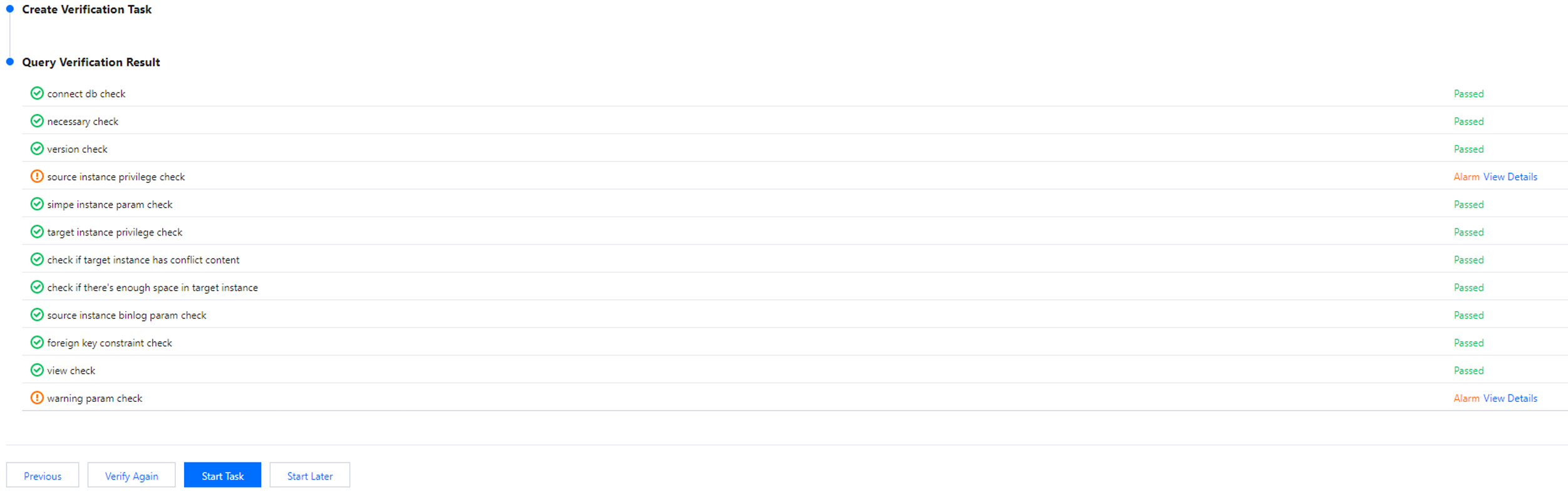
5. On the Task Verification page, verify the task. After the verification is passed, click Start Task.
If the check task fails, you can see Troubleshooting Approach to fix the issue and reinitiate a check task.
Failed: indicates that a check item fails and the task is blocked. Fix the issue and execute the check task again.
Warning: indicates that a check item does not completely meet the requirements, and the task can be continued, but the business may be affected. Users are required to assess whether to ignore the warning or fix the issue before continuing to execute the task based on the prompt.
6. Return to the data migration task list, and you can see that the task has entered the Preparing status. After 1–2 minutes, the data migration task will be started.
Select Structural Migration or Full Migration: The task automatically ends upon completion and does not need to be manually ended.
Select Full + Incremental migration: After full migration is completed, the migration task will automatically enter the incremental data sync phase, which will not stop automatically. You need to click Complete to manually stop the incremental data migration.
Select an appropriate time to manually complete the incremental data synchronization and perform the service switch.
Once you confirm that the migration task is in the incremental synchronization phase and no latency exists, suspend the write operations on the source database for several minutes.
Manually complete the incremental synchronization when the data difference between the target and source databases is 0 KB and the time delay is 0 seconds.
7. (Optional) If you need to view or delete tasks, click the task and perform the required operation in the Operation column. For details, see Managing Tasks.
8. When the status of the migration task changes to Task Successful, you can formally perform service cutover. For details, see Cutover Instructions.
フィードバック