Same-Version Migration
ダウンロード
フォーカスモード
フォントサイズ
Scenarios
TencentDB for SQL Server allows you to migrate data using COS files. The migration method described in this document applies to scenarios where you migrate SQL Server databases of the same version from other cloud providers or self-built environments to TencentDB for SQL Server.
Note:
Before migration, ensure that the SQL Server version of the target instance is the same as that of the source instance.
Each .bak file for migration must contain only one database.
The database to be migrated must not have a duplicate name with TencentDB for SQL Server.
The data migration feature for older versions has been decommissioned. This document is for reference only by existing users. To use the new data migration feature, see Data Migration Solution Overview.
Full Backup Migration
Preparing Backup Files
You can prepare a full backup file in the following two ways:
Full Backup with Downtime
Shut down your server. After shutdown, perform a full backup on the SQL Server database from another cloud provider or your self-built environment, and export the backup file (the backup file suffix must be in
.bak format). Keep the server shut down until the migration is complete.When you choose the full backup migration method with server shutdown, you do not need to perform incremental backup migration.
Full Backup Without Downtime
Note:
The backup file name cannot be customized. You must follow the naming convention in the script.
After the full backup is restored, you must continue performing incremental backup/recovery until the data in the source instance and the target instance are consistent.
A file whose name contains "1full1" is a full backup.
In an incremental recovery scenario, after you upload the backup and migrate the data but before you perform the final incremental backup/recovery, the database will be in a restoring state and cannot be accessed. This is normal. You must continue the process until the last incremental backup is restored, after which the database will be accessible again.
Keep your server running. Perform a backup on the SQL Server database from another cloud provider or your self-built environment, and export the backup file.
---No incremental recovery is required.backup database db to disk='d:\\db.bak' with init---Incremental recovery is required.declare @dbname varchar(100)declare @localtime varchar(20)declare @str varchar(max)set @dbname='db'set @localtime =replace(replace(replace(CONVERT(varchar, getdate(), 120 ),'-',''),' ',''),':','')set @str='BACKUP DATABASE [' + @dbname + '] TO DISK = N''d:\\dbbak\\' + @dbname + '_' + @localtime + '_1full1_1noreconvery1.bak'' WITH INIT'exec(@str)go
Upload the backup to COS.
Upload the backup to COS.
1. Log in to the COS console.
2. In the left sidebar, select the Bucket List page, and then click Create Bucket.
3. In the pop-up creation dialog box, configure the corresponding information and click OK.
The bucket region must be the same as the region of the target SQL Server instance for migration.
COS migration does not support cross-region operations.
4. Return to the bucket list, click the bucket name or Configuration Management in the Operation column.
5. On the File List page, click Upload File to upload a single file or multiple files.
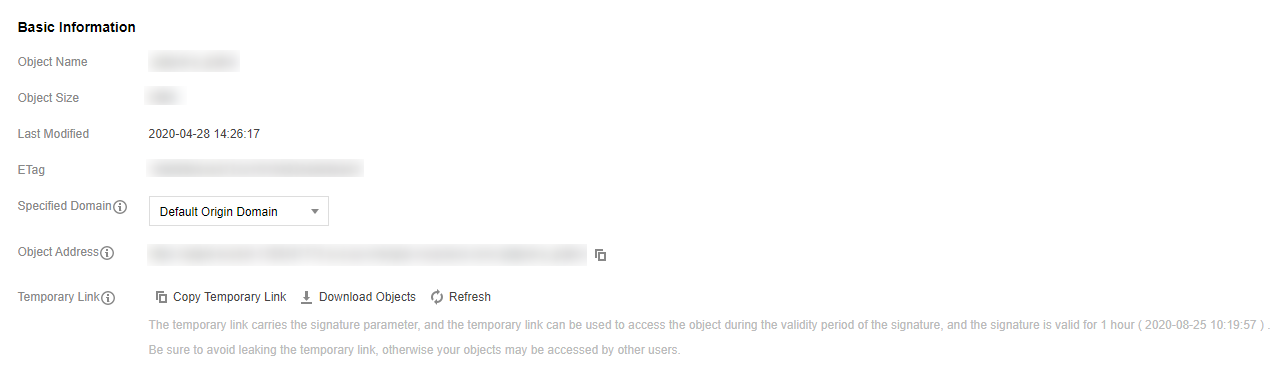
6. After the file is uploaded, click the bucket name and obtain the Object Address from the Basic Information section under Basic Configuration.
Migrate data via COS source files.
Migrate data via COS source files.
1. Log in to the TencentDB for SQL Server console.
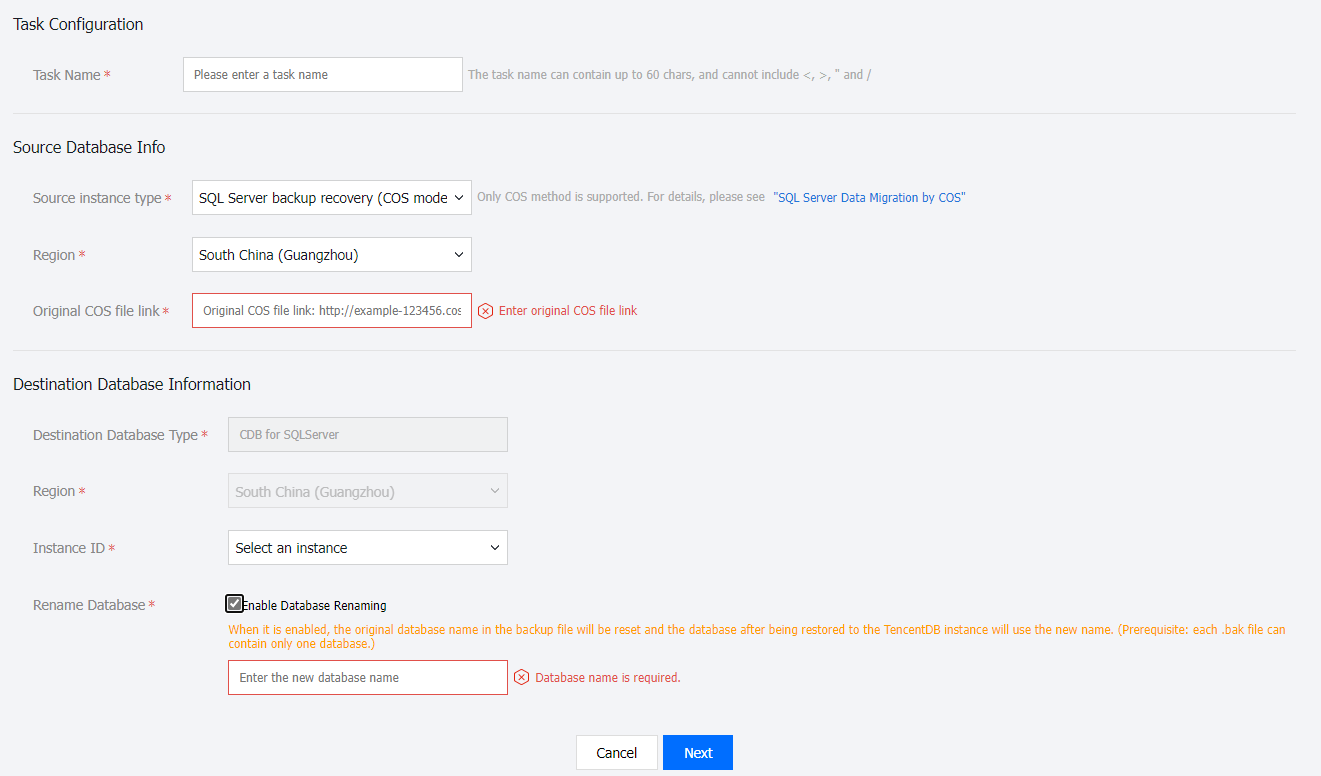
2. In the left navigation pane, select Data Migration (Legacy), click Create Task, and create a new offline migration task.
Task Name: User-defined.
Source Instance Type: Select SQL Server backup and recovery (COS mode).
Region: The region of the source database information must be the same as the region of the COS source file connection.
COS Original File Link: After uploading the source file to COS, you can view the file information and obtain the COS object address.
Target Database Type and Region: They are automatically generated by the system based on the source database configuration.
Instance ID: Select the instance to be migrated. You can only select an instance within the same region.
Rename Database: Select whether to enable it. If it is enabled, you need to enter a new database name.
Note:
After this option is enabled, the original database name in the backup file will be reset. After the database is restored to the cloud, it will be assigned a new database name. (Prerequisite: The backup .bak file can contain only one database.)
3. After completing the configuration, click Next.
4. Currently, you can adjust the selection type and database settings. Then, click Create Task.
5. Return to the task list. At this point, the task status is Initializing. Select and click Start at the top of the list to initiate the synchronization task.
6. After data synchronization is complete (that is, the progress bar reaches 100%), you must manually click Complete at the top of the list to end the synchronization process. Then, check the Status to see whether the migration succeeded.
When the task status changes to Task succeeded, it indicates that the data migration has succeeded.
When the task status changes to Task failed, it indicates that the data migration has failed. Please check the failure information, and then re-migrate after making corrections based on that information.
Incremental Backup Migration
Preparing Backup Files
Note:
The backup file name cannot be customized. You must follow the naming convention in the script.
A file whose name contains "1diff1" is an incremental backup.
(Optional) When you have multiple incremental backup files, the generation method for all but the last one is as follows. You must upload the backup and migrate data in the chronological order of the incremental backups. Otherwise, the migration will fail.
Note:
After you perform the "Generate Backup, Upload Backup, and Migrate Data" operation, the database will be in a restoring state and cannot be accessed. This is normal. You can repeat this operation until the last backup is uploaded and migrated. Then, proceed to the next step (that is, "Perform the final incremental backup after the server is shut down").
declare @dbname varchar(100)declare @localtime varchar(20)declare @str varchar(max)set @dbname='db'set @localtime =replace(replace(replace(CONVERT(varchar, getdate(), 120 ),'-',''),' ',''),':','')set @str='BACKUP DATABASE [' + @dbname + '] TO DISK = N''d:\\dbbak\\' + @dbname + '_' + @localtime + '_1diff1_1noreconvery1.bak'' WITH DIFFERENTIAL, NOFORMAT, INIT'exec(@str)go
Shut down the user server. After the shutdown, perform an incremental backup, export the backup file, and then proceed with "Upload Backup and Migrate Data".
Note:
After this operation is performed, the database can be accessed normally.
declare @dbname varchar(100)declare @localtime varchar(20)declare @str varchar(max)set @dbname='db'set @localtime =replace(replace(replace(CONVERT(varchar, getdate(), 120 ),'-',''),' ',''),':','')set @str='BACKUP DATABASE [' + @dbname + '] TO DISK = N''d:\\dbbak\\' + @dbname + '_' + @localtime + '_1diff1_1reconvery1.bak'' WITH DIFFERENTIAL, NOFORMAT, INIT'exec(@str)go
Uploading Backup and Migration Data
1. After you have prepared the backup files, see Upload Backup to COS and Migrate Data via COS Source File to perform the subsequent backup upload and data migration operations.
2. After you import the final incremental backup (that is, the .bak file containing
_1diff1_1reconvery1), the status of the target instance changes from read-only to usable. You can then switch your business to the TencentDB for SQL Server instance.Related APIs
API | Description |
This API (CreateMigration) is used to create a migration task. | |
This API (ModifyMigration) can modify existing migration task information. | |
This API (StartMigrationCheck) is used to start a pre-migration verification task, applicable to the migration method where the migration source type is TencentDB for SQL Server. | |
This API (RunMigration) is used to start a migration task and initiate the migration. | |
This API (StopMigration) is used to stop a migration task. | |
This API (CompleteMigration) is used to complete a migration task. | |
This API (DeleteMigration) is used to delete a migration task. | |
This API (DescribeMigrationDetail) is used to query the details of a migration task. | |
This API (DescribeMigrations) queries a list of migration tasks that meet the specified conditions based on the input criteria. | |
This API (DescribeMigrationDatabases) is used to query the list of databases to be migrated. | |
This API (QueryMigrationCheckProcess) is used to query the progress of a migration check task, applicable to the migration method where the migration source type is TencentDB for SQL Server. |
フィードバック