Tencent Cloud Object Storage (COS) provides the Object Lock feature, which ensures that objects cannot be overwritten or deleted within a specified retention period while remaining immediately accessible. This document primarily describes how to enable the Object Lock feature in the console. For detailed information, usage restrictions, and compatibility regarding the Object Lock feature, see Object Lock Overview.
Use Limits
The Object Lock feature is currently available only to allowlist customers. To enable this feature, please contact us.
The Object Lock feature cannot be enabled for multi-AZ buckets at this time.
Object Lock cannot be enabled for a bucket whose versioning feature is suspended. For a bucket with both Object Lock and versioning enabled, versioning cannot be suspended.
Object Lock is not compatible with the Intelligent Tiering feature. A bucket with Object Lock enabled cannot have Intelligent Tiering configured. Conversely, a bucket with Intelligent Tiering configured cannot have Object Lock enabled.
The relationship between Object Lock and lifecycle rules. While an object is within its retention period, the transition and deletion operations configured in the lifecycle policy do not take effect. After the object exceeds its retention period, the transition and deletion operations configured in the lifecycle policy can take effect normally.
Lifecycle Rule
Object Lock Retention Period
Lifecycle Execution Behavior
Objects to be transitioned after 20 days
30-day retention period
The object is not transitioned on the 20th day after upload, and is transitioned on the 31st day after upload.
Objects to be deleted after 20 days
30-day retention period
The object is not deleted on the 20th day after upload, and is deleted on the 31st day after upload.
Objects to be transitioned after 20 days
10-day retention period
The object is transitioned normally on the 20th day after upload.
Objects to be deleted after 20 days
10-day retention period
The object is deleted normally on the 20th day after upload.
After Object Lock is enabled for a bucket, file fragments are not restricted by the Object Lock rules. Users can clear file fragments within the bucket.
The Object Lock feature cannot be disabled once it is enabled.
After Object Lock is enabled, bucket and object ACLs can be modified.
2. In the left sidebar, choose Bucket List to go to the bucket list page.
3. Click the bucket for which you want to configure Object Lock to go to the bucket details page.
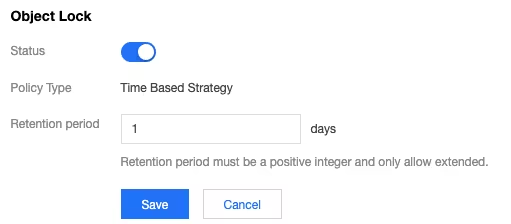
4. Choose Security Management > Object Lock, locate the Object Lock configuration item, click Edit, and change the Current Status to "Enabled". On the configuration page, you can enter the retention period as needed. The configuration items are described as follows:
Retention Period: Specifies the retention period for Object Lock. After the retention period expires, the Object Lock configuration becomes invalid, and you can add, delete, or modify it. Enter a positive integer between 1 and 36500. The retention period can only be extended, not shortened. Configure it appropriately.
Note:
After you set the retention period for Object Lock, the object remains locked during this period and cannot be unlocked.
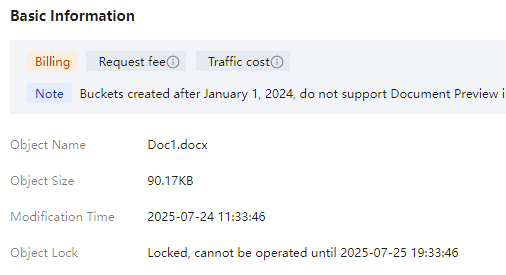
5. After confirming that the configuration information is correct, click Save. Then, click OK in the pop-up window to complete the Object Lock configuration for the bucket. After the configuration is complete, you can view the Object Lock expiration date. Click File List on the left, select the file you want to view, and click Details on the right side of the file. You can then see the Object Lock expiration date (Beijing time) in the Basic Information section.