Metadata Service
Unduh
Mode fokus
Ukuran font
SCS provides a metadata service (HiveMetastore, HMS for short) equivalent to that of dedicated and shared clusters. This service enables different scenarios, such as jobs and data exploration, to share the same set of table metadata, eliminating the need to repeatedly execute `CREATE TABLE` in each Flink job. You can enable this service with one click on an existing cluster and then directly connect it to the HiveCatalog of your Flink job by using the downloaded `hive-hms-***.jar` file, which includes hive-site.xml.
Currently, the system supports enabling the metadata service on a cluster. Within a cluster group, you can create at most one metadata service.
Must-Knows
1. A cluster group (ClusterGroup) can create only one metadata service. To recreate the service, first delete it on the Metadata Service tab.
2. Deleting the metadata service does not automatically stop jobs that reference HMS. Before deletion, confirm that downstream jobs have been switched over or stopped to avoid triggering job exception alarms.
Operation Steps
1. Go to Compute Resources > Go to the target cluster page > Cluster Services to enable the metadata service. The resources required for enabling the service are deducted from the cluster's available number of CUs.
2. In the pop-up panel, fill in the following configuration items and click OK. The metadata service then enters the Initializing state and is expected to change to the Running state in approximately 5 to 10 minutes.
Parameter | Description |
CPU | The CPU specification for the HMS container. It is recommended to be no less than 1 core. |
Memory Capacity | The memory specification for the HMS container. It is recommended to be no less than 4 GB. |
Quantity | The number of replicas. The default value is 1. Setting it to 2 indicates dual replicas. |
Warehouse Address | The default data warehouse path for HMS, using a COS bucket path. |
Advanced Parameters | If the Warehouse address is a metadata acceleration bucket, you need to fill in the following parameters: fs.AbstractFileSystem.ofs.impl: com.qcloud.chdfs.fs.CHDFSDelegateFSAdapter fs.ofs.impl: com.qcloud.chdfs.fs.CHDFSHadoopFileSystemAdapter fs.ofs.bucket.region: <YourRegion> fs.ofs.user.appid: <YourAppId> fs.ofs.tmp.cache.dir: /tmp/chdfs/ fs.ofs.upload.flush.flag: true |
3. Download the configuration file hive-hms-***.jar.
It contains a hive-site.xml configuration sample:
<configuration><property><name>hive.metastore.uris</name><value>thrift://ip:9083</value></property><property><name>hive.metastore.warehouse.dir</name><value>cosn://oceanus-warehouse-xxxx/hms/warehouse</value></property></configuration>
Flink SQL Job Access Example
Prerequisite: You have enabled the metadata service and downloaded the hive-hms-***.jar file.
CREATE CATALOG hive_catalog WITH ('type' = 'hive','default-database' = 'default');USE CATALOG hive_catalog;CREATE DATABASE IF NOT EXISTS testdb2;USE testdb2;CREATE TABLE IF NOT EXISTS hive_sink_0529 (`id` INT,`name` STRING,`amount` DOUBLE,`dt` STRING) PARTITIONED BY (`dt`) WITH ('connector' = 'hive','sink.partition-commit.trigger' = 'partition-time','sink.partition-commit.delay' = '1 min','sink.partition-commit.policy.kind' = 'metastore,success-file');USE CATALOG default_catalog;USE default_database;CREATE TABLE datagen_source (`id` INT,`name` STRING,`amount` DOUBLE,`dt` AS DATE_FORMAT(CURRENT_TIMESTAMP, 'yyyy-MM-dd')) WITH ('connector' = 'datagen','rows-per-second' = '10','fields.id.kind' = 'sequence','fields.id.start' = '1','fields.id.end' = '1000000','fields.name.length' = '8','fields.amount.min' = '1.0','fields.amount.max' = '1000.0');INSERT INTO hive_catalog.testdb2.hive_sink_0529SELECT id, name, amount, dtFROM datagen_source;
Upload it to the job through Job Dependency Management.
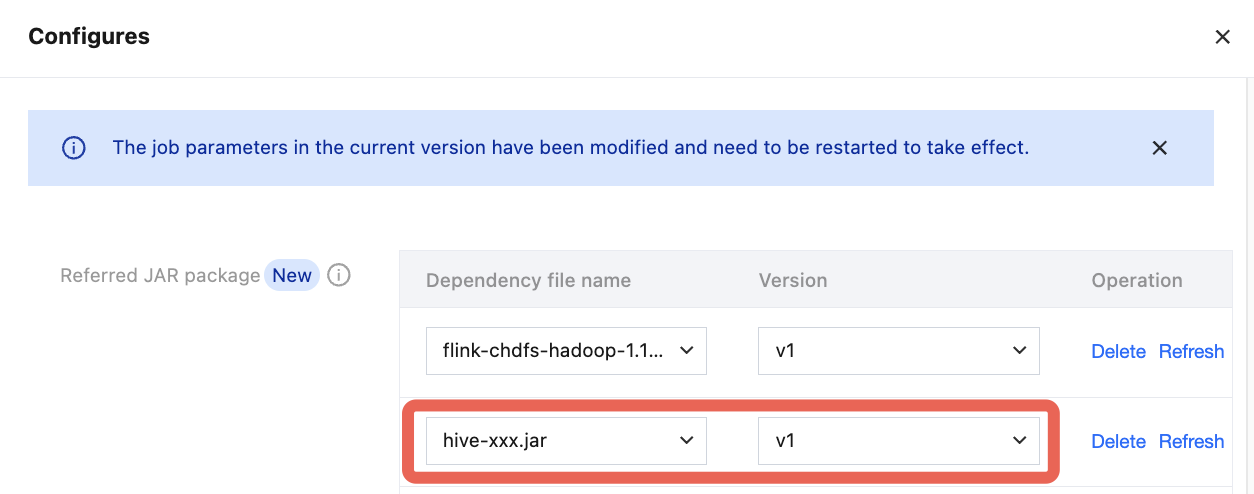
If the Warehouse address is a metadata-accelerated COS bucket, you also need to reference the following JARs as dependencies:
Bantuan dan Dukungan
Apakah halaman ini membantu?
Anda juga dapat Menghubungi Penjualan atau Mengirimkan Tiket untuk meminta bantuan.
masukan