Participant Management (Android)
Download
フォーカスモード
フォントサイズ
RoomParticipantStore is a specialized module within AtomicXCore designed for managing room participants. It provides essential functionality for conference scenarios, enabling you to build a robust participant management system.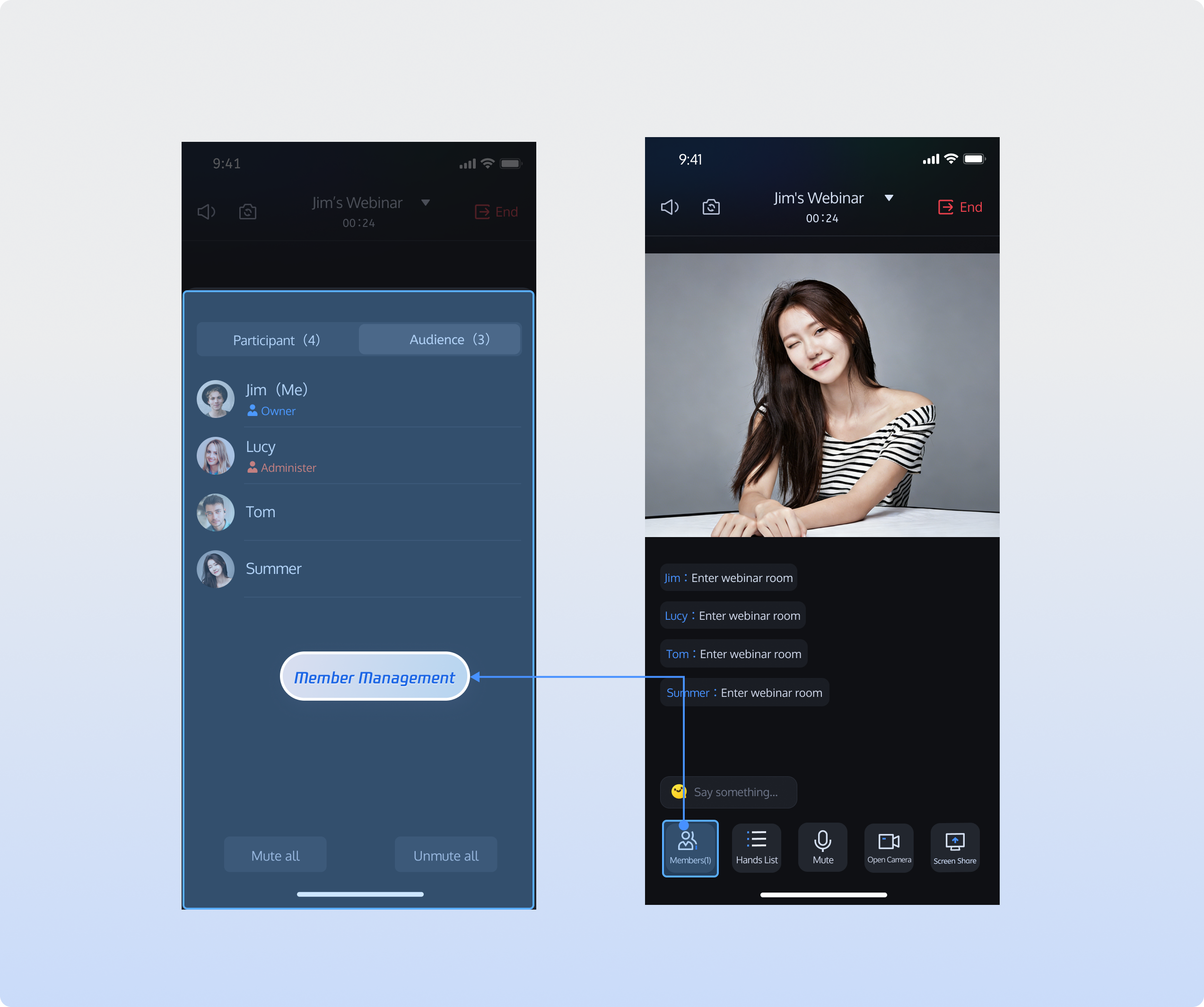
Feature Overview
The conference participant management module supports comprehensive user information display and permission management within a room:
Dual Role List Display: Dynamically displays both the guest list and audience list, showing nickname, role, and audio status.
Role Switching Between Guest and Audience: Allows hosts or admins to promote audience members to guests with speaking privileges, or demote guests to audience members.
Permission Control: Enables the host or admin to perform actions such as removing participants from the room or muting all members.
Hierarchical Management: Supports differentiated permissions for hosts, admins, guests, and audience members.
Core Functions
Retrieve Guest List: Fetch the current guest list in the room. Guests can enable their microphones and communicate with other guests via audio.
Retrieve Audience List: Obtain information for current audience members in the room.
Search Room Members: Search for specific users within the room.
Promote Audience to Guest: Promote an audience member to guest status. Promoted users can enable their microphones and communicate with other guests.
Demote Guest to Audience: Demote a guest to audience status. Demoted users lose the ability to interact via audio.
Set/Revoke Admin: Hosts can grant admin privileges to other room members or revoke admin status from existing admins.
Remove Member from Room: Hosts or admins can remove any participant from the room.
Core Concepts
Key concepts about
RoomParticipantStore is summarized in the table below:Core Concept | Type | Description |
data class | Represents the core data model for guests, encapsulating complete information and state management capabilities, including microphone control. Main functions include: basic guest information management (user ID, user name, avatar, room role), device state management (microphone status, camera status, screen sharing status, message status). | |
data class | Provides the data structure for managing participant states within the room, maintaining relevant status information. Main properties: participantList: Guest list.audienceList: Audience list.adminList: Admin list.localParticipant: Information about the current user in the room. | |
abstract class | Handles real-time events related to room members. | |
abstract class | Core class for participant control: manage panelist audio/video, participant roles, subscribe to RoomParticipantListener for real-time events. |
Implementation Steps
Step 1: Component Integration
Follow the Integration Overview to integrate the AtomicXCore SDK. Make sure you have completed the Implement Login Logic before proceeding.
Step 2: Retrieve Panelist List
After you join the room, call the
getParticipantList method of RoomParticipantStore to fetch the current panelist list.import android.util.Logimport io.trtc.tuikit.atomicxcore.api.room.RoomParticipantStoreimport io.trtc.tuikit.atomicxcore.api.room.RoomParticipantimport io.trtc.tuikit.atomicxcore.api.ListResultCompletionHandlerfun getParticipantList() {// Prerequisite: Join the room and create a RoomParticipantStore instance with the roomIDval roomID = "webinar_123456"val participantStore = RoomParticipantStore.create(roomID)// Retrieve panelist list (supports pagination with cursor)val initialCursor: String? = null // null starts from the first pageparticipantStore.getParticipantList(initialCursor, object : ListResultCompletionHandler<RoomParticipant> {override fun onSuccess(result: List<RoomParticipant>, cursor: String) {Log.d("Participant", "Panelist list retrieved, count: ${result.size}")}override fun onFailure(code: Int, desc: String) {Log.e("Participant", "Failed to retrieve panelist list [Error code: $code]: $desc")}})}
Step 3: Retrieve Audience List
After joining the room, use the
getAudienceList method of RoomParticipantStore to get the audience list.import android.util.Logimport io.trtc.tuikit.atomicxcore.api.ListResultCompletionHandlerimport io.trtc.tuikit.atomicxcore.api.room.RoomParticipantStoreimport io.trtc.tuikit.atomicxcore.api.room.RoomUserfun getAudienceList() {// Prerequisite: Join the room, and set roomType to WEBINARval participantStore = RoomParticipantStore.create(roomID = "webinar_123456")// Retrieve audience list (supports pagination with cursor)val initialCursor: String? = nullparticipantStore.getAudienceList(cursor = initialCursor, completion = object : ListResultCompletionHandler<RoomUser> {override fun onSuccess(result: List<RoomUser>, cursor: String) {Log.d("Test", "Audience list retrieved, count: ${result.size}")}override fun onFailure(code: Int, desc: String) {Log.e("Test", "Failed to retrieve audience list [Error code: $code]: $desc")}})}
Step 4: Search Room Members
After you join the room, search for members using the
searchUsers method of RoomParticipantStore.import android.util.Logimport io.trtc.tuikit.atomicxcore.api.ListResultCompletionHandlerimport io.trtc.tuikit.atomicxcore.api.room.RoomParticipantStoreimport io.trtc.tuikit.atomicxcore.api.room.RoomUserfun searchUsers() {// Prerequisite: Join the roomval participantStore = RoomParticipantStore.create(roomID = "webinar_123456")val keyword = "userName"participantStore.searchUsers(keyword = keyword, completion = object : ListResultCompletionHandler<RoomUser> {override fun onSuccess(result: List<RoomUser>, cursor: String) {Log.d("Test", "Room members found, count: ${result.size}")}override fun onFailure(code: Int, desc: String) {Log.e("Test", "Failed to search room members [Error code: $code]: $desc")}})}
Step 5: Promote Audience to Panelist
As a host or admin, use
promoteAudienceToParticipant in RoomParticipantStore to grant panelist privileges to an audience member.import android.util.Logimport io.trtc.tuikit.atomicxcore.api.CompletionHandlerimport io.trtc.tuikit.atomicxcore.api.room.RoomParticipantStorefun promoteAudienceToParticipant(userID: String) {// Prerequisite: Join the roomval participantStore = RoomParticipantStore.create(roomID = "webinar_123456")// Only host/admin can perform this actionparticipantStore.promoteAudienceToParticipant(userID = userID, completion = object : CompletionHandler {override fun onSuccess() {Log.d("Test", "User promoted to panelist successfully")}override fun onFailure(code: Int, desc: String) {Log.e("Test", "Failed to promote user to panelist [Error code: $code]: $desc")}})}
Subscribe to the
onAudiencePromotedToParticipant event in RoomParticipantListener to receive notifications when an audience member is promoted to panelist.import android.util.Logimport io.trtc.tuikit.atomicxcore.api.room.RoomParticipantListenerimport io.trtc.tuikit.atomicxcore.api.room.RoomParticipantStoreimport io.trtc.tuikit.atomicxcore.api.room.RoomUserfun subscribeParticipantEvent() {// Prerequisite: Join the room and create a RoomParticipantStore instanceval participantStore = RoomParticipantStore.create(roomID = "webinar_123456")val listener = object : RoomParticipantListener() {override fun onAudiencePromotedToParticipant(userInfo: RoomUser) {Log.d("Test", "Audience promoted to panelist: $userInfo")}}participantStore.addRoomParticipantListener(listener)// Remove listener when no longer needed// participantStore.removeRoomParticipantListener(listener)}
Step 6: Demote Panelist to Audience
As a host or admin, use
demoteParticipantToAudience in RoomParticipantStore to move a panelist to the audience role.import android.util.Logimport io.trtc.tuikit.atomicxcore.api.CompletionHandlerimport io.trtc.tuikit.atomicxcore.api.room.RoomParticipantStorefun demoteParticipantToAudience(userID: String) {// Prerequisite: Join the roomval participantStore = RoomParticipantStore.create(roomID = "webinar_123456")// Only host/admin can perform this actionparticipantStore.demoteParticipantToAudience(userID = userID, completion = object : CompletionHandler {override fun onSuccess() {Log.d("Test", "User demoted to audience successfully")}override fun onFailure(code: Int, desc: String) {Log.e("Test", "Failed to demote user to audience [Error code: $code]: $desc")}})}
Subscribe to the
onParticipantDemotedToAudience event in RoomParticipantListener to get notified when a panelist is demoted.import android.util.Logimport io.trtc.tuikit.atomicxcore.api.room.RoomParticipantListenerimport io.trtc.tuikit.atomicxcore.api.room.RoomParticipantStoreimport io.trtc.tuikit.atomicxcore.api.room.RoomUserfun subscribeParticipantEvent() {// Prerequisite: Join the room and create a RoomParticipantStore instanceval participantStore = RoomParticipantStore.create(roomID = "webinar_123456")val listener = object : RoomParticipantListener() {override fun onParticipantDemotedToAudience(userInfo: RoomUser) {Log.d("Test", "Panelist demoted to audience: $userInfo")}}participantStore.addRoomParticipantListener(listener)// Remove listener when no longer needed// participantStore.removeRoomParticipantListener(listener)}
Step 7: Set/Revoke Admin
As the host, use the
setAdmin method in RoomParticipantStore to assign or revoke admin privileges.import android.util.Logimport io.trtc.tuikit.atomicxcore.api.room.RoomParticipantStoreimport io.trtc.tuikit.atomicxcore.api.CompletionHandlerprivate val roomID = "webinar_123456"private val participantStore = RoomParticipantStore.create(roomID)// Assign admin privilegesfun setUserAsAdmin(userID: String) {participantStore.setAdmin(userID, object : CompletionHandler {override fun onSuccess() {Log.d("Participant", "User $userID set as admin successfully")}override fun onFailure(code: Int, desc: String) {Log.e("Participant", "Failed to set admin [Error code: $code]: $desc")}})}// Revoke admin privilegesfun revokeAdmin(userID: String) {participantStore.revokeAdmin(userID, object : CompletionHandler {override fun onSuccess() {Log.d("Participant", "Admin privileges revoked for user $userID")}override fun onFailure(code: Int, desc: String) {Log.e("Participant", "Failed to revoke admin [Error code: $code]: $desc")}})}
Subscribe to
onAdminSet and onAdminRevoked events in RoomParticipantListener to get role change notifications.import android.util.Logimport io.trtc.tuikit.atomicxcore.api.room.RoomParticipantListenerimport io.trtc.tuikit.atomicxcore.api.room.RoomParticipantStoreimport io.trtc.tuikit.atomicxcore.api.room.RoomUserprivate val roomID = "webinar_123456"private val participantStore = RoomParticipantStore.create(roomID)private val participantListener = object : RoomParticipantListener() {override fun onAdminSet(userInfo: RoomUser) {Log.d("Participant", "Admin assigned: $userInfo")}override fun onAdminRevoked(userInfo: RoomUser) {Log.d("Participant", "Admin revoked: $userInfo")}}private fun subscribeParticipantEvents() {participantStore.addRoomParticipantListener(participantListener)}
Step 8: Remove Member from Room
As the host or admin, remove a participant by calling
kickUser on RoomParticipantStore.import android.util.Logimport io.trtc.tuikit.atomicxcore.api.room.RoomParticipantStoreimport io.trtc.tuikit.atomicxcore.api.CompletionHandlerprivate val roomID = "webinar_123456"private val participantStore = RoomParticipantStore.create(roomID)fun kickUser(userID: String) {// Only host/admin can perform this action; the removed user will exit the room and receive a notificationparticipantStore.kickUser(userID, object : CompletionHandler {override fun onSuccess() {Log.d("Participant", "User $userID removed successfully")}override fun onFailure(code: Int, desc: String) {Log.e("Participant", "Failed to remove user [Error code: $code]: $desc")}})}
Subscribe to the
onKickedFromRoom event in RoomParticipantListener to handle removal notifications.import android.util.Logimport io.trtc.tuikit.atomicxcore.api.room.KickedOutOfRoomReasonimport io.trtc.tuikit.atomicxcore.api.room.RoomParticipantListenerimport io.trtc.tuikit.atomicxcore.api.room.RoomParticipantStoreprivate val roomID = "webinar_123456"private val participantStore = RoomParticipantStore.create(roomID)private val participantListener = object : RoomParticipantListener() {override fun onKickedFromRoom(reason: KickedOutOfRoomReason, message: String) {Log.d("Participant", "Removed from room: $reason, info: $message")}}private fun subscribeParticipantEvents() {participantStore.addRoomParticipantListener(participantListener)}
Step 9: Close Panelist Media Devices
As the host or admin, use
closeParticipantDevice in RoomParticipantStore to disable a panelist's camera or microphone.import android.util.Logimport io.trtc.tuikit.atomicxcore.api.CompletionHandlerimport io.trtc.tuikit.atomicxcore.api.device.DeviceTypeimport io.trtc.tuikit.atomicxcore.api.room.RoomParticipantStoreprivate val roomID = "webinar_123456"private val participantStore = RoomParticipantStore.create(roomID)fun closeParticipantDevice(userID: String, device: DeviceType) {// Only affects panelists; audience members do not have device permissionsparticipantStore.closeParticipantDevice(userID, device, object : CompletionHandler {override fun onSuccess() {Log.d("Participant", "Device closed for user $userID, device: $device")}override fun onFailure(code: Int, desc: String) {Log.e("Participant", "Failed to close device: [Error code: $code]: $desc")}})}
Note:
closeParticipantDevice is only applicable to guests. Audience members do not have audio/video device permissions and are unaffected by this operation.Subscribe to the
onParticipantDeviceClosed event in RoomParticipantListener to update UI when a device is disabled.import android.util.Logimport io.trtc.tuikit.atomicxcore.api.device.DeviceTypeimport io.trtc.tuikit.atomicxcore.api.room.RoomParticipantListenerimport io.trtc.tuikit.atomicxcore.api.room.RoomParticipantStoreimport io.trtc.tuikit.atomicxcore.api.room.RoomUserprivate val roomID = "webinar_123456"private val participantStore = RoomParticipantStore.create(roomID)private val participantListener = object : RoomParticipantListener() {override fun onParticipantDeviceClosed(device: DeviceType, operator: RoomUser) {Log.d("Participant", "Device $device closed by ${operator.userName}")}}private fun subscribeParticipantEvents() {participantStore.addRoomParticipantListener(participantListener)}
Step 10: Manage In-Meeting Chat Permissions
As the host or admin, mute or unmute a specific user by calling
disableUserMessage in RoomParticipantStore. Muted users are tracked in messageDisabledUserList.import android.util.Logimport io.trtc.tuikit.atomicxcore.api.CompletionHandlerimport io.trtc.tuikit.atomicxcore.api.room.RoomParticipantStoreprivate val roomID = "webinar_123456"private val participantStore = RoomParticipantStore.create(roomID)fun disableUserMessage(userID: String, disable: Boolean) {// Host/admin can mute/unmute user chat; affected users receive notificationparticipantStore.disableUserMessage(userID, disable, object : CompletionHandler {override fun onSuccess() {val action = if (disable) "Muted" else "Unmuted"Log.d("Participant", "$action user $userID successfully")}override fun onFailure(code: Int, desc: String) {Log.e("Participant", "Failed to mute user chat: [Error code: $code]: $desc")}})}
Note:
messageDisabledUserList is only applicable in conference (Webinar) rooms and maintains the list of individually muted users.Subscribe to the
onUserMessageDisabled event in RoomParticipantListener to update UI when chat is muted/unmuted.import android.util.Logimport io.trtc.tuikit.atomicxcore.api.room.RoomParticipantListenerimport io.trtc.tuikit.atomicxcore.api.room.RoomParticipantStoreimport io.trtc.tuikit.atomicxcore.api.room.RoomUserprivate val roomID = "webinar_123456"private val participantStore = RoomParticipantStore.create(roomID)private val participantListener = object : RoomParticipantListener() {override fun onUserMessageDisabled(disable: Boolean, operator: RoomUser) {val action = if (disable) "Muted" else "Unmuted"Log.d("Participant", "Chat $action by ${operator.userName}")}}private fun subscribeParticipantEvents() {participantStore.addRoomParticipantListener(participantListener)}
Step 11: Mute All, Disable All Video
As the host or admin, mute all microphones, disable all cameras, or disable all screen sharing for panelists by calling
disableAllDevices in RoomParticipantStore. When enabled, panelists cannot turn these devices on independently.import android.util.Logimport io.trtc.tuikit.atomicxcore.api.room.RoomParticipantStoreimport io.trtc.tuikit.atomicxcore.api.device.DeviceTypeimport io.trtc.tuikit.atomicxcore.api.CompletionHandlerprivate val roomID = "webinar_123456"private val participantStore = RoomParticipantStore.create(roomID)fun disableAllDevices(device: DeviceType, disable: Boolean) {// Host/admin can mute/unmute all devices in the room; all members receive notificationsparticipantStore.disableAllDevices(device, disable, object : CompletionHandler {override fun onSuccess() {val action = if (disable) "Muted" else "Unmuted"Log.d("Participant", "${action} all ${device} successfully")}override fun onFailure(code: Int, desc: String) {val action = if (disable) "Muted" else "Unmuted"Log.e("Participant", "Failed to ${action} all ${device} [Error code: $code]: $desc")}})}
Subscribe to the
onAllDevicesDisabled event in RoomParticipantListener to receive mute/unmute status updates.import android.util.Logimport io.trtc.tuikit.atomicxcore.api.device.DeviceTypeimport io.trtc.tuikit.atomicxcore.api.room.RoomParticipantListenerimport io.trtc.tuikit.atomicxcore.api.room.RoomParticipantStoreimport io.trtc.tuikit.atomicxcore.api.room.RoomUserprivate val roomID = "webinar_123456"private val participantStore = RoomParticipantStore.create(roomID)private val participantListener = object : RoomParticipantListener() {override fun onAllDevicesDisabled(device: DeviceType, disable: Boolean, operator: RoomUser) {val action = if (disable) "Muted" else "Unmuted"Log.d("Participant", "All ${device} ${action} by ${operator.userName}")}}private fun subscribeParticipantEvents() {participantStore.addRoomParticipantListener(participantListener)}
Step 12: Mute All Chat
As the host or admin, mute all chat messages in the room by calling
disableAllMessages in RoomParticipantStore. When enabled, chat is restricted for all participants.import android.util.Logimport io.trtc.tuikit.atomicxcore.api.CompletionHandlerimport io.trtc.tuikit.atomicxcore.api.room.RoomParticipantStoreprivate val roomID = "webinar_123456"private val participantStore = RoomParticipantStore.create(roomID)fun disableAllMessages(disable: Boolean) {// Host/admin can mute/unmute chat for all members; notifications sent to allparticipantStore.disableAllMessages(disable, object : CompletionHandler {override fun onSuccess() {val action = if (disable) "Muted" else "Unmuted"Log.d("Participant", "$action chat successfully")}override fun onFailure(code: Int, desc: String) {val action = if (disable) "Muted" else "Unmuted"Log.e("Participant", "$action chat failed [Error code: $code]: $desc")}})}
Subscribe to the
onAllMessagesDisabled event in RoomParticipantListener to update chat mute status.import android.util.Logimport io.trtc.tuikit.atomicxcore.api.room.RoomParticipantListenerimport io.trtc.tuikit.atomicxcore.api.room.RoomParticipantStoreimport io.trtc.tuikit.atomicxcore.api.room.RoomUserprivate val roomID = "webinar_123456"private val participantStore = RoomParticipantStore.create(roomID)private val participantListener = object : RoomParticipantListener() {override fun onAllMessagesDisabled(disable: Boolean, operator: RoomUser) {val action = if (disable) "Muted" else "Unmuted"Log.d("Participant", "Chat ${action} by ${operator.userName}")}}private fun subscribeParticipantEvents() {participantStore.addRoomParticipantListener(participantListener)}
Step 13: Listen to Events
Subscribe to
RoomParticipantListener events. For example, to listen for device requests:import android.util.Logimport io.trtc.tuikit.atomicxcore.api.room.DeviceRequestInfoimport io.trtc.tuikit.atomicxcore.api.room.RoomParticipantListenerimport io.trtc.tuikit.atomicxcore.api.room.RoomParticipantStoreprivate val roomID = "webinar_123456"private val participantStore = RoomParticipantStore.create(roomID)private val participantListener = object : RoomParticipantListener() {override fun onDeviceRequestReceived(request: DeviceRequestInfo) {Log.d("Participant", "Device request received: ${request.device}, User: ${request.senderUserID}")}}private fun subscribeParticipantEvents() {participantStore.addRoomParticipantListener(participantListener)}
Subscribe to state changes in
RoomParticipantState, such as monitoring who is currently speaking:import android.util.Logimport io.trtc.tuikit.atomicxcore.api.room.RoomParticipantStoreimport kotlinx.coroutines.CoroutineScopeimport kotlinx.coroutines.Dispatchersimport kotlinx.coroutines.launchprivate val roomID = "webinar_123456"private val participantStore = RoomParticipantStore.create(roomID)private fun subscribeParticipantState() {CoroutineScope(Dispatchers.Main).launch {participantStore.state.speakingUsers.collect { speakingUsers ->Log.d("Participant", "Speaking user list updated. Current count: ${speakingUsers.size}")}}}
API Documentation
Store/Component | Feature Description | API Documentation |
RoomParticipantStore | In-room participant management: set admin / transfer host / get panelist list / remove from room / panelist device control (e.g., close or invite to open microphone, etc.). |
Contact Us
If you have any questions or feedback during integration or use, please contact info_rtc@tencent.com.
フィードバック