接入概览(Android)
下载
聚焦模式
字号
本文档提供
AtomicXCore 的核心功能的集成指南,帮助开发者快速实现多人音视频房间功能。SDK 采用纯 API 架构设计,开发者可完全自定义 UI 界面,专注于业务逻辑和用户体验的实现。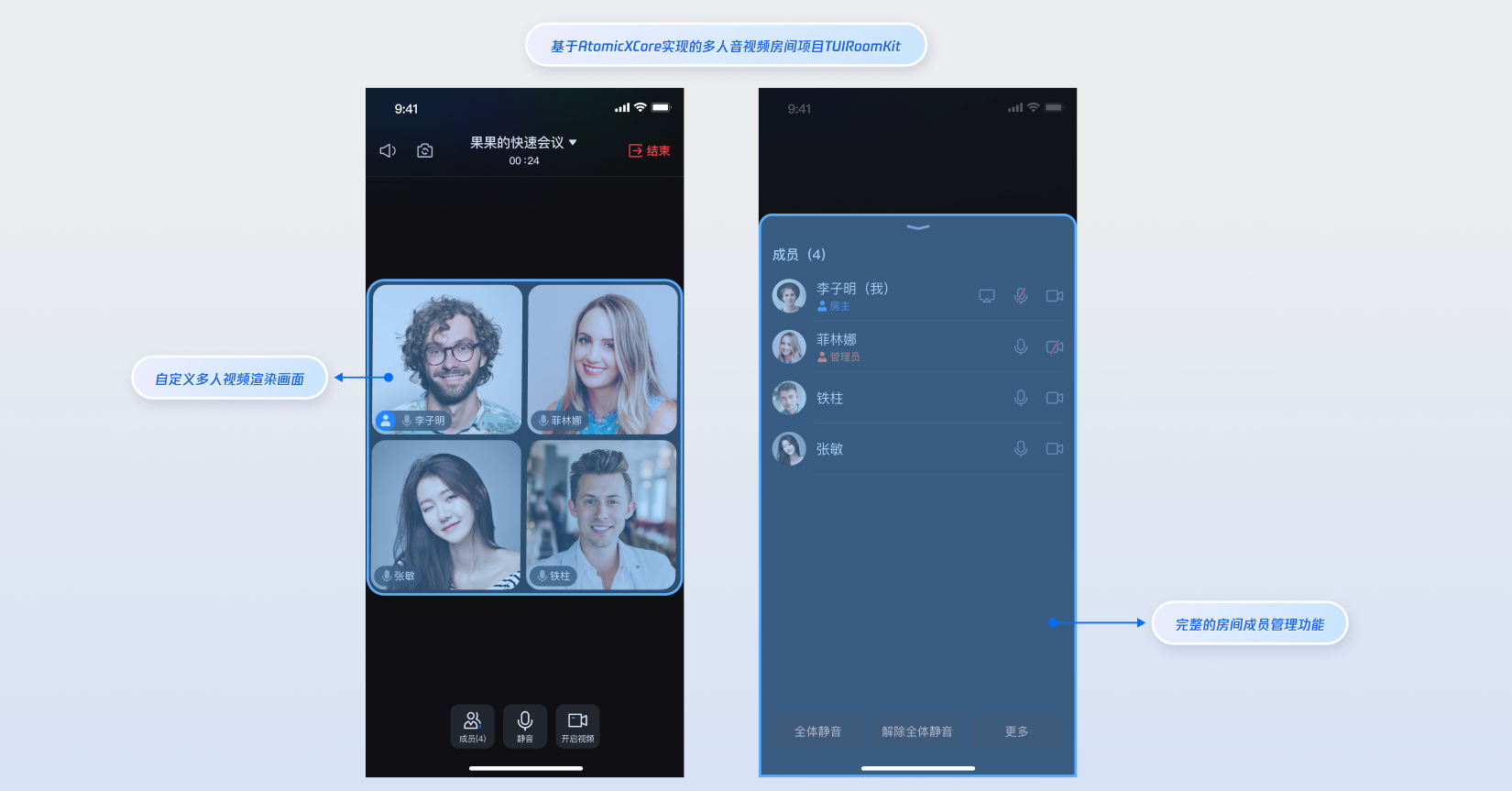
核心功能
AtomicXCore 中用于搭建多人音视频房间场景所需要使用到的核心模块包含以下三个:
RoomStore:房间管理功能入口,包含功能:预约房间、创建房间、加入房间、房间内呼叫等。RoomParticipantStore:房间内参与者功能入口, 包含功能:管理员设置、房主转移、移出房间、参与者设备控制等。RoomParticipantView:房间内参与者视频画面视图。准备工作
步骤1:开通服务
步骤2:环境要求
Android 5.0 (SDK API level 21)及以上。Gradle 8.0 及以上。Android 5.0 以上的设备。需使用
JDK 17、18 或 19 版本。步骤3:集成 AtomicXCore SDK
请在您的 build.gradle 文件中添加如下依赖,然后执行 Gradle Sync。
dependencies {implementation 'io.trtc.uikit:atomicx-core:3.6.1.66'api "com.tencent.imsdk:imsdk-plus:8.7.7201"}
步骤4:实现登录逻辑
在项目中调用
LoginStore.shared.login 完成登录,这是使用 AtomicXCore 所有功能的关键前提。重要:
推荐在自身的用户账户登录成功后,再调用 LoginStore.shared.login,以确保登录业务逻辑的清晰和一致。
import android.os.Bundleimport androidx.appcompat.app.AppCompatActivityimport io.trtc.tuikit.atomicxcore.api.login.LoginStoreimport io.trtc.tuikit.atomicxcore.api.CompletionHandlerimport android.util.Logclass MainActivity : AppCompatActivity() {override fun onCreate(savedInstanceState: Bundle?) {super.onCreate(savedInstanceState)LoginStore.shared.login(this, // context1400000001, // 替换为项目的 sdkAppID"test_001", // 替换为项目的 userID"xxxxxxxxxxx", // 替换为项目的 userSigobject : CompletionHandler {override fun onSuccess() {// 登录成功处理Log.d("Login", "login success");}override fun onFailure(code: Int, desc: String) {// 登录失败处理Log.e("Login", "login failed, code: $code, error: $desc");}})}}
登录接口参数说明:
参数 | 类型 | 说明 |
sdkAppID | Int | |
userID | String | 当前用户的唯一 ID,仅包含英文字母、数字、连字符和下划线。为避免多端登录冲突,请勿使用 1、123 等简单 ID。 |
userSig | String | 用于腾讯云鉴权的票据。请注意: 开发环境:您可以采用本地 GenerateTestUserSig.genTestSig 函数生成 UserSig 或者通过 UserSig 辅助工具 生成临时的 UserSig。生产环境:为了防止密钥泄露,请务必采用服务端生成 UserSig 的方式。详细信息请参见 服务端生成 UserSig。 |
搭建基础多人房间
步骤1:房主创建并加入房间
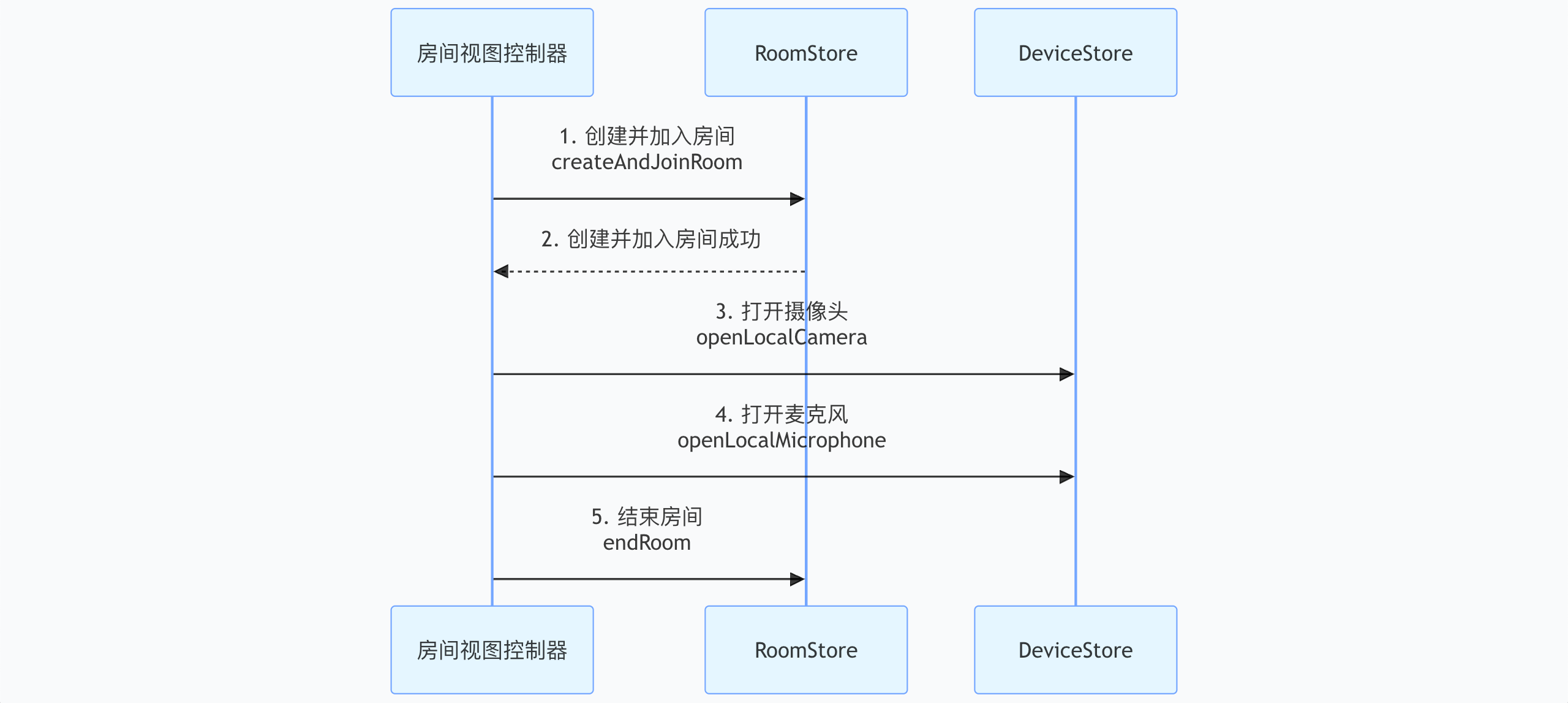
创建并加入房间具体流程如下,只需执行以下几步操作,即可快速搭建出多人房间。
提示:
1. 创建并加入房间
实现方式:
1.1 配置房间初始化参数:初始化
CreateRoomOptions 设置房间名称,房间密码。1.2 房间权限预设:设置房间内全场成员权限,例如全体静音,全体禁画等。
1.3 创建并加入房间:调用
RoomStore 的 createAndJoinRoom 接口执行核心操作。示例代码:
import android.os.Bundleimport android.util.Logimport androidx.appcompat.app.AppCompatActivityimport io.trtc.tuikit.atomicxcore.api.CompletionHandlerimport io.trtc.tuikit.atomicxcore.api.room.CreateRoomOptionsimport io.trtc.tuikit.atomicxcore.api.room.RoomStoreimport io.trtc.tuikit.atomicxcore.api.room.RoomType// RoomMainActivity 代表房间主视图 Activityclass RoomMainActivity : AppCompatActivity() {private val roomID = "test_room_001"private val roomType = RoomType.STANDARDoverride fun onCreate(savedInstanceState: Bundle?) {super.onCreate(savedInstanceState)//自动创建并加入房间逻辑createAndJoinRoom()}// 调用此方法完成创建并加入房间的复合操作private fun createAndJoinRoom() {// 1. 配置房间初始化参数// CreateRoomOptions 用于定义房间的基础属性及初始权限控制val options = CreateRoomOptions()options.roomName = "我的讨论会" // 设置房间对外展示的名称options.password = "" // 设置房间进入密码(若无需密码则留空)// 2. 房间权限预设:在创建之初即可控制全场权限(通常用于正式会议场景)options.isAllCameraDisabled = false // 全员开启/禁用摄像头的初始状态options.isAllMessageDisabled = false // 全员开启/禁言的初始状态options.isAllMicrophoneDisabled = false // 全员开启/静音的初始状态options.isAllScreenShareDisabled = false // 全员禁止/允许屏幕分享的初始状态// 3. 创建并加入房间// 该方法是一个复合操作:若房间不存在则先创建,随后自动执行加入流程RoomStore.shared().createAndJoinRoom(roomID, roomType, options, object : CompletionHandler {override fun onSuccess() {// 创建并加入成功:此时可以开始订阅房间状态、打开本地摄像头或麦克风Log.d("Room", "创建并加入房间成功")}override fun onFailure(code: Int, desc: String) {// 创建并加入失败:可能由于权限不足、网络异常或参数非法Log.e("Room", "创建并加入房间失败 [错误码: $code]: $desc")}})}}
createAndJoinRoom 接口参数详细说明
参数名 | 类型 | 必填 | 说明 |
roomID | String | 是 | 字符串类型的房间唯一标识符。 限制长度为 0-48 字节。 建议仅包含数字、英文字母(区分大小写)、下划线(_)和连字符(-)。避免使用空格和中文字符。 |
roomType | RoomType | 是 | 房间类型 STANDARD:标准房间(默认值)。WEBINAR:大型研讨会房间。多人会议场景这里填写 STANDARD 房间类型。 |
options | CreateRoomOptions | 是 | 创建房间配置对象。 详细用法请参考:CreateRoomOptions 结构体详细说明。 |
completion | CompletionHandler | 否 | 操作完成回调,用于返回创建和加入房间的结果。若创建失败则会返回错误码和错误信息。 |
CreateRoomOptions 结构体详细说明
参数名 | 类型 | 必填 | 说明 |
roomName | String | 否 | 房间名称,可以不设置,默认为空字符串。 限制长度为 0-60 字节。 【推荐用法】支持中英文、数字、特殊字符。 |
password | String | 否 | 房间密码,空字符串 "" 通常表示该房间不设密码。 限制长度为 0-32 字节。 推荐使用 4-8 位纯数字,方便移动端输入。设置后,其他用户加入房间时需输入密码。建议不要存储明文敏感信息。 |
isAllMicrophoneDisabled | Boolean | 否 | 是否全员禁止打开麦克风。开启后,除房主/管理员外,普通参与者默认禁止打开麦克风: true:禁止 false:取消禁止 (默认值) |
isAllCameraDisabled | Boolean | 否 | 是否全员禁止打开摄像头。开启后,除房主/管理员外,普通参与者默认禁止打开摄像头: true:禁止 false:取消禁止(默认值) |
isAllScreenShareDisabled | Boolean | 否 | 是否全员禁止发起屏幕共享。开启后,仅房主/管理员可进行屏幕共享: true:禁止 false:取消禁止(默认值) |
isAllMessageDisabled | Boolean | 否 | 是否全员禁止发送聊天消息(禁言)。开启后,普通参与者无法在房间内发送文字消息: true:禁止。 false:取消禁止(默认值) |
2. 打开摄像头和麦克风
进房成功后调用
DeviceStore 单例对象的 openLocalCamera、openLocalMicrophone 接口打开本地设备。import android.os.Bundleimport androidx.appcompat.app.AppCompatActivityimport io.trtc.tuikit.atomicxcore.api.device.DeviceStore// RoomMainActivity 代表房间主视图 Activityclass RoomMainActivity : AppCompatActivity() {override fun onCreate(savedInstanceState: Bundle?) {super.onCreate(savedInstanceState)openDevices()}private fun openDevices() {// 1. 打开前置摄像头DeviceStore.shared().openLocalCamera(true, completion = null)// 2. 打开麦克风DeviceStore.shared().openLocalMicrophone(completion = null)}}
注意:
openLocalCamera 接口参数详细说明
参数名 | 类型 | 必填 | 说明 |
isFront | Boolean | 是 | 是否开启前置摄像头: true :开启前置摄像头。 false :开启后置摄像头。 |
completion | CompletionHandler | 否 | 操作完成回调,用于返回开启摄像头的结果。若开启失败则会返回错误码和错误信息。 |
3. 结束房间
当房主期望结束房间时,调用
RoomStore 的 endRoom 接口即可结束当前房间。结束房间后,房间内的所有参与者都会收到房间结束事件。import android.os.Bundleimport android.util.Logimport androidx.appcompat.app.AppCompatActivityimport io.trtc.tuikit.atomicxcore.api.CompletionHandlerimport io.trtc.tuikit.atomicxcore.api.room.RoomStore// RoomMainActivity 代表房间主视图 Activityclass RoomMainActivity : AppCompatActivity() {override fun onCreate(savedInstanceState: Bundle?) {super.onCreate(savedInstanceState)endRoom()}// 调用此方法结束房间private fun endRoom() {// endRoom 接口用于永久结束当前房间。// 注意:通常该操作仅限房主(Owner)执行,执行后所有成员将被移出房间且音视频采集会强制停止。RoomStore.shared().endRoom(object : CompletionHandler {override fun onSuccess() {// 结束房间成功Log.d("Room", "结束房间成功")}override fun onFailure(code: Int, desc: String) {// 结束房间失败Log.e("Room", "结束房间失败 [错误码: $code]: $desc")}})}}
步骤2:参与者加入房间
参与者加入房间,通过简单几步操作,即可实现与房间内其他参与者进行实时音视频互动。
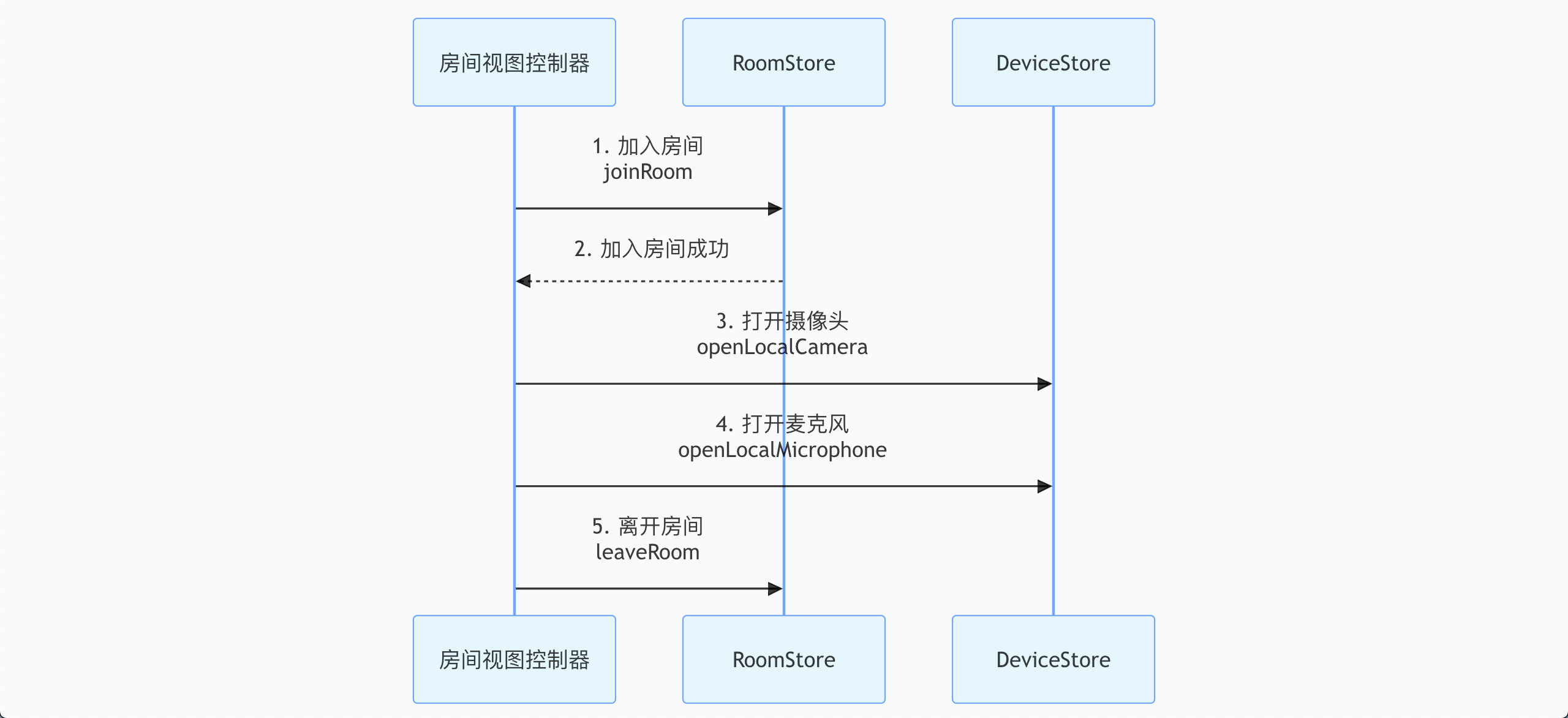
1. 加入房间
参与者需要加入房间时,调用
RoomStore 的 joinRoom 接口,即可加入房间,此时房间内其他参与者会收到参与者加入房间事件通知。import android.os.Bundleimport android.util.Logimport androidx.appcompat.app.AppCompatActivityimport io.trtc.tuikit.atomicxcore.api.CompletionHandlerimport io.trtc.tuikit.atomicxcore.api.room.RoomStoreimport io.trtc.tuikit.atomicxcore.api.room.RoomType// RoomMainActivity 代表房间主视图 Activityclass RoomMainActivity : AppCompatActivity() {private val roomID = "test_room_001"private val roomType = RoomType.STANDARDoverride fun onCreate(savedInstanceState: Bundle?) {super.onCreate(savedInstanceState)joinRoom()}// 调用此方法加入一个已存在的房间private fun joinRoom() {// 1. 准备加入参数// joinRoom 适用于加入一个已知且正在进行的房间val targetRoomID = this.roomID // 目标房间 IDval roomPassword = "" // 房间密码,若房间未设置密码则传空字符串或 null// 2. 调用 RoomStore 加入房间接口// 该操作会验证房间是否存在、用户是否被禁入以及密码是否正确RoomStore.shared().joinRoom(targetRoomID, roomType, roomPassword, object : CompletionHandler {override fun onSuccess() {// 3. 加入成功处理Log.d("Room", "加入房间成功")}override fun onFailure(code: Int, desc: String) {// 4. 加入失败处理Log.e("Room", "加入房间失败 [错误码: $code]: $desc")}})}}
joinRoom 接口参数详细说明
参数名 | 类型 | 必填 | 说明 |
roomID | String | 是 | 字符串类型的房间唯一标识符。 限制长度为 0-48 字节。 建议仅包含数字、英文字母(区分大小写)、下划线(_)和连字符(-)。避免使用空格和中文字符。 |
roomType | RoomType | 是 | 房间类型: STANDARD:标准房间(默认值)。WEBINAR:大型研讨会房间。多人会议场景这里填写 STANDARD 房间类型。 |
password | String | 否 | 房间密码,空字符串 "" 通常表示该房间不设密码。 限制长度为 0-32 字节。 推荐使用 4-8 位纯数字,方便移动端输入。设置后,其他用户加入房间时需输入密码。建议不要存储明文敏感信息。 |
completion | CompletionHandler | 否 | 操作完成回调,用于返回加入房间的结果。若加入房间失败则会返回错误码和错误信息。 |
2. 打开摄像头和麦克风
3. 离开房间
当参与者要离开房间时,通过调用
RoomStore 的 leaveRoom 接口即可离开房间,此时房间内其他参与者都会收到参与者离开房间事件通知。import android.os.Bundleimport android.util.Logimport androidx.appcompat.app.AppCompatActivityimport io.trtc.tuikit.atomicxcore.api.CompletionHandlerimport io.trtc.tuikit.atomicxcore.api.room.RoomStore// RoomMainActivity 代表房间主视图 Activityclass RoomMainActivity : AppCompatActivity() {override fun onCreate(savedInstanceState: Bundle?) {super.onCreate(savedInstanceState)leaveRoom()}// 调用此方法主动退出当前房间private fun leaveRoom() {// 1. 业务逻辑说明// leaveRoom 接口用于普通成员或房主主动退出房间。// 与 endRoom 不同,房主调用 leaveRoom 只会让自己离开,房间依然存在。// 2. 调用 RoomStore 离开房间接口// 该操作会停止音视频流传输,并通知服务器将当前用户移出房间RoomStore.shared().leaveRoom(object : CompletionHandler {override fun onSuccess() {// 3. 退出成功处理Log.d("Room", "退出房间成功")}override fun onFailure(code: Int, desc: String) {// 4. 退出失败处理Log.e("Room", "退出房间失败 [错误码: $code]: $desc")}})}}
步骤3:绑定视频画面视图
AtomicXCore SDK 的
RoomParticipantView 组件为开发者提供了完整的视频画面渲染解决方案。该组件支持本地摄像头画面和远端参与者视频流的实时显示,集成过程简单高效。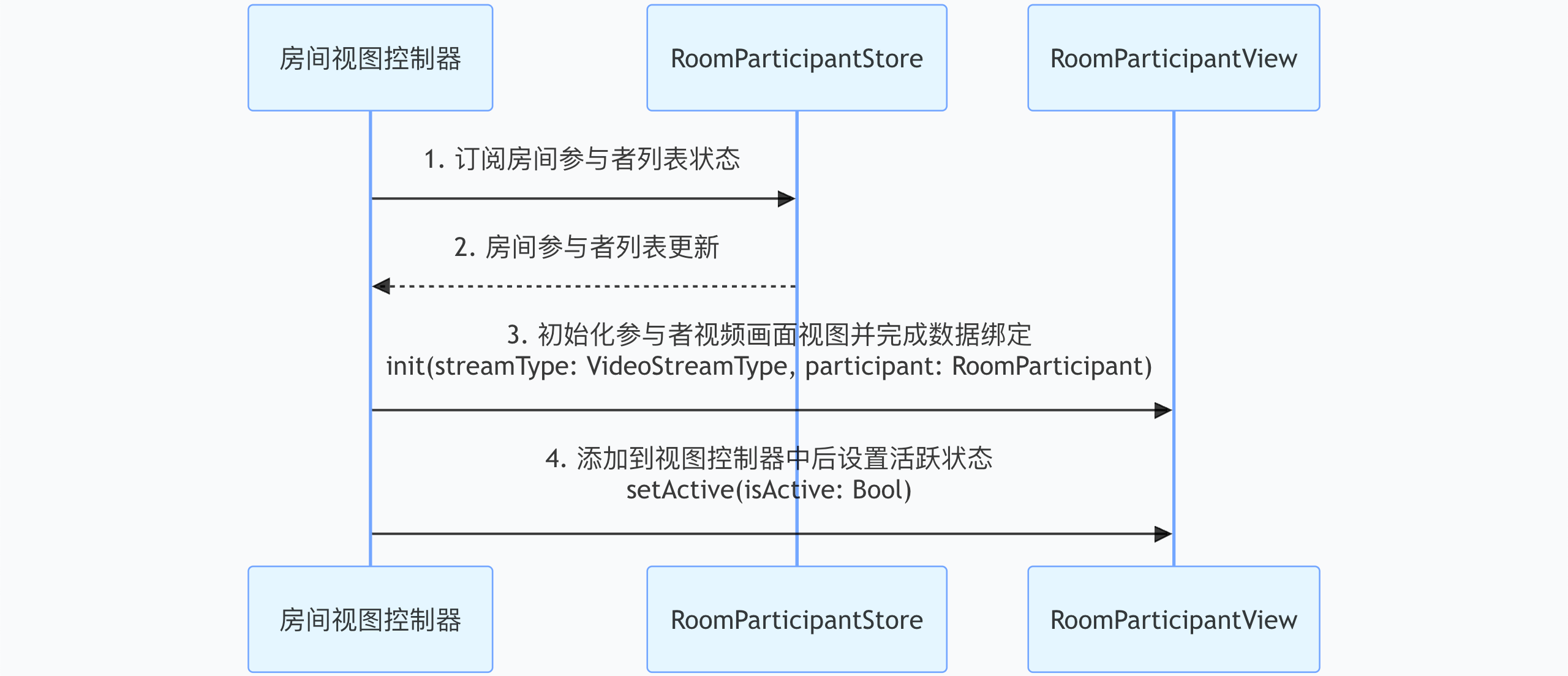
提示:
RoomParticipantView 是用于渲染房间参与者视频流的核心视图组件,若需要更灵活的视频组件布局方式,请参考 TUIRoomKit 开源项目中 RoomMainView.kt 文件来了解完整的实现逻辑。实现方式:
1. 数据层订阅:订阅
RoomParticipantStore.state.participantList,建立参与者状态的响应式监听。2. 状态自动同步:参与者列表变更时,系统自动更新
participantList 状态数据。3. 视图初始化:根据参与者数据实例化
RoomParticipantView,绑定视频渲染逻辑。4. UI 集成:完成视图层级集成、布局配置和渲染激活。
示例代码:
import android.os.Bundleimport android.widget.FrameLayoutimport androidx.appcompat.app.AppCompatActivityimport androidx.lifecycle.lifecycleScopeimport io.trtc.tuikit.atomicxcore.api.room.RoomParticipantimport io.trtc.tuikit.atomicxcore.api.room.RoomParticipantStoreimport io.trtc.tuikit.atomicxcore.api.view.RoomParticipantViewimport io.trtc.tuikit.atomicxcore.api.view.VideoStreamTypeimport kotlinx.coroutines.launch// RoomMainActivity 代表房间主视图 Activityclass RoomMainActivity : AppCompatActivity() {private val roomID = "test_room_001"private lateinit var container: FrameLayoutprivate val cellSize by lazy { resources.displayMetrics.widthPixels / 3 }// RoomParticipantStore 是与房间绑定的,需要通过 RoomParticipantStore.create(roomID: String) 工厂方法来为特定的房间创建实例private val participantStore = RoomParticipantStore.create(roomID)override fun onCreate(savedInstanceState: Bundle?) {super.onCreate(savedInstanceState)container = FrameLayout(this)setContentView(container)// 1. 数据层订阅subscribeParticipantState()participantStore.getParticipantList("", null)}private fun subscribeParticipantState() {lifecycleScope.launch {participantStore.state.participantList.collect { participants ->// 2. 状态自动同步updateParticipantView(participants)}}}private fun updateParticipantView(list: List<RoomParticipant>) {container.removeAllViews()list.take(9).forEachIndexed { index, participant ->// 3. 视图初始化val view = RoomParticipantView(this@RoomMainActivity).apply {init(VideoStreamType.CAMERA, participant)}val params = FrameLayout.LayoutParams(cellSize, cellSize).apply {leftMargin = (index % 3) * cellSizetopMargin = (index / 3) * cellSize}// 4. UI 集成view.setActive(true)container.addView(view, params)}}}
RoomParticipantView init()接口参数详细说明:
参数名 | 类型 | 必填 | 描述 |
streamType | VideoStreamType | 是 | 需要渲染视频流的类型。 CAMERA:摄像头流SCREEN:屏幕分享流 |
participant | RoomParticipant | 是 | 房间内实时的参与者对象,涵盖了从基础身份到业务状态、再到底层音视频设备权限的所有关键信息。 详细用法请参考:RoomParticipant 结构体详细说明。 |
RoomParticipant 结构体详细说明:
参数名 | 类型 | 必填 | 说明 |
userID | String | 是 | 用户的唯一标识符。 |
userName | String | 否 | 用户的昵称。 |
avatarURL | String | 否 | 用户头像的 URL 地址。 |
nameCard | String | 否 | 用户在房间内的名片/备注名。 限制长度为 0-32 字节。 支持设置中英文、数字、特殊字符。 |
role | ParticipantRole | 否 | 房间参与者的成员角色: OWNER:房主ADMIN:管理员GENERAL_USER:普通用户(默认值) |
roomStatus | RoomParticipantStatus | 否 | 成员在房间中的业务状态: SCHEDULED:已预约(默认值)IN_CALLING:呼叫中CALL_TIMEOUT:呼叫超时CALL_REJECTED:拒绝呼叫IN_ROOM:在房间中 |
microphoneStatus | DeviceStatus | 否 | 麦克风设备的开启/关闭状态: OFF:关闭(默认值) ON:开启 |
cameraStatus | DeviceStatus | 否 | 摄像头设备的开启/关闭状态: OFF:关闭(默认值) ON:开启 |
screenShareStatus | DeviceStatus | 否 | 屏幕共享状态: OFF:关闭(默认值) ON:开启 |
isMessageDisabled | Boolean | 否 | 是否被禁言。为 true 时无法发送聊天消息: true: 禁止 false:取消禁止(默认值) |
metaData | MutableMap<String, String> | 否 | 业务自定义扩展数据,随参与者状态同步。 限制长度为 0-60 字节。仅支持 JSON 类型字符串。 |
步骤4:监听房间内事件
进入房间完成后,通过调用
RoomStore 的 addRoomListener 可以订阅到 RoomListener 中与房间相关的被动事件。import android.os.Bundleimport android.util.Logimport androidx.appcompat.app.AppCompatActivityimport io.trtc.tuikit.atomicxcore.api.room.RoomInfoimport io.trtc.tuikit.atomicxcore.api.room.RoomListenerimport io.trtc.tuikit.atomicxcore.api.room.RoomStore// RoomMainActivity 代表房间主视图 Activityclass RoomMainActivity : AppCompatActivity() {// 1. 访问 RoomStore 的 RoomListener// 该 RoomListener 会推送房间全生命周期的事件,如呼叫、解散、预约提醒等private val roomListener = object : RoomListener() {// 2. 根据事件类型执行相应的业务逻辑override fun onRoomEnded(roomInfo: RoomInfo) {Log.d("Room", "当前所在房间已结束")}// ... 处理其他 RoomListener 事件 ...}override fun onCreate(savedInstanceState: Bundle?) {super.onCreate(savedInstanceState)// 核心流程:在初始化时开启事件监听subscribeRoomEvents()}// 调用此方法订阅房间被动事件private fun subscribeRoomEvents() {RoomStore.shared().addRoomListener(roomListener)}override fun onDestroy() {super.onDestroy()// 移除监听器,防止内存泄漏RoomStore.shared().removeRoomListener(roomListener)}}
运行效果
通过完成以上搭建步骤,您将得到一个纯净的多人视频渲染房间,但没有任何 UI 交互。
运行效果 | 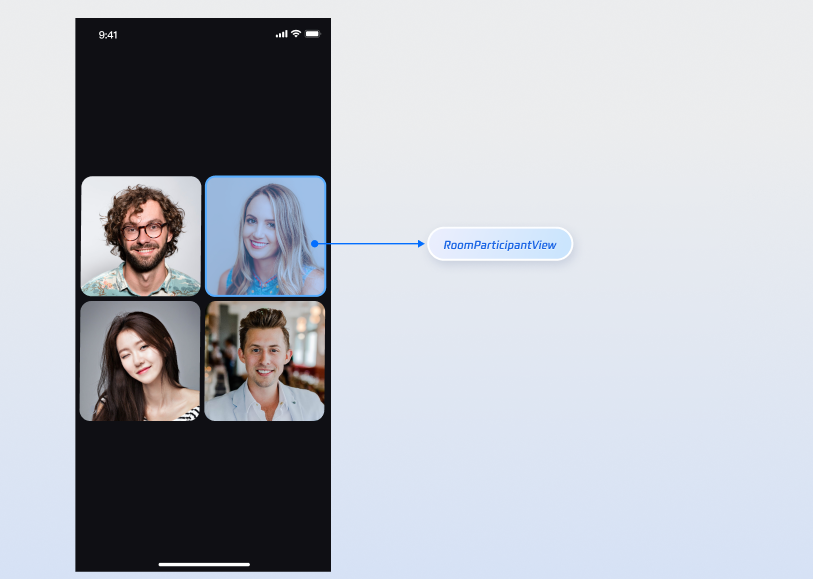 |
丰富多人房间功能
为了满足对多人房间更多的需求,AtomicXCore SDK 还提供了以下功能来丰富多人房间场景。
API 文档
Store/Component | 功能描述 | API 文档 |
RoomStore | 房间全生命周期管理:创建并加入 / 加入 / 离开 / 结束房间 / 更新、获取房间信息 / 房间预约 / 呼叫房间外成员 / 监听房间内被动事件(如房间解散,房间信息更新等)。 | |
RoomParticipantStore | 房间内参与者管理:设置管理员 / 转移房主 / 获取参与者列表 / 移出房间 / 参与者设备控制(邀请打开摄像头、 麦克风等)/ 申请打开设备(如申请打开摄像头、麦克风等)。 | |
RoomParticipantView | 单个参与者视频画面展示视图: 绑定和更新参与者信息 / 更新视频流类型 / 设置活跃状态等。 |
常见问题
集成代码后产生如下图所示编译报错 allowBackup 异常,如何处理?

问题原因:多个模块的
AndroidManifest.xml 中都配置了 allowBackup 属性,造成冲突。解决方法:您可以在您工程的
AndroidManifest.xml 文件中删除 allowBackup 属性或将该属性改为 false,表示关闭备份和恢复功能;并在 AndroidManifest.xml 文件的 application 节点中添加 tools:replace="android:allowBackup" 表示覆盖其他模块的设置,使用您自己的设置。修复示例如图所示: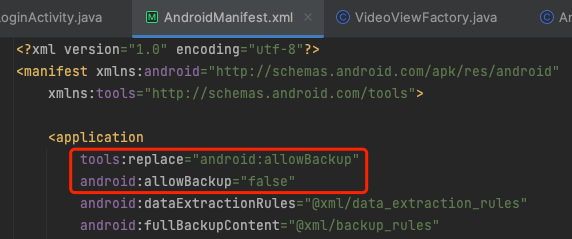
RoomParticipantView 绑定了其他参与者信息,并正确设置了视频流类型,依然看不到视频画面?
检查 setActive:请确保当前
RoomParticipantView 在屏幕中是可见状态,并正确调用 RoomParticipantView 的 setActive(true)。检查 RoomParticipant:请确保
RoomParticipantView 中设置的 RoomParticipant 的 cameraStatus 状态是否为 on。检查网络:请检查设备网络连接是否正常。
调用 DeviceStore 接口打开设备,对方依然看不到画面?
检查是否未申请系统相机和麦克风权限
Android 6.0 及以上版本动态申请系统权限可按照下面步骤:
1. AndroidManifest.xml 声明。
<uses-permission android:name="android.permission.CAMERA" /><uses-permission android:name="android.permission.RECORD_AUDIO" />
2. 动态申请权限。
import android.Manifestimport android.content.pm.PackageManagerimport android.os.Bundleimport android.util.Logimport androidx.appcompat.app.AppCompatActivityimport androidx.core.app.ActivityCompatimport androidx.core.content.ContextCompatimport io.trtc.tuikit.atomicxcore.api.device.DeviceStoreclass RoomMainActivity : AppCompatActivity() {private val PERMISSION_REQUEST_CODE = 1001override fun onCreate(savedInstanceState: Bundle?) {super.onCreate(savedInstanceState)checkAndRequestPermissions()}private fun checkAndRequestPermissions() {val permissions = arrayOf(Manifest.permission.CAMERA,Manifest.permission.RECORD_AUDIO)val permissionsToRequest = permissions.filter {ContextCompat.checkSelfPermission(this, it) != PackageManager.PERMISSION_GRANTED}if (permissionsToRequest.isNotEmpty()) {ActivityCompat.requestPermissions(this,permissionsToRequest.toTypedArray(),PERMISSION_REQUEST_CODE)} else {// 权限已授予,可以打开设备openDevices()}}override fun onRequestPermissionsResult(requestCode: Int,permissions: Array<out String>,grantResults: IntArray) {super.onRequestPermissionsResult(requestCode, permissions, grantResults)if (requestCode == PERMISSION_REQUEST_CODE) {if (grantResults.all { it == PackageManager.PERMISSION_GRANTED }) {// 所有权限已授予,调用打开设备如openDevices()openDevices()} else {// 部分权限被拒绝Log.e("Permission", "部分权限被拒绝")}}}private fun openDevices() {// 1. 打开前置摄像头DeviceStore.shared().openLocalCamera(isFront = true, completion = null)// 2. 打开麦克风DeviceStore.shared().openLocalMicrophone(completion = null)}
Android 14 以上机型切到后台后, 采集音视频无画面/无声音?
Android 14 及以上版本,应用在后台采集摄像头或麦克风数据时,必须启动前台服务并声明对应的服务类型,否则无法正常采集,解决方案可按照下面步骤:
1. AndroidManifest.xml 声明
FOREGROUND_SERVICE 、 FOREGROUND_SERVICE_CAMERA 、 FOREGROUND_SERVICE_MICROPHONE 权限和 service 声明。<uses-permission android:name="android.permission.FOREGROUND_SERVICE" /><uses-permission android:name="android.permission.FOREGROUND_SERVICE_CAMERA" /><uses-permission android:name="android.permission.FOREGROUND_SERVICE_MICROPHONE" /><serviceandroid:name=".MediaCaptureService"android:foregroundServiceType="camera|microphone" />
2. 在界面启动后开启后台采集服务。
import android.app.NotificationChannelimport android.app.NotificationManagerimport android.app.Serviceimport android.content.Intentimport android.content.pm.ServiceInfoimport android.os.Bundleimport android.os.IBinderimport androidx.appcompat.app.AppCompatActivityimport androidx.core.app.NotificationCompatclass MainActivity : AppCompatActivity() {override fun onCreate(savedInstanceState: Bundle?) {super.onCreate(savedInstanceState)startForegroundService(Intent(this, MediaCaptureService::class.java))}}class MediaCaptureService : Service() {override fun onCreate() {super.onCreate()// 1. 创建通知渠道val channel = NotificationChannel("media", "媒体采集", NotificationManager.IMPORTANCE_LOW)getSystemService(NotificationManager::class.java).createNotificationChannel(channel)// 2. 构建通知val notification = NotificationCompat.Builder(this, "media").setContentTitle("音视频通话中").setSmallIcon(android.R.drawable.ic_menu_call).build()// 3. 启动前台服务,指定 camera 和 microphone 类型(Android 14+ 必须)startForeground(1, notification,ServiceInfo.FOREGROUND_SERVICE_TYPE_CAMERA or ServiceInfo.FOREGROUND_SERVICE_TYPE_MICROPHONE)}override fun onBind(intent: Intent?): IBinder? = null}
联系我们
如果在接入或使用过程中有任何疑问或者建议,欢迎联系 info_rtc@tencent.com 提交反馈。
文档反馈