语法规则
下载
聚焦模式
字号
操作场景
检索分析语句由检索条件和 SQL 语句组成,两者通过竖线
|分割,只需要检索日志,不需要统计分析时,可省略其中的管道符|及 SQL 语句。[检索条件] | [SQL 语句]
检索条件:指定日志需要匹配的条件,返回符合该条件的日志。例如使用
status:404检索响应状态码为404的应用请求日志。检索条件为空或*时代表无检索条件,即所有日志。SQL 语句:针对符合检索条件的日志进行统计分析,返回统计分析结果。例如使用
status:404 | select count(*) as logCounts统计响应状态码为404的日志数量。注意:
检索基于日志分词,原始日志需在分词后包含检索条件指定的“词”才能被检索到,例如通过 error 检索不到 errorMessage,因为 errorMessage 本身是一个单独的词,不等于 error,需使用通配符 error*才能检索该日志。关于分词的更多说明及示例参见 分词与索引。
前提条件
使用检索条件
全文检索:配置索引 时开启了全文索引。
键值检索:
日志接入标准存储,低频存储不支持使用键值检索,详见 日志存储概述。
采集日志时按字段对日志进行了提取,即 日志结构化。
配置索引 时为需要检索的字段开启了键值索引。
使用 SQL 语句
日志接入标准存储,低频存储不支持使用 SQL 进行统计分析,详见 日志存储概述。
采集日志时按字段对日志进行了提取,即 日志结构化。
配置索引 时为需要检索的字段开启了键值索引且开启统计。
检索条件语法
检索条件支持
两种语法规则
:CQL:CLS Query Language,日志服务 CLS 专用检索语法,专为日志检索设计,使用容易,推荐使用。
Lucene:开源 Lucene 语法,由于该语法并非专为日志检索设计,对特殊符号、大小写、通配符等有较多限制,使用较为繁琐,容易出现语法错误,不推荐使用。
语法规则
语法 | 说明 |
key:value | 键值检索,查询字段(key)的值中包含 value 的日志,例如: level:ERROR |
value | 全文检索,查询日志全文中包含 value 的日志,例如: ERROR |
AND | “与”逻辑操作符,不区分大小写,例如: level:ERROR AND pid:1234 |
OR | “或”逻辑操作符,不区分大小写,例如: level:ERROR OR level:WARNING level:(ERROR OR WARNING) |
NOT | “非”逻辑操作符,不区分大小写,例如: level:ERROR NOT pid:1234 level:ERROR AND NOT pid:1234 |
() | 逻辑分组操作符,控制逻辑运算优先级,例如: level:(ERROR OR WARNING) AND pid:1234注意: 未使用括号时, AND 优先级高于 OR。 |
" " | 短语检索中不存在逻辑操作符,其等同于查询字符本身,例如: name:"and" |
' ' | |
* | |
> | 范围操作符,表示大于某个数值,例如: status>400 或 status:>400 |
>= | 范围操作符,表示大于等于某个数值,例如: status>=400或status:>=400 |
< | 范围操作符,表示小于某个数值,例如: status<400或status:<400 |
<= | 范围操作符,表示小于等于某个数值,例如: status<=400或status:<=400 |
= | 范围操作符,表示等于某个数值,例如: status=400,等价于status:400 |
\\ | 转义符号,转义后的字符表示符号本身。 被检索的值包含空格、 :、(、)、>、=、<、"、'、* 时,需进行转义,例如:body:user_name\\:bob使用双引号进行短语检索时,仅需转义 "及*使用单引号进行短语检索时,仅需转义 '及*未转义的 *代表模糊检索 |
key:* | text 类型字段:查询字段(key)存在的日志,无论值是否为空,例如: url:*long/double 类型字段:查询字段(key)存在,且值为数值的日志,例如: response_time:* |
key:"" | text 类型字段:查询字段(key)存在且值为空的日志,值仅包含分词符时也等价为空,例如: url:""long/double 类型字段:查询字段值不为数值的日志,包含字段(key)不存在的情况,例如: response_time:"" |
示例 | 语句 |
检索来源为某台机器的日志 | __SOURCE__:127.0.0.1 或 __SOURCE__:192.168.0.* |
检索来源为某个文件的日志 | __FILENAME__:"/var/log/access.log" |
检索包含 ERROR 的日志 | ERROR |
检索失败的日志(状态码大于400) | status>400 |
检索 GET 请求中失败(状态码大于400)的日志 | method:GET AND status>400 |
检索 ERROR 或 WARNING 级别的日志 | level:(ERROR OR WARNING) |
检索非 INFO 级别 的日志 | NOT level:INFO |
短语检索
使用双引号或单引号包裹一个字符串进行检索,例如
name:"john Smith"、filepath:"/var/log/access.log",与不使用引号包裹的检索相比,短语检索表示日志需在包含字符串内各个词的同时,词之间的顺序也与检索条件严格一致。例如有如下两条日志,分词符为
/:#1 filepath:"/var/log/access.log"#2 filepath:"/log/var/access.log"
使用
filepath:/var/log/access.log进行检索时会同时检索到上述两条日志,因为非短语检索不要求词之间的顺序。使用
filepath:"/var/log/access.log"进行检索时仅会检索到第一条日志。短语检索的检索条件更加严格,检索较长的字符串时,建议使用短语检索。
注意
短语检索内支持使用通配符,例如
filepath:"/var/log/acc*.log",但不支持在词的开头使用通配符,例如filepath:"/var/log/*cess.log"。短语检索中的通配符仅能匹配到符合条件的128个词,返回包含这128个词的所有日志,指定的词越精确,查询结果越精确,非短语检索无该限制。
模糊检索
模糊检索需要在词的中间或末尾加上通配符,可使用
*匹配零个、单个、多个字符,例如:IP:192.168.1.* 可检索到192.168.1.1、192.168.1.34等。host:www.te*t.com 可检索到 www.test.com、www.telt.com 等。注意
*不能用在词的开头,即不支持前缀模糊检索。long 和 double 类型字段不支持使用
*进行模糊检索,可以使用数值范围进行检索,例如:status>400 and status<500。如果您需要使用前缀模糊查询,可使用如下方法替代:
添加分词符:例如日志为
host:www.test.com、host:m.test.com,需要查询字段中间包含 test 的日志,可为该字段添加分词符.,便可以直接使用 host:test 对日志进行检索。使用 SQL中的 strpos 函数:例如
* | select * where strpos(host,'test')>0,但这种方式相比检索条件性能较差,不适合日志数据量过大的场景。通配符也可使用在短语检索内,例如
filepath:"/var/log/acc*.log",但同样不支持在词的开头使用通配符,例如filepath:"/var/log/*cess.log"。且短语检索中的通配符仅能匹配到符合条件的128个词,返回包含这128个词的所有日志,指定的词越精确,查询结果越精确,非短语检索无该限制。如需使用 Lucene 语法,请在此处切换语法规则:

语法规则
语法 | 说明 |
AND | “与”逻辑操作符,例如 level:ERROR AND pid:1234 |
OR | “或”逻辑操作符,例如 level:ERROR OR level:WARNING |
NOT | “非”逻辑操作符,例如 level:ERROR NOT pid:1234 |
() | 分组操作符,控制逻辑运算优先级,例如 (ERROR OR WARNING) AND pid:1234 |
: | 冒号,表示作用于的 key 字段,即键值检索,例如 level:ERROR |
"" | 双引号,引用一个短语,日志需包含短语内的各个词,且各个词的顺序保持不变,例如 name:"john Smith" |
* | 通配符查询,匹配零个、单个、多个字符,例如 host:www.test*.com,不支持前缀模糊查询还可以通过 key:* 的方式查询字段(key)存在的日志,等价于 _exists_:key |
? | 通配符查询,匹配单个字符,例如 host:www.te?t.com与 *类似,不支持前缀模糊查询 |
> | 范围操作符,表示大于某个数值,例如 status:>400 |
>= | 范围操作符,表示大于等于某个数值,例如 status:>=400 |
< | 范围操作符,表示小于某个数值,例如 status:<400 |
<= | 范围操作符,表示小于等于某个数值,例如 status:<=400 |
TO | “范围”逻辑操作符,例如 request_time:[0.1 TO 1.0] |
[] | 范围操作符,包含边界值的范围,例如 age:[20 TO 30] |
{} | 范围操作符,不包含边界值的范围,例如 age:{20 TO 30} |
\\ | 转义符号,转义后的字符表示符号本身,例如 url:\\/images\\/favicon.ico如不想使用转义符,可使用 ""包裹,例如url:"/images/favicon.ico",但需注意,双引号内的词会被当作一个短语,日志需包含短语内的各个词,且各个词的顺序保持不变 |
_exists_ | _exists_:key,返回 key 存在的日志,例如 _exists_:userAgent 表示搜索存在 userAgent 字段的日志 |
注意
语法区分大小写,例如 AND、OR 表示检索逻辑操作符,而 and、or 视为普通文本。
多个检索条件使用空格连接时,视为“或”逻辑,例如
warning error 等价于 warning OR error。检索关键字中存在特殊字符时,需使用转义符进行转义,特殊字符包括
+ - && || ! ( ) { } [ ] ^ " ~ * ? : \\。同时使用 AND 和 OR 逻辑运算符时,请使用
()对检索条件进行分组,以明确逻辑优先级,例如(ERROR OR WARNING) AND pid:1234。示例 | 语句 |
检索来源为某台机器的日志 | __SOURCE__:127.0.0.1 或 __SOURCE__:192.168.0.* |
检索来源为某个文件的日志 | __FILENAME__:"/var/log/access.log"或__FILENAME__:\\/var\\/log\\/*.log |
检索包含 ERROR 的日志 | ERROR |
检索失败的日志(状态码大于400) | status:>400 |
检索 GET 请求中失败(状态码大于400)的日志 | method:GET AND status:>400 |
检索 ERROR 或 WARNING 级别的日志 | level:ERROR OR level:WARNING |
检索非 INFO 级别 的日志 | NOT level:INFO |
检索 192.168.10.10主机上非 INFO 级别的日志 | __SOURCE__:192.168.10.10 NOT level:INFO |
检索 192.168.10.10主机上/var/log/access.log 文件中不包含 INFO 级别的日志 | (__SOURCE__:192.168.10.10 AND __FILENAME__:"/var/log/access.log") NOT level:INFO |
检索 192.168.10.10主机上 ERROR 或 WARNING 级别的日志 | __SOURCE__:192.168.10.10 AND (level:ERROR OR level:WARNING) |
检索 4XX 状态码的日志 | status:[400 TO 500} |
检索元数据中容器名为 nginx 的日志 | __TAG__.container_name:nginx |
检索元数据中容器名为 nginx,且请求延时大于1s 的日志 | __TAG__.container_name:nginx AND request_time:>1 |
检索包含 message 字段的日志 | message:* 或 _exists_:message |
检索不包含 message 字段的日志 | NOT _exists_:message |
模糊检索
在日志服务中进行模糊检索,需要在词的中间或末尾加上通配符,可使用
*匹配零个、单个、多个字符,或?匹配单个字符,例如:IP:192.168.1.* 可检索到192.168.1.1、192.168.1.34等。host:www.te*t.com 可检索到 www.test.com、www.telt.com 等。注意
*或?不能用在词的开头,即不支持前缀模糊检索。long 和 double 类型字段不支持使用
*或?进行模糊检索,可以使用数值范围进行检索,例如 status:[400 TO 500}。如果您需要使用前缀模糊查询,可使用如下方法替代:
添加分词符:例如日志为
host:www.test.com、host:m.test.com,需要查询字段中间包含 test 的日志,可为该字段添加分词符.,便可以直接使用 host:test 对日志进行检索。使用 SQL 中的 LIKE 语法:例如
* | select * where host like '%test%',但这种方式相比检索条件性能较差,不适合日志数据量过大的场景。CQL 语法相比 Lucene 语法在易用性上进行了大量优化,并精简了部分不常用的功能,主要区别如下:
功能 | Lucene | CQL |
逻辑操作符 | 仅支持大写,例如 AND NOT OR | 同时支持大小写,例如 AND and NOT not OR or |
特殊符号转义 | 存在较多特殊符号需进行转义,例如检索 /book/user/login/ 需转义为\\/book\\/user\\/login\\/ | 需转义的特殊符号较少,可直接检索 /book/user/login/ |
关键词检索 | 关键词包含分词时,分词间的关系为或,例如分词符为 /时,检索 /book/user/login/ 等价于 book OR user OR login,会检索到很多不相关的日志 | 关键词包含分词时,分词间的关系为与,例如分词符为 /时,检索 /book/user/login/ 等价于 book AND user AND login,符合检索习惯 |
短语检索 | 检索短语时,不支持使用通配符,例如 "/book/user/log*/"检索不到/book/user/login/及/book/user/logout/ | 检索短语时,支持使用通配符,例如 "/book/user/log*/"可以检索到/book/user/login/及/book/user/logout/ |
数值范围检索 | 使用 timeCost:[20 TO 30]形式的语法进行检索 | 使用 timeCost>=20 AND timeCost<=30形式的语法进行检索 |
字段存在的日志 | 使用 _exists_:key进行检索,其中key为字段名称 | 使用 key:*进行检索,其中key为字段名称 |
SQL 语句语法
语法 | 说明 |
从表中选取数据,默认从当前日志主题中获取符合检索条件的数据 | |
为列名称(KEY)指定别名 | |
结合聚合函数,根据一个或多个列(KEY)对原始数据进行分组聚合 | |
根据指定的 KEY 对结果集进行排序 | |
限制结果集数据行数,默认限制为100,最大100万 | |
对查询到的原始数据进行过滤 | |
对分组聚合后的数据进行过滤,与 WHERE 的区别在于其作用于分组(GROUP BY)之后,排序(ORDER BY)之前,而 WHERE 作用于聚合前的原始数据 | |
针对一些复杂的统计分析场景,需要先对原始数据进行一次统计分析,再针对该分析结果进行二次统计分析,这时候需要在一个 SELECT 语句中嵌套另一个 SELECT 语句,这种查询方式称为嵌套子查询 | |
使用 SQL 函数对日志进行更丰富的分析处理,例如从 IP 解析地理信息、时间格式转换、字符串分隔及连接、JSON 字段提取、算数运算、统计唯一值个数等。 |
注意:
SQL 语句对大小写不敏感,
SELECT 等效于 select。使用
SELECT从日志主题中获取数据时,默认最大获取100行数据,如需获取更多数据请使用 LIMIT 语法 指定需要获取的行数,最多可获取100万行。字符串必须使用单引号
''包裹,无符号包裹或被双引号""包裹的字符表示字段或列名。例如'status'表示字符串 status,status或"status"表示日志字段 status。字符串内本身包含单引号'时,需使用''(两个单引号)代表单引号本身。例如'{''version'': ''1.0''}'表示原始字符串{'version': '1.0'}。字符串内本身包含双引号"时无需特殊处理。SELECT中字段名称需符合 列名规范,不符合该规范时,需使用双引号""包裹。不需要在末尾加分号表示 SQL 结束。
示例 | 语句 |
统计 GET 请求中失败(状态码大于400)的日志条数 | method:GET AND status:>400 | select count(*) as errorCount |
按分钟统计 GET 请求中失败(状态码大于400)的日志条数 | method:GET AND status:>400 | select histogram(__TIMESTAMP__, interval 1 minute) as analytic_time_minute, count(*) as errorCount group by analytic_time_minute limit 1000 |
统计请求数量最大的5个 URL | * | select URL, count(*) as log_count group by URL order by log_count desc limit 5 |
统计 ERROR 日志占比 | * | select round((count_if(upper(Level) = 'ERROR'))*100.0/count(*),2) as "ERROR日志占比(%)" |
统计每个省份的请求数量 | * | select ip_to_province(client_ip) as province , count(*) as PV group by province order by PV desc limit 1000 |
说明:
操作步骤
1. 登录 日志服务控制台。
2. 在左侧导航栏中,单击检索分析。
3. 在顶部选择需要查询的日志主题。
4. 选择检索分析语句输入模式,日志服务提供两种模式来输入检索分析语句。
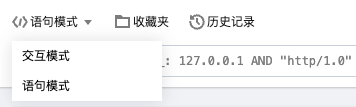
交互模式:通过鼠标点击指定检索条件及统计分析规则,自动生成检索分析语句,易用性高。
语句模式:直接输入检索分析语句,需符合语法规则,灵活度高。
5. 输入检索分析语句后,在右侧选择时间范围,然后单击搜索按钮,执行检索分析。
当检索分析语句仅包含检索条件时:可在原始日志中查看匹配检索条件的日志,默认按日志时间倒排。
当检索分析语句包含 SQL 语句时:可在统计图表中查看分析结果,同时还可在原始日志中查看符合检索条件的日志,以便于对比分析统计结果及原始日志。
文档反馈