Postpaid Billing
다운로드
포커스 모드
폰트 크기
Pay-as-you-go billing (also referred to as postpaid billing) follows a "use first, pay later" model,you pay only for the services you consume.
Pay-as-you-go billing is settled and invoiced according to the product's billing cycle. Common billing cycles include hour, day, and month. When a billing cycle is reached,charges are deducted and generates a bill.
If your account has insufficient balance,the account will enter an overdue state. You must complete the payment within the agreed time. If the agreed time is exceeded, the resources being used will be shut down (service suspension) and destroyed.
Note:
This document only provides a brief description of the pay-as-you-go billing mode. Since billing rules may vary by product, you can refer to the corresponding product documentation for specific billing rules.
To check the price of a specific product, view the Product Pricing page.
Due to network latency, system upgrades, and other reasons, some pay-as-you-go usage that is not deducted in the current month may be deducted in the following month. If you have any questions about these charges, please contact us.
Use Cases
Pay-as-you-go: use first, pay later.Pay-as-you-go is recommended when your business has the following characteristics:
Business development has significant volatility and cannot be accurately predicted.
Resource usage is temporary and bursty.
Features
You can use resources first and pay later, which offers more flexibility compared to prepaid plans. You only pay for what you use, with accurate billing and no resource waste.
Resources can be scaled up or down on demand, allowing resource purchasing requirements to be quickly adjusted based on business needs.
The unit price is higher than that of the prepaid mode.
When a large amount of resources is temporarily increased, a situation of no available resources may occur.
Must-Knows
When you enable a pay-as-you-go (postpaid) resource, the system freezes an amount equivalent to a billing cycle coefficient, as determined by the product policy.
When you adjust the configuration of a pay-as-you-go host, the frozen amount at the time of purchase will be unfrozen and
When a host is terminated, the frozen amount will be unfrozen.
Billing Process
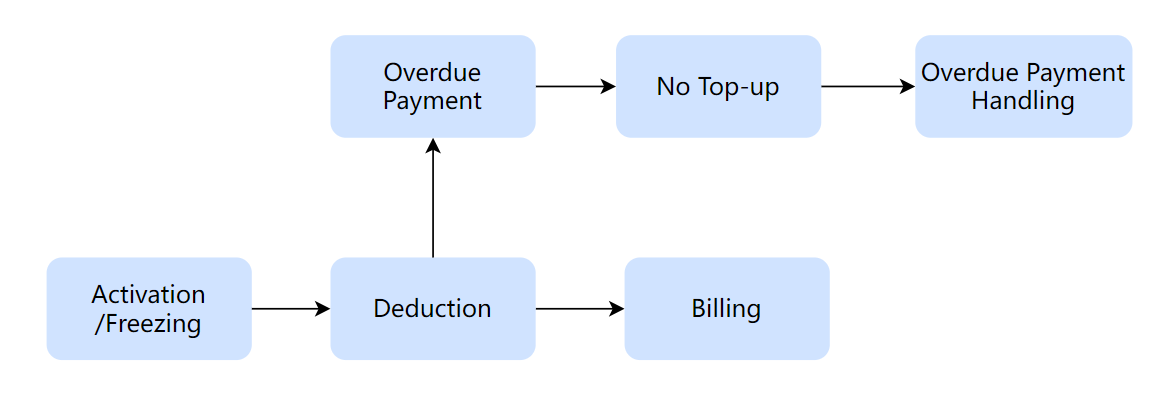
1. Activation/Freezing: After a user selects and enables a pay-as-you-go product, it can be used normally. Upon activation, the system pre-freezes an amount according to the specific product policy.
2. Deduction: Pay-as-you-go resources follow a "use first, pay later" model. For each billing cycle (hourly/daily/monthly), the system executes the settlement process and charges the fees.
3. Billing: After the deduction is completed, the system generates a bill based on the actual settlement information. You can go to the Cost Center to view the bill details.
4. Overdue Payment Handling: When an account is in an overdue payment state, resources will first go to an overdue payment protection period, followed by a resource service suspension period. If the account is not topped up beyond the resource service suspension period, the resources will be terminated, and the associated data will be deleted and cannot be recovered.
Overdue Payment Handling Mechanism
Under the pay-as-you-go model, charges are deducted and a bill is issued based on the actual resource usage. During the deduction process, if your account has insufficient balance, it may be placed into an overdue payment state. Once in an overdue payment state, all postpaid resources under your account will enter an overdue payment protection period. The specific rules are as follows:
Stage | Stage Duration | Handling Mechanism | Notification |
Overdue Protection Period (From the day of overdue payment - until before service suspension) | The protection period for hourly billing is typically set to 2 hours. The protection period for daily billing is typically set to 1 day. | During this period, you can continue to use the service, but you cannot activate new services or create new resources. To avoid affecting continuous service usage, please top up your account promptly. | The system will send an overdue payment reminder to you when your payment becomes overdue. Notification methods include: email, message center, and SMS. The actual notification methods and recipients are subject to the user's Message Center subscription configuration. |
Service suspension period (From the day of service suspension - until before resource termination) | The service suspension period is generally 7-15 days. | After the overdue payment protection period ends, resources go to the service suspension period. During this period, you cannot activate new services or create new resources. Resources in use will be automatically suspended. Service configurations and resources that are already disabled will be retained until the service suspension period ends. If you need to continue using the service, please top up your account promptly. After your account balance becomes positive, you can restart the corresponding service in the console. | Before the formal service suspension of resources, the system will send a service suspension notification. Notification methods include: email, message center, and SMS. |
Resource destruction | - | After the resource suspension period, the system will initiate the reclamation of overdue resources. Your resources will be reclaimed and destroyed, and related data will be cleared and cannot be recovered. | Before resources are officially destroyed, the system will push destruction notifications. Notification methods include: email, internal messages, and SMS. |
Note:
The overdue payment protection period and resource service suspension period vary slightly for different products. For specific policies, please refer to the official website documentation of the product you purchased.
피드백