tencent cloud
최신 혜택
상품
솔루션
가격
파트너
마켓플레이스
더 알아보기
Prev
Next
Tencent Cloud Observability Platform
Related Agreements
Application Performance Management Service Level Agreement
APM Privacy Policy
APM Data Processing And Security Agreement
RUM Service Level Agreement
개인 정보 보호 정책
데이터 처리 및 보안 계약
Mobile Performance Monitoring Service Level Agreement
Terminal Performance Monitoring Privacy Policy
Terminal Performance Monitoring Data Processing And Security Agreement
Cloud Automated Testing Service Level Agreement
ATTRIBUTIONS-iOS
ATTRIBUTIONS-Android
RUM Pro Privacy Policy
RUM Pro Data Processing and Security Agreement
Prometheus Service Level Agreement
TCMG Service Level Agreements
PTS Service Level Agreement
PTS Use Limits
Cloud Monitor Service Level Agreement
문서
Tencent Cloud Observability Platform
Copying Dashboard
다운로드
포커스 모드
폰트 크기
마지막 업데이트 시간: 2024-01-27 17:45:42
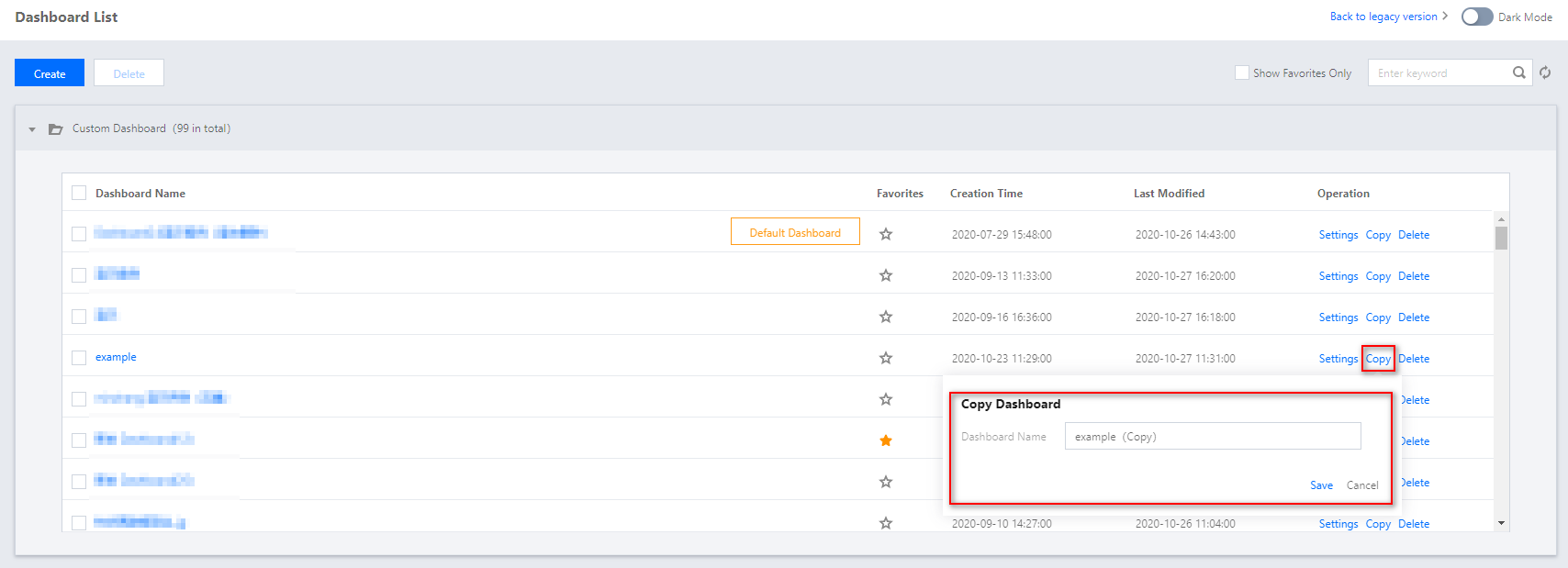
This document describes how to copy a dashboard.
Directions
1.
Log in to the
Tencent Cloud Observability Platform console
.
2.
In the left sidebar, click
Dashboard
>
Dashboard List
to go to the dashboard list page.
3.
In the dashboard list, find the dashboard that you want to copy and click
Copy
under the “Operation” column.
4.
In the window that appears, rename the dashboard and click
Save
.
다음 주제: Application Performance Management Service Level Agreement
도움말 및 지원
문제 해결에 도움이 되었나요?
예
아니오
더 자세한 내용은
문의하기
또는
티겟 제출
을 통해 문의할 수 있습니다.
피드백