tencent cloud

TencentDB for MySQL

Connection FAQs

Download
Focus Mode
Font Size
Last updated: 2026-06-10 11:37:43
This document introduces common issues encountered when a connection is established to a TencentDB for MySQL instance via different connection methods (private network, public network, or CCN).

Common Issues

Regardless of the connection method used to connect to the database, the following common issues are likely to occur. If the connection fails, it is recommended that you first check and identify the cause based on the suggestions below during self-troubleshooting.
Account and Password Issues
If you repeatedly fail to log in to the cloud database via command after logging in to the CVM, check whether the account and password you use for database login are incorrect.
In the command line: `mysql -h <private/public network ip address> -u <username, default root> -P <private/public network port> -p`. Ensure that the account and password used for login are correct. If you log in with a non-root account, you must enter the password corresponding to that non-root account. When the password is entered on the CVM page, the characters are not displayed as you type. You must enter the password correctly in one go and press Enter. If you forget the password, you can reset the password and try again.
TencentDB for MySQL Instance Issues
If the instance itself has an issue, the connection may fail. You can check whether any of the following instance issues exist.
If the disk of a MySQL instance is full, it may affect database connections. It is recommended to scale out the disk. For the operation, see Adjusting Database Instance Specifications.
When the error message "ERROR 1040(00000):Too many connections" appears, it indicates that the current maximum number of connections for the cloud database instance has exceeded the limit. Common causes and solutions:
i. If there are many sleep threads, it is recommended to lower the wait_timeout and interactive_timeout parameter values in the console. For the operation, see Setting Instance Parameters.
ii. If there are few sleep threads and no slow query backlog, it is recommended to increase the max_connections parameter value in the console. For the operation, see Setting Instance Parameters.
Check whether the MySQL instance is in the "primary/secondary switching" state. If the MySQL instance is undergoing primary/secondary switching when you attempt to connect, the connection will fail. Please wait until the primary/secondary switching is complete, and then reconnect via command.

Private Network Connection FAQs

Is There a Charge for Private Network Connections?

Private network connections are free to use and are not currently charged.

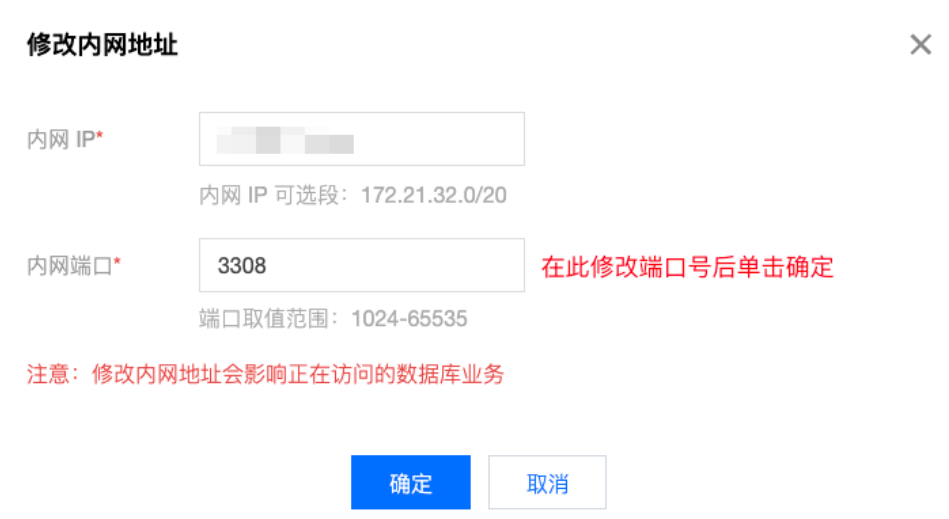
Can Private Network Ports Be Modified?

You can modify it. Log in to the TencentDB for MySQL console, go to the target instance details page, and click Edit next to the private network address to make the modification.


How to Troubleshoot Private Network Connection Errors

Possible causes for connection failures via a private network address are typically related to CVM type, account password, port, security group, network, or instance issues. The following sections introduce self-troubleshooting methods for various scenarios. For more self-diagnosis and handling, see Private Network Connection Failure.
1. Check whether the server you are using for connection is a CVM.
To connect via the private network, the server you use must be a CVM. If you are using a Lighthouse server or a server from a non-Tencent platform, connection via a private network address is not currently supported. You can refer to Customizing a Linux CVM to create a new CVM and then connect to the database via the private network address.
2. If you repeatedly fail to log in to the cloud database via command after logging in to the CVM, check whether the account and password you use for database login are incorrect.
In the command line: `mysql -h <private network ip address> -u <username, default root> -P <port number, default 3306> -p`. The account and password used for login must be correct. If you log in with a non-root account, you must enter the password corresponding to that non-root account. When the password is entered on the CVM page, the characters are not displayed as you type. You must enter the password correctly in one go and press Enter. If you forget the password, you can reset the password and try again.
3. Check whether the security group configuration is appropriate and whether it restricts IP addresses.
When configuring outbound rules in the CVM security group, if the destination of an outbound rule is not 0.0.0.0/0 and its protocol port is not ALL, you must add the private IP address and port of MySQL to the outbound rule.
When configuring inbound rules in the MySQL security group, if the source of an inbound rule is not 0.0.0.0/0 and its protocol port is not ALL, you must add the IP address and port of MySQL to the inbound rule.
4. Check whether it is a network issue.
The CVM and TencentDB for MySQL must be in the same region and the same VPC. You can go to the CVM console and the TencentDB for MySQL console to verify whether this requirement is met. If they are not in the same VPC, you can use Switch Network to change the network of the MySQL instance to match that of the CVM. If you confirm that the CVM and TencentDB for MySQL are in the same region and the same VPC, but a network error is still reported, check whether your local network has any restrictions.
5. Check whether any instance issues exist.
If the disk of a MySQL instance is full, it may affect database connections. It is recommended to scale out the disk. For the operation, see Adjusting Database Instance Specifications.
When the error message "ERROR 1040(00000):Too many connections" appears, it indicates that the current maximum number of connections for the cloud database instance has exceeded the limit. Common causes and solutions:
i. If there are many sleep threads, it is recommended to lower the wait_timeout and interactive_timeout parameter values in the console. For the operation, see Setting Instance Parameters.
ii. If there are few sleep threads and no slow query backlog, it is recommended to increase the max_connections parameter value in the console. For the operation, see Setting Instance Parameters.
Check whether the MySQL instance is in the "primary/secondary switching" state. If the MySQL instance is undergoing primary/secondary switching when you attempt to connect, the connection will fail. Please wait until the primary/secondary switching is complete, and then reconnect via command.

Public Network Connection FAQs

Is There a Charge for Public Network Connections?

Public network connections are free to use and are not currently charged.

Why Is It Necessary to Open MySQL Private Network Ports for Public Network Connections?

After you enable the public network address for a TencentDB for MySQL instance, Tencent Cloud's backend cluster accesses the instance's private network port over the private network, performs port mapping, and then forwards traffic to enable public network access. Therefore, after enabling the public network address, you must open the MySQL private network port in the security group to allow connections from the backend cluster.

Can Public Network Ports Be Modified?

It cannot be modified.

How Secure Are Public Network Connections?

Enabling the public network address exposes your database service to the public network, which may lead to the database being compromised or attacked. Therefore, it is generally recommended to use private network connections to the database. Public network connections for cloud databases are suitable for development or auxiliary management purposes. They are not recommended for formal business connections, as uncontrollable factors may cause public network connections to become unavailable (for example, DDoS attacks or sudden high-volume traffic).

How to Restrict Connections to Specific IPs and Block Others After Enabling a Public Network Address?

To restrict permissions based on host location, you can modify the host address authorized for a database account in the TencentDB for MySQL console to limit access to the database. For details, see Modifying the Host Address for Authorized Access.
Alternatively, you can consider using a public network CLB for forwarding to enable public network login, and use the security group policy of the CLB to restrict the source. For details, see Enabling Public Network Service via CLB.

Why Can't I Enable Public Network Connections?

Public network connection addresses can be enabled for primary instances in the following regions: Guangzhou, Shanghai, Beijing, Chengdu, Chongqing, Nanjing, Hong Kong (China), Singapore, Seoul, Tokyo, Silicon Valley, Virginia, Frankfurt, Jakarta, and Riyadh. For the regions where public network connection addresses can be enabled for read-only instances, refer to the console. If an instance is deployed in a region that does not support public network connections, the public network connection cannot be enabled.


How to Troubleshoot Public Network Connection Errors

Possible causes for connection failures via a public network address are typically related to account password, port, security group, network, or instance issues. The following sections introduce self-troubleshooting methods for various scenarios.
1. If you repeatedly fail to log in to the cloud database via command after logging in to the CVM, check whether the account and password you use for database login are incorrect.
In the command line: `mysql -h <public network ip address> -u <username, default root> -P <public network port number> -p`. The account and password used for login must be correct. If you log in with a non-root account, you must enter the password corresponding to that non-root account. When the password is entered on the CVM page, the characters are not displayed as you type. You must enter the password correctly in one go and press Enter. If you forget the password, you can reset the password and try again.
2. Check whether the security group configuration is appropriate and whether it restricts IP addresses.
When outbound rules are configured in the CVM security group, if the destination of an outbound rule is not 0.0.0.0/0 and its protocol port is not ALL, you must add the public IP address and port of MySQL to the outbound rule.
When configuring inbound rules in the MySQL security group, if the source of an inbound rule is not 0.0.0.0/0 and its protocol port is not ALL, you must allow the private network port of the MySQL instance in the inbound rule. The default port is 3306.
3. Check whether it is a network issue.
Connecting to the database via a public network may fail due to unstable network, local network restrictions, or VPC-bound ACL policies. Switch your local network, remove the relevant restrictions, and try again. It is recommended to use private network connection to the database for greater stability and lower latency.
4. Check whether any instance issues exist.
If the disk of a MySQL instance is full, it may affect database connections. It is recommended to scale out the disk. For the operation, see Adjusting Database Instance Specifications.
When the error message "ERROR 1040(00000):Too many connections" appears, it indicates that the current maximum number of connections for the cloud database instance has exceeded the limit. Common causes and solutions:
i. If there are many sleep threads, it is recommended to lower the wait_timeout and interactive_timeout parameter values in the console. For the operation, see Setting Instance Parameters.
ii. If there are few sleep threads and no slow query backlog, it is recommended to increase the max_connections parameter value in the console. For the operation, see Setting Instance Parameters.
Check whether the MySQL instance is in the "primary/secondary switching" state. If the MySQL instance is undergoing primary/secondary switching when you attempt to connect, the connection will fail. Please wait until the primary/secondary switching is complete, and then reconnect via command.

CCN Connection FAQs

Is There a Charge for CCN Connections?

Using CCN incurs fees. For details, see CCN Billing Overview.

When to Use CCN to Connect to TencentDB for MySQL?

1. If your CVM and TencentDB for MySQL instance reside in different VPCs (including same/different accounts, same/different regions), you can connect to the database using CCN.
2. If you purchase a Lighthouse server, you need to connect to the database using CCN.

How to Achieve Private Network Interconnection for Lighthouse?

Lighthouse uses a VPC automatically assigned by Tencent Cloud for network isolation. By default, its private network does not interconnect with the private networks of other Tencent Cloud resources within the VPC, such as CVM and cloud databases. You need to associate it with CCN to enable interconnection. For details, see Private Network Interconnection.
Note:
Lighthouse only supports association with CCNs under the same account. Lighthouse instances across different accounts cannot interconnect.

Note:

Tencent Cloud CCN offers three service levels: Platinum, Gold, and Silver.
The service level of data transfer in the same region is gold, which cannot be modified.
For cross-region interconnection, three service levels are provided: Platinum, Gold, and Silver. When creating a CCN, users can select a service level.
Different service levels incur different fees. You can select a level based on your business needs. For details, see Billing Overview.

Note:

1. Check whether the CCN route table is valid. Follow the steps below to perform the check:
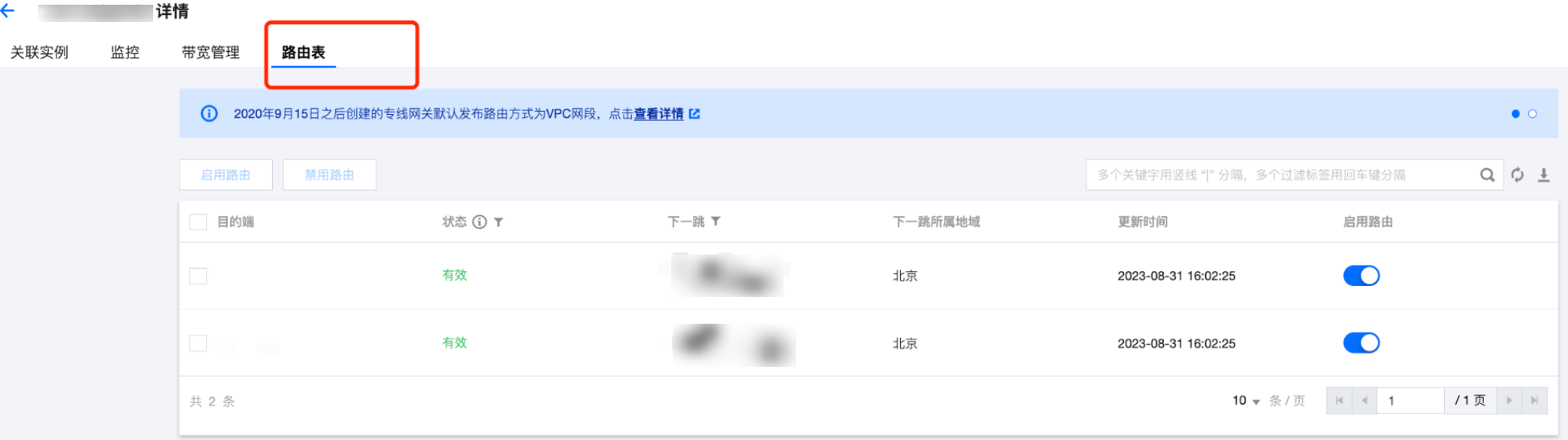
1.1 On the "Private Network Interconnection" page, click the "CCN ID" in the region card to go to the CCN details page.
1.2 On the CCN details page, select the Route Table tab.
1.3 Ensure that the newly added route entry is "Valid". If a CIDR conflict exists, the route entry may be invalid.

Note:
To use invalid routes, see Disable Route and Enable Route. For conflict rules and restrictions, see Use Limits.
2. After logging in to the Lighthouse instance, if you repeatedly fail to log in to the cloud database via command, check whether the account and password you use for database login are incorrect.
In the command line: `mysql -h <private network ip address> -u <username, default root> -P <port number, default 3306> -p`. The account and password used for login must be correctly matched. If you log in with a non-root account, you must enter the password corresponding to that non-root account. When the password is entered on the Lighthouse page, the characters are not displayed as you type. You must enter the password correctly in one go and press Enter. If you forget the password, you can reset the password and try again.
3. Check whether any instance issues exist.
If the disk of a MySQL instance is full, it may affect database connections. It is recommended to scale out the disk. For the operation, see Adjusting Database Instance Specifications.
When the error message "ERROR 1040(00000):Too many connections" appears, it indicates that the current maximum number of connections for the cloud database instance has exceeded the limit. Common causes and solutions:
i. If there are many sleep threads, it is recommended to lower the wait_timeout and interactive_timeout parameter values in the console. For the operation, see Setting Instance Parameters.
ii. If there are few sleep threads and no slow query backlog, it is recommended to increase the max_connections parameter value in the console. For the operation, see Setting Instance Parameters.
Check whether the MySQL instance is in the "primary/secondary switching" state. If the MySQL instance is undergoing primary/secondary switching when you attempt to connect, the connection will fail. Please wait until the primary/secondary switching is complete, and then reconnect via command.

Help and Support

Was this page helpful?

Help us improve! Rate your documentation experience in 5 mins.

Feedback