tencent cloud
最新优惠
产品
解决方案
价格中心
合作伙伴网络
云市场
探索更多
Prev
Next
云数据库 MySQL
动态与公告
产品动态
产品公告
新手指引
产品简介
产品概述
产品优势
应用场景
数据库架构
隔离策略
经济型实例
产品功能列表
数据库实例
高可用性(多可用区)
地域和可用区
自研内核
内核概述
内核版本更新动态
功能类特性
性能类特性
安全类特性
稳定类特性
TXRocks 引擎
LibraDB 引擎
内核问题检查与修复
产品计费
计费概述
选型指南
购买方式
续费说明
欠费说明
退费说明
按量转包年包月
调整实例费用说明
存储空间超用计费说明
备份空间收费说明
数据库审计计费说明
数据库代理商业化计费和活动说明
数据库代理计费周期说明
查看费用账单
快速入门
入门概述
创建 MySQL 实例
连接 MySQL 实例
SQL 洞察(原数据库审计)
SQL 洞察(原数据库审计)简介
查看审计实例列表
开通审计服务
查看审计日志
日志投递
配置事后告警
修改审计规则
修改审计服务
关闭审计服务
审计规则模板
SQL 审计规则(旧版)
查看审计任务
授权子用户使用数据库审计
MySQL 云盘版
MySQL 云盘版概述
创建 MySQL 云盘版实例
维护管理实例
查看实例监控
调整实例配置
其他功能相关操作
迁移或升级至 MySQL 云盘版
用户指南
使用限制
操作总览
维护管理实例
升级实例
CPU 弹性扩容
只读/灾备实例
数据库代理
数据库管理(DMC)
账号管理
参数配置
备份与回档
数据迁移
网络与安全
监控与告警
日志中心
只读分析引擎
标签
实践教程
对 RO 执行 FLUSH TABLE 不写 binlog 的实践
腾讯云 MySQL 帮助实现 MySQL 5.7升级至 MySQL 8.0
如何设置存储超用锁定事件告警
MySQL 5.6升级到 MySQL 5.7方法和说明
云数据库 MySQL 数据库审计等保实践
构建全场景高可用架构
云数据库 MySQL 使用规范
应用程序配置自动重连功能
MySQL 主实例参数修改的影响
MyISAM 自动转换为 InnoDB 引擎限制
为云数据库 MySQL 创建 VPC
使用云数据库 MySQL 提高业务负载能力
两地三中心灾备建设
读写分离扩展云数据库 MySQL 性能
使用 DTS 将 InnoDB 数据迁移至 RocksDB
构建 LAMP 堆栈 Web 应用程序
构建 Drupal 网站
通过 Python 语言使用 MySQL API
主备实例查询数据不一致
单节点(原基础版)迁移操作指南
白皮书
性能白皮书
安全白皮书
故障处理
连接相关
性能相关
备份恢复相关
实例数据同步延迟
设置大小写不敏感失败
通过命令获取 slow_query_log_file 失败
隐藏主键相关报错处理
API 参考
History
Introduction
API Category
调用方式
Instance APIs
Data Import APIs
Database Proxy APIs
数据库审计相关接口
Security APIs
Task APIs
Data Security Encryption APIs
Account APIs
Backup APIs
Rollback APIs
Parameter APIs
Database APIs
Log-related API
Monitoring APIs
Data Types
Error Codes
常见问题
选型相关
计费相关
备份相关
回档相关
连接登录
参数修改
升级相关
账号权限
性能空间内存
运维相关
数据迁移
功能特性
控制台相关
日志相关
事件相关
数据库审计
实例切换影响
服务协议
服务等级协议
服务条款
通用参考
标准与认证
联系我们
词汇表
文档
云数据库 MySQL
SQL 洞察(原数据库审计)
审计规则模板
删除规则模板
删除规则模板
下载
聚焦模式
字号
最后更新时间: 2026-05-28 10:32:26
本文为您介绍通过控制台删除规则模板。
说明:
若规则模板有关联实例,则不支持删除,仅规则模板没有绑定实例时,才支持被删除,规则模板删除后,将不能应用于实例。
操作步骤
1.
登录
MySQL 控制台
。
2.
在左侧导航栏选择
SQL 洞察(原数据库审计)
。
3.
选择
地域
后,单击
规则模板
。
4.
在
规则模板
列表里找到目标规则模板(也可在搜索框通过资源属性筛选快速查找),在其
操作
列单击
删除
。
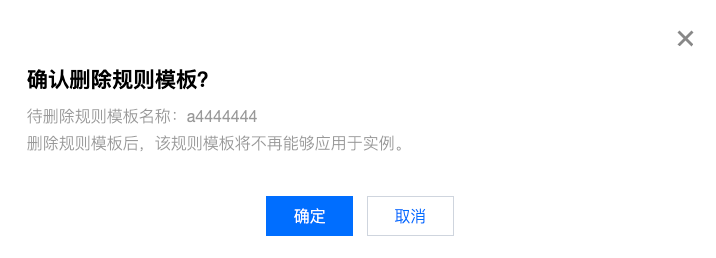
5.
在弹窗中单击
确定
。
上一篇: 修改规则模板
下一篇: SQL 审计规则(旧版)
帮助和支持
本页内容是否解决了您的问题?
是
否
您也可以
联系销售
或
提交工单
以寻求帮助。
填写满意度调查问卷,共创更好文档体验。
点击前往
文档反馈
搜索
仅搜索标题
请输入关键词搜索文档