アカウントの削除
Download
フォーカスモード
フォントサイズ
操作シナリオ
作成したデータベースアカウントの利用を停止する場合は、TencentDB for MySQLコンソールでアカウントを削除することができます。
説明:
アカウントの削除により、業務に支障を生じることがないよう、削除するデータベースアカウントが他のアプリケーションで使用されていないことを確認してください。
操作手順
1. MySQLコンソールにログインします。
2. インスタンスリストからアカウントを削除するインスタンスを選択し、インスタンス名又は【操作】列の【管理】をクリックすると、インスタンス管理ページが表示されます。
3. 【データベース管理】>【アカウント管理】タブを選択し、削除するアカウントを見つけて【その他】>【アカウントの削除】を選択します。
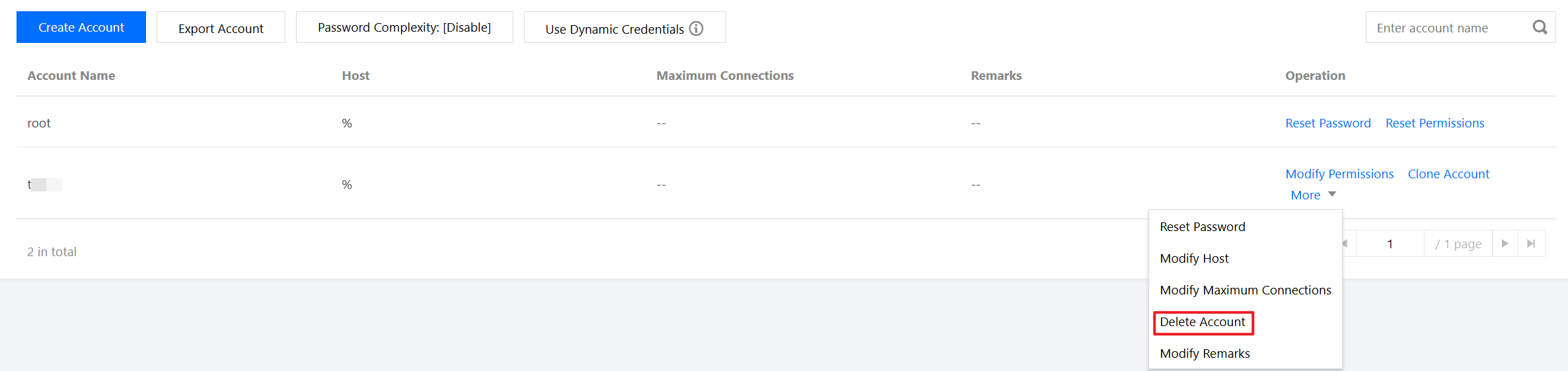
4. ポップアップダイアログボックスで、【OK】をクリックすると、アカウントを削除することができます。
関連するAPI
API名 | 説明 |
TencentDBアカウントを削除します |
フィードバック