tencent cloud
最新优惠
产品
解决方案
价格中心
合作伙伴网络
云市场
探索更多
Prev
Next
云压测
产品概述
购买指南
计费概述
按量计费(后付费)
购买方式
欠费说明
退费说明
快速入门
操作指南
简单模式压测
脚本模式压测
JMeter 模式压测
管理项目
管理场景
流量录制
环境管理
定时压测
压测报告
访问控制
告警管理
标签管理
错误代码手册
实践教程
使用 Prometheus 观测性能压测指标
使用云压测回放 GoReplay 录制的请求
API 文档
History
Introduction
API Category
Making API Requests
PTS-related APIs
Data Types
Error Codes
JavaScript API 列表
JavaScript API 列表概述
pts/global
pts/http
pts
pts/dataset
pts/grpc
pts/jsonpath
pts/protobuf
pts/redis
pts/sql
pts/url
pts/util
pts/ws
pts/socketio
pts/socket
常见问题
相关协议
服务等级协议
使用限制
隐私政策
数据处理和安全协议
文档
云压测
操作指南
管理项目
删除项目
删除项目
下载
聚焦模式
字号
最后更新时间: 2025-03-10 16:47:03
本文将为您介绍如何删除云压测项目。
操作步骤
1.
登录
腾讯云可观测平台
。
2.
在左侧菜单栏中单击
云压测 > 项目列表
。
3.
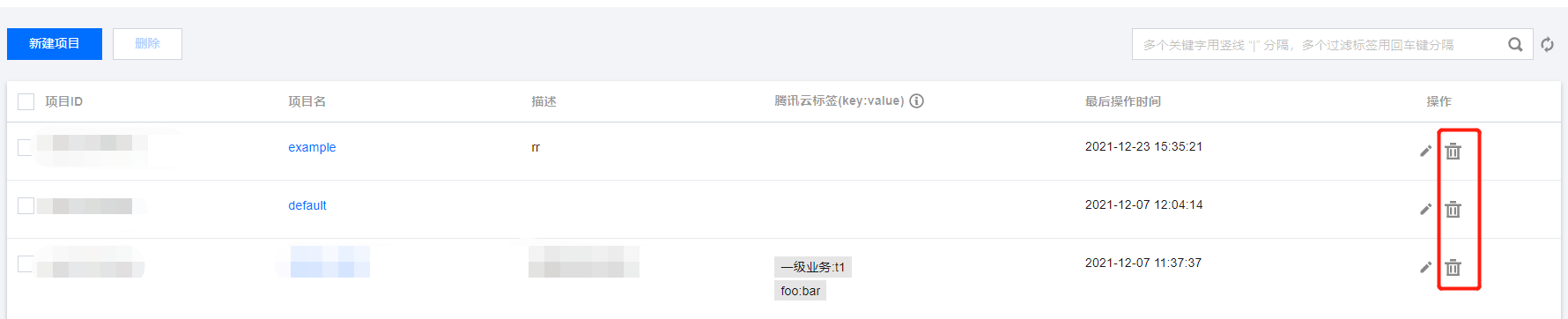
在新建项目管理页,找到需要删除的项目,在操作列中单击
删除图标
并确定删除。
上一篇: 编辑项目
下一篇: 场景概述
帮助和支持
本页内容是否解决了您的问题?
是
否
您也可以
联系销售
或
提交工单
以寻求帮助。
填写满意度调查问卷,共创更好文档体验。
点击前往
文档反馈
搜索
仅搜索标题
请输入关键词搜索文档