Smart Compression
Download
Focus Mode
Font Size
Function Introduction
EdgeOne enables Gzip or Brotli compression globally by default. When the client request header carries
Accept-Encoding: br, gzip or Accept-Encoding: br or Accept-Encoding: gzip, the node will intelligently compress files based on their Content-Type. Compressed files can effectively reduce the size of resources and speed up content transmission. Enabling smart compression can help you:1. Improve user experience: By reducing resource size, web page loading speed can be significantly improved, providing a better user experience. Especially for websites with a large amount of CSS, JavaScript, and other resources, enabling compression can greatly reduce loading time.
2. Save traffic: Compressed resources will consume less network traffic, which will help reduce operational costs.
Directions
Note:
By default, you do not need to modify this configuration. If in some scenarios, such as: the current client will perform MD5 verification on the file or the current client does not support parsing the specified compressed file, and you want the current site to use only Brotli compression or Gzip compression, or not to compress at all, you can follow the steps below.
Scenario 1: Enable/Disable Smart Compression for All Domain Names of the Site
If you need to enable/disable smart compression for the whole connected site, please refer to the following steps:
1. Log in to the Tencent Cloud EdgeOne console, enter Service Overview in the left menu bar, and click the site to be configured under Website Security Acceleration.
2. On the site details page, click Site Acceleration to enter the global site configuration page. Then click File Optimization in the right sidebar.
3. Find the smart compression configuration card, which is enabled by default. Click the switch to configure enable/disable.

Scenario 2: Enable/Disable Smart Compression for Specific Domain Names
If you only need to enable/disable smart compression for specific domain names, please refer to the following steps:
1. Log in to the Tencent Cloud EdgeOne console, enter Service Overview in the left menu bar, and click the site to be configured under Website Security Acceleration.
2. On the site details page, click Site Acceleration to enter the global site configuration page. Then click the Rule Engine tab.
3. On the rule engine management page, click Create rule and select Add blank rule.
4. On the rule editing page, select the Host matching type to match requests for specific domain names.
5. Click Action > Select Box, and in the pop-up operation list, select the operation as Smart Compression, and click the switch to enable/disable Gzip or Brotli compression.

6. Click Save and Publish to complete the rule configuration.
Related References
Smart Compression Effective Rules
1. Smart compression supports a file size (Content-Length) range of 256B - 30MB.
2. When the origin site response is Transfer-Encoding: chunked, data is transmitted in a streaming, chunked manner. EdgeOne nodes cannot determine the total file length before receiving the complete response. Due to the "256B - 30MB" file size judgment rule and performance considerations, nodes do not perform real-time compression during synchronous transmission. Subsequent requests can be compressed based on cached resources.
3. Smart compression is synchronous compression, compressing files while fetching them from the origin. When the node first requests a compressed file, it can directly respond with the compressed file.
4. Smart compression compresses files based on
Content-Type by default, supporting the following types:text/htmltext/xmltext/plaintext/csstext/javascriptapplication/jsonapplication/javascriptapplication/x-javascriptapplication/rss+xmlapplication/xmltextimage/svg+xmlimage/tifftext/richtexttext/x-scripttext/x-componenttext/x-java-sourcetext/x-markdowntext/jsimage/x-iconimage/vnd.microsoft.iconapplication/x-perlapplication/x-httpd-cgiapplication/xmlapplication/xml+rssapplication/vnd.api+jsonapplication/x-protobufmultipart/bagmultipart/mixedapplication/xhtml+xmlfont/ttffont/otffont/x-woffapplication/vnd.ms-fontobjectapplication/ttfapplication/x-ttfapplication/otfapplication/x-otfapplication/truetypeapplication/opentypeapplication/x-opentypeapplication/font-woffapplication/eotapplication/fontapplication/font-sfntapplication/wasmapplication/javascript-binastapplication/manifest+jsonapplication/ld+json
5. If you have both Gzip and Brotli compression enabled at the same time, and the client request header
Accept-Encoding carries both br and gzip:If the node already has cached content, it will respond according to the following rules:
If the node has both Brotli and gzip compressed cache content, it will prioritize responding with Brotli compression.
If the node only has Brotli compressed cache content, it will prioritize responding with Brotli compression.
If the node only has gzip compressed cache content, it will prioritize responding with Gzip compression.
If the node does not have cached content, it will prioritize responding with Brotli compression.
6. When only Brotli compression is enabled, if the request compression header is gzip, the compression will not take effect, and the original resources will be returned; when only Gzip compression is enabled, if the request compression header is br, the compression will not take effect, and the original resources will be returned.
7. If the origin server has enabled compression and the server carries response headers:
Content-Encoding, the smart compression function will no longer be effective.8. The node determines and caches the corresponding compressed version based on the Content-Encoding in the origin site's response headers. Therefore, it is recommended that the origin site strictly returns the corresponding encoding according to the Accept-Encoding request header. If a request does not carry Accept-Encoding but the origin site still returns gzip content, that content will be cached by the node as a gzip version. Subsequently, for requests that also lack Accept-Encoding, because the node does not have a cache of the uncompressed version, it can only pass the request back to the origin site for processing. For this scenario, it is recommended to standardize the origin site's compression behavior: when a request does not contain Accept-Encoding, return uncompressed content; or disable compression at the origin site and instead enable smart compression on the EdgeOne side.
Request Example
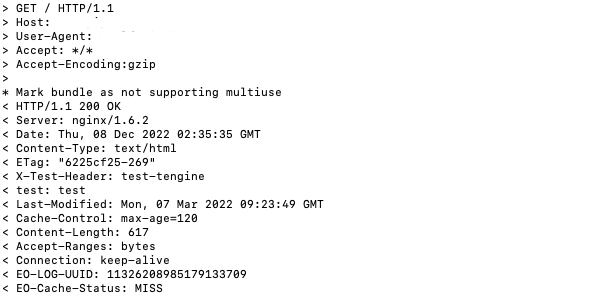
Smart compression not enabled
For the first request for a gzip compressed file, if it misses the node cache, EdgeOne retrieves the original file from the origin and caches it on the node, then responds with the original file:
Enabled Smart Compression
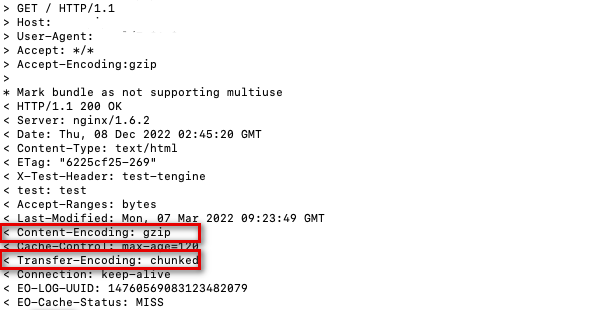
First request for gzip compressed file, cache miss on node cache, perform origin retrieval for file, node synchronously compresses and caches the compressed file, EdgeOne response with compressed file:
Smart compression supports chunk stream compression. If a request misses the node cache, the system retrieves the file from the origin and then responds via chunk.
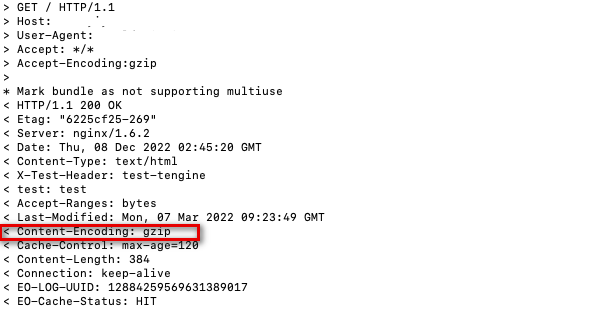
Subsequent requests, hit the node cache of gzip compressed file, the node directly responds with the compressed file.
Help and Support
Was this page helpful?
You can also Contact sales or Submit a Ticket for help.
Help us improve! Rate your documentation experience in 5 mins.
Feedback