TDSQL-C for MySQL provides Serverless services to meet enterprise database service requirements for specific business scenarios, helping reduce costs and improve efficiency. This document describes the key features of Serverless services.
Feature name
Description
Resource scaling range (CCU)
You can adjust the range for elastic CCU scaling. Within this range, the Serverless cluster automatically increases or decreases CCU based on actual business load.
Elastic policy
The Serverless cluster continuously monitors workload metrics such as CPU and memory usage, and triggers the automatic scaling policy based on predefined rules.
Automatic start/stop
The Serverless service supports custom auto-pause settings. If no connection is detected, the instance automatically pauses and instantly resumes without interruption when a task connection is received.
Resource Scaling Range (CCU)
CCU (TDSQL-C Compute Unit) is the billing unit for Serverless compute. One CCU approximately equals the compute resources of 1 CPU and 2 GB of memory. The CCU usage per billing cycle is determined by taking the maximum value between the number of CPU cores used by the database and half of the memory size.
You need to set an elastic range for the Serverless service. For the detailed range, refer to configure computing resources.
The minimum capacity for the Serverless service can be configured down to 0.25 CCU. When the elastic range is set for the first time, it is recommended to set the minimum capacity to 1 CCU and select a higher value for the maximum capacity. A lower capacity allows your cluster to scale down to the maximum extent when completely idle, avoiding additional costs, while a higher capacity enables your cluster to scale up to the maximum extent under heavy load, ensuring stability during business peaks.
Note:
If your business scenario requires rapid scaling to a very high capacity, consider setting the minimum capacity to a slightly larger value.
If you need to modify the resource scaling range, log in to the console and make the corresponding changes based on the actual view mode.
Tab View
List View
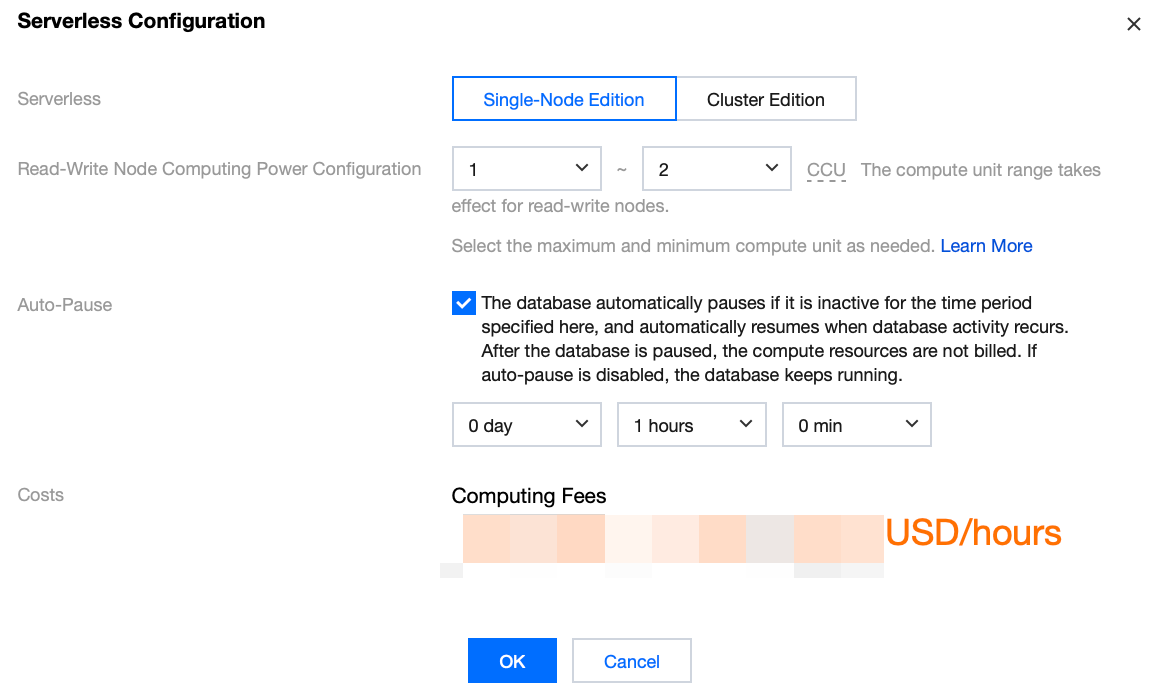
On the target Cluster Management page, click Serverless Configuration in the upper-right corner and modify the computing resource configuration in the pop-up window. The changes take effect immediately upon completion without impacting your business.
On the target Cluster Management page, click More in the Operation column of the Instance List and select Adjust Configurations. The adjustment takes effect immediately upon completion without impacting your business.
Elasticity Policy
Note:
When Serverless is used, cross-machine scale-out may occur due to its inherent elastic capabilities. To mitigate the impact of cross-machine scale-out on your business, it is recommended to add a database proxy when a Serverless cluster is used. This helps prevent connection interruptions caused by momentary disconnections during cross-machine operations. Additionally, ensure your application has a reconnection mechanism to further reduce the impact of cross-machine operations.
Read-only nodes currently support only vertical scaling for a single node and do not support horizontal scaling for the number of read-only nodes.
One CCU equals the compute resources of 1 CPU core and 2 GB of memory.
The elastic policy for Serverless services is implemented through a monitoring and compute layer. By monitoring business loads, the system automatically scales out or scales in compute resources when a scale-out or scale-in policy is triggered, and bills for the resources consumed at that moment. The elastic modes of TDSQL-C for MySQL Serverless services are categorized into two types: CPU elasticity and memory Buffer Pool elasticity (referred to as memory BP elasticity). They are described separately below.
CPU Elasticity: The system immediately triggers a scale-out when CPU usage exceeds the threshold of the current instance specifications. This elastic mode provides sub-second elasticity, where the impact of instantaneous full load is negligible (it can quickly complete resource scale-out during sudden load spikes, with negligible elastic time).
Memory BP Elasticity: In this elastic mode, scaling is performed based on CPU usage and elastic duration. Here, CPU usage = the number of cores corresponding to the instance's compute capacity upper limit x the instance's current CPU utilization, and elastic duration = detection duration (2 seconds for scale-out, 60 seconds for scale-in) + execution duration (approximately 3 seconds).
The CPU usage threshold for triggering elasticity, along with the corresponding instance specifications and BP sizes, are shown in the table below.
CPU Usage Threshold
Corresponding Instance Specifications
Corresponding BP Size
0.5 core
0.5-core 1 GB
0.5GB
1 core
1-core 2 GB
1GB
2 core
2 core and 4 GB
2.4GB
4 core
4 core and 8 GB
5.6GB
8 core
8 core and 16 GB
11.2GB
16 core
16-core 32 GB
22.4GB
32 core
32-core 64 GB
51.2GB
The scaling policies corresponding to different elastic modes are described in the table below.
Elastic Mode
Scale-out Policy
Scale-in Policy
CPU Elasticity
Policy: Scale-out is triggered when the CPU usage of an instance exceeds the CPU usage threshold corresponding to its current instance specifications.
Example: For example, the current instance specifications are 2 core and 4 GB, and the current CPU usage is 1.5 core. If the CPU usage in the next second is 2.4 core, the instance is immediately scaled out to full capacity, reaching specifications of 4 core and 8 GB.
Policy: Scale-in is triggered when the CPU usage of an instance falls below half of the CPU usage threshold corresponding to its current instance specifications.
Example: For example, the current instance specifications are 8 core and 16 GB, and the current CPU usage is 4.6 core. If the CPU usage in the next second is 3.2 core, the instance is immediately scaled in to specifications of 4 core and 8 GB.
Memory BP Elasticity
Policy: Scale-out is triggered when the CPU usage of an instance exceeds the CPU usage threshold corresponding to its current instance specifications for 2 seconds. The step size for each scale-out is twice the current instance specifications.
Example: For example, the current instance specifications are 2 core and 4 GB, and the current CPU usage is 1.5 core. If the CPU usage in the next monitoring cycle is 2.4 core, the BP is scaled out to the size corresponding to 4 core and 8 GB.
Policy: Scale-in is triggered when the CPU usage of an instance remains below the CPU usage threshold corresponding to its current instance specifications for 60 seconds. The instance specifications after scale-in are half of the current instance specifications, and the step size for each scale-in is 0.5 CCU (that is, 0.5 core and 1 GB).
Example: For example, the current instance specifications are 8 core and 16 GB, and the current CPU usage is 4.6 core. If the CPU usage in the next monitoring cycle is 3.2 core, the BP is scaled in to the size corresponding to 4 core and -8 GB.
Automatic Start/Stop
You can enable or disable the automatic suspension setting based on your business needs. This setting can be modified in the console.
Note:
The auto-pause feature for Serverless services is determined by whether user connections exist. If your business scenario requires using event_scheduler to schedule SQL operations, it is not recommended to enable auto-pause.
To enable or disable the auto-pause setting, perform the corresponding operation based on your actual view mode.
Tab View
List View
On the target Cluster Management Page, click Serverless Configuration in the upper-right corner. Then, in the pop-up window, select or deselect Auto-pause.
On the Instance List of the target cluster management page, click More > Adjust Configurations in the Operation column. Then, in the pop-up window, select or deselect Auto-pause.
When the feature is enabled, you need to set an auto-pause time, which defaults to 1 hour. If the database has no connections and no CPU usage during this period, it will be paused automatically. After pausing, compute resources are not billed, while storage is billed based on actual usage.
When the feature is disabled, the database remains running continuously. If there are no connections and no CPU usage, billing is based on the minimum CCU compute capacity configured by the user. This mode is suitable for application scenarios where the business maintains heartbeat connections.
Manual Pause
You can also manually pause a specified database in the console based on your actual view mode.
Tab View
List View
Manual Start After Pause
A database in a paused status cannot use console features. To perform operations, you can wait until the database automatically starts, or manually start the Serverless database in the console based on your actual view mode.
Tab View
List View
Continuous Request Forwarding Capability
When a connection is accessed, the system automatically starts the database in a paused status within seconds. Users do not need to configure a reconnection mechanism.
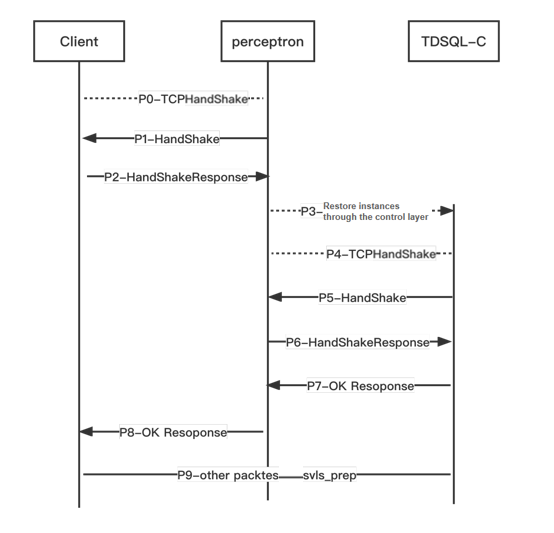
The access layer of TDSQL-C for MySQL incorporates a module called the recovery perceptron (perceptron for short) to forward requests. After the perceptron performs a handshake with the client, it does not disconnect the connection between the client and the cluster. After the cluster is recovered, the perceptron performs a handshake with TDSQL-C for MySQL and subsequently forwards Layer-4 packets.
The overall process design employs two challenge random numbers for authentication. This enables the relay module, perceptron, to complete username and password verification without storing them, ensuring the security of user passwords and avoiding the issue of password storage inconsistency.
When the instance is paused, if a connection is initiated, the MySQL client first performs a TCP handshake with the perceptron (P0). After the TCP handshake is completed, the perceptron sends a "Random Number A" to the client as a challenge (P1). The MySQL client then calculates and replies with its own "Login Answer A" using its account credentials and "Random Number A" (P2). Since the perceptron does not store user account passwords, it cannot verify whether "Login Answer A" is correct. However, the perceptron can distinguish whether the client is a MySQL client or another type of client (the perceptron is a classifier in the machine learning field, and its ability to distinguish different client types is one reason for its name). The verification of "Login Answer A" will be performed by the TDSQL-C for MySQL compute layer (hereinafter referred to as TDSQL-C). After the perceptron wakes up TDSQL-C through management control (P3), the next step of the login verification process begins.
After the TCP handshake with the perceptron (P4), from the perspective of TDSQL-C, the perceptron is also a regular MySQL client. Therefore, TDSQL-C sends a "Random Number B" challenge (P5) to the perceptron. The perceptron's reply is a special MySQL packet (P6). First, it uses "Random Number B" and its own authentication mechanism to calculate and embed "Login Answer B" into the packet. Second, it also piggybacks "Random Number A" and "Login Answer A" in this packet. After receiving the special answer packet, TDSQL-C performs two verifications. The first verification checks the correctness of "Random Number B" and "Login Answer B" as well as the identity of the perceptron. After passing the first verification, it proceeds to the second verification, which checks the correctness of "Random Number A" and "Login Answer A". Upon passing both verifications, TDSQL-C logs in as the user and replies to the perceptron with a login success message (P7). The perceptron then replies to the user with a login success message (P8).
When the cluster is in a paused status, only the perceptron's route is retained. When the cluster recovers, the system retains both the perceptron's route and the TDSQL-C route, and sets the perceptron's route weight to 0. This allows new connections to directly connect to TDSQL-C, while existing connections that have already established links with the perceptron can still communicate.