tencent cloud

Secrets Manager

Examples of Management via Tags

下载
聚焦模式
字号
最后更新时间: 2024-01-02 15:07:13

Overview

Tags are used to manage resource classification and permissions from different dimensions.
For SSM, tags are used for User Credentials.
By adding tags to a secret, you can classify, track, and manage secrets more easily. Also, you can summarize the usage of secrets according to their tags.

Use Limits

There are some limits on the usage of tags (tag key and tag value). For more information, please see Use Limits.

Directions

Setting tags in the SSM console

1. Log in to the SSM console.
2. Select the region where the secret to be edited is located.
3. Find the secret whose tags need to be edited and click Edit Tag on the right.


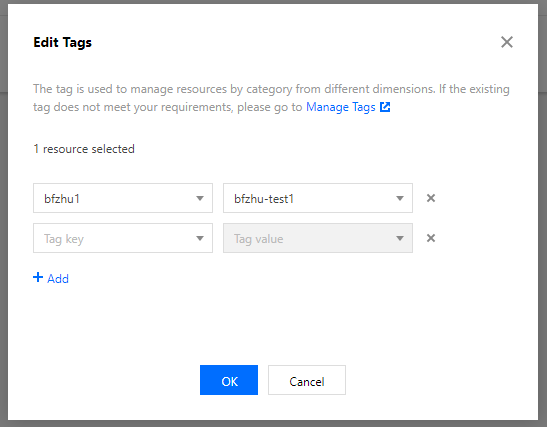
4. Set the tags in the "1 resource selected" section of the pop-up window.
The following figure shows you how to add two sets of tags.

5. Click OK. A message indicating the edit was successful will be prompted.

Filtering keys with tags

1. Log in to the SSM console.
2. Select the region where the secret to be edited is located.
3. In the Credential List of the selected region, use tags as the filter criteria, enter the filter content, and press the Enter key, as shown in the following figure.
For example, if you want to filter keys whose owner is alex, you can enter the "owner:alex" tag.


帮助和支持

本页内容是否解决了您的问题?

填写满意度调查问卷,共创更好文档体验。

文档反馈