iOS Custom Capabilities
다운로드
포커스 모드
폰트 크기
This document primarily introduces the custom capabilities supported by the iOS SDK, including two aspects: custom multilingual and custom UI.
1. Custom Multilingual
Built-in languages
The SDK supports the following languages by default, configured via
HuiYanOsConfig.languageType:Enumeration Value | Meaning |
HY_DEFAULT | Follow system settings (default) |
HY_CUSTOMIZE_LANGUAGE | Custom language |
Using built-in languages requires no additional configuration, such as following the system:
HuiYanOsConfig *config = [[HuiYanOsConfig alloc] init];config.languageType = HY_DEFAULT;
Custom language configuration
If the built-in languages do not meet your requirements, you can provide a custom language Bundle. This Bundle contains all multilingual fields within the SDK, as follows.
Step 1: Build UserLanguageBundle
1. Open the delivery package to find the project files in the
demo/ directory, then locate the Localizable under the UserLanguageBundle directory; this part serves as the translation source file.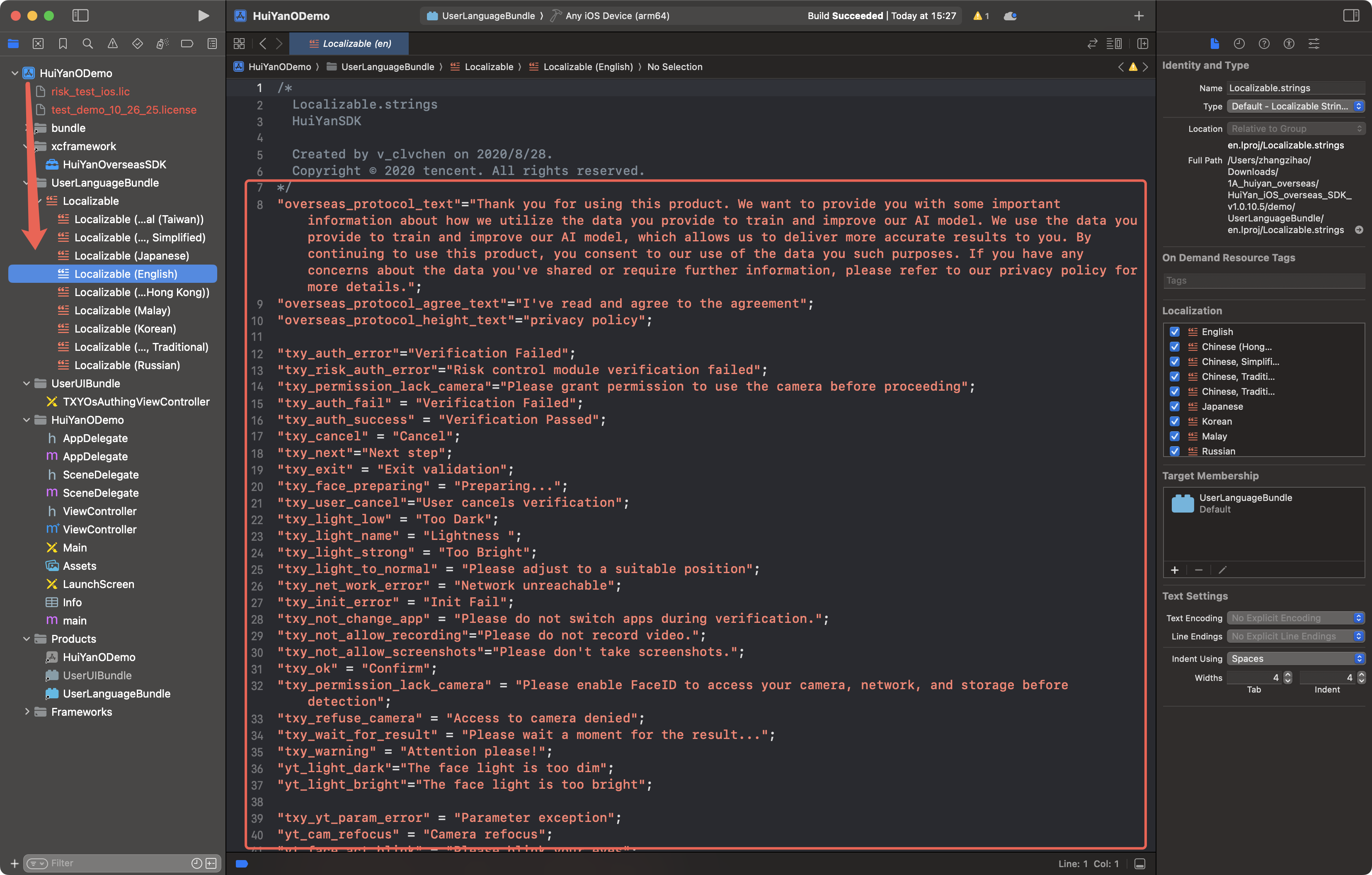
2. Locate the
UserLanguageBundle (Build Target) in the project.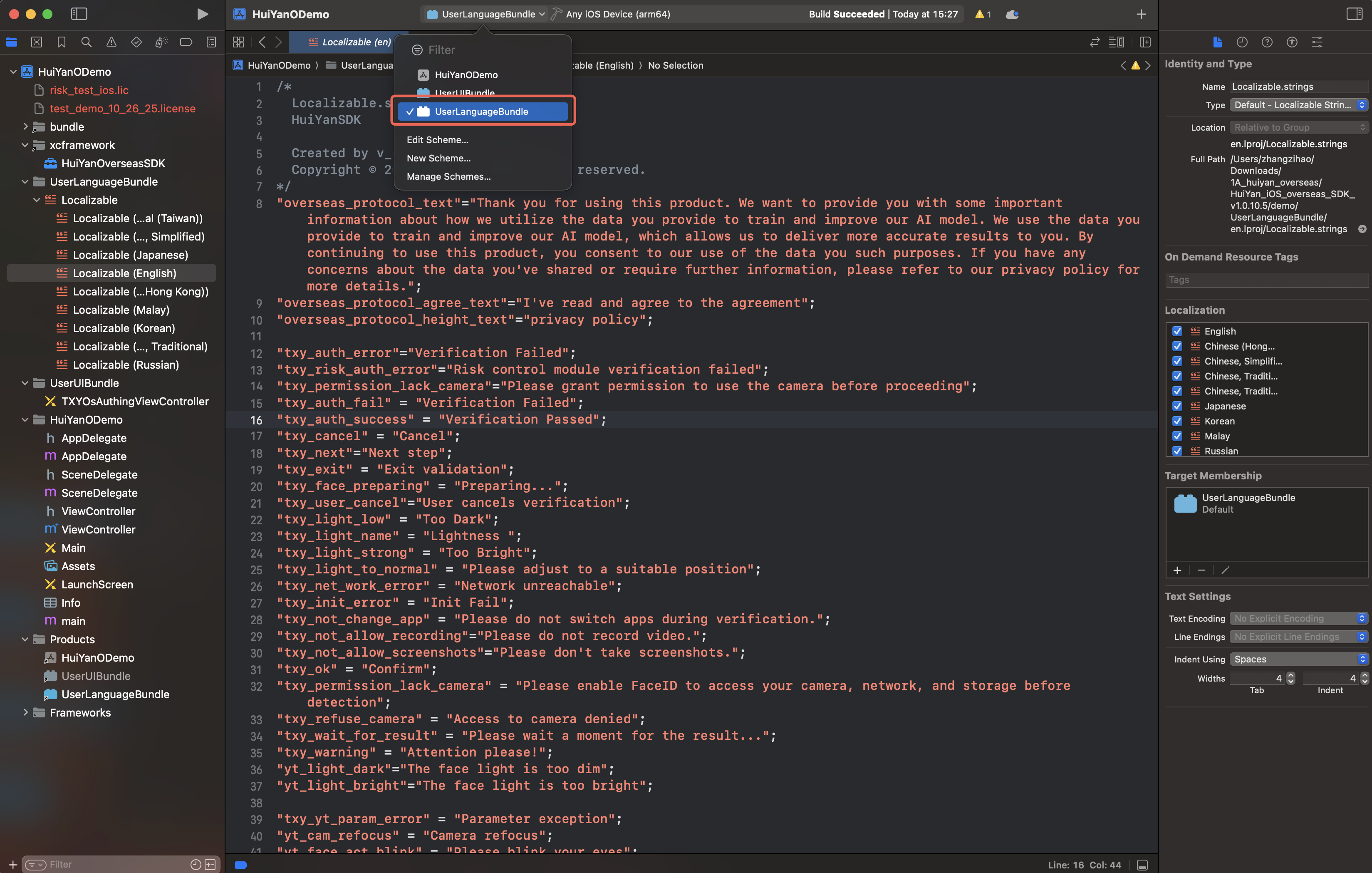
3. Add language files as needed (such as
ar.lproj).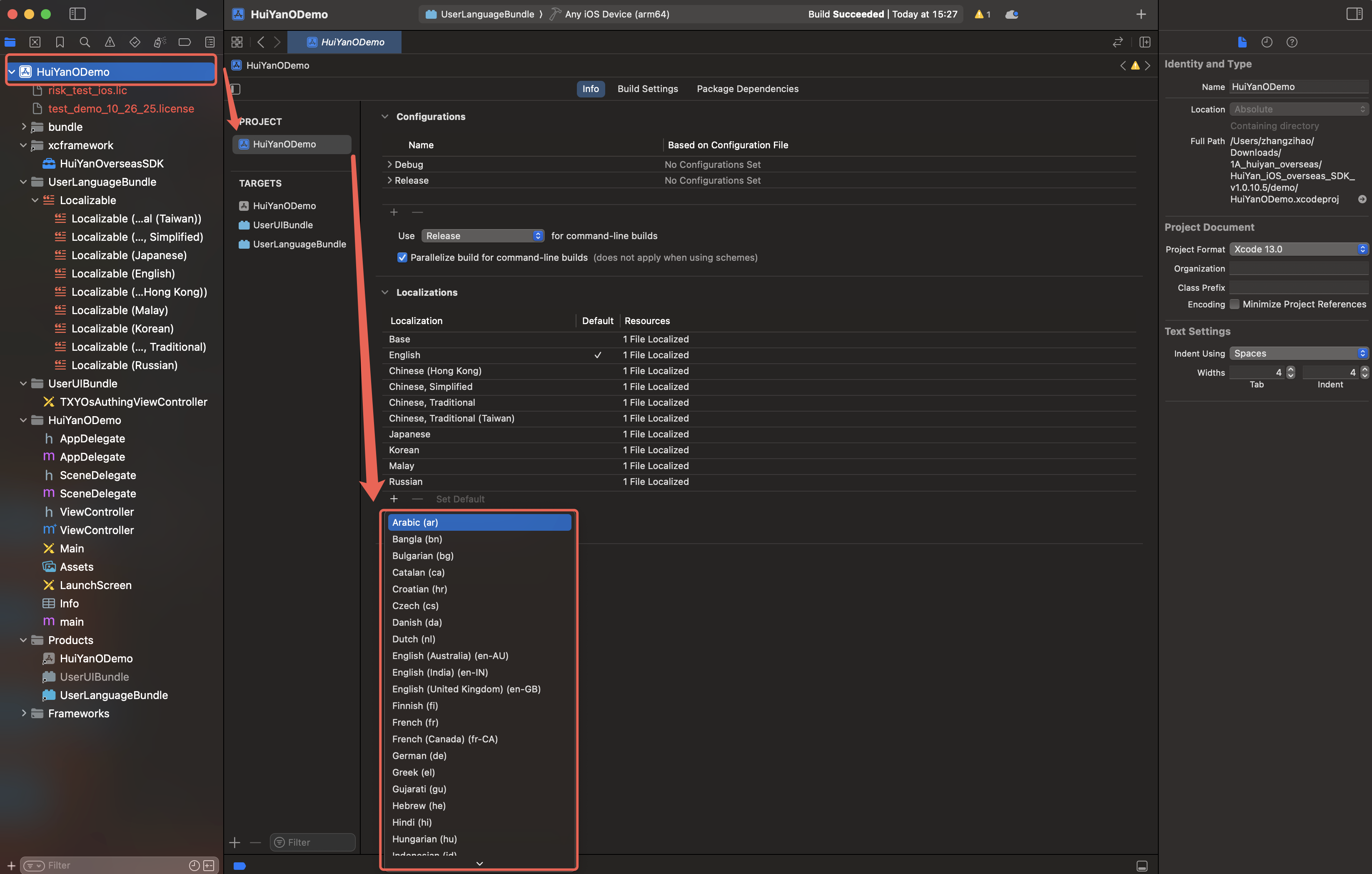
4. Add the new multilingual content to
Localizable.strings.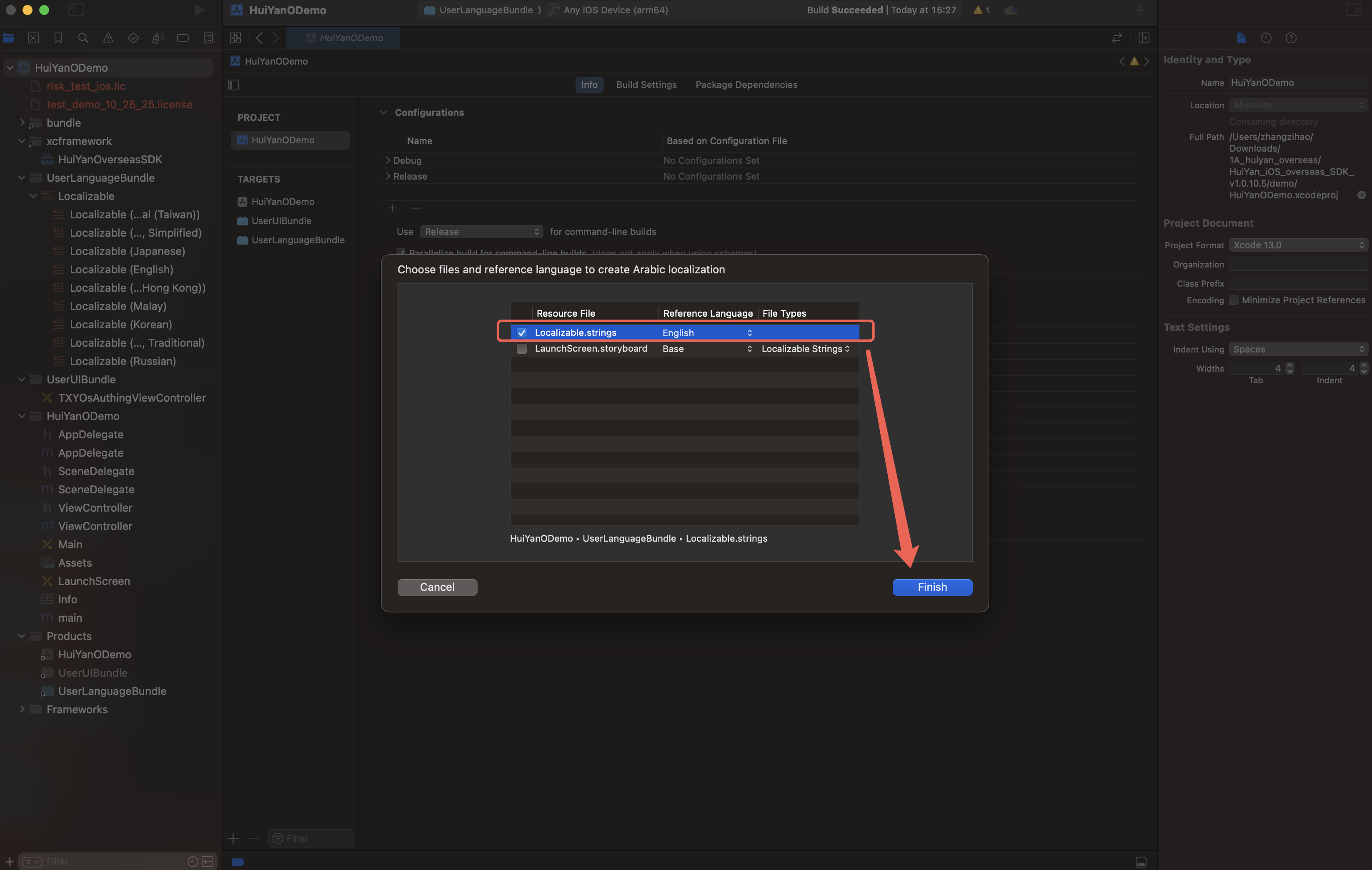
5. Locate the newly added multilingual files in
Localizable and translate their content: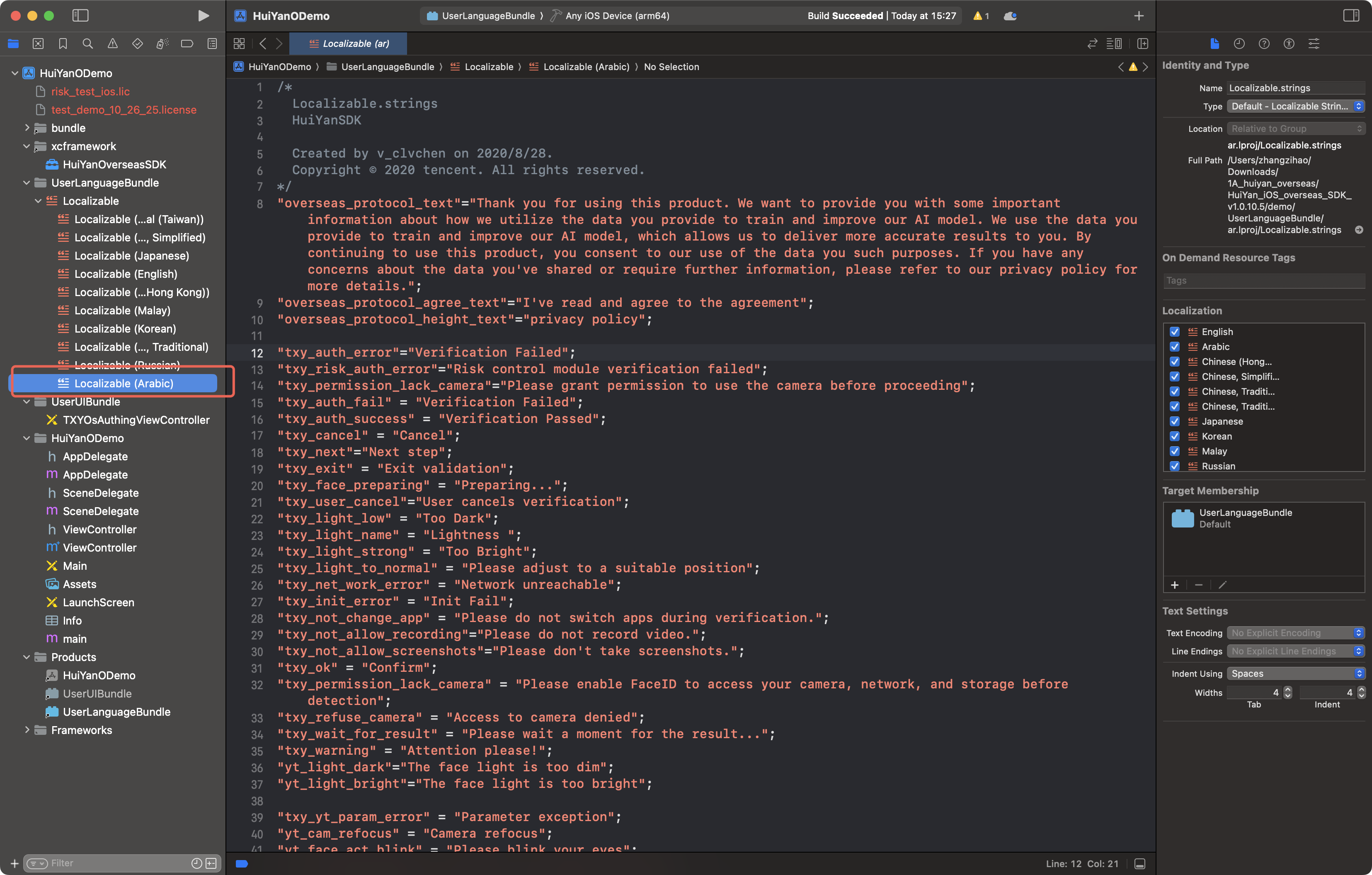
// The left side is the Key used by the SDK, and the right side is the translation content in the target language."Verifi_OK" = "OK";"Verifi_exit" = "Exit";// ... For the remaining Keys, refer to the Localizable file in the delivery package.
6. Compile to produce
UserLanguageBundle.bundle.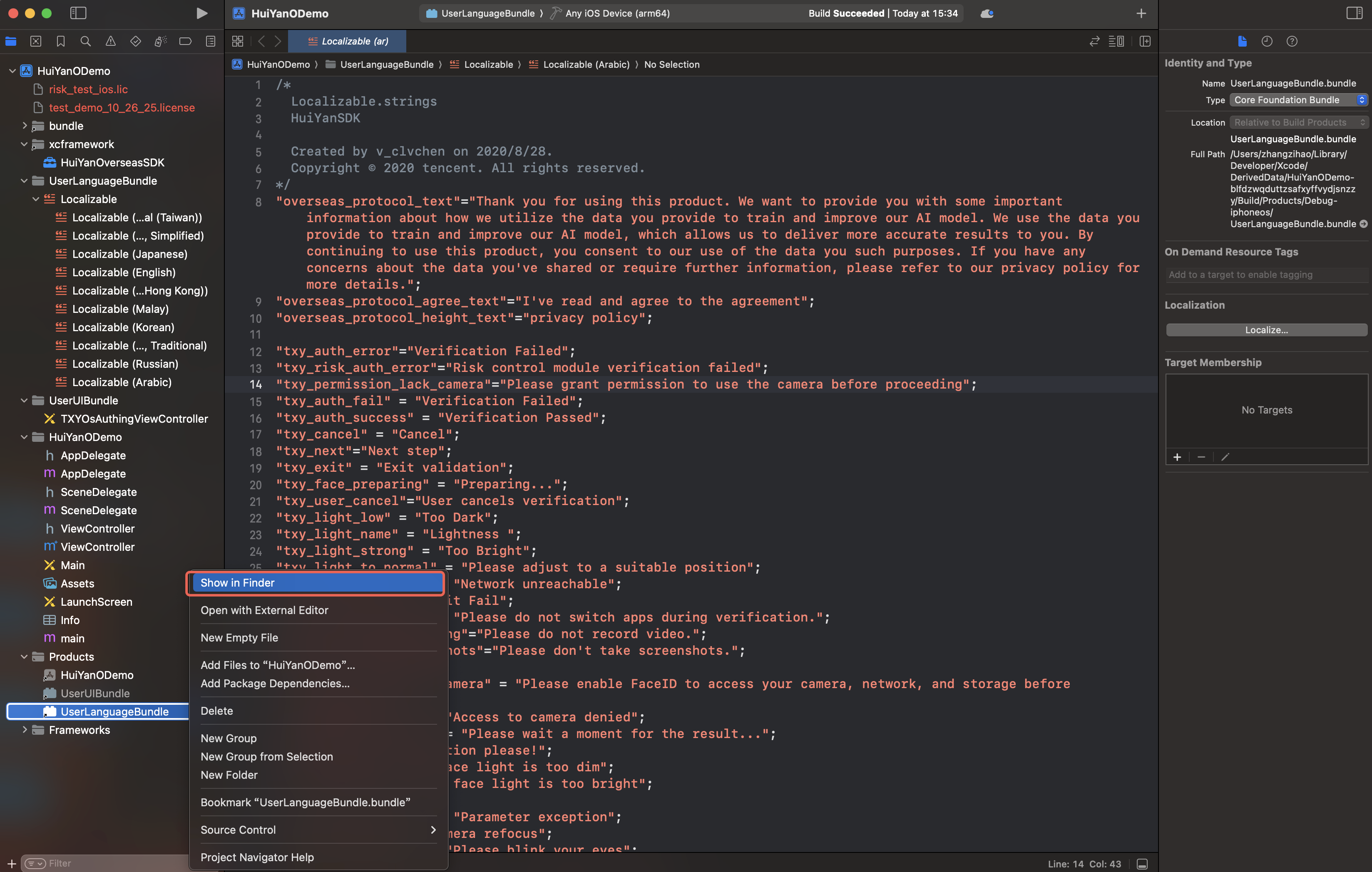
7. If a signature error occurs during compilation, please configure the signature and recompile. After successful compilation, delete the
Info.plist and _CodeSignature folders within the Bundle.8. Import the
UserLanguageBundle.bundle into the host project.Step 2: Configure to the SDK
HuiYanOsConfig *config = [[HuiYanOsConfig alloc] init];// 1. Enable custom language modeconfig.languageType = HY_CUSTOMIZE_LANGUAGE;// 2. Specify the absolute path to the Bundleconfig.languageBundlePath = [[NSBundle mainBundle] pathForResource:@"UserLanguageBundle" ofType:@"bundle"];// 3. Specify the language folder nameconfig.userLanguageFileName = @"ja.lproj";
Required | Type | Required condition | Description |
languageType | Enumeration | Required | Set to HY_CUSTOMIZE_LANGUAGE to enable customization. |
languageBundlePath | NSString * | Required when custom languages are used | The absolute path of UserLanguageBundle |
userLanguageFileName | NSString * | Required when custom languages are used | Target .lproj folder name, such as ja.lproj |
Note:
If
languageBundlePath is nil, the SDK will look for multilingual resources in the mainBundle (default behavior).II. Custom UI
Code-level UI customization (no XIB required)
If you only need to adjust styles such as colors and fonts, the SDK provides configuration fields without requiring recompilation of the Bundle.
HuiYanOsConfig *config = [[HuiYanOsConfig alloc] init];// Set the text color for operation error promptsconfig.feedBackErrorColor = 0xFF584C;// Set the text color for operation success promptsconfig.feedBackTxtColor = 0xFF0000;// Set the color of the circular frame for operation error promptsconfig.authCircleErrorColor = 0xFF584C;// Set the color of the circular frame for correct operationsconfig.authCircleCorrectColor = 0x29CC85;// Set the background color of the recognition pageconfig.authLayoutBgColor = 0xFFFFFF;// Set the font and size of the prompt textconfig.feedBackTxtFont = [UIFont systemFontOfSize:18];// Set the font and size of other prompt textconfig.feedbackExtraTxtFont = [UIFont systemFontOfSize:18];// Set the countdown text colorconfig.countDownTxtColor = 0xFFFFFF;// Set the text color of the Cancel buttonconfig.cancelTxtColor = 0xFFFFFF;// Set whether to display the internal dialog box, default is YESconfig.isShowDialog = YES;// Set whether to hide the identity verification avatar guidance box, default is NOconfig.isHideAvatarGuideFrame = NO;
Adding UI controls (XIB not required)
By using
HuiYanOsConfig.delegate, you can monitor the creation and destruction events of the SDK interface and insert custom controls when the identity verification page is displayed:HuiYanOsConfig *config = [[HuiYanOsConfig alloc] init];config.delegate = self; // Implements the HuiYanOverseasDelegate protocol
// HuiYanOverseasDelegate protocol methods@protocol HuiYanOverseasDelegate <NSObject>@required/// Callback when the identity verification main interface is displayed, where authView is the root view presented by the SDK- (void)onMainViewCreate:(UIView *)authView;@optional/// Callback when the identity verification interface is removed.- (void)onMainViewDestroy;@end
Example: Insert a custom Tag on the identity verification page:
@interface ViewController ()<HuiYanOverseasDelegate>@end@implementation ViewController- (void)onMainViewCreate:(UIView *)authView {UILabel *label = [[UILabel alloc] initWithFrame:CGRectMake(0, 100, 200, 30)];label.backgroundColor = [UIColor blackColor];label.textColor = [UIColor yellowColor];label.text = @"Custom Label";label.font = [UIFont systemFontOfSize:16];label.textAlignment = NSTextAlignmentCenter;[authView addSubview:label];}- (void)onMainViewDestroy {NSLog(@"huiyan face vc destroy");}@end
Modify UI controls (XIB not required)
Control name | Control description | tag value |
cancelButton | Liveness Verification Page Cancel/Back Button | 101 |
timeoutLabel | Liveness Verification Page Countdown Tag | 102 |
tipsLabel | Liveness Verification Page Prompt Text | 103 |
fakeNavBarView | Liveness Verification Page Virtual Navigation Bar | 200 |
Through the
onMainViewCreate: callback, after the identity verification page is created, you can directly access the controls above via viewWithTag: and modify them.Example: Modify the styles of various controls on the Liveness Verification Page
- (void)onMainViewCreate:(UIView *)authView {// Modify the cancel button iconUIButton *cancelButton = (UIButton *)[authView viewWithTag:101];UIImage *backImage = [UIImage systemImageNamed:@"chevron.left"];[cancelButton setImage:backImage forState:UIControlStateNormal];// Modify the leading left margin constraint of the Cancel buttonfor (NSLayoutConstraint *constraint in cancelButton.superview.constraints) {if ((constraint.firstItem == cancelButton && constraint.firstAttribute == NSLayoutAttributeLeading) ||(constraint.secondItem == cancelButton && constraint.secondAttribute == NSLayoutAttributeLeading)) {constraint.constant = 16.0;break;}}// Modify the countdown Tag color and fontUILabel *timeoutLabel = (UILabel *)[authView viewWithTag:102];timeoutLabel.textColor = [UIColor whiteColor];timeoutLabel.font = [UIFont systemFontOfSize:15];// Modify the Virtual Navigation Bar background colorUIView *navBarView = [authView viewWithTag:200];navBarView.backgroundColor = [UIColor colorWithRed:0.05 green:0.05 blue:0.1 alpha:1.0];// Add a custom title to the Virtual Navigation BarCGFloat statusBarHeight = [UIApplication sharedApplication].statusBarFrame.size.height;CGRect frame = CGRectMake(0, statusBarHeight, navBarView.bounds.size.width, navBarView.bounds.size.height - statusBarHeight);UILabel *titleLabel = [[UILabel alloc] initWithFrame:frame];titleLabel.text = @"Custom Title";titleLabel.textColor = [UIColor whiteColor];titleLabel.textAlignment = NSTextAlignmentCenter;[navBarView addSubview:titleLabel];}
Note:
1. Before modifying, it is recommended to perform a null check on the control (
if (view) { ... }) to prevent crashes when the control does not exist.2. Code-level style configuration (such as
feedBackErrorColor) and control modifications in callbacks can be used simultaneously. Modifications in callbacks will override the final effect of the corresponding controls.Using XIB to customize the page
The SDK provides XIB files for the host App to fully customize the layout of the liveness verification page, located in the project's
UserUIBundle build target:demo/└── UserUIBundle/└── TXYOsAuthingViewController.xib # Liveness Verification Main Page
XIB file name | Corresponding page | Description |
TXYOsAuthingViewController | Liveness Verification Main Page | Liveness Detection and Face Comparison main page |
Warning:
You can modify the layout constraints of controls or add new controls, but **existing controls in the XIB must not be removed, otherwise the app may crash at runtime.**.
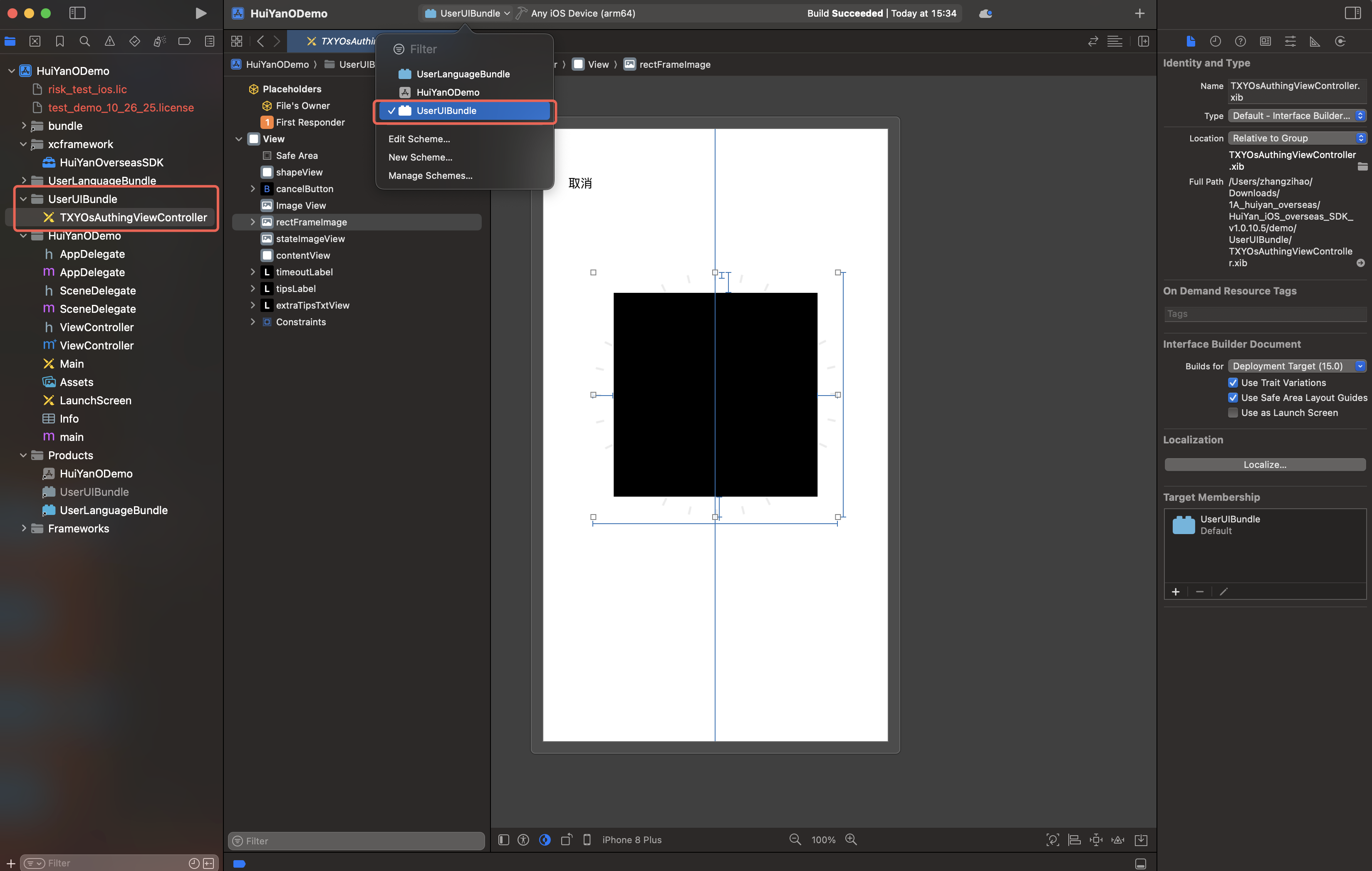
1. Liveness Verification Page (TXYOsAuthingViewController.xib)
This page supports modifying the size and position of the following components:
rectFrameImage: Modifying constraints can control the size and position of the viewfinder.
tipsLabel: Modifying constraints can control the position of the prompt text.
timeoutLabel: Modifying constraints can control the position of the countdown Tag.
cancelButton: Modifying constraints can control the position of the back button.
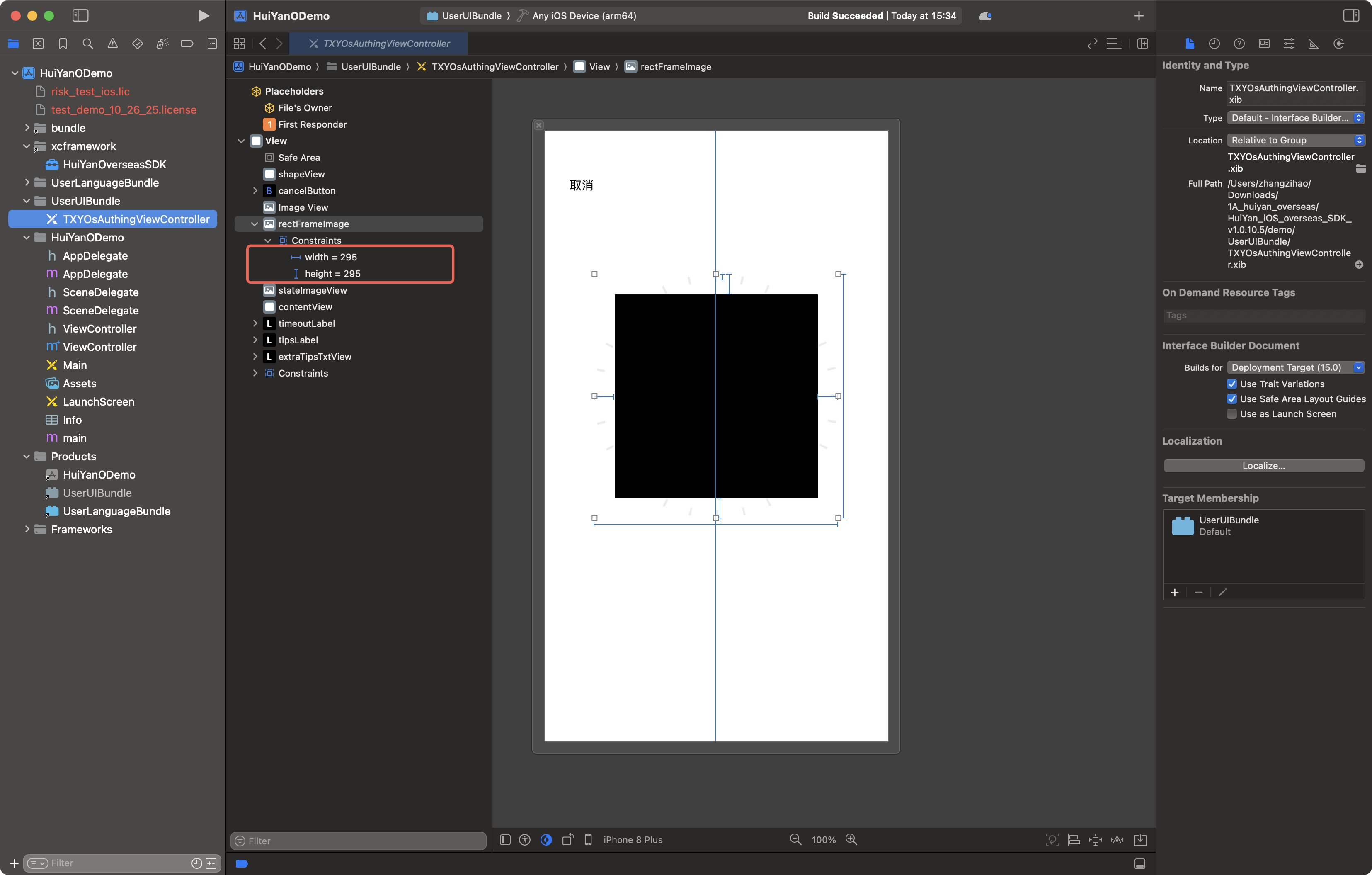
2. Build UserUIBundle
1. Open the project file in the delivery package
demo/ directory.2. Locate the
UserUIBundle (Build Target) in the project.3. Modify the layout constraints of
TXYOsAuthingViewController.xib as needed, or add new controls.4. Compile to produce
UserUIBundle.bundle.5. If a signature error occurs during compilation, please configure the signature and recompile; after successful compilation, delete the
Info.plist and _CodeSignature folders within the Bundle.6. Import the
UserUIBundle.bundle into the host project.3. Configure the SDK
HuiYanOsConfig *config = [[HuiYanOsConfig alloc] init];// Specify the absolute path to the HuiYanSDKUI Bundle (required)config.huiyanSdkUIBundlePath = [[NSBundle mainBundle] pathForResource:@"HuiYanSDKUI" ofType:@"bundle"];// Specify the absolute path to the custom UI Bundleconfig.userUIBundlePath = [[NSBundle mainBundle] pathForResource:@"UserUIBundle" ofType:@"bundle"];
4. Custom XIB Source Code Management Recommendations
It is recommended to copy the entire directory of
demo/UserUIBundle/ to the code repository of the host project as the source code directory for custom UI. All subsequent modifications will be made in this directory for easier version control along with the project.Complete configuration example
The following example enables both custom UI and custom multilingual:
HuiYanOsConfig *config = [[HuiYanOsConfig alloc] init];config.authLicense = [[NSBundle mainBundle] pathForResource:@"license" ofType:@""];// --- Custom UI ---// Bundle path (required)config.huiyanSdkUIBundlePath = [[NSBundle mainBundle] pathForResource:@"HuiYanSDKUI" ofType:@"bundle"];config.faceTrackerBundlePath = [[NSBundle mainBundle] pathForResource:@"face-tracker-v003" ofType:@"bundle"];// Custom UI Bundle (optional)config.userUIBundlePath = [[NSBundle mainBundle] pathForResource:@"UserUIBundle" ofType:@"bundle"];// Code-level style fine-tuning (optional)config.feedBackErrorColor = 0xFF584C;config.authCircleCorrectColor = 0x29CC85;// Implement the delegate to listen to UI events (optional)config.delegate = self;// --- Custom Multilingual ---config.languageType = HY_CUSTOMIZE_LANGUAGE;config.languageBundlePath = [[NSBundle mainBundle] pathForResource:@"UserLanguageBundle" ofType:@"bundle"];config.userLanguageFileName = @"ja.lproj";// Start verification[[HuiYanOSKit sharedInstance] startHuiYaneKYC:@"your-face-token"withConfig:configwithSuccessCallback:^(HuiYanOsAuthResult *authResult, id reserved) {// Verification successful. Use authResult.faceToken to query the result} withFailCallback:^(int errCode, NSString *errMsg, id reserved) {// Verification failed. Error code HY_BUNDLE_CONFIGURATION_EXCEPTION(307) indicates an exception in the Bundle path configuration.}];
3. Error Handling
When Bundle path validation fails, the SDK returns the following error codes via
failCallback:Error Code | Enumeration | Trigger Condition |
307 | HY_BUNDLE_CONFIGURATION_EXCEPTION | The specified Bundle path either does not exist or is invalid. |
Error message (
errMsg) example:"HuiYanSDKUI bundle path is not found": The path specified by huiyanSdkUIBundlePath does not exist."face-tracker-v003 bundle path is not found": The path specified by faceTrackerBundlePath does not exist."user bundle is invalid": The path specified by userUIBundlePath does not exist."user language bundle is not found": The path specified by languageBundlePath does not exist.4. Migration Instructions
v1.0.9.11 made a change to the Bundle configuration field, from "Bundle Name" to "Bundle Absolute Path". Please update your code according to the following comparison table:
Old field | New field | Change Description |
userUIBundleName | userUIBundlePath | Changed from Bundle name to absolute path. |
userLanguageBundleName | languageBundlePath | Changed from Bundle name to absolute path. |
Migration example:
// Old syntax (v1.0.9.10 and below)config.userUIBundleName = @"UserUIBundle";config.userLanguageBundleName = @"UserLanguageBundle";// New syntax (v1.0.9.11 and above)config.userUIBundlePath = [[NSBundle mainBundle] pathForResource:@"UserUIBundle" ofType:@"bundle"];config.languageBundlePath = [[NSBundle mainBundle] pathForResource:@"UserLanguageBundle" ofType:@"bundle"];
If the path field is
nil, the SDK maintains the same default behavior as the old version (searching for the corresponding Bundle from mainBundle), which does not affect integrators who do not use custom features.
피드백