Document-to-Video
다운로드
포커스 모드
폰트 크기
Feature Introduction
Doc to Video can convert a static document into a narrated video. You only need to provide documents such as PDF, PPTX, DOCX, or images, and the system will use a large language model to understand the document content, automatically complete storyboard orchestration, video image generation, AI dubbing, and subtitles, and output a complete narrated video.
Applicable scenarios: short video knowledge broadcasting, online education courseware, product promotional videos, corporate training, and knowledge popularization.
Core Capability
Capability | Description |
Multi-document Input | Up to 3 documents per request, supporting pdf / pptx / docx / png / jpg. |
Multilingual Output | Supports 8 languages: Chinese, English, Japanese, Korean, Russian, French, Spanish, and German. |
Multiple Aspect Ratios | Supports three aspect ratios: 16:9, 9:16, and 1:1. |
AI Dubbing | Optionally enable TTS and specify a voice, including cloned voices / designed voices. |
Subtitle Generation | Optionally enable subtitles. |
High-fidelity PPTX Reproduction | Reproduce the original layout and content of the input PPTX as faithfully as possible. |
Background and Watermark | Supports custom background images and watermarks at the four corners. |
Phased Confirmation | Supports review at the outline and voiceover animation stages, allowing you to confirm and proceed or regenerate based on prompts. |
Result Persistence | Supports saving the final video to your own COS bucket. |
Two Generation Modes
Doc to Video provides two generation modes, which are determined by the
Mode parameter during task creation. This is the first design choice you need to make before integration, because it determines whether your call flow is a single submission or multi-turn interaction.Mode | Value | Call Chain | Scenario |
End-to-end direct generation | auto | Create task → Poll query → Obtain the final video. | Batch generation scenario. |
Generate After Confirmation | stage | Create task → Review staged output → Confirm / Regenerate → Obtain the final video. | Scenarios that require high final video quality and manual review. |
<The
stage mode splits the generation process into two stages that allow manual intervention and one automated composition stage:
Phase | Phase Output | Manual Adjustment or Not | Description |
STAGE_1 | Overall style, video outline, and storyboard structure (text only) | Confirm or regenerate the outline. | In the outline stage, there is only text and no video image preview. |
STAGE_2 | Voiceover, animation effects, subtitles, and storyboard preview | Confirm or regenerate | Generates preview videos and voiceovers for each storyboard segment, allowing segment-by-segment review. |
STAGE_3 | Final video | No. It is automatically executed after STAGE_2 is confirmed. | Combines the final video. After completion, the task enters the final state. |
Attention:
In stage mode, each regeneration consumes model computing power again. Evaluate the number of retries based on your billing expectations.
Prerequisites
Before using this feature, you need to complete the following preliminary operations:
1. Register and log in to a Tencent Cloud account, and activate the MPS service.
2. Complete service role authorization to grant MPS read and write access to COS buckets under your account. Use the root account to visit the following link for one-click authorization:
https://console.tencentcloud.com/cam/role/grant?roleName=MPS_QcsRole&policyName=QcloudCOSDataFullControl,QcloudCOSGetServiceAccess,QcloudAccessForMPSRole,QcloudCOSBucketConfigRead,QcloudCOSBucketConfigWrite,QcloudAccessForMPSRoleInDeliverToSCF&principal=eyJzZXJ2aWNlIjoibXBzLmNsb3VkLnRlbmNlbnQuY29tIn0=
3. Activate COS and create a bucket to store input documents and generated results. It is recommended to set the bucket access permission to "Public Read - Private Write".
4. Obtain API Keys: Go to Access Keys to obtain the SecretId and SecretKey.
If you are using a Tencent Cloud sub-account, you must also ensure that the account has sufficient permissions to use MPS. For detailed instructions, see Getting Started. For account authorization issues, see the Account Authorization document.
Note:
Quick Start: After activating the MPS service, you can click to go to the MPS console and use the Doc to Video feature.
Billing Overview
This service uses the pay-as-you-go billing mode. Billing items are divided into two categories: required and optional.
Mandatory Billable Items
Billable Item | List Price | Billing Method |
Video generation duration | 0.07656 USD/minute *Total seconds are accumulated within each billing cycle and then converted to minutes, rounded up to the nearest integer. | Billed based on the actual duration of generated videos. |
Document understanding | Advanced: 6.5 USD / million tokens Basic: 1 USD / million tokens | Billed based on the actual number of tokens consumed when the large model processes documents. |
Optional Billable Items
Billable Item | List Price | Trigger Condition |
AI Dubbing | 0.0746 USD/minute | Generated only when EnableTTS = true. |
Voice Cloning / Voice Design | 1.5 USD/voice | Generated only when cloned voices or designed voices are used. |
Creating a Doc-to-Video Task
Doc to Video supports the following two methods for initiating tasks. You can choose based on your use case:
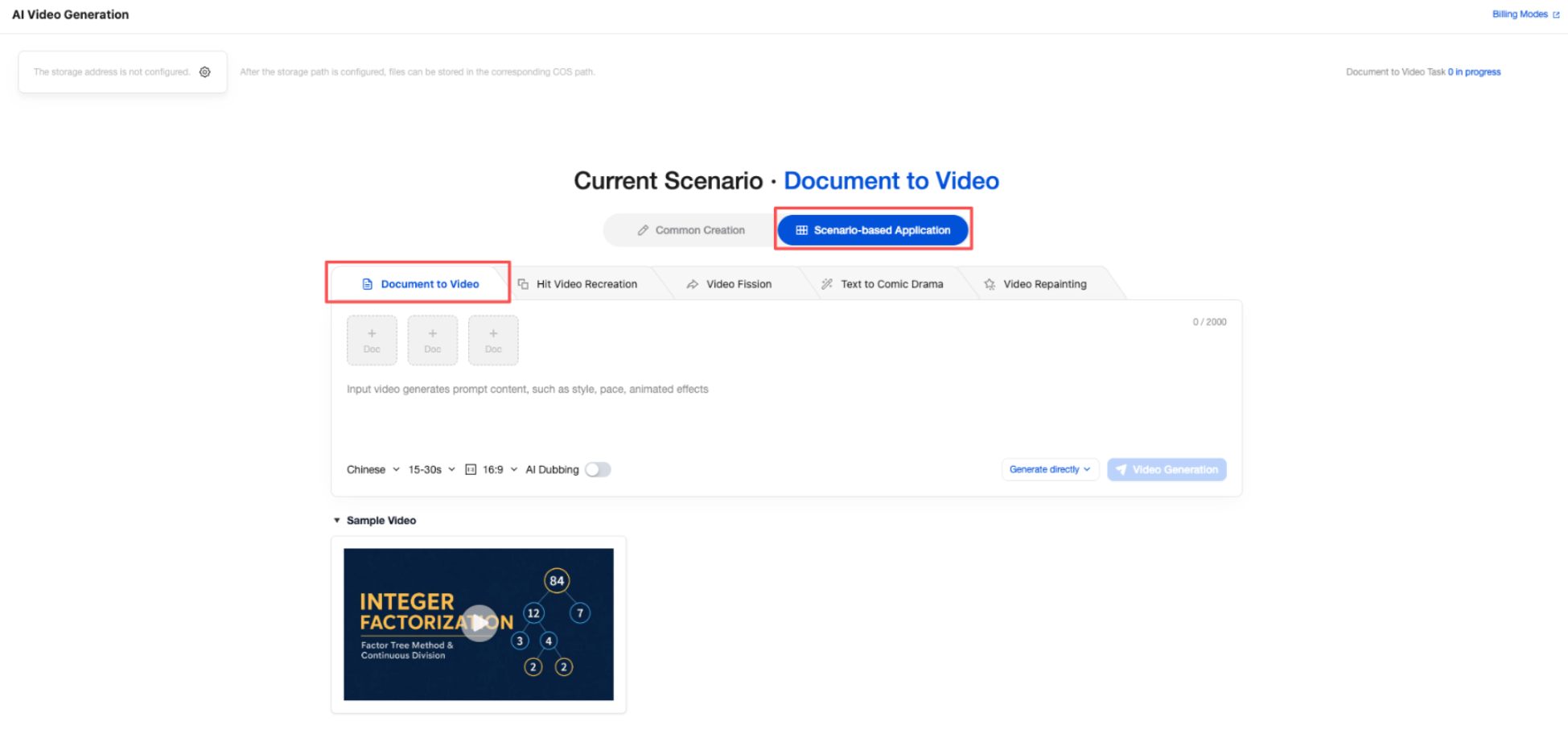
Console: Suitable for visual operations, quick trials, or small-batch tasks. In the MPS console, choose AI Video > Scenario-based Applications > Doc to Video, configure the input document, prompts, and generation parameters, and then submit the task.
API: Suitable for batch task scenarios. Call the CreateDocToVideoTask API and pass in parameters to initiate tasks. For details, see the parameter descriptions below.
Method 1: Creating a Task in the Console
In the MPS console, choose AI Video > Scenario-based Applications > Document to Video, upload the document, configure the model, prompts, and parameters, and then click Video Generation to create the task.
Method 2: Initiating a Task via API
Call the CreateDocToVideoTask API to initiate a Doc to Video task. For details, see the following introduction to Doc to Video APIs.
API Overview
API | Action | Function | Request Rate Limit |
CreateDocToVideoTask | Submit the document and create a video generation task, and return the task ID. | 20 times/second | |
DescribeAigcTaskStatus | Query the execution status and result by task ID. | 20 times/second | |
ModifyDocToVideoTaskStatus | Confirm the stage output or regenerate the specified stage based on the prompt. | 20 times/second |
Note:
General Information
Request domain:
mps.tencentcloudapi.comRequest method: POST (
application/json)API version:
2019-06-12Signature method: TC3-HMAC-SHA256.
API Details
1. Creating a Doc-to-Video Task (CreateDocToVideoTask)
CreateDocToVideoTask API description: Submit a document and create a video generation task. You can create an end-to-end direct generation task (
mode=auto) or a confirm-before-generation task (mode=stage). A task ID is returned.Top-Level Parameter
Parameter | Type | Required | Description |
Input | Yes | Input information for document-to-video generation. See the group description below. | |
CosInfo | No | COS information for result storage. If left blank, the result is stored at the platform's default address. It is strongly recommended to provide this information. | |
ResourceId | String | No | Resource ID, used for cost allocation management. Ensure that the corresponding resource is enabled. Defaults to the account's primary resource ID. Example: vts-********-1. |
Core Parameter
Parameter | Type | Required | Description |
Input.FileUrl | Array of String | Yes | Document link used for video generation. Supports pdf / pptx / docx / png / jpg; up to 3 documents; single document ≤ 10MB; single document ≤ 100 pages. The link must be publicly accessible. |
Input.Prompt | String | Yes | Prompt for video generation, with a maximum length of 2000 characters. |
Input.ModelName | String | Yes | Name of the document-to-video generation model. Default value: Wand |
Input.ModelVersion | String | Yes | Version of the document-to-video generation model. Enumeration values: 1.0 1.0-lite Default value: 1.0 |
Generation Mode Parameter
Parameter | Type | Required | Description |
Input.Mode | String | No | Generation mode. auto: End-to-end direct generation; stage: Generate after confirmation, with review available at the STAGE_1 and STAGE_2 stages. |
Video Specification Parameter
Parameter | Type | Required | Description |
Input.Ratio | String | No | Aspect ratio. Options: 16:9 / 9:16 / 1:1. Default value: 16:9 |
Input.Language | String | No | Generation language. Options: zh (Chinese) / en (English) / ja (Japanese) / ko (Korean) / ru (Russian) / fr (French) / es (Spanish) / de (German). Default value: zh |
Input.ReferenceDuration | Integer | No | Duration reference value in seconds. Valid range: [15, 1200]. Not an exact duration. It is provided for model reference only. The actual duration is determined by the model based on the document content and prompt. |
Voiceover and Subtitle Parameter
Parameter | Type | Required | Description |
Input.EnableTTS | Boolean | No | Whether to enable AI dubbing. Default value: false. After it is enabled, AI dubbing fees are incurred. |
Input.VoiceId | String | No | Voice ID. It takes effect only when AI dubbing is enabled. If it is left blank, the default voice is used. It can be obtained from the voice library in the console or by calling the voice query API. |
Input.EnableCaption | Boolean | No | Whether to enable subtitle generation. Default value: false |
Layout and Video Image Parameter
Parameter | Type | Required | Description |
Input.PPTXFidelity | Boolean | No | Whether to enable PPTX fidelity reproduction mode. Default value: false. After this mode is enabled, the system reproduces the content and layout of the input PPTX as faithfully as possible (animation effects are not supported, and perfect reproduction cannot be achieved). When this mode is enabled, the input document must contain at least one PPTX. If multiple PPTX files exist, this mode takes effect only on the first one. |
Input.Background.ImageUrl | String | No | Background image URL. This parameter takes effect only when fidelity reproduction mode is not enabled. |
Input.Watermark.ImageUrl | String | No | Watermark image URL. This parameter takes effect only when fidelity reproduction mode is not enabled. |
Input.Watermark.Position | String | No | Watermark position. Valid values: top-left / top-right / bottom-left / bottom-right. |
Storage Parameter (CosInfo)
Parameter | Type | Required | Description |
CosInfo.CosBucketRegion | String | No | COS bucket region. Example: ap-guangzhou |
CosInfo.CosBucketName | String | No | COS bucket name. Example: example-1303333058 |
CosInfo.CosBucketPath | String | No | COS bucket path. Example: /doc2video/output |
Output Parameter
Parameter | Type | Description |
TaskId | String | Task ID. Example value: 1380000000-AigcScenario-6f2c9e4a8b7d3510f9a2c4e6d8b1a7f3 |
RequestId | String | Unique request ID. It is required for locating an issue. |
Error Code
Error Code | Description |
FailedOperation.CreateAIGCTaskFailed | Failed to create the AIGC task. |
FailedOperation.UserArrears | The user status has been suspended. Check the account balance. |
InvalidParameter | Parameter error. |
LimitExceeded.CreateTask | Unable to create a task because the number of running tasks has reached the upper limit. |
Initiate Example (auto Mode)
{"Input": {"FileUrl": ["https://example-1303333058.cos.ap-guangzhou.myqcloud.com/doc2video/input/user-guide.pdf","https://example-1303333058.cos.ap-guangzhou.myqcloud.com/doc2video/input/product-launch.pptx"],"Prompt": "Generate a product introduction video of about 2 minutes based on these two documents, with a professional and concise style, targeting enterprise customers.","ModelName": "Wand","ModelVersion": "1.0","Mode": "auto","Ratio": "16:9","Language": "zh","ReferenceDuration": 120,"EnableTTS": true,"VoiceId": "v1_shUQBcs3N6VrPd9RMTf5************zq5Q9pE0HoEQ959hpulWHGFZSp3v4w=","EnableCaption": true,"Watermark": {"ImageUrl": "https://example-1303333058.cos.ap-guangzhou.myqcloud.com/doc2video/assets/logo.png","Position": "bottom-right"}},"CosInfo": {"CosBucketRegion": "ap-guangzhou","CosBucketName": "example-1303333058","CosBucketPath": "/doc2video/output"}}
Initiate Example (stage Mode + PPTX Faithful Reproduction)
{"Input": {"FileUrl": ["https://example-1303333058.cos.ap-guangzhou.myqcloud.com/doc2video/input/product-launch.pptx"],"Prompt": "This is a product launch presentation. Generate a product introduction video for enterprise customers and the media, explaining the product highlights, core specifications, and launch information page by page.","ModelName": "Wand","ModelVersion": "1.0","Mode": "stage","PPTXFidelity": true,"Ratio": "16:9","Language": "zh","ReferenceDuration": 120,"EnableTTS": true,"EnableCaption": true},"CosInfo": {"CosBucketRegion": "ap-guangzhou","CosBucketName": "example-1303333058","CosBucketPath": "/doc2video/output"}}
Output example
{"Response": {"TaskId": "1380000000-AigcScenario-6f2c9e4a8b7d3510f9a2c4e6d8b1a7f3","RequestId": "a2644899-acbf-4973-b8ea-1a93772be6f7"}}
2. Querying a Task (DescribeAigcTaskStatus)
DescribeAigcTaskStatus API description: This API is a general-purpose AIGC task query API. Pass in a task ID to get the execution status and result.
Input parameters
Parameter | Type | Required | Description |
TaskId | String | Yes | Task ID. Example value: 1380000000-AigcScenario-6f2c9e4a8b7d3510f9a2c4e6d8b1a7f3 |
Output Parameter
Parameter Name | Type | Description |
TaskId | String | Task ID. |
TaskStatus | String | Task status description. Enumeration values: PENDING: The task is waiting to be scheduled. RUNNING: The task is running. FINISHED: The task executed successfully. STOP: The task was aborted. FAILED: The task failed. TIMEOUT: The task timed out. Example value: FINISHED. |
OutputUrl | String | Output URL. Note: This field may return null, indicating that no valid value can be obtained. Example value: https://example-1303333058.cos.ap-guangzhou.myqcloud.com/doc2video/output/1380000000-AigcScenario-6f2c9e4a8b7d3510f9a2c4e6d8b1a7f3-202606012044-0.mp4 |
CreateTime | String | Task creation time. Example value: 2026-06-01 20:40:50 |
ScheduledTime | String | Task scheduling time. Example value: 2026-06-01 20:40:51 |
FinishedTime | String | Task completion time. Example value: 2026-06-01 20:44:32 |
TaskResultCode | Integer | Task error code. Example value: -401 |
TaskResultMsg | String | Error message returned by the task. Example value: Save to COS failed (usually due to incomplete COS role authorization or bucket permission issues; see Prerequisites step 2). |
RequestBody | String | Request body. Example value: {"Input":{"FileUrl":["https://example-1303333058.cos.ap-guangzhou.myqcloud.com/doc2video/input/product-launch.pptx"],...},"Action":"CreateDocToVideoTask","RequestId":"5f4f34f0-...","Uin":"100012345678","ApiModule":"mps","Region":"","AppId":1303333058} |
TaskType | String | Task type. For document-to-video tasks, DocGenVideo is returned. Example value: DocGenVideo. |
TaskInfo | String | Other task information (JSON string), including the current stage and complete storyboard structure. It is the only way to obtain stage outputs in stage mode. See below for its structure. Note: This field may return null. Example value: {"current_stage": "STAGE_1"} |
Stage | String | Task substatus. It is a key field for determining stage progress in stage mode. In auto mode, it is an empty string. Note: This field may return null. Example value: STAGE_2_FINISHED |
RequestId | String | Unique request ID. It is generated by the server and is returned for each request. (No RequestId is returned if the request is not received by the server due to certain reasons.) RequestId is required for locating an issue. |
Stage Status Field (Required for stage mode)
Stage and TaskInfo are key fields that drive the interaction flow in stage mode. TaskStatus describes the macro status of the entire task. In stage mode, the task pauses and waits for your confirmation after the output of a stage is generated. At this point, TaskStatus may still be RUNNING, so you need to rely on Stage / TaskInfo to determine which stage the task is currently paused at and whether the output of that stage is ready, and then decide whether to call confirm to proceed or regenerate to regenerate.Stage Complete values and transitions:STAGE_1_RUNNING → STAGE_1_FINISHED ──confirm──▶ STAGE_2_RUNNING → STAGE_2_FINISHED ──confirm──▶ STAGE_3_RUNNING → FINISH
regenerate causes the corresponding stage to return to STAGE_x_RUNNING and regenerate the output.Value | Description | What You Need to Do |
STAGE_1_RUNNING | Generating the outline | Continue polling. |
STAGE_1_FINISHED | Outline generated | Review the outline and call confirm or regenerate. |
STAGE_2_RUNNING | Generating voiceover, animation effects, and subtitles | Continue polling. |
STAGE_2_FINISHED | Voiceover, animation effects, and subtitles generated | Review the stage output and call confirm or regenerate. |
STAGE_3_RUNNING | Synthesizing the final video | Continue polling. |
FINISH | All completed (final state) | Obtain the final video from OutputUrl. Note that the final state is FINISH, not STAGE_3_FINISHED. |
Note:
<In
auto mode, Stage remains an empty string throughout, so you only need to focus on TaskStatus.TaskInfo is a String type rather than a structured object. When parsing it, you need to perform a JSON deserialization first and implement fallback handling for missing fields. In this string, current_stage provides the current stage (STAGE_1 / STAGE_2 / STAGE_3), and scenes[] contains the complete storyboard structure, which is described in the next section.Typical judgment logic: Poll the query API. When
Stage is STAGE_1_FINISHED / STAGE_2_FINISHED, retrieve the output of that stage from TaskInfo.scenes[] for manual review, and then call ModifyDocToVideoTaskStatus with the corresponding Stage (STAGE_1 or STAGE_2).Stage Output Structure (TaskInfo.scenes)
stage mode does not have a dedicated output download API. The outputs of all stages are in the scenes[] array after TaskInfo is deserialized:{"current_stage": "STAGE_2","title": "Smart Speaker X1 Product Launch Introduction","style_summary": "Deep blue tech style, cyan and orange dual accents, clean card-based layout","width": 1920,"height": 1080,"total_scenes": 6,"scenes": [{"id": "scene-1","title": "Opening: X1 Grand Launch","key_points": ["The all-new Smart Speaker X1 is officially launched", "Three major upgrades: sound quality, voice assistant, and whole-home connectivity"],"visual_summary": "Deep blue tech background, product name pops up in the center, product image enters with a rotation","sentences": ["The all-new Smart Speaker X1 is officially launched.", "Today, we will focus on its three major upgrades."],"audio": "https://doc2video-tmp-1300000000.cos.ap-guangzhou.myqcloud.com/doc2video/tasks/1380000000-AigcScenario-6f2c9e4a8b7d3510f9a2c4e6d8b1a7f3/workspace/audio/scene-1.m4a?q-sign-algorithm=sha1&...","video": "https://doc2video-tmp-1300000000.cos.ap-guangzhou.myqcloud.com/doc2video/tasks/1380000000-AigcScenario-6f2c9e4a8b7d3510f9a2c4e6d8b1a7f3/previews/scene-1.mp4?q-sign-algorithm=sha1&..."}]}
Field | Description |
current_stage | Current stage ( STAGE_1 / STAGE_2 / STAGE_3). After all tasks are completed, it is STAGE_3. |
title | Video title. |
style_summary | Visual style overview. |
width / height | Resolution. |
total_scenes | Total number of scenes. |
scenes[].id | Scene ID ( scene-1, scene-2, ...), which is the value to be filled in Regenerate.SceneIds. |
scenes[].title | Scene title. |
scenes[].key_points | Key points of the scene. |
scenes[].visual_summary | Video image description. |
scenes[].sentences | Voice-over script. |
scenes[].audio | Temporary signed URL of the voice-over (m4a) for this scene. |
scenes[].video | Temporary signed URL of the preview video (mp4) for this scene. |
Stage Output Population Status:
Field | At the End of STAGE_1 (Outline) | At the End of STAGE_2 (Voiceover and Effects) |
title / style_summary / width / height / total_scenes | Has value | Has value |
scenes[].id / title / key_points / visual_summary | Has value | Has value |
scenes[].sentences / audio / video | Null | Has value |
Note:
The outline stage contains only text and no video image preview: When reviewing the
STAGE_1 output, you cannot see the actual video image. You must advance to STAGE_2 to view the preview video and voiceover shot by shot.scenes[].audio / video are temporary signed URLs (valid for about 2 hours). Download them promptly for review or archival. After they expire, query the task again to obtain new signed links.scenes[].id (for example, scene-1) is the storyboard ID that you need to specify in Regenerate.SceneIds when regeneration is called.Response example (task succeeded)
{"Response": {"TaskId": "1380000000-AigcScenario-6f2c9e4a8b7d3510f9a2c4e6d8b1a7f3","TaskStatus": "FINISHED","OutputUrl": "https://example-1303333058.cos.ap-guangzhou.myqcloud.com/doc2video/output/1380000000-AigcScenario-6f2c9e4a8b7d3510f9a2c4e6d8b1a7f3-202606012044-0.mp4","CreateTime": "2026-06-01 20:40:50","ScheduledTime": "2026-06-01 20:40:51","FinishedTime": "2026-06-01 20:44:32","TaskResultCode": null,"TaskResultMsg": null,"TaskType": "DocGenVideo","Stage": "FINISH","TaskInfo": "{\\"current_stage\\": \\"STAGE_3\\", \\"title\\": \\"Smart Speaker X1 Product Launch Introduction\\", \\"style_summary\\": \\"Deep blue tech style, cyan and orange dual accents, clean card-based layout\\", \\"width\\": 1920, \\"height\\": 1080, \\"total_scenes\\": 6, \\"scenes\\": [ { \\"id\\": \\"scene-1\\", \\"title\\": \\"Opening: X1 Grand Launch\\", \\"sentences\\": [\\"The all-new Smart Speaker X1 is officially launched.\\", \\"Today, we will focus on its three major upgrades.\\"], \\"audio\\": \\"https://doc2video-tmp-1300000000.cos.ap-guangzhou.myqcloud.com/doc2video/tasks/1380000000-AigcScenario-6f2c9e4a8b7d3510f9a2c4e6d8b1a7f3/workspace/audio/scene-1.m4a?q-sign-algorithm=sha1&...\\", \\"video\\": \\"https://doc2video-tmp-1300000000.cos.ap-guangzhou.myqcloud.com/doc2video/tasks/1380000000-AigcScenario-6f2c9e4a8b7d3510f9a2c4e6d8b1a7f3/previews/scene-1.mp4?q-sign-algorithm=sha1&...\\" }, \\"...6 scenes in total...\\" ]}","RequestId": "9ee02d10-a534-4a2d-842a-c4d084bcfbde"}}
Response example (stage mode: outline produced, awaiting confirmation)
In the following example,
TaskStatus remains RUNNING (the entire task has not yet completed), but Stage already shows STAGE_1_FINISHED, indicating that the outline stage output is ready and awaiting your confirmation. At this point, you should not simply keep polling based on TaskStatus. Instead, retrieve the outline from TaskInfo.scenes[] (text only, no video image preview) for review, and then call ModifyDocToVideoTaskStatus to proceed or regenerate.{"Response": {"TaskId": "1380000000-AigcScenario-6f2c9e4a8b7d3510f9a2c4e6d8b1a7f3","TaskStatus": "RUNNING","OutputUrl": null,"CreateTime": "2026-06-01 20:40:50","ScheduledTime": "2026-06-01 20:40:51","FinishedTime": "","TaskResultCode": null,"TaskResultMsg": null,"TaskType": "DocGenVideo","Stage": "STAGE_1_FINISHED","TaskInfo": "{\\"current_stage\\": \\"STAGE_1\\", \\"title\\": \\"Smart Speaker X1 Product Launch Introduction\\", \\"style_summary\\": \\"Deep blue tech style, cyan and orange dual accents, clean card-based layout\\", \\"width\\": 1920, \\"height\\": 1080, \\"total_scenes\\": 6, \\"scenes\\": [ { \\"id\\": \\"scene-1\\", \\"title\\": \\"Opening: X1 Grand Launch\\", \\"key_points\\": [\\"The all-new Smart Speaker X1 is officially launched\\", \\"Three major upgrades: sound quality, voice assistant, and whole-home connectivity\\"], \\"visual_summary\\": \\"Deep blue tech background, product name pops up in the center, product image enters with a rotation\\", \\"sentences\\": \\"\\", \\"audio\\": \\"\\", \\"video\\": \\"\\" }, \\"...6 scenes in total, all with text outlines only...\\" ]}","RequestId": "9ee02d10-a534-4a2d-842a-c4d084bcfbde"}}
Error Code
Error Code | Description |
FailedOperation.QueryAIGCTaskFailed | An error occurred while querying the task. |
ResourceNotFound.TaskNotFound | The task does not exist. Check whether the TaskId is correct. |
Note:
Polling recommendation: Query once every 5 seconds and set an overall timeout limit (recommended to be at least 10 minutes, adjusted based on document size). Do not poll frequently without meaningful progress.
3. Confirming and Regenerating (ModifyDocToVideoTaskStatus)
ModifyDocToVideoTaskStatus API description: This API is required only for tasks with
Mode=stage. Call the ModifyDocToVideoTaskStatus API to confirm and proceed or regenerate the stage output in stage mode.Input parameters
Parameter | Type | Required | Description |
Input.Action | String | Yes | Modification action. confirm: Confirms the completed stage and proceeds to the next stage.regenerate: Regenerates the specified stage. |
Input.Stage | String | Yes | Target stage. STAGE_1: Outline stage.STAGE_2: Voiceover / animation / subtitle stage. |
Input.SourceTaskId | String | Yes | ID of the target task to be modified. |
Input.Regenerate | DocToVideoRegenerateInput | No | Regeneration parameter. Required only when Action=regenerate. |
Combined Semantics of Action and Stage
Stage | Action=confirm | Action=regenerate |
STAGE_1 | Confirm the outline and continue generating the subsequent voiceover, animation effects, and subtitles. | Regenerate the outline. |
STAGE_2 | Confirm the voiceover, animation effects, and subtitles, and generate the final video. | Regenerate the voiceover, animation effects, and subtitles. |
Regenerate Parameter
Parameter | Type | Required | Description |
Regenerate.Scope | String | Yes | Regeneration scope. full: Regenerates the entire stage in full (for example, when the total number of scenes is adjusted).scenes: Regenerates locally by scene (for example, when the specific content of a scene is modified). |
Regenerate.Prompt | String | Yes | Prompt for regeneration, used to describe the desired adjustments. |
Regenerate.SceneIds | Array of String | No | Array of target scene IDs. Required only when Scope=scenes; cannot be duplicated, with a maximum of 5 per request. |
Note:
<The choice of
Scope depends on the granularity of the modification: use full to change the overall structure (merge pages, add or remove scenes, or compress pacing). To modify only the copy or video image of certain scenes while keeping the rest unchanged, use scenes and specify SceneIds to avoid regenerating scenes that are already satisfactory.Output Parameter
Parameter | Type | Description |
TaskId | String | Task ID, consistent with the passed-in SourceTaskId. Example value: 1380000000-AigcScenario-6f2c9e4a8b7d3510f9a2c4e6d8b1a7f3. |
RequestId | String | Unique request ID. |
Note:
The task ID remains unchanged throughout the entire process: In
stage mode, the entire workflow always uses the same task ID from task creation to final video generation. The SourceTaskId passed in each confirm / regenerate call is the same TaskId returned at task creation, and the TaskId returned by the API is also the same. You only need to save this one ID and use it throughout all subsequent status queries and modification operations.Example: Regenerate the outline in full
{"Input": {"Action": "regenerate","Stage": "STAGE_1","SourceTaskId": "1380000000-AigcScenario-6f2c9e4a8b7d3510f9a2c4e6d8b1a7f3","Regenerate": {"Scope": "full","Prompt": "Compress it and merge the content of the first and second pages together."}}}
Example: Regenerate specified scenes partially
{"Input": {"Action": "regenerate","Stage": "STAGE_1","SourceTaskId": "1380000000-AigcScenario-6f2c9e4a8b7d3510f9a2c4e6d8b1a7f3","Regenerate": {"Scope": "scenes","Prompt": "The explanation on this page is too general. Please add specific data to support it.""SceneIds": [ "scene-3" ]}}}
Example: Confirm the stage and proceed
{"Input": {"Action": "confirm","Stage": "STAGE_1","SourceTaskId": "1380000000-AigcScenario-6f2c9e4a8b7d3510f9a2c4e6d8b1a7f3"}}
Response Example
{"Response": {"TaskId": "1380000000-AigcScenario-6f2c9e4a8b7d3510f9a2c4e6d8b1a7f3","RequestId": "3e8e036a-0aae-4ad6-b321-dc91eb5f7261"}}
Complete Call Flow
Flow 1: auto Mode (End-to-End)
1. CreateDocToVideoTask(Mode=auto)↓ Returns the TaskId2. DescribeAigcTaskStatus (poll at 5-second intervals)↓ TaskStatus=FINISHED3. Download / transfer the final video from OutputUrl.
Flow 2: stage Mode (Phased Confirmation)
1. CreateDocToVideoTask(Mode=stage)↓ Returns the TaskId — use this single ID throughout the entire process.2. Poll DescribeAigcTaskStatus(TaskId)↓ Continue until Stage=STAGE_1_FINISHED → the outline is generated (TaskInfo.scenes, text only, no video image preview).3. Review the outline (read the title / key_points / visual_summary in TaskInfo.scenes).├─ Not satisfied → ModifyDocToVideoTaskStatus│ (SourceTaskId=TaskId, Action=regenerate, Stage=STAGE_1, Regenerate={...})│ ↓ Go back to step 2 and continue polling the same TaskId.└─ Satisfied → ModifyDocToVideoTaskStatus(SourceTaskId=TaskId, Action=confirm, Stage=STAGE_1)4. Poll DescribeAigcTaskStatus(TaskId)↓ Continue until Stage=STAGE_2_FINISHED → voiceover / motion effects / subtitles are generated (reviewable shot by shot).5. Review the stage output (download TaskInfo.scenes[].video to check the video image and voiceover shot by shot, noting that the temporary URL is valid for about 2 hours).├─ Not satisfied → ModifyDocToVideoTaskStatus│ (SourceTaskId=TaskId, Action=regenerate, Stage=STAGE_2, Regenerate={...})│ ↓ Go back to step 4 and continue polling the same TaskId.└─ Satisfied → ModifyDocToVideoTaskStatus(SourceTaskId=TaskId, Action=confirm, Stage=STAGE_2)↓ Go to STAGE_3 to compose the final video.6. Poll DescribeAigcTaskStatus(TaskId)↓ Stage transitions from STAGE_3_RUNNING to FINISH, and TaskStatus=FINISHED.7. Download / transfer the final video from OutputUrl.
Integration highlights
To determine the stage progress, check
Stage / TaskInfo, not TaskStatus. In stage mode, while the task is waiting for manual confirmation, TaskStatus may still be RUNNING. Only Stage can tell you which stage the task is currently paused at and whether the output is ready.The stage outputs (outline and storyboard preview) are all in
TaskInfo.scenes[] returned by the query API. There is no dedicated output download API, so you need to deserialize TaskInfo from JSON before using the outputs.The task ID remains unchanged throughout the entire process: the
TaskId obtained at task creation is used throughout the entire stage workflow. Each confirm / regenerate call uses it as the SourceTaskId, and status queries always query this same ID. You only need to save one ID on the business side.Reviewing stage outputs is a manual step. We recommend persisting task status to a database and handling the workflow asynchronously, rather than using synchronous blocking polling to connect the entire
stage process.Each regeneration consumes model computing power again and incurs corresponding fees. We recommend setting a limit on the number of retries per task on the business side.
Usage Limits and Precautions
Documentation Requirements
Supported formats: pdf, pptx, docx, png, jpg.
A single request can contain up to 3 documents. The content of multiple documents is merged and understood before the video is generated.
A single document must be no larger than 10 MB and no more than 100 pages.
The document link must be a publicly accessible URL. We recommend uploading the document to COS and then obtaining the access link, and ensuring that the link remains valid throughout task execution.
Prompt
Prompt can contain up to 2,000 characters.We recommend specifying the video duration, style, target audience, and explanation focus in the prompt. The generated result will then align much more closely with your expectations.
Video Duration
ReferenceDuration is a reference value (15 to 1200 seconds), not an exact duration. The actual duration is determined by the model based on the document content and prompt.Billing is calculated based on the actual generation duration.
Result Storage
If
CosInfo is left blank, the result is stored at the platform's default address, which has a time limit.For production environments, fill in
CosInfo to persist data to your own COS bucket, and download or transfer the data as soon as possible after obtaining OutputUrl.<In
stage mode, the storyboard preview and voiceover (TaskInfo.scenes[].video / audio) are temporary signed URLs that are valid for about 2 hours. Download them promptly for review or retention.Concurrency and Frequency
API request rate limit: 20 requests/second.
The maximum number of concurrently running tasks is 8. If this limit is exceeded,
LimitExceeded.CreateTask is returned. Control concurrency and retry.Signature Time
The difference between the request timestamp and the server time must not exceed 5 minutes. Ensure that the local system time is synchronized with the standard time.
FAQs
What to Do If a Documentation Link Is Inaccessible?
FileUrl must be a publicly accessible URL. We recommend uploading the document to Tencent Cloud COS and setting it to public read and private write, or using a pre-signed URL. Ensure that the link remains valid throughout task execution.Should I Choose auto or stage Mode?
For batch production and unattended scenarios, select
auto. For scenarios where the final video requires manual review and multiple rounds of adjustments, select stage. We recommend using auto first to validate the workflow and results, and then switch as needed.In stage Mode, the Task Stays in RUNNING Status. Is It Stuck?
Not necessarily. In
stage mode, the task pauses and waits for your confirmation after producing stage output, while TaskStatus remains RUNNING. Check the Stage field instead: if STAGE_1_FINISHED or STAGE_2_FINISHED is displayed, the task is waiting for you to call ModifyDocToVideoTaskStatus, not stuck in execution.TaskInfo: How to Parse It?
TaskInfo is a String-type JSON String (for example, {"current_stage": "STAGE_1"}). You need to perform a JSON deserialization first to access current_stage, and it is recommended to implement fallback handling for missing fields.Where to Obtain Stage Artifacts (Outline and Storyboard Preview) in stage Mode?
There is no dedicated API for downloading outputs. The outputs are in
TaskInfo returned by the query API: after deserialization, the scenes[] array is the storyboard structure. In the STAGE_1 stage, you can review title / key_points / visual_summary (text outline, no visual preview). In the STAGE_2 stage, you can additionally review sentences (lines), video (storyboard preview), and audio (voiceover). Note that the preview URLs are temporary signed links (valid for about 2 hours), so download them promptly.In stage Mode, Does the Task ID Change After Each Confirmation or Regeneration?
No. The entire
stage workflow has only one task ID from start to finish: the TaskId returned at task creation is both the SourceTaskId to pass in each call to the modification API and the TaskId returned by the modification API, as well as the ID used for status queries. You only need to save this one ID on the business side throughout the entire process, without maintaining ID changes.Scope=full or Scope=scenes: How to Choose?
To adjust the overall structure (merge pages, add or remove scenes, or compress pacing), use
full. To modify only certain scenes while keeping the rest unchanged, use scenes and specify the target scenes through SceneIds, with a maximum of 5 per request.After Partial Regeneration (Scope=scenes), Why Are All Storyboard Previews Missing?
This is normal during regeneration: after you submit
regenerate, the video / audio fields of all storyboards are temporarily cleared. After completion, only the outputs of the target storyboards are updated, while the rest remain unchanged. Do not mistake this for partial regeneration not taking effect or the entire stage being regenerated.Why Do the Background Image and Watermark Not Take Effect After Enabling PPTX Faithful Reproduction?
In fidelity replication mode, the layout comes entirely from the original PPTX, and
Background and Watermark do not take effect. To customize the background and watermark, disable PPTXFidelity.Can PPTX Faithful Reproduction Perfectly Restore the Original?
The content and layout will be replicated as closely as possible, but perfect replication is not guaranteed, and animation effects are not currently supported. If multiple PPTX files are provided, only the first one will take effect.
How to Enable AI Dubbing and Subtitles?
At task creation, set
EnableTTS: true to enable voiceover and EnableCaption: true to enable captions. The voice can be specified through VoiceId. If left blank, the default voice is used. Enabling voiceover incurs additional charges (0.0746 USD per minute), and using cloned / designed voices incurs voice charges (1.5 USD per voice).What to Do If You Want to Change the Voice After Review?
VoiceId can only be specified at task creation, and Regenerate does not support changing the voice. To change the voice, you must create a new task.What to Do If a Task Stays in PENDING Status?
The queue time depends on the current system load. If the status remains PENDING for a long time (more than 10 minutes), check whether your account has overdue payments (
FailedOperation.UserArrears) or contact technical support.How to Troubleshoot Task Failures?
When querying task details, pay attention to three fields:
TaskResultCode (error code), TaskResultMsg (error message), and RequestBody (the original request at task creation, used to verify parameters). If TaskResultMsg is Save to cos failed, it is usually caused by incomplete COS role authorization or a bucket permission issue. Check Step 2 of the prerequisites.How to Troubleshoot Signature Failures?
Common causes: the timestamp differs from the server time by more than 5 minutes,
Date is not converted from the timestamp according to UTC+0, the Content-Type used for signing is inconsistent with the one actually sent, or the SecretKey is incorrect or disabled. The corresponding error codes are AuthFailure.SignatureExpire, AuthFailure.SignatureFailure, and AuthFailure.SecretIdNotFound. For details, see Signature Method v3.
피드백