Operation Guide
다운로드
포커스 모드
폰트 크기
Operation Process
You can follow the four steps below to create an external CMK.
1. Create a CMK from "external" in the console or through the API, which means creating an external CMK.
2. Obtain parameters imported by key material via API operations, including a public key for encrypting the key material and an import token.
3. Encrypt your key material locally through the encryptor or other secure encryption measures using the encryption public key obtained in Step 2.
4. Through an API operation, import the encrypted key material and the import token obtained in Step 2 into the created external CMK. At this point, the import of the external key is completed.
Operation Steps
Step 1: Creating the External CMK
You can create an external CMK via the console or the API.
Console method
1. Log in to the KMS (Compliant) console. In the left sidebar, click Key Management > Root Key.
2. On the Root Key Management page, click Create Root Key. In the configuration box that pops up, select External as the key material source, read the method and precautions for importing external key material, and select the confirmation box.
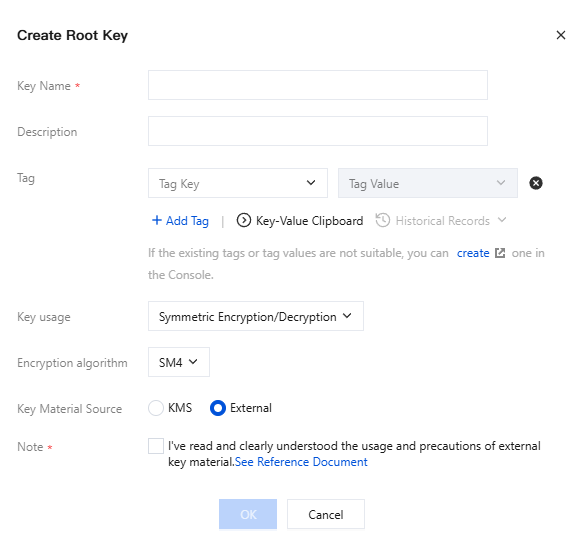
3. Click OK to create the external CMK. You can view the created external CMK in the console, where the Key Source is displayed as External.
API method
This example uses the Tencent Cloud command-line tool TCCLI. You can use any supported programming language for subsequent calls.
When calling the CreateKey API, specify the Type parameter as 2. Run the command as follows.
tccli kms CreateKey --Alias <alias> --Type 2
Source code example of CreateKey function:
def create_external_key(client, alias):"""Generate BYOK key:param Type = 2"""try:req = models.CreateKeyRequest()req.Alias = aliasreq.Type = 2rsp = client.CreateKey(req)return rsp, Noneexcept TencentCloudSDKException as err:return None, err
Step 2: Obtaining the Parameters of the Key Material to Be Imported
To ensure the security of your key material, you need to encrypt your key material before importing it. You can get its parameters through an API, including a public key used to encrypt the key material and an import token.
Run the command via TCCLI as follows:
tccli kms GetParametersForImport --KeyId <keyid> --WrappingAlgorithm RSAES_PKCS1_V1_5 --WrappingKeySpec RSA_2048
GetParametersForImport function source code example:
def get_parameters_for_import(client, keyid):"""Obtain parameters for importing CMK materials.The returned Token is used as one of the parameters for executing ImportKeyMaterial,The returned PublicKey is used to encrypt the autonomously imported key material.The returned Token and PublicKey will expire in 24 hours. If you need to re-import after expiration, you need to call the API again to obtain the new Token and PublicKey.WrappingAlgorithm specifies the algorithm for key material encryption. Currently, it supports RSAES_PKCS1_V1_5, RSAES_OAEP_SHA_1, RSAES_OAEP_SHA_256.WrappingKeySpec specifies the type of key material encryption. Currently, only RSA_2048 is supported."""try:req = models.GetParametersForImportRequest()req.KeyId = keyidreq.WrappingAlgorithm = 'RSAES_PKCS1_V1_5' # RSAES_PKCS1_V1_5 | RSAES_OAEP_SHA_1 | RSAES_OAEP_SHA_256req.WrappingKeySpec = 'RSA_2048' # RSA_2048rsp = self.client.GetParametersForImport(req)return rsp, Noneexcept TencentCloudSDKException as err:return None, err
Step 3: Locally Encrypting Your Key Material
Encrypt your key material locally using the encryption public key obtained in Step 2. The encryption public key is a 2048-bit RSA public key, and the encryption algorithm used must match the one specified when the import key material parameters are obtained. Since the encryption public key returned by the API is Base64-encoded, you need to decode it before use. Currently, KMS supports the RSAES_OAEP_SHA_1, RSAES_OAEP_SHA_256, and RSAES_PKCS1_V1_5 encryption algorithms.
Below is an example of encrypting the key material using OpenSSL. In actual use, it is recommended to encrypt your key material using an encryptor or other secure encryption measures.
1. Call the GetParametersForImport API to obtain the Token and PublicKey. Write the PublicKey to the file public_key.base64.
2. Generate a random number using OpenSSL.
openssl rand -out raw_material.bin 16
You can also use the GenerateRandom API to generate a random number for Base64-decoding.
Note:
For the national cryptography version, key material must be 128 in length, and for the FIPS version, it is 256.
3. Decode the public key.
openssl enc -d -base64 -A -in public_key.base64 -out public_key.bin
4. Use the public key to encrypt the key material.
# The command line corresponding to RSAES_OAEP_SHA_1 is as follows.openssl pkeyutl -in raw_material.bin -out encrypted_key_material.bin -inkey public_key.bin -keyform DER -pubin -encrypt -pkeyopt rsa_padding_mode:oaep -pkeyopt rsa_oaep_md:sha1# The command line corresponding to RSAES_PKCS1_V1_5 is as follows.openssl pkeyutl -in raw_material.bin -out encrypted_key_material.bin -inkey public_key.bin -keyform DER -pubin -encrypt -pkeyopt rsa_padding_mode:pkcs1# The command line corresponding to RSAES_OAEP_SHA_256 is as follows.openssl pkeyutl -in raw_material.bin -out encrypted_key_material.bin -inkey public_key.bin -keyform DER -pubin -encrypt -pkeyopt rsa_padding_mode:oaep -pkeyopt rsa_oaep_md:sha256
5. Import the encoded ciphertext into KMS as a parameter.
openssl enc -e -base64 -A -in encrypted_key_material.bin -out encrypted_material.base64
encrypted_material.base64 is the final output, to be imported into KMS as EncryptedKeyMaterial.
Step 4: Importing Key Material
Finally, import the encrypted key material and the import token obtained in Step 2 into the external CMK created in Step 1 via an API operation.
The import token and public key for key material encryption are bound. Meanwhile, a token can only be used to import key material for the CMK specified when generated. The import token validity period is 24 hours. It can be reused within this period. If it expires, you need to obtain a new import token and encryption public key.
If you call GetParametersForImport multiple times to obtain import materials, only the token and publicKey of the last call are valid, and those returned by previous calls will automatically expire.
You can import key material for an external key where no key materials have ever been imported, reimport expired and deleted key material, or reset the expiration time of key material.
To import, call ImportKeyMaterial. A command example is as follows:
tccli kms ImportKeyMaterial --EncryptedKeyMaterial <material> --ImportToken <token> --KeyId <keyid>
Source code example of ImportKeyMaterial function:
def import_key_material(client, material, token, keyid):try:req = models.ImportKeyMaterialRequest()req.EncryptedKeyMaterial = materialreq.ImportToken = tokenreq.KeyId = keyidrsp = client.ImportKeyMaterial(req)return rsp, Noneexcept TencentCloudSDKException as err:return None, err
At this point, the external CMK has been imported. You can use it just like an ordinary key.
More Operations
Deleting the External CMK
Deleting an external CMK involves two kinds of operations: Deleting the CMK at the scheduled time, and deleting the key material, which will lead to different results.
Schedule Deletion of CMK
Delete an external CMK using the scheduled deletion feature. This operation enforces a waiting period of 7 - 30 days. After the scheduled time is reached, the external CMK will be permanently deleted. A deleted CMK cannot be recovered, and data encrypted with it cannot be decrypted. Proceed with caution.
Deleting the Key Material
You can delete key material in two ways. Once the key material expires or is deleted, the associated external key CMK will no longer be usable, and ciphertext encrypted with that CMK cannot be decrypted unless the same key material is re-imported.
The DeleteImportedKeyMaterial operation through the API is completed. After the key material is deleted, the key status will become PendingImport.
In the import key material API operation, you complete the setting of the ValidTo parameter for ImportKeyMaterial. The KMS service will then automatically delete the key material when it reaches the expiration time.
Description:
Waiting for the key material to become invalid upon expiration and deleting it manually have the same effect.
To delete key material, run the following command:
tccli DeleteImportedKeyMaterial --KeyId <keyid>
DeleteImportedKeyMaterial function source code example:
def delete_key_material(client, keyid):try:req = models.DeleteImportedKeyMaterialRequest()req.KeyId = keyidrsp = client.DeleteImportedKeyMaterial(req)return rsp, Noneexcept TencentCloudSDKException as err:return None, err
Note:
When you import key material into the CMK, the CMK is associated permanently with the key material. That is, you cannot import other key material into this external CMK. After you delete the key material, if you need to reimport key material, the imported key material should be identical to the deleted key material for successful import.
When you use an external CMK to encrypt data, the encrypted data can only be decrypted with the CMK used for encryption (The CMK metadata and key material should match the imported key). Otherwise, decryption would fail. Be cautious with the deletion operations of key materials and CMKs.
피드백